I’m pretty sure this is WordPress not bbpress, so you are looking at WordPress admin vs subscriber rather than bbpress keymaster vs. participant.
You don’t say how you added the capability
eg
https://www.wpbeginner.com/wp-tutorials/how-to-add-additional-file-types-to-be-uploaded-in-wordpress/
anyway I’d suggest you do some tests eg set up a user with
admin and participant
subscriber and keymaster
and see which is preventing upload
If that plugin is 8 years old, it will be for bbpress version 1, so chances are it will not work with current version
Hey there @wproyal,
Do you happen to be using the GetShopped Support Forums plugin? The reason I ask is I see hooks or functions in the error message you shared as follows:
bbps_lock_to_author
bbps_get_all_premium_topic_ids
The bbps_* prefix is used by the plugin I mentioned (though it’s entirely possible it is also used by other plugins). So, a good starting point toward resolving this could be to temporarily deactivate that plugin, if you can, and see if things clear up.
If that does fix things and you still need this plugin, perhaps a good immediate step would be thinking about what recently changed to introduce the problem (an update either to it or to bbPress itself? A change in some custom code someplace? A settings change?) and then think about ways to roll back.
Of course, you could also reach out to the author/support team for the GetShopped plugin and see if they can offer help with this 🙂
new error on old site? only just installed bbpress?
new error on old site? only just installed bbpress? what version of bbpress and WordPress?
Hi All,
In the WordPress log file, I am getting error
[21-Dec-2019 07:42:06 UTC] WordPress database error You have an error in your SQL syntax; check the manual that corresponds to your MySQL server version for the right syntax to use near ')' at line 1 for query SELECTidFROM wp_posts WHEREpost_parentIN () made by require('wp-blog-header.php'), require_once('wp-includes/template-loader.php'), apply_filters('template_include'), WP_Hook->apply_filters, call_user_func_array, bbp_template_include, apply_filters('bbp_template_include'), WP_Hook->apply_filters, call_user_func_array, bbp_template_include_theme_compat, bbp_buffer_template_part, bbp_get_template_part, bbp_locate_template, load_template, require('/plugins/bbpress/templates/default/bbpress/content-single-user.php'), bbp_get_template_part, bbp_locate_template, load_template, require('/plugins/bbpress/templates/default/bbpress/user-topics-created.php'), bbp_get_user_topics_started, bbp_has_topics, bbp_parse_args, apply_filters('bbp_after_has_topics_parse_args'), WP_Hook->apply_filters, call_user_func_array, _bbp_has_topics_query, apply_filters('bbp_has_topics_query'), WP_Hook->apply_filters, call_user_func_array, bbps_lock_to_author, bbps_get_all_premium_topic_ids
Can anyone suggest what might be an issue to this?
Thanks
Hi,
I’m using the setting “Allow guest users without accounts to create topics and replies”, I’d like to remove the comment_author_cookies, comment_author_email, and comment_author_url. I added the code : remove_action( ‘set_comment_cookies’, ‘wp_set_comment_cookies’ ); in function.php, but it’s does’t work. May I know how to remove these cookies in bbpress?
Thanks
@packzap the plugin linked in this thread will fix issue until bbpress’s next release is ready and that should fix it and assume the plugin will no longer be needed.
Yes, the front page of my forum “last post” dates are looking very stale since moving to bbPress 2.6.3. The post dates look to be prior to the “upgrade”. I do not have any page caching plug-ins enabled on these public forums. Manually running “recalculate last activity in each topic and forum” updates the freshness dates correctly.
Hello all, I’m using bbpress 2.6.3 with the last version of wp5. I defined some mime types I need on the site, eg the extension .nvn. I noticed that Participants cannot upload these newly defined mime types, why?
Keymasters do it without any problem. When a participant tries, he gets the error “Sorry, this file type is not permitted for security reasons” as it was not permitted. Please help
I am trying to display an image within the content area of a topic,
as illustrated in this image…

I am using bbpress 2.6.3 and WordPress 5.3.2.
Please help.
Thanks
WP 5.2.5
Theme Enfold 4.5.7
bbPress 2.6.3
http://www.infogovsolutions.com
Forum roles are added by site admin for access to private forums. Users with participant role get the 404 “Oh, bother” message when they try to log into page containing short code : [bbpress forum-index]. I have tested with all other roles and they access the forums as expected. This issue has been identified with new participants being added to the forums. I am not sure if all prior participants are experiencing the same issue. Any help would be appreciated. Thanks.
bbpress just uses WordPress login, so suggest you investigate authentication of WordPress
google around – I got
https://wordpress.stackexchange.com/questions/268665/set-up-wp-authentication-from-external-api
from a google of ‘wordpress login using 3rd party credentials’
I am still waiting for an answer. Anyone??? Any ideas?? I realize that bbPress always call the core wp-login.php to login, register or reset your password. I know that I can probably add code to wp-login.php but that would be a very bad thing to do as it is a core file and any updates to WP will overwrite your changes. I need a way to intercept the call from bbPress to wp-login.php.
Thanks,
J
I’m also planing to move from Kunean 5 to bbPress. Please share info if you do know migrate tool for this.
Hello!
I’m not sure, whether I have the same issue or a different one. I have simple forum structure with a forum list and every forum has a topic list. You may take a look at my forum list.
The features
- You don’t need to log in to read.
- The first forum is read-only for all users except the admin.
- Anyone can register and gets write-permission to all forums except the first one (Loginizer and Akismet in use).
- The forum with most topics gets its topics from posts by the plugin “bbPress Topics for Posts“. Despite being old the plugin has worked flawlessly until the most recent update
The issue
- Some of the forums have kept displaying “juuri nyt” (just now) since the update, because some of their topics show the same freshness.
What I have tried
- recalculated everything
- disabled the plugin “bbPress Topics for Posts” and recalculated everything
- changed to the Twenty Twenty theme and recalculated everything
but in vain. Is this caused/related by the bug #3297? Any pointers appreciated.
I’m a newbie, so please be kind. Is it correct that plugins (except ecommerce ones) are not available for wordpress.com sites? Is there any way to install bbpress onto a wordpress.com website?
Thanks.
Hi All,
Is there a way to re-direct users that are logged in and land on the bbpress home location e.g /chat/ and re-direct them to a specific forum.
E.g, logged in users visits mysite.com/chat, and it redirects them to mysite.com/chat/forum/support.
i am using the code below found in the bbpress forums which re-directs guest to another page. It works great.
/**
* Redirect bbPress pages to registration page
*/
function kleo_page_template_redirect()
{
//if not logged in and on a bp page except registration or activation
if( ! is_user_logged_in() && is_bbpress() ) {
wp_redirect( home_url( '/register/' ) );
exit();
}
}
add_action( 'template_redirect', 'kleo_page_template_redirect' );
Hi All,
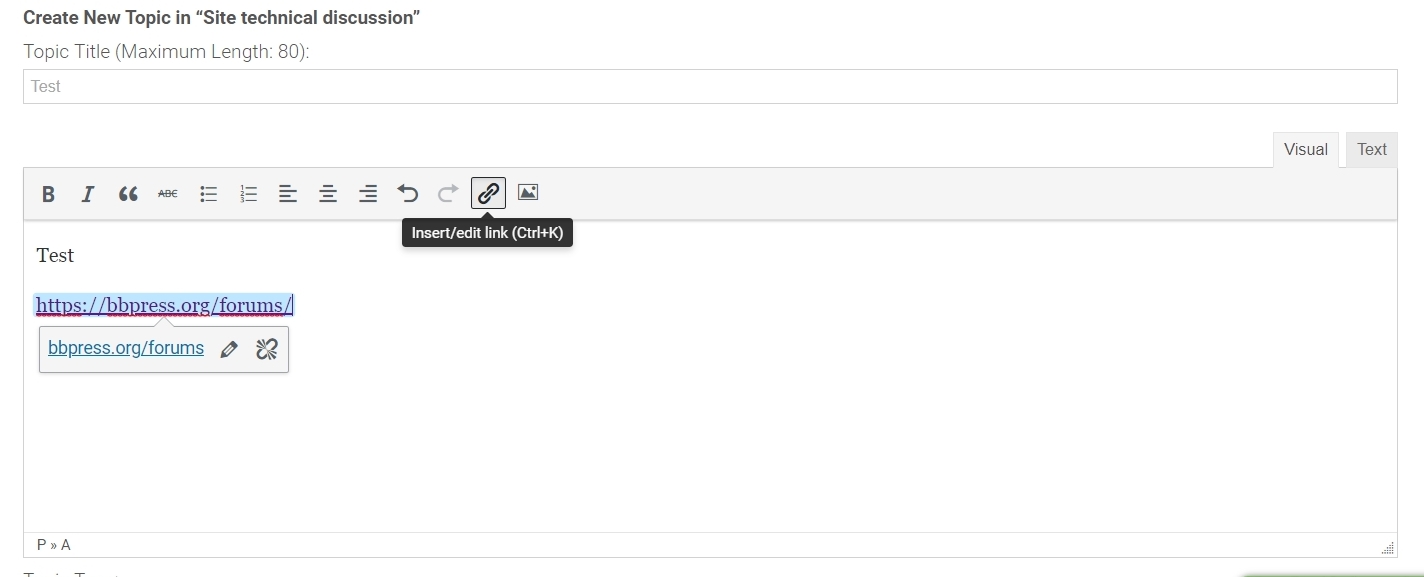
I am seeking a way to hide/disable the “Insert Link Button” for users in bbpress when creating a post.
Does anyone have a code snippet for this, or know of a way to achieve this?
Thank you
David
In all topics on my forum there is incorrect information: “This topic is empty.”
Test2
This problem is not only on my site:
bbPress Forum Anonymous Topic
How to fix it ?
Hello,
After some troubleshooting it appears the latest version of bbPress interfered with showing the subscribe button for individual topics. I confirmed it was there prior to the upgrade.
Please advise how to resolve the issue.
Thank you!
Fixed the issue I was having with this same error.
Whew… after lots of searching and turning plugins on and off, I found the conflict and it was actually just settings that were defaulted incorrectly the Ultimate Member plugin with it’s add-on Extension for BBPress (premium plugin from Ultimate Member extensions bundle).
The Ultimate Member BBPress extension has settings for every user role in the Ultimate Member > User Roles section, and in those settings it has permissions for BBPress that override BBPress settings. In those settings there are checkboxes for each permission, including posting replies, posting topics, etc. Customer roles, admin roles, and a bunch of other roles were for some reason defaulted to not allow these types of posts.
To fix Ultimate Member permission settings, go into each role and enable the features / permissions accordingly.
not with css I’m afraid.
you will need to know how to transfer files to/from your site using ftp. If so then
find
wp-content/plugins/bbpress/templates/default/bbpress/form-anonymous.php
transfer this to your pc and edit
remove lines 32-35 ie
<p>
<label for="bbp_anonymous_website"><?php esc_html_e( 'Website:', 'bbpress' ); ?></label><br />
<input type="text" id="bbp_anonymous_website" value="<?php bbp_author_url(); ?>" size="40" maxlength="200" name="bbp_anonymous_website" />
</p>
and save
create a directory on your theme called ‘bbpress’
ie wp-content/themes/%your-theme-name%/bbpress
where %your-theme-name% is the name of your theme
Then transfer the file you saved above and put in in the directory called bbpress that you created above, so you end up with
wp-content/themes/%your-theme-name%/bbpress/form-anonymous.php
bbPress will now use this template instead of the original
@johnjamesjacoby that sounds amazing! I’ve did some digging already, but I couldn’t find an easy fix to get it working again.
If you’ve some pointers to get the code from
Sven (https://wpup.co/bbpress-threaded-nested-replies-with-paging/) working with the latest version, I’ll gladly do some testing.
Hi,
I installed BBpress on my site and it goes well for two month.
Suddenly i faced 503 error in reply page of admin side
I repaired forum but nothing was solved , I reset the froum and it solved the problem
but i need my forum data and as soon as i import them with wordpress as XML , again the error comes back!
what should i do now ? do you have any idea?