Search Results for 'bbpress'
-
Search Results
-
Topic: our bbPress install…
Still a work in progress, we had to get it up ASAP, converted from phpBB.
http://www.herdhaven.com/forum/
Integrated with our WordPress blog
We’re playing with some stuff, trying to do some things with the forums, etc.
Has anyone seen this amazing commentform on http://css-tricks.com/snippets/css/flip-an-image/
That would be perfect for a BBpress theme.
So clean, sharp, easy to understand.
Yet it is original, in the form that the avatars are round float next to each other in block quotes and such. It breaks the tradtionally “square” internet-look and feels more alive.
They say nothing about either WordPress or BBpress there, but I sure wish someone could make that theme for BBpress. With working and easy to upload avatars! Which is absolutely essential to that design.
I have a Forum/Blog that I have been trying to get up and running. Right now I want to tackle the problem of having a huge amount of spam being generated by people — or bots — who are trying to register.
It is a payed web site (to keep out the riff-raff) and people have to buy a subscription to the site. But, suprisingly, this does not stop my inbox from being flooded by “requests for a username”.
Here is what my inbox looks like:
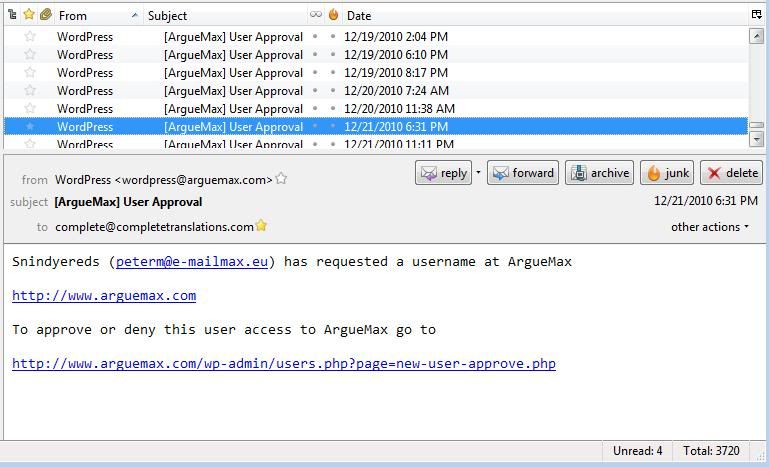
Most of the time, the email addresses in these messages are fake. But sometimes they are not but when I email these persons back, I am ignored. So they really are just spammers looking for a way of posting ad content on my web site for free.
The Registration page has a CAPTCHA Code required entry field:
http://www.arguemax.com/wp-login.php?action=register
But I wonder if the bots are sophisticated enough to get past that.
The user has to click on the “I accept the agreements” field but the agreements field clearly tells the user that they have to buy a subscription. If they do not click on that check box they get this:
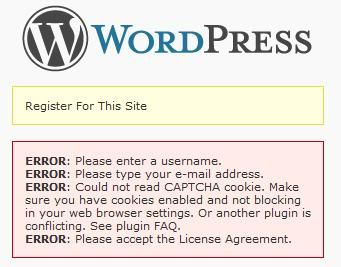
One way I want to try to keep from getting all this spam is to make it such that the registration button is inactive until they click on the subscribe button
https://www.paypal.com/en_US/i/btn/btn_subscribeCC_LG.gif
How do I go about making that happen?
I’m a newb, guys, and just wanted to share with other newbs who might have problems with require_once at Dreamhost.
/*the following line of code got the forums to appear correctly but then admin didn’t work. Note: registration does not work here now–email address not accepted.
require_once(‘../wp-load.php’);
*/
/*The program told me: Warning: require_once(../wp-load.php) [function.require-once]: failed to open stream: No such file or directory in /home/my_db_username/foo.com/forums/bb-config.php on line 66
Fatal error: require_once() [function.require]: Failed opening required ‘../wp-load.php’ (include_path=’.:/usr/local/lib/php:/usr/local/php5/lib/pear’) in /home/my_db_username/foo.com/forums/bb-config.php on line 66
So let’s try the full path and see if admin works. Otherwise, we’re going to see if we can load the bbpress admin functions in the main install.
*/
/*first using the /home/my_db_username path*/
require_once(‘/home/my_db_username/foo.com/wp-load.php’);
/*this works to display the forum correctly. Checking the admin side: admin side also working. Note: don’t work on stuff late at night if you’re going to miss simple stuff like this */
YMMV. Hope this helps somebody.
Topic: Problem with cookies
Hi,
I’ve just integrated bloguismo.com and bloguismo.com/foro with BBPress but I’m doing something wrong with cookies.
First of all I’ve done deep integration but I have the logout/login problem…
Second: in the wordpress part (bloguismo.com) i use on the top nav bar this:
<?php $user_info = get_userdata(1);
echo($user_info->first_name . “n”);
?>
So it could shows the first name of the user registered, but shows my name (admin name)… could you register and test?
http://www.bloguismo.com/login/?action=register
http://www.bloguismo.com/foro/register.php (the same)
thanks!
Topic: Deep Integration Error
So i’m trying to Deep Integrate my WordPress with BBpress, everything is fine until now I get:
Parse error: syntax error, unexpected $end in /hermes/web03/b619/moo.defendersofthefallen/KaoTech/Forum/bb-config.php on line 72
In my bb-config.php line 72 is ‘ ?> ‘
You can see it for yourself at http://www.kaotech.co.uk/Forum
I’m sure I entered the code correctly
/* Deep integration */if ( !defined('ABSPATH') & !defined('XMLRPC_REQUEST')) {
define('WP_USE_THEMES', false);
include_once(dirname(__FILE__) . '/../wp-blog-header.php' );
header("HTTP/1.1 200 OK");
header("Status: 200 All rosy");
I had to start on line 2 instead of line 1 as ‘ <?php ‘ was the start of the file, and the same tags were closed on line 72.
Am I missing something obvious or? Anyhelp would be great!
Thanks!
Hi All,
I hope you can help.
I am trying to do a recount (BBPress 0.9.0.4).
What happens is that the first few items in the Recount list get done. Then the system goes to
“Counting topics to which each user has replied…”
And gets stuck there.
I tried not checking the box for “Count topics to which each user has replied”, and when I do this, the Recount function goes through every item in the list and satisfactorily completes it. But if I check this one single box (or all of them), it always gets stuck on this step.
I have tried deactivating all plugins and the problem persists.
Topic: Page not found!
Hello all. I am having a few problems lately on a fresh install.
Well perhaps fresh is not the right word. I installed bbpress but then uninstalled it and installed buddypress. But I did not like not being able to create categories. Well, at least not the way I wanted to anyways. So I deleted buddypress and tried to change back to bbpress. Here is where the problem starts.
I kept getting the error “Page not found!” when I would go to http://www.mysite.com/forums But it would show a login box. I did some searching here and decided to drop all “bb_” tables in “myadminphp”. That sort of fixed it. I was able to then run the install page at http://www.mysite.com/forums. So I thought I was all set. But once the install was finished I was right back where I started from. I have a feeling there is some little piece of buddypress hanging around somewhere in my site but I am not sure where.
You can view my main site at http://www.laughsonthenet.com and the forums at http:///www.laughsonthenet.com/forums.
I will just try to leave it alone for a little while, while I wait for some replies here.
I await your advice and thank you in advance.


 I stand by the reasoning behind the plugin route though, I still think it’ll make our lives a whole lot easier.