Skip to:
Content
Pages
Categories
Search
Top
Bottom

Search Results for 'bbpress'

Viewing 25 results - 30,626 through 30,650 (of 64,518 total)
  • Author
    Search Results
  • #116033
    Janus12
    Member

    Hello I am new to bbpress however eveything has been going fairly well. There are 2 problems however.

    Problem 1:

    When in the forums the text entry for replying to a post is transparent and it makes it look ugly and makes entering text difficult. how can I change the text entry box to something brighter?
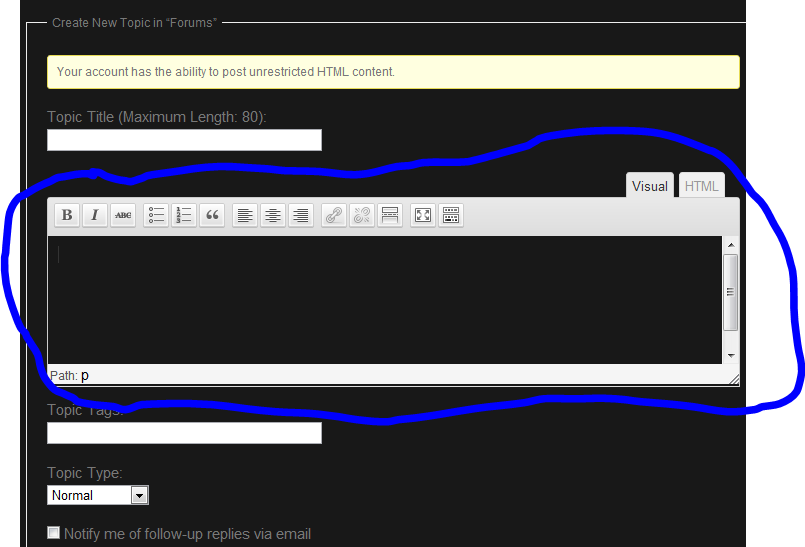
    (the text box blends with the background)

    Problem 2:

    When multiple people post on a thread particularly their immages get cut out halfway.
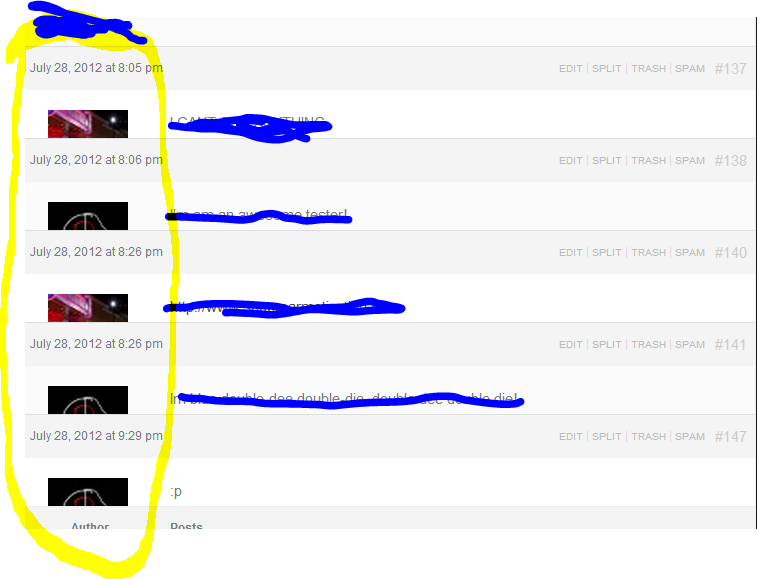
    (first/main post is ok)

    Can someone please help me with these issues?

    Additional information:

    I am using custom community theme 1.8.9.1

    Thank you!

    varsitysmack
    Participant

    I want to be able to show the reply content in the (bbPress) Recent Replies widget, not just the topic title. I would like to be able to show either the entire reply text or a portion of the reply text (limit it to characters). Is there a way to do this?

    #116030

    Delete the /plugins/bbpress folder, and replace it with a fresh download.

    #116027
    craftcore
    Member

    Hi! A few days ago, I was playing around in the bbPress plugin, and I introduced an error. I was trying to figure out where a function outputted, but never figured it out.

    If you visit my boards here, http://craftcore.ca/boards/ , you can see the words “Hello World” on my forums list:

    > 0 0 No Topics Hello world!

    Now the thing is…I can’t remember what file I edited. I opened all the template files in EditPad and seached for “Hello World”, and found nothing. I deactivated, removed, and readded bbPress, and it’s still there.

    Any suggestions of where I should be looking? This is such a silly problem, I know. Any advice would be wonderful!

    Thank you!

    #116025
    viktora
    Member

    Hi all. This evening I was just about to translate some pieces of BBpress into my native Czech lang. I am used to use Codestyling Localization plugin for translating plugins. This same I saw some strange warning. First time in my life.:-) Is here someone able to provide me with more details on following error message regarding bbpress?

    Loading Issue: Author is using load_textdomain instead of load_plugin_textdomain function. This may break behavior of WordPress, because some filters and actions won’t be executed anymore. Please contact the Author about that. (Codestyling Localization plug error message)

    #116023
    nick_w
    Member

    Found the fix on this site, deep in the Tracking discussion. Adding bbp_admin(); (courtesy of xiosen) did the trick, like this:

        // Setup admin (to include converter)
    require_once( bbpress()->plugin_dir . 'bbp-admin/bbp-admin.php' );
    
    bbp_admin();
    
    // Convert password
    require_once( bbpress()->admin->admin_dir . 'bbp-converter.php' );
    require_once( bbpress()->admin->admin_dir . 'converters/' . $row->meta_value . '.php' );
    

    Many thanks,

    nick

    #116022
    aaclayton
    Participant

    Hey JJJ, thanks for the advice. I am using /css/bbpress.css in my theme, the trouble I’m having is actually getting the proper syntax for unhooking these elements when they aren’t needed.

    Essentially, what I’m trying to do is something like this:

    add_action( 'get_header', 'remove_bbpress_scripts' );
    function remove_bbpress_scripts() {
        if ( !is_bbpress() ) {
            remove_action ( 'bbp_enqueue_scripts' , 'enqueue_styles' );
            remove_action ( 'bbp_enqueue_scripts' , 'enqueue_scripts' );
        }
    }
    

    Something isn’t working with this syntax though, I suspect I need to prefix ‘enqueue_styles’ with something, but I’m not sure what the proper prefix is.

    #116006

    In reply to: Forum shows no content

    Should not be happening with the bbPress TwentyTen theme unless you have a plugin that’s incorrectly filtering query results.

    #116005

    Jared was actually incorrect. 🙂

    bbPress actions are piggy-backed on top of WordPress actions, there’s no condition to them.

    1. If you don’t want bbPress to enqueue it’s own CSS, dequeue it, or make sure your theme has /css/bbpress.css in it.
    2. bbPress uses admin-ajax.php for a few ajax bits that happen theme-side. They degrade properly, so if you do not want to include the ajax bits, you can safely unhook that too.
    #115998
    Eisenhans
    Member

    In my new bbpress-Forum (2.1.1) I can see the title of a new topic, but there seems to be no content, only the headlines appear. In the wp-dashboard the content of the topics and replys are readable. Its WP with Atahualpa and I also tried the bbpress twenty ten-theme with the same result. http://hoerakustik-wissen.de/forums/topic/videos-diskutieren/

    • This topic was modified 13 years, 9 months ago by Eisenhans.
    • This topic was modified 13 years, 9 months ago by Eisenhans.
    #115997
    aaclayton
    Participant

    Ok….so clearly I can’t effectively display what is actually getting put in my header section without the forum thinking I’m embedding live html or something. Just to clarify, bbpress is enqueing a stylesheet, bbp-child-bbpress-css from my theme’s /css directory regardless of the site page in question. Furthermore, it’s adding a script to the header defining a js variable:

    var ajaxurl = 'http://localhost/tamrielfoundry/wp-admin/admin-ajax.php';
    

    which I’m not sure is necessary?

    #115991
    aaclayton
    Participant

    Hey Jared, thanks for the reply. Unfortunately (perhaps due to misconfiguration on my part) these actions are firing on all site pages. Specifically I believe that bbPress is responsible for:

    link rel='stylesheet' id='bbp-child-bbpress-css'
    

    and

      /*  */
    

    I have bbPress configured to use theme compatibility base settings, upon which I am hand tuning templates within my theme directory. Any ideas why the child-css is getting called ubiquitously? The AJAX reference also showed up only after I installed bbPress, and I’m not convinced that it’s necessary…

    Any ideas would be great, thanks again. Andrew

    EDIT: Wow, I’m having a lot of trouble getting this code to display in blocks without getting stripped, so I had to throw in some unneccesary single quotes, but you get the idea…

    • This reply was modified 13 years, 9 months ago by aaclayton.
    • This reply was modified 13 years, 9 months ago by aaclayton.
    • This reply was modified 13 years, 9 months ago by aaclayton.
    • This reply was modified 13 years, 9 months ago by aaclayton.
    • This reply was modified 13 years, 9 months ago by aaclayton.
    #115989
    Siobhan
    Member

    Mason and I started to come up with a task list after talking to John at WCNYC. Here’s what we came up with:

    Setting up and running your forum
    bbPress settings (I have some content for this somewhere – will add it as a draft)
    Customizing how bbPress works
    Useful plugins that extend bbPress
    Moderating and managing your forum

    We also had:
    WordPress User Roles and bbPress
    Getting Started with bbPress

    They are complete though.

    Since you guys are on the ground supporting bbPress users, what things in the docs would you like to see prioritized?

    #115983
    Ramiuz
    Participant

    But the forum is on a different database than my wordpress. So I can´t upgrade 1.02 to 2.1.

    I´ve already installed BBpress 2.1 on the other database, on my website. But its completely empty. I need to import the data and users from the other forum.

    How?

    newpress
    Member

    I set the number of topics and replies that should be shown in a single page as 2, 5, 6 and 10. It doesnt work that way. The rest is paginated and indicated in the page, but not navigatable. I am disappointed. Is there any work around?

    #115979
    wendykier
    Member

    I am using whishlist as a membership site with Optimize Press. I don’t seem to be able to get bbPress to work. When the pages are set up it goes to a 4O4 Page

    #115968
    Ephramar
    Participant

    I use ClassiPress as my current theme with “standalone” BBPress installed on it

    I do have six forums namely

    • Sports (with two topics)
    • Student
    • General (with two topics)
    • Food
    • Gossip
    • Newbie Parents

    I manage to edit the overview of my forums. But as you can see on the image. The topics, except for the stacked one, is present on all of the forums

    get_the_topics

    How may I able to display topics on their respectable forums?

    #115966
    atomnet
    Participant

    Thanks to all,
    with this shortcode i see only my forum/post index and not internal post (image and text).
    I try this [bbp-single-topic id=$topic_id=name post] but with /%postname%/ dont works.

    Thanks again.

    #115963
    mrjarbenne
    Participant

    Since updating to bbpress 2.1 the Forum Index is blank (whether pulled up through http://domain.com/?post_type=forum, or with the shortcode), and the descriptions entered for each of the Forum posts are not showing up. When all of the forum topics are set to private, a user who is not logged in sees the dialogue “Oh bother! No forums were found here!” But once the user is logged in, that dialogue disappears, but none of the Private Forums appear.

    I’ve reset the permalinks in Settings and in the Forum slugs area, and tried the Repair functions as well.

    #115961
    Stephen Edgar
    Keymaster

    I’m not sure if I’m reading what you want correctly but is this shortcode what your looking for?

    [bbp-topic-index] – This will show the most recent 15 topics across all your forums with pagination.

    https://codex.bbpress.org/shortcodes/

    #115959

    You don’t need to worry about using that conditional because those actions only fire on bbPress sections of the site 🙂

    #115958
    wgmccallum
    Member

    This problem appeared when I installed the bbPress Admin Bar Addition, and disappeared when I deactivated it.

    #115957
    aaclayton
    Participant

    Hi bbPress community,

    Thank you for all your collective hard work on this great plugin. I’m working on an integration of the new 2.1 plugin into my own theme, and I had a question about scripts and styles that bbPress enqueues into the wp_head.

    In general, for plugins which are highly localized on the site (ones that only get used in very specific places), I prefer to conditionally enqueue styles and scripts to keep the head section of the main site relatively clean. bbPress currently initializes the following code site-wide:

    /** Scripts ***********************************************************/
    
    add_action( 'bbp_enqueue_scripts',      array( $this, 'enqueue_styles'        ) ); // Enqueue theme CSS
    add_action( 'bbp_enqueue_scripts',      array( $this, 'enqueue_scripts'       ) ); // Enqueue theme JS
    add_filter( 'bbp_enqueue_scripts',      array( $this, 'localize_topic_script' ) ); // Enqueue theme script localization
    add_action( 'bbp_head',                 array( $this, 'head_scripts'          ) ); // Output some extra JS in the 
    

    Normally I’m fairly handy with actions and filters in my functions.php file, but I’ve had a load of trouble getting these scripts to conditionally enqueue. Ideally, I would want to condition them on is_bbpress(). Can anyone offer a snippet to filter these unless is_bbpress() is true?

    Thanks in advance, and let me know if my question is unclear in any way.

    Andrew

    varsitysmack
    Participant

    Its too bad this has never been answered. I’m looking for the same thing.

    #115950

    Here on bbPress.org, I used the forums shortcode, and used CSS to hide a few columns. I did not use bbp_list_forums(), which has a specific purpose outside of what you’re trying to do.

Viewing 25 results - 30,626 through 30,650 (of 64,518 total)
Skip to toolbar