Search Results for 'bbpress'
-
Search Results
-
Topic: BBpress throws 404 errors
So I think it is a permalink issue but I am not sure. I am developing a theme framework and I want to integrate bbpress with it and thus i was testing bbpres default installation. How ever going to site/forums/forum/test gives me a 404 error. even site/forums gives me a 404 – the theme throws the 404 –
Can any one give me any ideas as to how to fix this? My permal link structure is
/%category%/%postname%/HELP!
I’m having issues with my BBpress WordPress installation as of late (since I did a plugin update to 2.1.1) on all pages I get the error:
Warning: get_class() called without object from outside a class in /nfs/c05/h01/mnt/77944/domains/charterproject.ca/html/wp-content/themes/charterprojectbb/functions.php on line 529
I tracked this in the functions file in my theme that controls the WP theme and the BBPress theme.
the code is:
if ( 'bbPress' == get_class( $bbp ) ) {

    $bbp->theme_compat->theme = new BBP_Twenty_Ten();

}

endif;
I’m not a wiz at PHP so I’m not sure why this causing this error but it does result in the form being quite non-functioning, please help! you can view the site for reference at : http://charterproject.ca
Pez
I have converted from phpBB to bbpress with luck.
But everytime my forum converted users want to login they get this error:
Warning: require_once(bbp-converter.php) [function.require-once]: failed to open stream: No such file or directory in /home/surfogki/public_html/wp-content/plugins/bbpress/bbp-includes/bbp-user-functions.php on line 1466
Fatal error: require_once() [function.require]: Failed opening required ‘bbp-converter.php’ (include_path=’.:/usr/lib/php:/usr/local/lib/php’) in /home/surfogki/public_html/wp-content/plugins/bbpress/bbp-includes/bbp-user-functions.php on line 1466
Normal made users can login as normal. how do i fix this?
For those of you familiar with phpbb forums, a very liked feature is the ability to show your unread posts, and also to skip to the last unread reply in that thread.
I have spoken to Pippin, from http://pippinsplugins.com, who estimates that to create a plugin to include these features on bbpress will cost between $350 and $600.
Now my website, which will have a forum migrated to it soon, will require these features, however it is only a hobby website 🙁
So I’m asking bbpress forum owners out there, do you want this plugin? And if yes, would you be willing to contribute to the cost?
Tanya 🙂
I just had a quick question about removing the sidebar.
I changed my forum theme to 2010 (bbpress). The forum now fill up almost the full width of the page. I am using custom community theme mind you.
The problem I have know is the sidebar on the forum pages
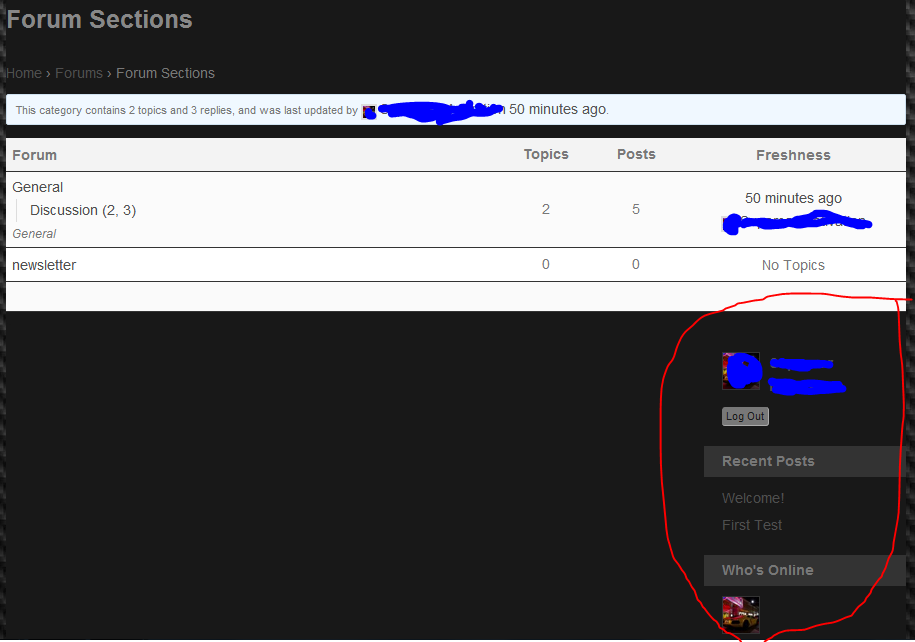
The sidebar is now underneath the forum and I was wondering if there was a quick method to removing the sidebar on forum pages.
If there is no easy way, what is the only other way?
Thank you so much for your time!
Topic: front page text plugin
Hi. I’m new to bbpress and I’m trying to install the front page text plugin but I can’t get it to work. Can someone give me some more detailed guidance than what’s on the page here, http://www.fldtrace.com/wordpress/bbpress-front-page-text-plugin.
I have the plugin installed and I can activate it from the admin account, but when I click on the “front page text” button, I get an error message that says, “There is no administration page at the requested address. Please check the address you entered and try again.”
Any ideas?
Hi I am new to bbPress and BuddyPress 🙂
I have just installed: WordPress: 3.4.1 Theme: Salutation Version 1.4.3.1 bbPress: 2.1.1 BuddyPress: 1.5.7 + some more plugins
- how to create a parent bbpress group forum in buddypress?
I am a Administrator and have created a new Group and wants to create a forum but cant – get this ERROR: Your forum must have a parent?
But where do I create this parent forum? I have tried to create a Category but it didn help 🙁
I am a newbie i know 🙂 regards Tonny
NB! BuddyPress forum is not enabled
Topic: User pages and error-404
Hey everyone,
Unfortunately I’m having another minor hiccup in my bbPress 2.1 implementation. I’ve done some fairly heavy modifying of bbpress user profile pages, and somewhere along the line I have induced wordpress to flag profiles as error-404.
My site homepage is http://tamrielfoundry.com, which can be accessed using username=test and password=test.
My own user profile page http://tamrielfoundry.com/users/atropos/ works just fine, no 404.
A different user (who has not made any posts, which could be the cause) gets error-404 as a class in the body declaration. http://tamrielfoundry.com/users/blade/
Regardless, the fact that this content is getting flagged as 404 doesn’t seem to affect the page actually displaying the relevant content, however obviously it would be preferable if I can get the site to recognize user pages for existing users as non-404.
Let me know if I can provide any relevant info, any help would be greatly appreciated.
Andrew
Does anyone have any idea how I can have members become “Supporting Members” and add a supporting member badge to a single user’s bbpress posts under their username? I dont want to run a full subscription plugin, just a badge to show members that are in an elite group of donating members?
Topic: Template hierarchy?
Got another question. How does bbPress weigh the different templates? For example, if I put a bbpress.php in my child theme root, with the sidebar removed, all pages in the forum misses the sidebar.
However, if I put archive-forum.php in the child theme root, with a removed sidebar, that sidebar pops up on all the other pages.
In what order does bbPress look for templates in version 2.1?
Topic: HTML tags in topics posts
Hi all, it looks like the bbpress is – for some reason – not interpreting the HTML tags in first posts. The HTML tags are visible in the posts themselves and the content is not formated. Replies are OK – HTML formated, tags not visible.
Example here: http://poradci-sobe.cz/diskuse/topic/nef%C3%A9rov%C3%A9-jedn%C3%A1n%C3%AD-poji%C5%A1%C5%A5ovny/
Any idea what is the issue
One small remark – all the forum content was imported from bbpress 1.02 via bbconverter
Hi, I’m trying to create a custom theme for the bbPress forum. I already got a child theme based on Twenty Eleven, and I’m trying to style bbPress with my style.css in the child theme folder.
The problem is that bbpress.css is imported in the html code after my style.css, overwriting the latter’s styling. How do I force bbPress to use style.css instead, even though bbpress.css is imported after?
I have been struggling with this for hours and hours.


