Search Results for '\"wordpress\'
-
Search Results
-
Notice: bp_setup_current_user was called incorrectly. The current user is being initialized without using $wp->init(). Please see Debugging in WordPress for more information. (This message was added in version 1.7.)
Why? and How to fix?
Buddypress also had this error, but they fixed it almost 2 years ago. Something to do with calling is_user_logged_in()
See here: https://buddypress.org/support/topic/debug-error-bp_setup_current_user-was-called-incorrectly/
Hi all,
I hope you guys can offer some advice suggestions here.
This is the situation:
– I have a wordpress multi-site setup (4 blogs in total)
– There are currently 4 xenforo forums I need to import. These need to be imported in to my 4 multi-site blogs. One xenforo forum to each of the 4 blogs.
– all users from all xenforo forums, imported in to each of the 4 blogs should be able to visit each of those 4 blogs and post in any they chooseThe goal is to ultimately have a single user base within my wordpress multi-site, but with 4 different forums running (one under each blog), where users can access and post data in all of them (as well as submit regular post comments etc)
The main issue I can see me having is that each xenforo forum will have users who’s IDs start at 1, and go up to about 15,000 (lots of users!!). If I import one forum in to the first multisite blog, then what happens when I import the next forum in the second multisite blog? Will users get overwritten? Will forum topics/replies get attributed to the wrong user?
Note: I am also running buddypress.
A solution I have considered is to import all users from xenforo forum 1. Then loop through all users in xenforo forum 2 to update their ID’s to +15,000 (i.e user with ID 1 becomes user with ID 15001 etc). Then import that forum in to bbpress. Then do the same with xenforo forums 3 and 4 (+30000, +45000).
That is a hefty task though.
Any advice/help would be really appreciated!
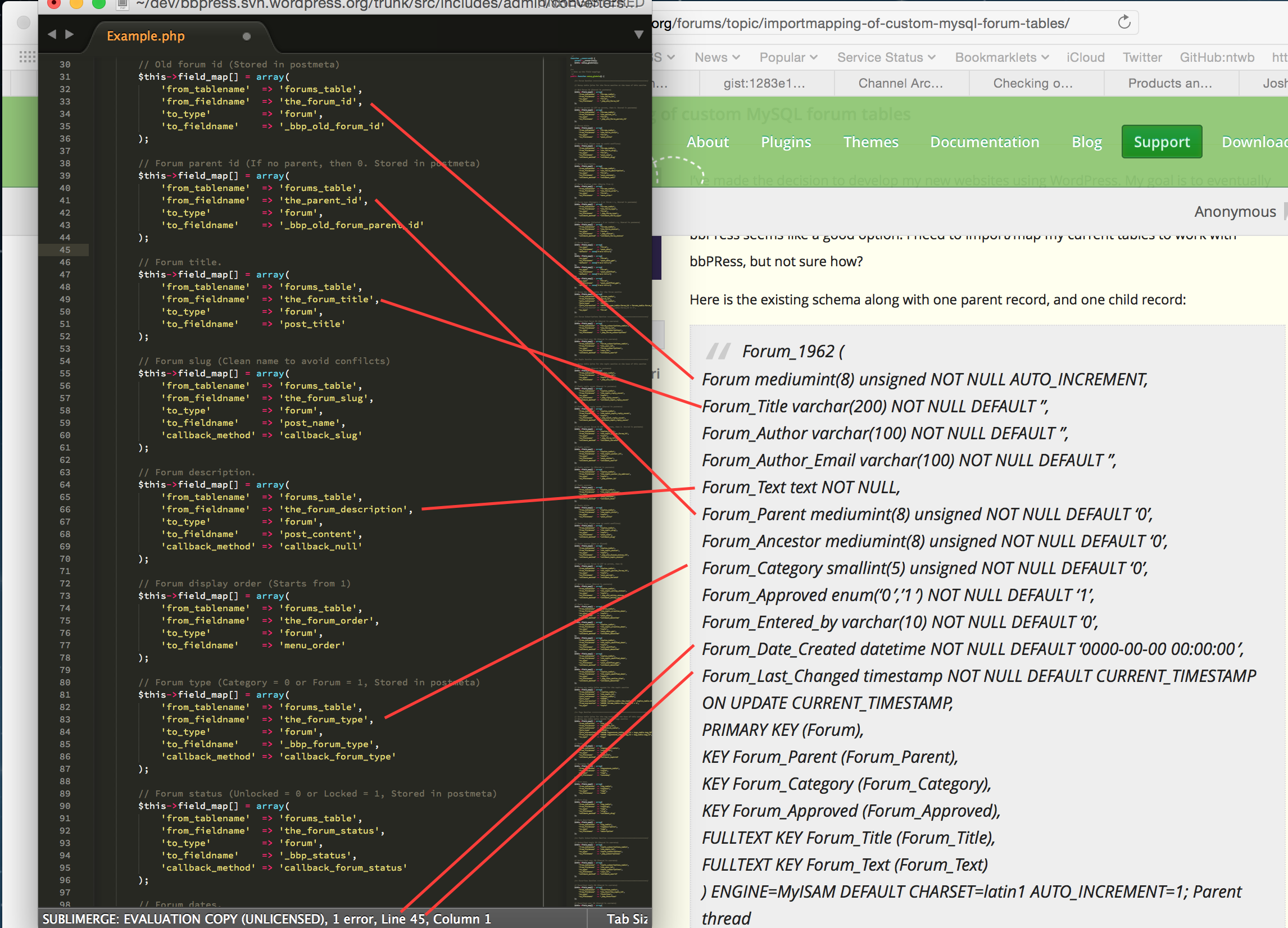
I’ve made the decision to develop my new websites using WordPress. My goal is to eventually re-write my PHP code as a WordPress plugin, but, until then I need to use what’s available, and bbPress seems like a good option. I need to import/map my current tables to work with bbPRess, but not sure how?
Here is the existing schema along with one parent record, and one child record:
Forum_1962 (
Forum mediumint(8) unsigned NOT NULL AUTO_INCREMENT,
Forum_Title varchar(200) NOT NULL DEFAULT ”,
Forum_Author varchar(100) NOT NULL DEFAULT ”,
Forum_Author_Email varchar(100) NOT NULL DEFAULT ”,
Forum_Text text NOT NULL,
Forum_Parent mediumint(8) unsigned NOT NULL DEFAULT ‘0’,
Forum_Ancestor mediumint(8) unsigned NOT NULL DEFAULT ‘0’,
Forum_Category smallint(5) unsigned NOT NULL DEFAULT ‘0’,
Forum_Approved enum(‘0′,’1’) NOT NULL DEFAULT ‘1’,
Forum_Entered_by varchar(10) NOT NULL DEFAULT ‘0’,
Forum_Date_Created datetime NOT NULL DEFAULT ‘0000-00-00 00:00:00’,
Forum_Last_Changed timestamp NOT NULL DEFAULT CURRENT_TIMESTAMP ON UPDATE CURRENT_TIMESTAMP,
PRIMARY KEY (Forum),
KEY Forum_Parent (Forum_Parent),
KEY Forum_Category (Forum_Category),
KEY Forum_Approved (Forum_Approved),
FULLTEXT KEY Forum_Title (Forum_Title),
FULLTEXT KEY Forum_Text (Forum_Text)
) ENGINE=MyISAM DEFAULT CHARSET=latin1 AUTO_INCREMENT=1;Parent thread
=============
(19261, ‘Can I rent an RV?’, ‘BillB’, ‘bill@web-crafter.net’, ‘I\’d like to give RVing a try, but there\’s no way I\’m going to plunk down thousands of $$ to buy an RV. Is it possible to rent an RV like you\’d a car?’, 0, 19261, 1962, ‘1’, ‘rvcn’, ‘2002-12-12 13:52:29’, ‘2002-12-12 13:53:25’);Ancestor thread
===============
(19262, ‘Re: Can I rent an RV?’, ‘Mark’, ‘mark@ittelligent.com’, ‘No problem. Just check your yellow pages for a rental agency in your area. I know there are a few national outfits too. Cruise America and El Monte come to mind off the top of my head.’, 19261, 19261, 1962, ‘1’, ”, ‘2002-12-12 13:59:42’, ‘2002-12-12 13:59:42’);You’ll notice that there are fields for both parent and ancestor, which allows for infinite sub-topic threads (those replies to replies under one parent). Also, I the author name and email are also stored in this table, and not tied to a separate user table (so will need to address that). Each MySQL dump is between 1MB and 3MB.
Need any more information? Please advise.
My goal is one of two options:
- Import/Map existing table dumps in several websites to WordPress and bbPress using above forum schema as source, OR
- Convert my existing PHP forum code to be compatible with WordPress and forget about bbPress altogether if I can’t easily map the table (I don’t know WordPress enough to even think about doing this myself, even though the code is simple and fast, and will ne advice on someone who can)
I am doing this so I can better control the mobile templates and have a more robust way of controlling my websites. I need to do this for about 6 websites, and would like the method to do this myself after the first time.
Thanks in advance,
Lisa
I’m building what while be a discussion board style website. I will embed a single forum through a shortcode in each/every post.
This will allow standard WordPress navigation and give each forum its own post/page.
I will not allow users access to any part of the natural bbpress forum hierarchy (categories/forums/subforums/etc.) and will use redirects to ensure that all requests for specific forums end up on the appropriate post/page that uses the embedded shortcode.
My question: Without the need to query numerous (potentially hundreds) of individual forums through traditional forum navigation, do I still need to spread the forums out among multiple categories/sub-categories when building the forums on the backend.
Remember, no user will ever need, nor get, access to the forum hierarchy/structure. ALL forums links will redirect to the appropriate post.
Having to create a needlessly complex hierarchy/structure is daunting and would make a mess for moderators to dig through.
Just curious. Appreciate any guidance in this matter.
Thanks,
Chad SchulzI’m extending an existing WordPress theme with bbpress functionality. I’ve gotten everything up and running except I can’t seem to find the base template for search results to customize everything AROUND the BBPress search results code. It looks like by default it’s pulling from page.php or single.php, but I would like to use a more specific template for it. I’m not seeing anything in Extras that fits the bill.
Hi –
I just installed my first attempt at bbpress and nothing is showing up in the dashboard menu. There is no forum option, no tools and no options under settings. My site role is listed as “Administrator”, secondary and forum roles as “Keymaster”.
It will be complicated to disable all of the plugins or install TwentyThirteen. Does anyone have any other suggestions as to what the problem might be? WordPress 4.1.1 & bbpress 2.5.6, running Bolid Theme (Is that known to have a conflict). Thanks in advance.
Topic: Not the heading I want
I’m using WordPress 4.1.1 on twentyfifteen them, and bbpress 2.5.6
I’ve created a test forum called ‘A completely spurious forum’ which is set to ‘private’. But when I go there as a logged in user, the heading of the forum is ‘Private: Private: A completely spurious forum’. Where did the two ‘privates’ come from and how do I get rid of them?
Alan