bbpress only works on wordpress, so no your can’t directly run it on Magento, so yes a link would do it.
Hi,
I have WordPress 3.8.1 and BBPress 2.5.3. I am also using WP Members version 2.9.1. BBPress new topic notifications were working, up until about 2 weeks ago (all other system notifications are still working fine). The only recent plug-in update has been to WP Members, so there may be an issue with compatibility – but I can’t be sure that the problem didn’t in fact start before I updated WP Members.
I would really appreciate your advice, many thanks.
http://www.spha.org.uk
Hi,
I have WordPress 3.8.1 and BBPress 2.5.3. I am also using WP Members version 2.9.1. BBPress new topic notifications were working, up until about 2 weeks ago (all other system notifications are still working fine). The only recent plug-in update has been to WP Members, so there may be an issue with compatibility – but I can’t be sure that the problem didn’t in fact start before I updated WP Members.
I would really appreciate your advice, many thanks.
Mailchimp for WordPress I dont think is actually made by Mailchimp?
Mailchimp Widget for WordPress is. They all seem to play on those words. Probably why it wasnt showing up.
I was trying this one in particular because it used a checkbox in the wp registration area and used that registration info to add the user to my mailchimp database. The Mailchimp one doesnt seem that flexable, it made the user fill it out twice which isnt cool.. but then, apparently this one wasnt either… there must be a way and I’ll find it.
Main thing is I know exactly what the problem is now and that its not a BBPress thing.
That is a huge relief.. 🙂
Using WP 3.8.1, bbPress 2.5.3 on my website http://www.dogfoodadvisor.com
As the owner-admin for my website, I’ve been the Keymaster for my bbPress forum for almost 2 years and have experienced no issues. However, I would like to make one of my trusted users a moderator so she can help me better handle the traffic.
When I log into her user account and select “Moderator” for her new role, the software apparently accepts her new role. However, when she logs in, the software appears to reset her role back to “No Role for These Forums”. I even tried making her an admin first, then changed her forum role to “Moderator”. And again, the same thing happens. She reverts back to WordPress role of “Subscriber” and reverts back to “No Forum Role”.
I really need the help of another moderator or two and would really appreciate your help fixing this issue. Any ideas?
Thanks so much for your help.
Mike Sagman, Editor
The Dog Food Advisor
I’ve created a series of Forums on this site:
http://xxxxxxxx.ca
They are located here at http://xxxxxx.ca
I used a series of shortcodes so I could customize the pages…
I seem to be running into a problem of “now you see them now you dont” when topics or replies are posted.. almost as if the short codes cant hold the link to the topics and replies.. yet the one main topic I “stuck” to the top and closed as an admin always remains.
If you register for the forums, everythings fine… if you post, it seems to be fine.. but go back later.. and its gone. I cant make any sense out of this. It all seems very buggy… I’m suspicious of a conflict in there somewhere, sometimes the wp menu bar shows.. and I can see the posts.. sometimes.. even though Im logged in it disappears.. but is there to touch.. and I can still see the posts.. sometimes its gone completetly and bbpress thinks I logged out completely, then I can see nothing.. grrrrrrr
The short of it.. these forums arent working right… very frustrating and somehow I need to fix it. I cant just start disabling things without affecting the whole site.
Any sugestions?
With the disappearing toolbar over top.. I suspect a conflict.
I currently run WP 3.8.1
I also use BBPress 2.5.3, BBPress reCapctha 1.1, mailchimp for wordpress lite 1.5.7, W3 Total Cache 0.9.3, WP SEO 1.5.2.2
Im lost.. about to go into the long haul of troubleshooting but any suggestions would be helpful.. I am by no means an expert in these forums, these are the first I have ever built.
I’d like to get rid of the “Leave a Reply” that appears on the bottom of the page that lists all my forums. i edited the page and unchecked “Comments” and “Discussions” – but it still shows up. ?
http://cchca.stevelescure.net/forum/
WordPress 2.3.9.1
bbpress 1.9.2
i’m using the twenty fourteen theme
thanks!
I added this new Voting feature as part of the old GetShopped Support Forum plugin.
It was the quickest way I could get a support forum (resolved/unresolved) plus topic voting working together.
Here is the comment I made on the WordPress plugin repo site:
https://wordpress.org/support/topic/i-added-bbpress-voting-and-fixed-some-bugs-version-303?replies=1
Code is available on github. It’s not polished enough to be a standalone plugin just yet.
I have added a few new things:
1) topic voting
2) sidebar registration widget
3) copied the ‘resolved’ dropdown to near the submit button, so you can easily mark a topic as resolved while you are replying to it (much quicker!)
4) fixed a couple of potential bugs around permissions (ie: anyone could mark a thread resolved or assign a thread to someone etc..)
You can grab the code (and see the changes) from here: https://github.com/dtbaker/bbPress-Support-Forums
The voting and sidebar registration features can be seen in the demo here: http://ultimateclientmanager.com/forums/forum/feature-requests/
(I have modified some of the div tags/classes in this plugin to better support bootstrap, so it might look a bit funky on the standard bbPress install)
Cheers,
Dave
https://wordpress.org/plugins/bbpress-vip-support-plugin/
i do have a child theme, but it didn’t even occur to me (only been into this WordPress thing for about a week).
thanks for being so responsive!
Being new to all of this, could someone help with how to do this from @nerdenpose:
*Make sure to move all your theme files into your wordpress theme (wp-includes/themes/your_theme/buddypress/) so you don’t lose your work with an upgrade.
I have done a little more investigation (with a slightly different configuration). I created a new “test” topic as one user. I logged out and logged in as a different user and attempted to respond to the test topic and I received the following error:
Fatal error: Call to undefined function bp_notifications_add_notification() in /nas/wp/www/staging/cbblogers/wp-content/plugins/bbpress/includes/extend/buddypress/notifications.php on line 124
My configuration was:
bbPress v2.5.3
buddyPress v1.8.1
Wordpress v3.8.1
site url: http://cbblogers.staging.wpengine.com
Thanks much,
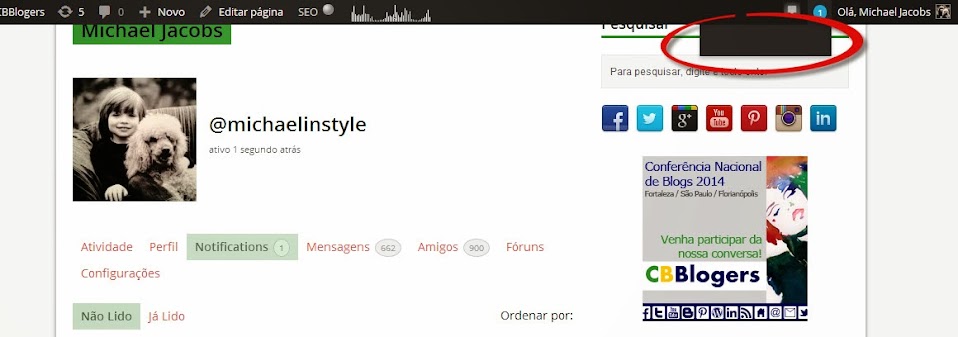
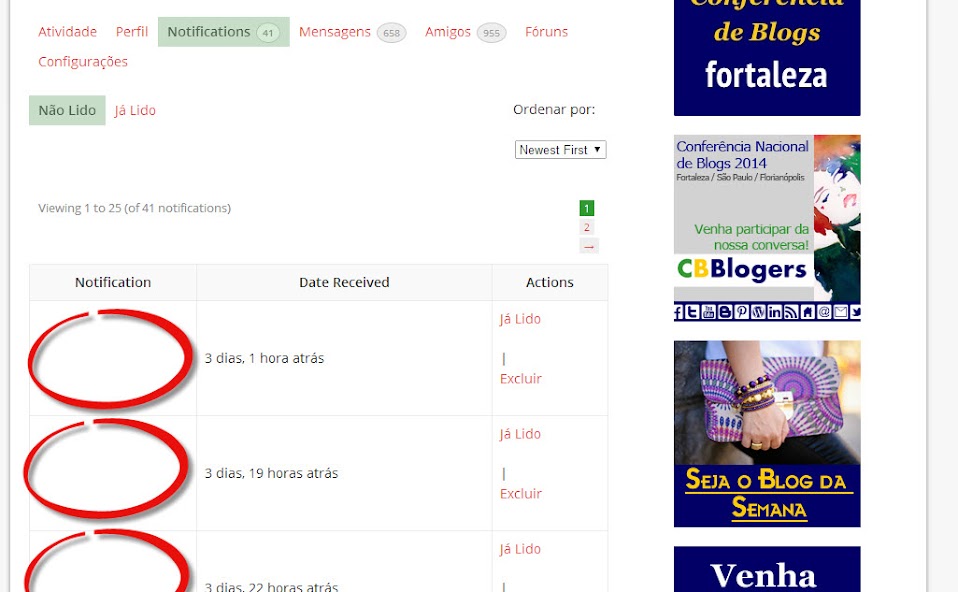
bbPress notifications of the type “bbp_new_reply” are showing up as blank in Buddypress. (I have also posted a ticket in the buddyPress forum about this issue: http://buddypress.org/support/topic/notification-still-not-being-displayed/)
As of today, my user notification page contains 43 “blank” notifications.
1 – When I mouse over the notification circle in the header of the page, the list of notifications is displayed as blank, even when I have notifications pending. Screenshot: https://lh5.googleusercontent.com/-gvkfWwp6rSg/Uu5iQpXEayI/AAAAAAAAM-0/tA7ok02oXC4/w958-h337-no/buddypress+blank+notification+list.jpg
2 – When I click on the notification circle, I am taken to the list of current notifications, but the title of the notifications in each row is blank. Screenshot: https://lh4.googleusercontent.com/-OqKLmC4t_-c/UyWU-1tw42I/AAAAAAAANfc/MgSf8atB4mw/w958-h592-no/notifications+screenshot.jpg
Here are a couple of rows from the notifications database table:
201438 2 15959 2483 forums bbp_new_reply 3/11/14 16:11 1
201443 2 1064 2101 forums bbp_new_reply 3/11/14 17:33 1
201464 2 15959 2347 forums bbp_new_reply 3/12/14 13:07 1
201468 2 15959 2494 forums bbp_new_reply 3/12/14 16:43 1
Here is my current configuration:
bbPress v2.5.3
buddyPress v1.9.1
Wordpress v3.8.1
site url: http://www.cbblogers.com
Please help….
Thanks much,
Michael
@1lizcollins
Don’t know why it happened. try Dashoboard>tools>forums.reapir forums and run one at a time to see of this fixes your links.
It could also be worth checkint that you haven’t got a plugin or theme issue, although neither would cause a plugin to disappear.
Check other plugins
Check that no other plugins are affecting this.
Turn off all other plugins, and see if that fixes the problem. If the problem is resolved, add back one at a time to see which is causing the conflict.
Check themes
If plugins are not the cause, then it may be a theme issue. Switch to a default theme, such as twentytwelve, and test.
@adenslayer
This seems to be a known issue with this plugin viz :
https://wordpress.org/support/topic/wpsc-support-tickets-bbpress-conflict?replies=1
I see you’ve also posted to the plugin site, so hopefully the plugin author will come back to you.
Bump – because this is the first Google Search result on bbPress slowing down sites.
Everything I read about bbPress said it’s light weight and integrates well into WordPress. Integration was excellent, but the website speed suffered significantly. I finally had to uninstall it and will need to look for a lighter weight forum plugin.
Click here to see a screen shot of the P3 Plug-in profiler results.
bbPress was responsible for half the load time of all active plugins (bbPress was a fresh install – with no forum activity). I had 24 plugins running total which means bbPress was taking longer to load than 23 other plugins combined. With results like that, there has to be a way to make bbPress more efficient either through caching or making bbPress more efficient when it searches for its short codes (which I believe is why bbPress loads on every page).
I’ve seen this concern on a few forums and really want to see bbPress be successful. If anyone has had success speeding up bbPress or believes my experience was an anomaly, please let us know. Thank you.
Website – WordPress 3.8.1 Multisite, BuddyPress 1.9.2., bbPress 2.5.3
I don’t have memory but it was something about hotlinking or creating an image at another site. Someone answered here or at the WordPress Support forum.
Sorry, this functions seems to return the topic title, not the forum title. I have ‘googled’ around and got this:
$forum_object = get_queried_object();
$forum_id = $forum_object->forum_id; // get the forum id, is it right?
$forum_title = get_forum_name( $topic->forum_id ); // get forum title by id
$forum_class = sanitize_title_with_dashes($forum_title); //sanitize
Not working since get_forum_name doesn’t work outside bbpress (inside WordPress header). Any other idea on how get the forum title (not the topic) and use as body class on WordPress? Thank you.
You should be able to find a WordPress plugin that will let you do that
https://wordpress.org/extend/plugins/
bbPress uses the same login system as WordPress, so if you find one for WordPress it will also work with bbPress
Hi there,
I am using bbPress 2.5.3-5249, WP 3.8.1 and theme dw-minion on http://www.blogperle.de.
My user contacted me with the information that he can’t create a topic.
Errormessage: ERROR: Your topic cannot be created at this time.
I found out, that the german word “Aufforderung” is the reason that the error message appears.
Every time I tried to use “Aufforderung” the bbpress denied to create (and edit) the post.
Wherever I used it in title or in bodytext, it does not work. I checked every user role. Only with Administrator rights it works with this word.
I checked within “Settings” > “Discussion” > “Comment-Blacklist” if this word is there. It is not.
Any help for this? Aufforderung means “challenge” (to sb. to do sth.) or better “request”.
Another thing, take a look at the following plugin
https://wordpress.org/plugins/bbpress-enable-tinymce-visual-tab/
I wouldn’t add this now whilst things are not working as expected as you will compound your issues but it might be another option available to you if your want a custom visual editor on your forms.
Hello,
How to make adsense ads to display them at the 1 and the 3 post?
I checked the plug http://wordpress.org/plugins/bbpress-simple-advert-units/
This plugin displays only the first post i want to also display the adsense under 3 post
How to do it?
sorry for my bad english
So the wordpress site in question is on 3.7.1 and bbpress is 2.5.3
Problem: None of the users on this site “register”. They are all imported via s2membership import function. As such the import overwrites the user role on each import.
All wp users that exist in the system should be able to by default be a participant. Is there an override?
“deactivating all plugins tangentially related to bbpress ”
The plugin conflict has nothing to do with whether the plugin is related to bbpress – any plugin can cause a conflict.
This is because conflicts are often with common variable names such as $user, where one plugin may set it to be x and the other uses it expecting it to be y.
Disable all plugins, and switching to a default theme proves that both wordpress and bbpress are correctly installed (ie not corrupt). From there you can add back themes and plugin to work out which is causing the conflict.
“There are a number of related threads about this issue on the forum but none have any real solutions provided.”
There are tens of thousands of plugins, and thousands of themes, and conflicts will occur with combinations of these. There is not one common problem here, the symptoms are the same but the causes many, so “real” solutions are individual. In the last few weeks solutions for many including a caching plugin and a theme have been posted.
Your problem is individual to you.
Try again with getting to a root cause by disabling all plugins and going to default theme, and come back if you still have a problem, we’ll try to help you to resolve this.
This will be an issue forr GD bbPress attachments.
I suggest you have a read of the existing support topics here and post your own if needed.
https://wordpress.org/support/plugin/gd-bbpress-attachments
I posted about this issue that I had a couple of weeks ago without any resolution. So I thought I would start at the beginning. I installed a fresh copy of WordPress (3.8.1) with the default themes on a newly created directory. Second I installed BBpress (2.5.3) and kept all the default settings. Upon completion I added the BBpress login widget and tested the login function. When I do this it hangs up on /wp-login.php page with nothing but a single period on the page.
Is anyone else having this same issue? I need help!!!!
There is no real easy way to do this in bbPress 1.x and that is what you are using.
The latest version of bbPress is bbPress v2.5.3 that is a plugin for WordPress.
You should just delete the entire database and install WordPress then bbPress.
https://wordpress.org/download/ https://wordpress.org/plugins/bbpress/