Search Results for '"wordpress'
-
Search Results
-
Topic: new user email with password
I have recently discovered that new users at my bbpress forum
fail to receive their welcome email with their password.
BBpress version 1.0.2 integrated with WordPress version 2.9.2
I thought it might be the New User Email Setup , http://www.epicalex.com/new-user-email-set-up/ plugin installed in my WP, but deactivating it didn’t fix the issue.
Any tips on where to start looking for a solution would be much appreciated.
Hi at all, I have some question:
first question:
if I put
require_once( dirname( dirname( __FILE__ ) ) . ‘bbpress/bb-load.php’ );
define(‘WP_BB’, true);
on my wp_config.php, for use bbpress function on wordpress, I recive a blank page, why? is the same code that I put on bb-config.php with another path and file. (I can put wordpress function on bbpress, it works). wordpress is on the root and bbpress inside the bbpress folder.
second question:
i have install bbsync, on plugin page I see that there is some config to do, if I click on “It needs your config!” i’m linked on general setting, I don’t understand what I have to do for use this plugin.
third question: is neccesary wp_plugin_bbPress_Integration?
I put all key on bb-config and wp-config.
thank you
kikko088
Topic: Linking to WordPress
I installed a fresh copy of bbpress and during the installation process I was asked if I wanted to connect it to a wordpress database.
Now, when I register a new account on wordpress, it appears as a new account on bbpress.
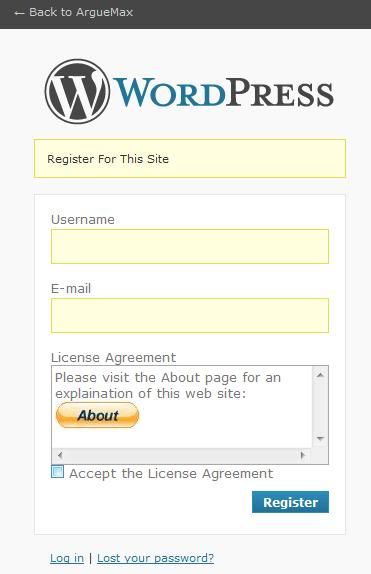
But here is the rub. I have added a plug in on the wordpress side on the registration menu. You have to click to agree to some policy. Since this plugin does not exist on the bbpress side, if I register a new account on the bbpress side, and try to use it to log in on the Wordperss side, I get an error that says “you do not have permission to ….”
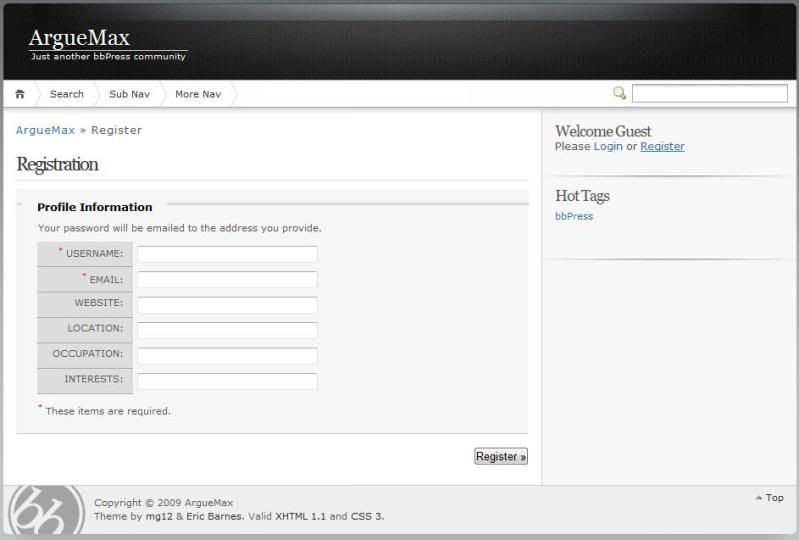
How do I make the registration I have formed on the WordPress side match the Registraion process on the BBPress side. Although the database is shared according to my tests and how I installed the latest versioin of BBPRess, the registration and login pages are not the samel
Here is the registration on the wordpress side showing my custom plugin
http://i67.photobucket.com/albums/h292/Athono/WordPress/arguemaxregistration2.jpg
Here is the registration on the bbpress side.
http://i67.photobucket.com/albums/h292/Athono/WordPress/arguemaxregistration.jpg
Maybe there is a way to make the bbpress such that when they click on the login link it directs the user to the login for the wordpress side (and also if they click on the registration link on the bbpress it goes to the registration on the wordpress side). How would I go about changing that? Is it html code or php code? The page http://www.arguemax.com/bbpress-1.0,2-2/bbpress/ has the login and register links the link for login goes to http://www.arguemax.com/bbpress-1.0,2-2/bbpress/bb-login.php and the link for Register goes to http://www.arguemax.com/bbpress-1.0,2-2/bbpress/register.php . How do I change that?
Matt confessed that he dove into bbPress. He admitted that he became a little burnt out on it. bbPress will undoubtedly be tied closer to WordPress. The future of bbPress will be a really awesome plugin. He even admitted that right now, it would be better off to use another plugin rather than bbPress. Matt said he just needs a little more time before he dives into bbPress again. The bbPress community was a bit rough around the edges and the flame war that ensued forced Matt to break away for a bit.
– http://www.wptavern.com/mattnote-from-wordcamp-san-francisco
I appreciate that I come across a bit strong sometimes, and certainly I felt that Matt wasn’t prepared for walking into the bbPress project when he came back last year. Personally, I think its a bit rich to say that the bbPress community “was a bit rough around the edges” given the way Automattic had handled bbPress with contempt for so long (leading to every single person involved in the project leaving – save for 1 forum moderator).
And as for the “flame war”, and it was probably the most quiet and mannerly flame war in the history of the internet, I think that maybe Matt has become acustomed to people praising the good things he and his company does and not that used to pointing out when they drop the ball (which originally was one of the things that most impressed me about Matt and Automattic).
– http://bbpress.org/forums/topic/whats-happening-with-bbpress/page/4
(the world’s nicest flame war, where 6 different people ask Matt questions using ugly words like Please, Thank You, and “really hope you had a great time on your travels
 “. Man it almost made me want to quit the total internet it was SUCH a flame war of epic proportions!!!!)
There’s no doubt in my mind that Matt is a humble positive guy that just wants the best for all of us. He speaks from the heart, and sometimes that can be a double edged sword because people hold him to that. Truly we understand that, but throwing the toys out of the pram in the way he did isn’t conducive to galvanising the community/development of bbPress.
All of the major issues/setbacks that bbPress has had have been quite obvious long long long before we hit them; and the “Relax, we’ve done this before” line is now seriously coming home to roost. Given the sheer volume of “wordpress integration” questions and “buddyPress” questions on this forum; i fail to see how telling people to not use bbPress is going to do anything to help the community or development of bbPress.
I said it when Matt came back that if bbPress is going to be a WordPress plugin then there is no point wasting development time rushing out new features that attempt to duplicate features already in WordPress. Its a shocking waste of development time, made with a unilateral decision without any real project management input. Headless chickens don’t make for good developers!!
hmmmm.
Well I am worried I’m just trudging up old ground. I’m quite sure there will be great Euphoria on the board today with this new theme (though personally, having all text shurnk by 20%, the space in which the text goes reduced to under 500px, and the links changed to a light green on a white background are mental decisions – oh and brilliantly going against everything the new WP theme is doing ) . Many will mistake it for bbPress not being an after thought, and development once again being kick started; though you’ll excuse the cynic in me for thinking the roll out of the new theme had as much to do with _ck_ calling Matt out on the WPtavern page as anything else.
Ha, but then again, maybe thats the real positive here. Welcome back _ck_.
Topic: Monetize
Hello,
I am currently working on figuring out BBPress and one thing I was wondering about is if it was possible to add sidebars similar to wordpress where I can drop a widget in there and put an add in that widget. Also I could put other things in there such as maybe a links section (like blog roll) or Nextgen gallery. I guess what I am really wanting is to be able to have the forum look similar to my wordpress site. Any ideas or know how to do something like that. I know practically no PHP so it would likely have to come in the form of a plugin or theme that requires a drag and drop mechanism similar to wordpress if possible.
Thanks
It took way too long to find the necessary instructions on how to install on Godaddy. The instructions listed with the download of this software was not sufficient. When people asked questions, it had an issue resolved there, one resolved here, but nothing complete. Finally I got it to run so I thought I would share a complete instruction manual on how to do this.
First, I would like to point out that I installed it on their free hosting service if you buy a domain name through them. However you can install it on their paid hosting service the same way I am pretty sure. In fact, I installed it on their free service for now while I test things and will install it on their paid hosting service in a bit so I can edit this if it turns out to be different.
1) download BBPress. Unzip it.
2) Log in to Godaddy services. Click on the Home tab at the top left -> the sub-tab hosting -> then click on hosting under the “my products section” on the left. If you have already bought hosting or had the free version set up, you should see a list of your domain names that are set up for hosting.
3) Click on manage account next to the domain name you wish to install this bad boy on.
4) The first thing you need to do is create a database. So click on databases at the top and then mysql.
5) The click on create database on the upper center right.
6) Type in a description name (maybe forum or blah or whatever)
7) Type in the same thing in mysql database user name box
 Type in a password that you can remember and then retype it in in the next box. Skip the last three boxes and click ok.
9) It will take forever and a day for the database to set up. Not really but maybe 20 minutes. In the meantime, lets go ahead and load the files onto your godaddy server. So click on the content tab at the top next to the databases tab you just selected and then click on FTP client.
10) Scroll down a bit and you will see two side by side panels. On the left is your desktop. On the right is the files on your domain name. Even if you just set up the hosting service, there will be files already on there.
11) Now you have two options. Do you want to install it at http://www.yourdomain.com/bbpress or do you want to install it directly on your main domain name http://www.yourdomain.com? If you want it directly on your domain name, then you need to transfer all the files within the downloaded folder from BBPress and not the actual folder with all the files in it. So in the left panel, you will navigate to your BBPress folder and double click it to view the contents. When you see all the files within that folder, hold the control key down and select all the files and folders within that folder. Then hit the little arrow in the center that points to the right which should move those files to the right panel and onto your domain name. If you wanted it at the http://www.yourdomain.com/bbpress, then just upload the actual folder with all the files in it versus opening up that folder and moving each file over individually. Also, you can rename the folder BBPress to something different and it will give it a different extension on your domain. For example if you renamed it Forums and loaded the entire folder onto the server, then you would have http://www.yourdomain.com/Forums.
12) Now we need to change some information in there. But first we need some information from the database you set up early. Probably it is still not set up yet and is pending setup. To check, click on databases tab at the top and then mysql. It will be listed as “setup” or “pending setup” under the status column. If it is pending setup, then grab some popcorn. Once it is ready, click on the pencil icon under the action column and you will then see the host name. It will likely start with yourdomain and then some numbers and dots and other stuff. Copy it.
13) Now click the home tab at the top.
14) Then click on the big button called “your files” under the tabs at the top.
15) Now locate the file that is called bb-config-sample.php. Check the box next to it. Then click edit at the top. A new window should pop up.
16) Scroll down and change BBDB NAME to the name you gave your database earlier. Change BBDB user to the same thing. Change mysql password to the password you set up earlier (if you used caps, you must use it here too). Then change mysql hostname (which is probably currently listed as local host) to the name you copied just a bit ago from the database pencil menu that had numbers and dots and other stuff. Then hit the save button at the top left.
17) Now this step, I forgot to do and it still works. I was just building a test site anyways so I will fix it when I attempt to load it to my real site. But you need to change the name of the file you were just editing. You should still have bb-config-sample.php still checked. Up at the top, click rename. Rename the file to bb-config.php. Essentially you are just dropping the -sample part.
18) Now navigate to your domain name where you installed the BBPress.
19) It will prompt you with the installation (or should). It will tell you that it recognizes that it is the first time and needs to be installed and then ask you to proceed. You will then enter all your information including database name, mysql user name (which was the same as the database name), and the password (with the necessary caps if you used them). But ONE PART THAT IS HIDDEN AND NEEDS to be adjusted is in the advanced section. So click the little check box. Now paste that host name you copied earlier with numbers and dots and other stuff. Now proceed onwards.
One thing I noticed is that I would proceed through the installation process at that last part and it would revert to the beginning again. I think this was because I was hosting it on Godaddy’s free server and they put ads at the top which was causing it to loop. After several times (probably 5) of clicking the buttons over and over again and retyping the information, it finally worked. Also the login screen is very basic on the free server. I don’t know if this is normal but I will let you know when I try on my paid server. But it was my understanding that the dashboard of the forum should be similar to wordpress. Maybe that is after integration between the two. Not sure.
Anyways, hope that helped. Thanks
I saw from wordpress showcase (http://wordpress.org/showcase/slashgear/) slashgear.com is using wp+bbpress. can anyone tell me which theme they are based on?
Hi,
I’m using phpbb3 right now but want to move to bbpress. So I installed bbpress on my server and was able to import all the posts and users from the phpbb3 to the new bbpress forum. Everything worked great. But now I would like to integreate the wordpress user database with the bbpress database. When I’m using this build in integration method, all the users I transfered from phpbb3 to bbpress disapear…
does anyone know how to fix that or is the bbpress user databye deleted by integreating it to wordpress?