I think I have the same issue here. Strange that the topics is not sorted by #ID ?
Topic 1 last 3 replies:
2014-04-01 kl. 21:17 #395
2014-04-02 kl. 18:40 #445
2014-04-01 kl. 22:31 #402
Topic 2 last 3 replies:
2014-04-01 kl. 13:32 #389
2014-04-02 kl. 18:22 #443
2014-04-01 kl. 22:43 #404
WordPress Versions eg. 3.8.1
bbPress Version eg. 2.5.3
Operating System eg. Linux (Debian)
Web Server eg. Apache
Theme eg. Techism
PHP Version eg. 5.3.28
I can confirm that George Stephanis sollution to deactivating threaded replies in settings solved the problem.
Wordpress version 3.8.1
bbPress version: latest version
Link to site: manupmyhealth.com/locker-room
I used “display: none” for .bbp-topic-voice-count to remove it, and now want to use a larger portion of the table that displays topics to show the content in .bbp-topic-title.
When I set the width to 75% for .bbp-topic-title, the desktop version looks good, but the mobile version looks disoriented. Is there a way to disable responsive design for mobile so people see the desktop version even when they are on a mobile phone?
Also, any thoughts on what to set the width parameter to so .bbp-topic-title takes a larger width in the desktop version and the mobile version will still look good? Thanks.
Hi there, I was reading this ticket (https://bbpress.trac.wordpress.org/ticket/2504)
It appears as though this issue has been addressed, and they say that the forum should be visible when using shortcodes, but it is not working for me.
I am using [bbp-forum-index] on a page, and that page is not visible on mobile, but the other pages of the forum are that are not using shortcodes.
Any help would be appreciated.
here is the page using shortcodes, (http://motocrossnw.net/forum/) you can just drag the corner of your browser and make the window small to replicate the issue.
Hello all,
This seems like it should be easy but I cant find ANYTHING ANYWHERE on how to just migrate bbpress forum posts from one bbPress forum Version 2.5.3 to another bbPress forum which is also Version 2.5.3. Both wordpress sites are running WordPress 3.8.1.
I just want to transfer the forums/forum posts/replies from a forum on website aaa.com to website bbb.com which are both on the same server.
It seems like this should be very easy, there are a million tutorials on how to import/export from OTHER forum services like phpbb, etc. but nothing about bbpress to bbpress hahahahaha
Anyways, any help is GREATLY appreciated.
Thanks!
 B
BParticipant
Hi all,
I’d like all links within my forum to open up in a new window/tab. Yes, I’ve done multiple searches and have seen all the previously-posted solutions:
Open Links in new window
Open target in a new window
Add Blank Target to Website Links
Open Links in New Window & Target Blank
Add target="_blank" to external links
I’ve also seen this: https://bbpress.trac.wordpress.org/ticket/2483
None of the forum posts have identified a concrete solution, plus, those seem to be referencing bbP 1.x.
So my question is, what’s the best way to implement this for a bbPress 2.x install? Have you done it, and if so, how?
Thanks in advance
Is there a way to have the 2nd line of a title of a topic that has a lot of words to be right underneath the 1st line? Currently the 2nd line goes below the image which I used this plugin http://wordpress.org/support/plugin/bbpress-topic-thumbnails for. See link below for an image of how it currently is. The 2nd link below is the actual link to the forum. Thanks.
http://awesomescreenshot.com/0342l05j91
http://www.manupmyhealth.com/locker-room/
Hi, I’m using WordPress 3.8.1 with bbPress.
Looking for a plugin that will allow me to reply to posts by email.
I found this post and use this plugin but it causes an error
Reply to Posts via Email
https://github.com/rmccue/bbPress-Reply-by-Email.
Error:
Warning: require_once(/home/power90/public_html/wp-content/plugins/bbsub/vendor/postmark-inbound/lib/Postmark/Autoloader.php): failed to open stream: No such file or directory in /home/power90/public_html/wp-content/plugins/bbsub/library/bbSubscriptions/Handler/Postmark.php on line 9 Fatal error: require_once(): Failed opening required '/home/power90/public_html/wp-content/plugins/bbsub/vendor/postmark-inbound/lib/Postmark/Autoloader.php' (include_path='.') in /home/power90/public_html/wp-content/plugins/bbsub/library/bbSubscriptions/Handler/Postmark.php on line 9
Ok, on your first :
This is to do with your theme and it’s page templates, not bbPress directly.
what you will need to do is create a bbpress.php file and into that put the page layout
see
Step by step guide to setting up a bbPress forum – Part 1
for creating a bbpress page to use
Then see
http://brookswebdesign.net/how-to-create-a-wordpress-template-with-left-sidebar/
for creating a left hand sidebar.
On your second, this is either
related to your theme and how it is displaying content. Switch to a default theme such as twentytwelve for a moment and see it is it then displaying – in default all with not be indented.
or
maybe because you are using threading on dashboard>settings>forums>reply threading
Let me know which, and I’ll take a lokk to see how to get all to ident
“Version Control Software” is how I ‘got it fixed’, everything I do these days is done using ‘version control’ it lets me know what I’ve done and easily roll back any changes I made to site or bbPress. 🙂
bbPress & WordPress use SVN though a real popular one is Git and GitHub https://github.com/
They have nice intro course for Git on GitHub here http://try.github.io and it does take a while to grasp all the concepts but once you do you would never go back to not using it 🙂
Hehehehe…. Developing WordPress themes, child themes, plugins can be like a rabbit warren, once you go down it it can me daunting to find your way back out ;;)
Glad you found the issue and got it sorted 🙂
Check out this article and the links in it.
It will look at a site and tell you what WordPress theme they are using 🙂
What Theme: A New Website Theme Detector Powered By WordPress
This time, it converted the users, all of the topics, and about 220,00 replies, then started just outputting dashes again. What does it mean when it starts outputting dashes? What is the program doing?
As I stated above it can be for many reasons and is a bug/error that we have not been able to isolate to fix, we have not found a way to trigger the bug allowing us to reproduce the bug and create the fix. It is a random thing as I outlined in my previous reply.
I opened a new window and re-started the conversion from that window, but instead of picking up where it left off, it started converting topics again. Am I going to have two copies of each topic in the BBPress forums now? Should I reset the forums again?
If you want the importer to resume from where it left off you need to make sure you don’t check the checkbox in the following screenshot, if you do check it then it will start again from the start and you will end up with two of everything.

Instead of using “reset forums,” can I just empty some of the MySQL tables?
This should be sufficient for most cases and because bbPress uses custom post types it shares the same wp_posts and wp_postmeta tables with WordPress and any other plugin or themes custom post types. It should be quite fast and behind the scenes it is actually doing direct MySQL queries to remove only the bbPress forums, topics, replies and topic tags from the posts, postmeta and taxonomy tables.
I know it can be frustrating getting this to work as I have been were you are now and is the reason I started using bbPress. I went through the same problems trying to import from phpBB to bbPress, I eventually got it working and started learning PHP and now as a novice PHP programmer I try my best to help others migrate their forums to bbPress and improve bbPress as best I can and it’s not easy and for an old dog learning new tricks I reckon I’m doing alright.
Finally I’ve written a small script to migrate kunena attachments to GD bbPress attachments
@cybnet Awesome thanks for this, I added it to the (still sparse) Kunena docs here.
I’ll take a closer look when I get the chance and see what ideas I can come up with. I was at a WordPress Meetup a couple of months ago that demoed a few different ways to move media from one install to another that once time permits I’d love to take a shot at including it in our importer.
Now I’d like to write a script to convert kunena BBCode into bbPress HTML because there are some bbcodes not converted.
This I can most definitely help out with now.
The SMF and phpBB importers both have some good examples of converting BBCode to ‘native’ bbPress (WordPress) code. I am simply use regular expressions to convert them on the fly as each topic or reply is converted.
eg. This Replaces [size=$1:XXXXXXXX] with <span style="font-size:$1%;">$3</span>
$phpbb_uid = preg_replace( '/\[size=(.*?):(.*?)\]/', '<span style="font-size:$1%;">', $phpbb_uid );
You can see the SMF regex here and the phpBB here. There are probably quite a few that we can repurpose and if not make up a list for me and I’ll work towards getting them added to the Kunena importers in a future release.
Hi there 🙂
Please forgives my bad english, I hope I will be understandable.
I’ve a bbpress forum here, and sometimes an error in post order occures. This bug is that the last post of a topic is showed before the previous post!
In other words, if there is 5 posts in a topic and you publish the 6th post, this post will be showed at the 5th place and the previous post will be at the 6th place.
Thanks a lot for you help, I have find nothing about this kind of issue :-\
Edit : for information I’m running bbPress 2.5.3 and WordPress 3.8.1
No problems, if you’d like the last post date rather than freshness, use this plugin
https://wordpress.org/plugins/bbp-last-post/
This is weird, as you say there is only one copy of the forums in the backend yet two on the front :/
I see http://elitegamingcomputers.com/forum/ & http://elitegamingcomputers.com/forum/page/2/
Yet picking a forum via either page above eg http://elitegamingcomputers.com/forum/social/in-game-strategy/ is the same resulting URL from either page, the same for a topic from either forum page eg http://elitegamingcomputers.com/topic/dthpwns-pvp-keybinding-guides/
If there were duplicates from an import you would see the duplicates in the back end and when viewing the forum or topic typically one of them would end with -2, for example you would have example.com/forum/my-topic and example.com/forum/my-topic-2 as each page. forum, topic must have a unique slug.
What I do see that is weird though is your main forum page is:
http://elitegamingcomputers.com/?post_type=page&p=4947 <- That is weird
http://elitegamingcomputers.com/forum <- This is what I expect you should be using
Do you have a custom page setup for your forums and by chance do have you used the bbPress shortcode [bbp-forum-list] twice?
The topics section of your site looks and appears ‘mostly’ to work as expected:
http://elitegamingcomputers.com/topics/
The ‘By’ section in the below screenshot should not be there though.
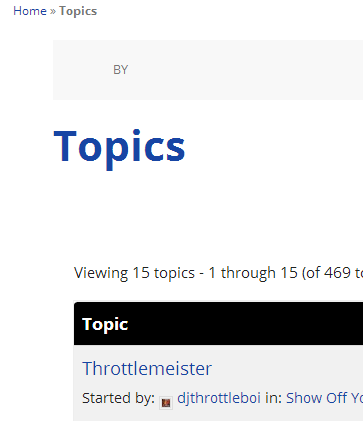
Looking at the source of your site I know see your using a Genesis theme, do you have the Genesis bbPress Extend plugin installed and activated? https://wordpress.org/plugins/bbpress-genesis-extend/ as you will need this.
One more thing is that this could be an issue with your rewrite rules. To fix this try resetting your permalinks. In your WordPress Administration Screens navigate to Settings > Permalinks, select a different permalink structure and save. Then select your preferred permalink structure and save again.
Hi, how’s it going? I just switched over to bbPress and I’m having a problem.
The forums are showing that there are two pages to choose between, but both pages show the same exact list of forums:
http://elitegamingcomputers.com/forum/
I did go through the import process twice and I’m assuming that’s why there are two pages. However, only one set of forums show up in the “Forums” tab in the WordPress dashboard, so I can’t just go in and delete them (if that makes sense).
Anyway that I can fix this so it just shows the one page?
I am so very lost, frustrated and feeling like a failure at this point.
I have tried my hardest all week to understand BuddyPress/bbPress and have dumped way over 60 hours (very late nights and early mornings) into trying to set this up and I have come up short handed with absolutely nothing to show for the time I’ve put into this.
Today alone I have failed and retried 6 times. I have completely deleted sites, created newer ones, emptied the Trash, cleared caches and all of the above with no luck whatsoever.
Could somebody….just anybody please help me out here? I am beyond lost and confused.
I have been trying to achieve this with absolutely no results whatsoever: https://www.youtube.com/watch?v=M8mh3f6Vzbo
I use the Social Buddy theme: http://themeforest.net/item/social-buddy-wordpress-buddypress-theme/3691122
The site is project.arclightcomics.com
I haven’t a clue what I am doing wrong and after 6 tries I am starting to think this was a ginormous mistake on my end and I really don’t want to think that.
I run my bbPress forum so that users do not need to register. Moderators log in to post and are the only required registered users. So far Akismet has been fabulous catching spam.
Today Akismet marked a legitimate reply as spam and I quickly unchecked that so it would post properly. No problem there.
Later, a spam reply was missed by Akismet because it appears to have relatively normal text. But I recognized the text to be spam and the username confirmed that. I added the IP to a blacklist and checked it as spam. No problem there.
The problem I have is that the topic the reply was posted under is now appearing at the top of the topic order in the forum indicating that I have just posted a reply recently. The spam is removed so the last date of a reply would have been mine, in December.
Is there anyway to get this topic to appear where it should on the forum page, well below more recent topics?
Thank you, Matoca
WordPress 3.8.1
bbPress 2.5.3-5249
http://www.secondchanceaihadogs.com/forums/forum/aiha-dog/
That sounds like the way to do it. I’m rather new to WordPress but I have a decent knowledge of PHP / MySQL. If it’s not too much of a pain, I’d really appreciate looking at some code to use as a starting point.
what shortcodes?
what software versions of bbpress, buddypress and wordpress are you running?
what theme?
what plugins are you running?
url of your site?
when do you get 404 – logged in, not logged in?
etc.
We would love to help you, but give us a fighting chance of working out what is wrong by giving us some details 🙂
Come back and we’ll do our best to hep you !
No problem @netweb & @maveas. I dealt with the same issue and it was driving me nuts. I submitted a ticket for it about a week ago to Nextgen gallery, and they are currently working on a fix. I am not sure when the next beta or fixed version will be released, but if you need it running use version 2.0.40. This was the last version that didn’t cause the redirection issues.
https://wordpress.org/plugins/nextgen-gallery/download/
The easy way I did it was by first FTP into your site, and rename the current /wp-content/plugins/nextgen-gallery folder to nextgen-gallery-latest
Then download the 2.0.40 package from above and upload the nextgen-gallery folder to your plugins folder. Activate is as you would any other plugin, and disable the current one. They will have different version numbers. Don’t update the 2.0.40 version. Once you see an update for the latest version, or a change log that shows it fixed, you can reverse the steps above and not lose any settings.


