I suggest you have a read of some of the docs, most of what you are asking about is in the docs.
For example you can use shortcodes and widgets for login and register actions:
https://codex.bbpress.org/shortcodes/ https://codex.bbpress.org/widgets/
The majority of bbPress actions including moderation can all be performed in the ‘front end’ and only some specific actions (configuration and settings) are required to be performed in the WordPress dashboard (back-end).
https://codex.bbpress.org/getting-started-with-bbpress/
Codex
You are more than likely correct 🙁
Things are a bit funky for forum and topic subscriptions and topic favorites.
This was discussed at great length in the following topic, you might be able to get a temp fix from here until we get it patched for bbPress 2.6.
Is there a way to remove this character "|" next to the subscription link?
The bug/s https://bbpress.trac.wordpress.org/ticket/2581
I also plan on using ‘dashicons’ https://bbpress.trac.wordpress.org/ticket/2582
Ask and you shall rec… Oh wait… This is kind of goals of the bbPress and BuddyPress codex’s, just like WordPress’. Have you seen the new WordPress developer reference that was launched a couple of days ago?
Reference
Do you think that will be useful? I presume by your statement you’d like a forum topic associated with each item… Maybe bbPress and BuddyPress will get there own versions of this reference 😉
This has nothing to do with bbPress per se, if you have added Thank you in advance those terms to ‘Comment Moderation’ or ‘Comment Blacklist’ in Settings -> Discussion then you should remove them this also includes if you have the term van then because ‘advance’ includes ‘van’ it will be blocked.
See this for more details: https://codex.wordpress.org/Combating_Comment_Spam#Comment_Blacklist
Maybe take a look at the two example methods (Comments 14 & 16) in the bbPress trac ticket:
https://bbpress.trac.wordpress.org/ticket/1792
As always patches welcome 🙂
How possible is it to make a plugin like the above? Is there a filter or so I can hook into to change the front end language?
I can’t think of a way of the top of my head…
If there is not, is having two wordpress installations, each in a separate language but sharing the same database an option? It is rather cumbersome way to work around this but I am going crazy over this now.
This would be an option, could be done, but a massive amount of work in setup and maintenance.
I haven’t used WPML myself so how it does it’s thing I am not sure of but if it must be a fresh install can you make a backup of your database and site then export posts, pages, forums, topics, replies with the WXR Export then perform a clean install of WordPress, add WPML, then import the WXR data to the fresh install?
Hi Stephen,
Thank you for replying. I don’t think I can use WPML now since the site is up and running and a fresh start won’t be an option. I had to look again to understand that page. Simple yet niche 😀
How possible is it to make a plugin like the above? Is there a filter or so I can hook into to change the front end language?
If there is not, is having two wordpress installations, each in a separate language but sharing the same database an option? It is rather cumbersome way to work around this but I am going crazy over this now.
yes and yes !
bbPress uses the wordpress login, you simply have an additinla contro, to set the user access level to the forums.
So each users has a wordpress access level and a bbpress access level, but only one login !
I know that 2 of the 3 plugins you mention should be working fine because I know a couple of sites that currently use them and if they were broken the authors would update them.
I suggest you create a support topic in the plugins support forums and see what feedback and or updates are released.
And this plugin was just released last week as an alternate and/or/substitute
Plugin: bbPress Go To First Unread Post
https://wordpress.org/plugins/bbpress-go-to-first-unread-post/
We don’t actually want to display a notice, it acknowledges that ‘something’ is actually there when the purpose is not unconditionally not display that content to a user who does not have the capabilities to see it.
In bbPress 2.6 this will change from a 404 to a 403 error though:
https://bbpress.trac.wordpress.org/ticket/2485
That plugin would be for the old ‘standalone’ version v1.x of bbPress, you would need to find a plugin that works with bbPress 2.x.
Maybe WPML will work? http://wpml.org/ Quite a few people here use it with bbPress:
https://bbpress.org/forums/topic-tag/wpml/
(Note: You have to ask WPML for the extra bbPress additional plugin to use WPML with bbPress)
On a related note, how is the language options provided in this page? (under the subpages heading)
They are just simple ordinary WordPress pages and the parent page is the page you linked. Both the content and the title of each page is written in the authors ‘native tongue’ there is nothing special behind this, standard WordPress is way cool like this. 🙂
Turn off define('WP_DEBUG', true); in your wp-config.php file, this is a known issue.
More info on this:
https://bbpress.trac.wordpress.org/ticket/2309 https://core.trac.wordpress.org/ticket/24169
Edit: PS, I did not get an email that there was a reply on this, and it’s definitely checked…
Firstly, did you get this reply?
And I’m a little confused: doesn’t bbPress have it’s own editor that’s separate from WordPress? I have an awesome editor for WordPress, but it doesn’t show up for bbPress.
My bad, Yes and no, bbPress can use WordPress’ editor if you enable TinyMCE as detailed here, that is the same editor you see in the backend of WordPress to create posts, pages tec.
The original links I posted are for adding custom themes for TinyMCE.
If you are not using TinyMCE you can edit bbPress CSS in the ‘/* =TinyMCE in themes’ section around line #714.
Ok, so ignore the above, I have found and hit the same wall you have with the ‘editor buttons’, I’m not sure if this has changed with WordPress 3.9 and TinyMCE 4 but I can’t override these either without some serious hacky code.
I’ll create a bbPress and/or WordPress ticket/s in trac so this can be done without quite so much effort. I’ve been messing about for the past hour trying to get the numerous combinations of ‘editor styles’ to work and am now walking away to go ask the experts 😉
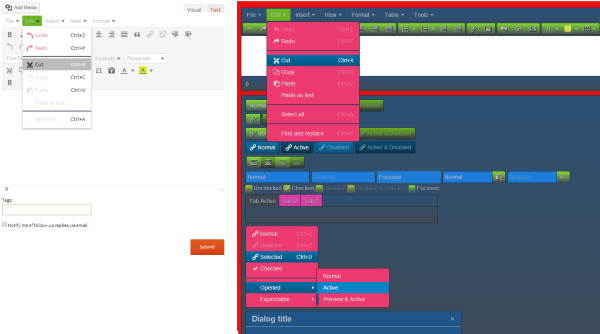
I am using theme which has padding of 35px on side of posts. Same style is used for bbpress as well and i have by bbpress forum topics with 35px padding on both sides. Is there any way i could remove this padding only for bbpress forum and not for normal wordpress posts?
WP 3,9
BBP 2.5.3
Twenty Ten
Database = 48Kb (according to PHPMYAdmin) and about 10kb exported
Tick all options in Importer. Get this: (Although I can see this Table in my database. If I repeat the process, I will get message of another Table not existing.)
Any suggestions?
Repair any missing information: Continue
WordPress database error: [Table ‘goandsta_phpb1.phpbbusers’ doesn’t exist]
SELECT convert(users.user_id USING “utf8”) AS user_id,convert(users.user_password USING “utf8”) AS user_password,convert(users.user_form_salt USING “utf8”) AS user_form_salt,convert(users.username USING “utf8”) AS username,convert(users.user_email USING “utf8”) AS user_email,convert(users.user_website USING “utf8”) AS user_website,convert(users.user_regdate USING “utf8”) AS user_regdate,convert(users.user_aim USING “utf8”) AS user_aim,convert(users.user_yim USING “utf8”) AS user_yim,convert(users.user_icq USING “utf8”) AS user_icq,convert(users.user_msnm USING “utf8”) AS user_msnm,convert(users.user_jabber USING “utf8”) AS user_jabber,convert(users.user_occ USING “utf8”) AS user_occ,convert(users.user_interests USING “utf8”) AS user_interests,convert(users.user_sig USING “utf8”) AS user_sig,convert(users.user_from USING “utf8”) AS user_from,convert(users.user_avatar USING “utf8”) AS user_avatar FROM phpbbusers AS users LIMIT 0, 100No users to convertNo data to cleanStarting Conversion
Mmm, same problem here. I’ve updated WordPress to version 3.9 and now the users (except admins) are unable to create topics.
Ok… so I’ve been working on this all day. I installed BuddyPress, then I installed bbPress. The only other plugin installed at the time was Jetpack. I’m using Thememakers Blessing Theme on WP 3.8.3 and the latest BuddyPress and bbPress plugins.
However, I went to create a new user (participant) and noticed that none of the new roles usually created when installing bbPress were there. I still only have the standard roles created when WP is installed.
Here are the steps I’ve taken. I uninstalled all other active plugins. I uninstalled BuddyPress and bbPress. (completely deleted) I changed themes to a more generic theme (TwentyThirteen). So I was basically back to a fresh install of WordPress. I’m working on a new site that is not live yet so no big deal.
I went and re-installed bbPress and still nothing. No new roles. No Keymaster, no participant… nothing. I’ve been searching for quite a while and I can’t find that anyone else has had this issue.
Does anyone have any thoughts? Thanks.
So I followed the instructions at WordPress to change the bbPress editor look, and match my dark theme (as posted above by netweb) and it didn’t work. I’m not sure that page is current for the new WordPress. Not only did it not change my editor’s CSS, it gave me a php header error that wouldn’t let me access some pages.
I also tried to put the CSS in the bbPress css in my child theme, hoping if I narrowed it down enough it would take precedence, but no luck there. Also, there are several buttons involved in the editor that are controlled by css in yet *another* css file (located in the same folder as the editor: wp-includes/css) buttons.min.css that is also causing a ton of white in the editor, and when I tried the php fix to create a custom css file for that one in my child theme the whole site crashed.
It seems really strange to me that such a huge part of this plugin doesn’t have a clear solution for those who prefer a dark theme after all this time. I’ve literally spent hours today trying to problem solve this. The glaring white looks really, really bad in my forums. If I ever sort it out, I’ll do my best to make sure and get the directions out there.
bbpress should have no problems with any database prefix that wordpress accepts, it just rides on this
bbpress largely picks up on your wordpress theme, use any of thevdefault ones and you’ll get a great look.
I use twentyten very successfully.
and look at the set up guides
Codex
Same thing happening to me. Running WordPress 3.9. I activated bbPress – first time i got a weird access denied error, so I removed and reinstalled. Now when I activate, i get nothing, no welcome page, nothing on the left menu. I do get a widget on the dashboard telling me I have no forums…
Any more thoughts on this?
WordPress 3.9
bbPress 2.5.3
On website, links to topics work – eg:
http://domain/forums/topic/topic_name
The forums link produces a list of forums – eg:
http://domain/forums
However, the links to forums do not work – eg:
http://domain/forums/forum/forum_name
I get page not found
In addition, the dashboard menu for ‘Forums’ only has the ‘Attachments’ link. ‘All Forums’ and ‘New Forum’ have vanished.
I have tried:
* repairing forums
* re-saving settings
* resaving existing permalinks
* running debug mode (no errors)
The updates were from:
WP: 3.2.1 to 3.9
bbPress: 2.0 to 2.5.3
Any ideas what to look for?
Thanks
Hi.
I am getting this error.
Notice: bbp_setup_current_user was called incorrectly. The current user is being initialized without using $wp->init(). Please see Debugging in WordPress for more information. (This message was added in version 2.3.) in /home/xxx/public_html/xxx/wp-includes/functions.php on line 3245
I saw some of people asked about this question for previous versions. Its supposed to be fixed.
I am using
Debug : True
Wordpress : 3.9
bbPress Version 2.5.3


