I made the importer with SP v5.1.4 and every now and then upgrade to the latest just as I did earlier.
I’ve got nothing else that comes to mind at this minute, it’s quite late here so I’ll take a closer look in the morning.
A couple of things will help though, what versions of WordPress, bbPress and SimplePress are you using?
From what I can see of your site just now is you still have those plugins enabled and your still using your theme. Disable your plugins and switch to a default WordPress theme like Twenty Thirteen and you won’t have a problem deleting those replies.
Once your done that activate your theme and check if the problem still exists.
Next enable one other plugin and check the problem again.
Next, your next plugin, check again.
Keep doing this one by one and you will find the conflict and we can go from there.
Hello Stephen,
I did as you suggested and it worked but again error.
First i deleted bbPress and reinstalled it and then it was working, i deleted some replies as they were spam but then it stopped working now again i deleted bbPress and reinstalled it many times, 3 times it worked and then stopped and now permanently stopped, i mean no effect of Deleting bbPress and reinstalling it now.
And one more thing i am able to add new replies there from dashboard and can access spam, Published and trash folder in replies but only two tabs are not accessible pending and all replies in replies main tab, should i try it installing through FTP, it might work as the reinstalling worked few times.
And it might be possible that the pending replies, there are 4 now can disturbing BBpress, 3 of them are spammy, some Chinese language is there. So i think if you can tell me how to delete that pending replies data from FTP without accessing WordPress dashboard as it showing error from there, i think it might work.
And i have also contacted my hosting provider, awaiting for their reply….
Delete bbPress and reinstall it, you won’t let lose your forum data.
If that doesn’t fix the issue you will have to contact your hosting provider as there will be something wrong with either the Apache or PHP configuration or you are simply running out of memory, you have quite a few plugins running.
There are NO known issues when WordPress’ only active plugin is bbPress.
Ok, so if I understand you problem correctly, what you’d like is the main forum page to show is
1.
Category
Forum
Subforum
forum
subforum
The subforums are not currently showing?
and
2. for each to have a description?
you are trying to achieve this by using a wordpress page and shortcodes.
What confuses me is that you give a link to the page you want to use – if this is a real page, then what is preventing you form using it?
Sorry if I’m not understanding you correctly
Here are the answers…..
1. Yes bbPress is fully working, except that when i go to Dashboard>replies i get an internal server error mentioned above.
2. this is an old installation, few days back it was working fine from 10 days back i am getting this error in Dashboard>replies.
3. This error is always been there.
4. Nothing has changed on the site except i installed some plugins i needed.
5. I am running these wordpress pulgins are BackUpWordPress, bbPress Genesis Extend( beacuase bbpress has problems with genesis framework and it helps), bbPress Moderation, Broken Link Checker, Contact Form 7, ContestHopper for WordPress, Eggplant 301 Redirects, Genesis Simple Edits, Google Analytics for WordPress, Jetpack by WordPress.com, Nofollow for external link, SEO Friendly Images, W3 Total Cache, WordPress SEO, WordPress SEO News, WP-No-Tag-Base and Google Publisher Plugin.
6. Yes using W3 Total Cache as a caching software but i don’t think it is the issue.
7. Yes this problem is also there with ALL plugins except bbPress deactivated AND a default theme such as Twenty Thirteen installed i still get this error? and the default theme i used is Twenty Thirteen.
Thanks for your help…..
My objective is to not use the standard forum root index page that is auto-created and instead use a WordPress page with forum shortcodes.
The auto-generated forum root page is here: http://thirdscribe.com/cafe
and I would much rather use this page here: http://thirdscribe.com/cafe-forums
I have not had any success in customizing my root from the settings panel where it says: “Customize your Forums root. Partner with a WordPress Page and use Shortcodes for more flexibility.”
Failing the ability to use the WP page with shortcodes, I would like for the sub-sub forums to be shown, as well as the text descriptions for everything, in the root index. This forum supports a book network, and to have the subgenres showing under the genres is pretty important. Again, I would prefer to just use the page generated using the shortcodes, but I’ll accept just getting the subgenres and descriptions to show.
This is my first time using bbPress — I like it and like the back end administration, but I REALLY need to be able to show more information on this forum page.
I am running WP 3.8.1, Buddypress 1.9.2, and bbPress 2.5.3
Any help or suggestions appreciated.
No is the quick answer.
bbPress is a plugin for WordPress, hence if you have multiple WordPress sites you will need to install the bbPress plugin on each WordPress site.
I was on Simple:Press v5.3.4 and have just now upgraded to v5.4.1
Tested the current bbPress v2.5.3 import using the SimplePress5 importer and everything worked fine.
Repair any missing information: Continue
Conversion Complete
No reply_to parents to convert
Converting replies (0 - 99)
No tags to convert
No super stickies to stick
Calculating topic stickies (0 - 99)
Converting topics (0 - 99)
Calculating forum hierarchy (0 - 99)
Converting forums (0 - 99)
Delete users WordPress default passwords (0 - 99)
Converting users (0 - 99)
Starting Conversion
This is the SQL query that runs the step you are stuck on:
SELECT post_id AS value_id, meta_value FROM sp_postmeta WHERE meta_key = '_bbp_forum_parent_id' AND meta_value > 0 LIMIT 0, 100
This shouldn’t really cause any issues, worst case scenario you no longer have your forums grouped in their previous hierarchal structure.
The only other thing I can think of is maybe a SimplePress plugin/extension may have modified the database setup beyond the basic ‘out of the box’ setup I use.
You could also try reordering your SimplePress forums to force an update of their values in the database. Also try removing the forums from the groups and delete the groups. You can easily add the groups/categories again on the bbPress side once the import is completed successfully.
Hi,
How can I remove the roles from appearing in both the drop down list as well as the users tab in wordpress?
I looked around in my database and file manager but I don’t see anything relating to bbpress remaining.
What should I look for?
Thanks!
Hello all!
Quick question – Can one bbPress forum work across multiple WordPress sites, not a multisite?
Graham
Using WordPress 3.8.1, bbPress 2.5.3 with the Toothpaste 2.0.2 theme. DepreciationGuru.com Note – I have tried using TwentyTen, TwentyEleven, TwentyTwelve, TwentyThirteen & TwentyFourteen and still have the same results.
I set up the forum as per the Step by step guide to setting up a bbPress forum – part 1. Would like for my Forum Topics to show indented under the Forum Title.
This is how it appears: http://www.depreciationguru.com/forums/
This is how I would like it to look: Sample From Step by Step Guide to setting up
Any help would be greatly appreciated!
bbpress only works on wordpress, so no your can’t directly run it on Magento, so yes a link would do it.
Hi,
I have WordPress 3.8.1 and BBPress 2.5.3. I am also using WP Members version 2.9.1. BBPress new topic notifications were working, up until about 2 weeks ago (all other system notifications are still working fine). The only recent plug-in update has been to WP Members, so there may be an issue with compatibility – but I can’t be sure that the problem didn’t in fact start before I updated WP Members.
I would really appreciate your advice, many thanks.
http://www.spha.org.uk
Hi,
I have WordPress 3.8.1 and BBPress 2.5.3. I am also using WP Members version 2.9.1. BBPress new topic notifications were working, up until about 2 weeks ago (all other system notifications are still working fine). The only recent plug-in update has been to WP Members, so there may be an issue with compatibility – but I can’t be sure that the problem didn’t in fact start before I updated WP Members.
I would really appreciate your advice, many thanks.
Mailchimp for WordPress I dont think is actually made by Mailchimp?
Mailchimp Widget for WordPress is. They all seem to play on those words. Probably why it wasnt showing up.
I was trying this one in particular because it used a checkbox in the wp registration area and used that registration info to add the user to my mailchimp database. The Mailchimp one doesnt seem that flexable, it made the user fill it out twice which isnt cool.. but then, apparently this one wasnt either… there must be a way and I’ll find it.
Main thing is I know exactly what the problem is now and that its not a BBPress thing.
That is a huge relief.. 🙂
Using WP 3.8.1, bbPress 2.5.3 on my website http://www.dogfoodadvisor.com
As the owner-admin for my website, I’ve been the Keymaster for my bbPress forum for almost 2 years and have experienced no issues. However, I would like to make one of my trusted users a moderator so she can help me better handle the traffic.
When I log into her user account and select “Moderator” for her new role, the software apparently accepts her new role. However, when she logs in, the software appears to reset her role back to “No Role for These Forums”. I even tried making her an admin first, then changed her forum role to “Moderator”. And again, the same thing happens. She reverts back to WordPress role of “Subscriber” and reverts back to “No Forum Role”.
I really need the help of another moderator or two and would really appreciate your help fixing this issue. Any ideas?
Thanks so much for your help.
Mike Sagman, Editor
The Dog Food Advisor
I’ve created a series of Forums on this site:
http://xxxxxxxx.ca
They are located here at http://xxxxxx.ca
I used a series of shortcodes so I could customize the pages…
I seem to be running into a problem of “now you see them now you dont” when topics or replies are posted.. almost as if the short codes cant hold the link to the topics and replies.. yet the one main topic I “stuck” to the top and closed as an admin always remains.
If you register for the forums, everythings fine… if you post, it seems to be fine.. but go back later.. and its gone. I cant make any sense out of this. It all seems very buggy… I’m suspicious of a conflict in there somewhere, sometimes the wp menu bar shows.. and I can see the posts.. sometimes.. even though Im logged in it disappears.. but is there to touch.. and I can still see the posts.. sometimes its gone completetly and bbpress thinks I logged out completely, then I can see nothing.. grrrrrrr
The short of it.. these forums arent working right… very frustrating and somehow I need to fix it. I cant just start disabling things without affecting the whole site.
Any sugestions?
With the disappearing toolbar over top.. I suspect a conflict.
I currently run WP 3.8.1
I also use BBPress 2.5.3, BBPress reCapctha 1.1, mailchimp for wordpress lite 1.5.7, W3 Total Cache 0.9.3, WP SEO 1.5.2.2
Im lost.. about to go into the long haul of troubleshooting but any suggestions would be helpful.. I am by no means an expert in these forums, these are the first I have ever built.
I’d like to get rid of the “Leave a Reply” that appears on the bottom of the page that lists all my forums. i edited the page and unchecked “Comments” and “Discussions” – but it still shows up. ?
http://cchca.stevelescure.net/forum/
WordPress 2.3.9.1
bbpress 1.9.2
i’m using the twenty fourteen theme
thanks!
I added this new Voting feature as part of the old GetShopped Support Forum plugin.
It was the quickest way I could get a support forum (resolved/unresolved) plus topic voting working together.
Here is the comment I made on the WordPress plugin repo site:
https://wordpress.org/support/topic/i-added-bbpress-voting-and-fixed-some-bugs-version-303?replies=1
Code is available on github. It’s not polished enough to be a standalone plugin just yet.
I have added a few new things:
1) topic voting
2) sidebar registration widget
3) copied the ‘resolved’ dropdown to near the submit button, so you can easily mark a topic as resolved while you are replying to it (much quicker!)
4) fixed a couple of potential bugs around permissions (ie: anyone could mark a thread resolved or assign a thread to someone etc..)
You can grab the code (and see the changes) from here: https://github.com/dtbaker/bbPress-Support-Forums
The voting and sidebar registration features can be seen in the demo here: http://ultimateclientmanager.com/forums/forum/feature-requests/
(I have modified some of the div tags/classes in this plugin to better support bootstrap, so it might look a bit funky on the standard bbPress install)
Cheers,
Dave
https://wordpress.org/plugins/bbpress-vip-support-plugin/
i do have a child theme, but it didn’t even occur to me (only been into this WordPress thing for about a week).
thanks for being so responsive!
Being new to all of this, could someone help with how to do this from @nerdenpose:
*Make sure to move all your theme files into your wordpress theme (wp-includes/themes/your_theme/buddypress/) so you don’t lose your work with an upgrade.
I have done a little more investigation (with a slightly different configuration). I created a new “test” topic as one user. I logged out and logged in as a different user and attempted to respond to the test topic and I received the following error:
Fatal error: Call to undefined function bp_notifications_add_notification() in /nas/wp/www/staging/cbblogers/wp-content/plugins/bbpress/includes/extend/buddypress/notifications.php on line 124
My configuration was:
bbPress v2.5.3
buddyPress v1.8.1
Wordpress v3.8.1
site url: http://cbblogers.staging.wpengine.com
Thanks much,
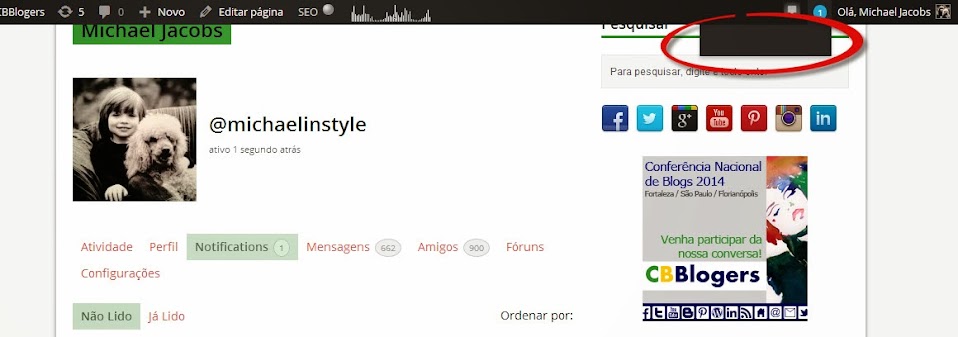
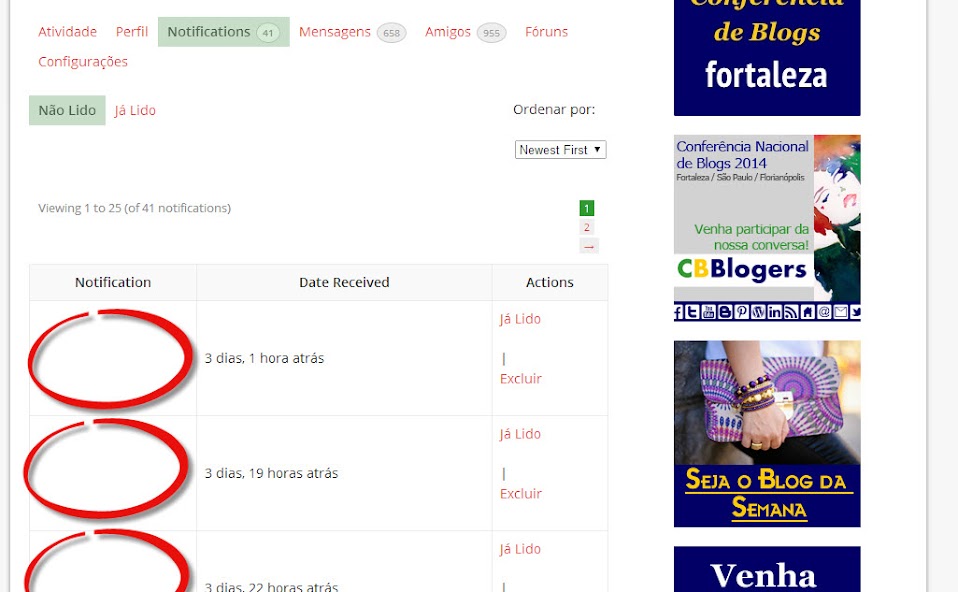
bbPress notifications of the type “bbp_new_reply” are showing up as blank in Buddypress. (I have also posted a ticket in the buddyPress forum about this issue: http://buddypress.org/support/topic/notification-still-not-being-displayed/)
As of today, my user notification page contains 43 “blank” notifications.
1 – When I mouse over the notification circle in the header of the page, the list of notifications is displayed as blank, even when I have notifications pending. Screenshot: https://lh5.googleusercontent.com/-gvkfWwp6rSg/Uu5iQpXEayI/AAAAAAAAM-0/tA7ok02oXC4/w958-h337-no/buddypress+blank+notification+list.jpg
2 – When I click on the notification circle, I am taken to the list of current notifications, but the title of the notifications in each row is blank. Screenshot: https://lh4.googleusercontent.com/-OqKLmC4t_-c/UyWU-1tw42I/AAAAAAAANfc/MgSf8atB4mw/w958-h592-no/notifications+screenshot.jpg
Here are a couple of rows from the notifications database table:
201438 2 15959 2483 forums bbp_new_reply 3/11/14 16:11 1
201443 2 1064 2101 forums bbp_new_reply 3/11/14 17:33 1
201464 2 15959 2347 forums bbp_new_reply 3/12/14 13:07 1
201468 2 15959 2494 forums bbp_new_reply 3/12/14 16:43 1
Here is my current configuration:
bbPress v2.5.3
buddyPress v1.9.1
Wordpress v3.8.1
site url: http://www.cbblogers.com
Please help….
Thanks much,
Michael
@1lizcollins
Don’t know why it happened. try Dashoboard>tools>forums.reapir forums and run one at a time to see of this fixes your links.
It could also be worth checkint that you haven’t got a plugin or theme issue, although neither would cause a plugin to disappear.
Check other plugins
Check that no other plugins are affecting this.
Turn off all other plugins, and see if that fixes the problem. If the problem is resolved, add back one at a time to see which is causing the conflict.
Check themes
If plugins are not the cause, then it may be a theme issue. Switch to a default theme, such as twentytwelve, and test.
@adenslayer
This seems to be a known issue with this plugin viz :
https://wordpress.org/support/topic/wpsc-support-tickets-bbpress-conflict?replies=1
I see you’ve also posted to the plugin site, so hopefully the plugin author will come back to you.