@hydrogriff – ok, not sure that I ma goung to be able to help much further.
I can only suggest it could be a theme or plugin issue
Themes
As a test switch to a default theme such as twentyfifteen, and see if this fixes.
Plugins
If that doesn’t work, also deactivate all plugins apart from bbpress and see if this fixes. if it does, re-enable one at a time to see which is causing the error.
Then come back
Hi
In the past, I had the same question, but I didn’t try to find a solution yet.
I’ll try to continue this thread.
It’s about the page title for the opening page or index page of the forum, shown in the browser’s title bar. For the topic starter, that title starts with:
Archiwum Fora
It’s Polish for “archive forums”.
For my site, it’s in Dutch:
Archief forums
It’s Dutch for “archive forums”.
It’s the title of the index page of the forum shown by the browser.
For forums themselves, the browser shows the title of the forum as text in the browser’s title bar. So that’s going well.
As the forum opening page or index page is live and active, it’s expected to not to see “archive” as title in the browser.
On my setup, I tried the suggestion of mclegend.
Administration -> You mean the WordPress Back-End with all the configuration settings?
For ‘Configuration’, I don’t see ‘Server Settings’, only ‘Settings’ and indeed ‘General’, which points to basic WordPress options / item “Forum Title” is not there.
There is however a ‘Settings’ with ‘Forums’, and I see forum-related options. eg. Forum root and below the title ‘Single Forum Slugs’, there is ‘forum’, which could be a title, but not labeled that way.
The setting or word ‘archive’ or Dutch translated variant is on those pages not mentioned.
I suppose the Dutch (or for topic starter, Polish version) is by using translation file(s) and localized version of the WordPress.
But it’s not about the translation, it’s about the original ‘archive’ in the title.
So, question remains:
How to get rid of the word ‘archive’ in the browser’s title bar for the opening page or index page of the forum, and/or where can we set a title manually?
Current setup: PHP 7.3.12 / WordPress 5.3.2 / bbPress 2.5.14 and seen on earlier versions of 2.5.x and on the later 2.6.x versions while testing.
Hi Robin,
this is awesome.
I just tested it and it works like a charm.
Thanks you
Matthias
untested, but try this
add_filter ('bbp_get_user_profile_link' , 'rew_get_user_name', 10 , 2) ;

function rew_get_user_name ($user_link, $user_id ) {
	// Validate user id
		$user_id = bbp_get_user_id( $user_id );
		if ( empty( $user_id ) ) {
			return false;
		}

		$user      = get_userdata( $user_id );
		$user_link = esc_html( $user->display_name ) ;

		// Filter & return
		return apply_filters( 'rew_get_user_name', $user_link, $user_id );
}
Put this in your child theme’s function file – or use
Code Snippets
Testing has been performed for that bug, but it must be something more structural. We are still looking at where it’s coming from. But had already other important bugs fixed so we did not want to wait in bringing already 2.6.4
ok, as a TEST, can you try deactivating 1 & 2 (I wrote 3 so know it is not the problem!) and see if sub forums reappear ? You can re-enable immediately afterwards
Hi Robin,
Thanks for the feedback, however the plugin you have suggested has not been updated in 5 years. I would refrain from using it as old plugins could hide security vulnerabilities and from what I can see it is also not tested to work with the latest WP updates.
Do you have any other suggestions?
Thanks
This is fantastic — I will definitely test this out.
Am I right in thinking that the two times this line appears:
if ($user_id == 57) $signature 'signature for user 57' ;
Should actually read as:
if ($user_id == 57) $signature = 'signature for user 57' ;
Hi
We’ve got an issue after upgrading bbPress to 2.6.x:
The “latest reply” column on the forum index page isn’t showing the real latest reply. Instead, we see the latest reply as it was just before the upgrade to 2.6.x.
None of the replies after the update are displayed.
This happens only at the forum index, not on the sub forum index pages; the sub forum index page shows the right latest reply.
The options to repair/recalculate didn’t correct the information in the “latest reply” column.
We’ve seen this on 2.6.1 and 2.6.3.
We did a downgrade to 2.5.14 twice, once after 2.6.1 and once after 2.6.3, we did every time the repair/recalculate, and we’ve got the column working good again with the right and expected “latest reply”.
URL: http://www.lotgenotenseksueelgeweld.nl
Note: It’s in Dutch localized.
bbPress version now: 2.5.14
We have the forum index built by using the shortcode [bbp-forum-index] .
For the sub forums, we use the corresponding shortcode with the ID of the sub forum.
WordPress version 5.3.2.
PHP version 7.3.12.
Anyone else having this situation? How did you get it solved?
Or could this be a bug in the bbPress?
ok, can anyone who still has this problem let me know if they are using bbp toolkit
If so as a test try deactivating this (you can reactivate after) to see if this fixes.
Please report back
untested but try
add_filter( 'bbp_get_reply_content', 'rew_reply_signature', 1, 2 );
add_filter( 'bbp_get_topic_content', 'rew_topic_signature', 1, 2 );

function rew_topic_signature ($content = '', $topic_id = 0) {
	$topic_id  = bbp_get_topic_id       ( $topic_id );
	$user_id   = bbp_get_topic_author_id( $topic_id );
	$separator = '<hr />' ;
	$before = '<div class="bbp-topic-signature">' ;
	$after = '</div>' ;
	if ($user_id == 3) $signature =  'signature for user 3' ;
	if ($user_id == 57) $signature 'signature for user 57' ;
	if ( !empty( $signature ) )
		$content = $content . $separator . $before . $signature . $after;
	return apply_filters( 'rew_topic_signature ', $content, $topic_id) ;
}

function rew_reply_signature ($content = '', $reply_id = 0) {
	$reply_id  = bbp_get_reply_id       ( $reply_id );
	$user_id   = bbp_get_reply_author_id( $reply_id );
	$separator = '<hr />' ;
	$before = '<div class="bbp-reply-signature">' ;
	$after = '</div>' ;
	if ($user_id == 3) $signature =  'signature for user 3' ;
	if ($user_id == 57) $signature 'signature for user 57' ;
	if ( !empty( $signature ) )
		$content = $content . $separator . $before . $signature . $after;
	return apply_filters( 'rew_reply_signature ', $content, $reply_id) ;
}
Put this in your child theme’s function file – or use
Code Snippets
This might do it
bbPress No CAPTCHA reCAPTCHA
not tested, so let me know
Hi!
When the forum sends out an email to members the email body contains HTML code. Instead of adding a space between the two lines it ads . The reply looks normal on the forum page and on the backend.
For example:
This is a test message.
This is a test message.
Topic Link:…….
———–
You are receiving this email because you subscribed to a forum.
Login and visit the topic to unsubscribe from these emails.
Thank you for your help!
Hi folks. I am trying to add the shortcode for a single forum [bbp-single-forum id=$id ]
However I cannot find the ‘forum id’ anywhere.
The bbpress install is new and I have only created one test forum. Nowhere is the ‘test forum id’ listed. I can only see a field for ‘order’ which is by default ‘0’. So I tried the forum id as 0 but nothing appears on the page, I have also tried the id as 1 as it is the only forum created.
Please note that the shortcode for showing ‘all forums’ work as expected on the page.
Any thoughts?
Thank you.
Working with WordPress Live support, we have been unable to solve the problem of subscribers to my forum receiving notifications when a new topic is posted (We haven’t yet moved on to testing for those who subscribe to a topic getting notification of any new posts under that topic).
WordPress Live received guidance from you that we should try a different theme (Twenty Twelve) and also try disabling all plugins except for bbPress and trying that. That did not work either.
So, we’re coming back to you for further guidance. Can you provide? Will I receive notification by email when there is a response to this request or do I need to keep checking the forum. My email is eric.brown@cbia.com.
Also, I’m working on WordPress version 5.3.2 and bbPress version 2.6.3
Thank you very much!
Eric Brown
I have run all the tools and checked the cache.
At one point it appeared that the forum was reporting freshness based on the latest topic, not the latest reply.
But it is so all over the place, I am not sure that is the case anymore.
Here is a screen shot that shows a typical error.
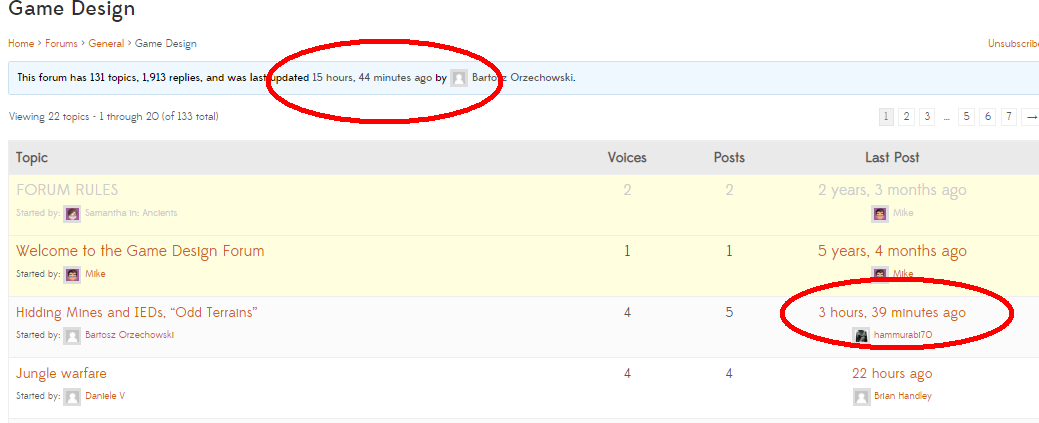
Here is a link to the above forum:
https://www.thewargameswebsite.com/forums/forum/general-discussion-3/game-design/
The thing that baffles me, is that the freshness URL is correct.
So why is the bbpress forum itself not reflecting this?
https://www.thewargameswebsite.com/forums/view/topics-freshness/
Here is the site, please do have a look around in the various forums and you will see the freshness is a mess.
If anyone can help I will be very appreciative.
https://www.thewargameswebsite.com/
WordPress 5.3.2
BBpress 2.6.3
Back again. I swep whole testing site, delete database and reinstall everything including wordpress and forum loos OK now.
But on my production site which is running on Divi the problem still exist. So it will be really something on Divi´s end…
Hm, can anyone help, please? It´s going to be urgent now.
Here is the testing forum:
darkplace.cz/forums/
please check post/reply page on mobile.
Thanks.
N.
suggest if you haven’t updated or changed software that you contact your host provider
otherwise
it could be a theme or plugin issue
Themes
As a test switch to a default theme such as twentyfifteen, and see if this fixes.
Plugins
If that doesn’t work, also deactivate all plugins apart from bbpress and see if this fixes. if it does, re-enable one at a time to see which is causing the error.
Then come back
I have a fresh bbPress install and want to import everything possible from my phpBB version 3.2.4 installation. The import runs and step 8 is importing lots of anonymous topic authors.
However, why aren’t my users importing? Based on other posts I ensure no topics/threads are attributed to founders/moderators/admins. (I created a single founder account and downgraded everyone else).
I see some references to a 3rd party import script, and other references saying its not needed. Can someone help? It’s Jan 15 2020 and I have the latest bbPress. Note sure hot to proceed.
Excerpt from log:
6.No forum subscriptions to import
5.All forum parents imported100%
5.Calculating forum hierarchy (0 through 11 of 11)0%
4.All forums imported100%
4.Converting forums (0 through 16 of 16)0%
3.No passwords to clear
2.No users to import
1.Skipping sync-table clean-up
Hi,
I can confirm, that version 2.0 of OneSignal is the reason for the “link expired” problem…
Install “WP Rollback” plugin and roll back to latest 1.7 release…
Toengel@Alex
those words are not from bbpress.
it could be a theme or plugin issue
Themes
As a test switch to a default theme such as twentyfifteen, and see if this fixes.
Plugins
If that doesn’t work, also deactivate all plugins apart from bbpress and see if this fixes. if it does, re-enable one at a time to see which is causing the error.
Then come back
it could be a theme or plugin issue
Themes
As a test switch to a default theme such as twentyfifteen, and see if this fixes.
Plugins
If that doesn’t work, also deactivate all plugins apart from bbpress and see if this fixes. if it does, re-enable one at a time to see which is causing the error.
Then come back
sorry, this is way beyond any help that could be offered on a forum – this is the equivalent of saying ‘my car is making a funny noise’ – don’t take that the wrong way, just trying to explain 🙂 🙂
your screenshot shows one element of 200odd taking 6 seconds – would tend to suggest an issue with a particular reply in your database, maybe corrupt, maybe long, maybe calls to a slow external site.
You’d need to run that test against lots of variants of forum display to try and isolate the cause.


