Skip to:
Content
Pages
Categories
Search
Top
Bottom

Search Results for 'test'

Viewing 25 results - 4,876 through 4,900 (of 11,598 total)
  • Author
    Search Results
  • Stephen Edgar
    Keymaster

    I tried your code you provided, unfortunately the conversion results were the same as I described originally. Same results running the tools after the import/conversion as well.

    There is a chance I got the code wrong, I based it on the snippets you posted above.

    I think it will be a matter of just working out the correct fields to grab the correct data from in and around the topics table with topic_id, parent_id and forum_id and similarly for the replies table so that the correct value is being added to post_parent.

    If you want to dump all the code so I can take a closer look dump it into a gist here on GitHub.

    https://gist.github.com/

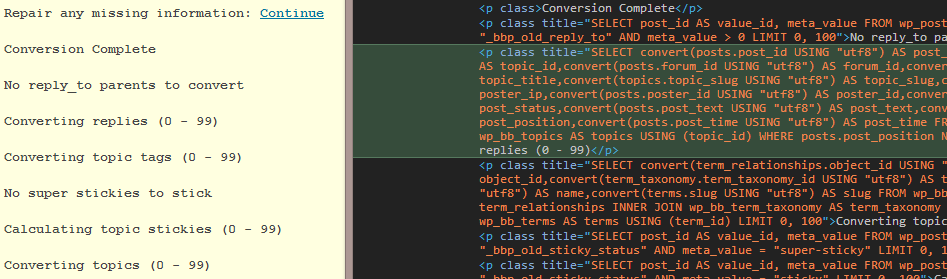
    I am going to run some test queries on the databases just to try to figure out where things are breaking down, probably tomorrow. 🙂 Do you know of a way to echo the SELECT queries to the old Database tables forums, replies, and topics during import?

    Us e Google Chrome/Firefox’s Inspector, simply right click in the yellow window and select ‘Inspect Element’, we have all the MySQL queries that are used during import echo’d out in the page source, just not rendered on the page.

    adressler
    Participant

    Thank you @netweb. I tried your code you provided, unfortunately the conversion results were the same as I described originally. Same results running the tools after the import/conversion as well.

    I am going to run some test queries on the databases just to try to figure out where things are breaking down, probably tomorrow. 🙂 Do you know of a way to echo the SELECT queries to the old Database tables forums, replies, and topics during import?

    Thanks again.

    #144155
    Stephen Edgar
    Keymaster

    Most likely a plugin conflict, deactivate both the plugins you mention and then try creating a new forum. Does it work now? If so reactivate ‘flip book’, does it still work? Reactivate Yoast, how about now?

    (You may need to deactivate all your plugins to test this fully)

    #144154
    jslom
    Participant

    Check other plugins. I had some redirect issues with the latest Nextgen Gallery plugin. They are working on a fix, if that is the cause for you also..

    #144140
    Robin W
    Moderator

    Check other plugins

    Check that no other plugins are affecting this.

    Turn off all other plugins apart from bbpress, and see if that fixes the problem. If the problem is resolved, add back one at a time to see which is causing the conflict.

    Check themes

    If plugins are not the cause, then it may be a theme issue. Switch to a default theme, such as twentytwelve, and test.

    #144130
    Xn2
    Participant

    hi,
    im using bbpress on my website, but we have an issue with editing function.

    In facts we are able to edit topics, but when we want to edit replies we obtained :

    /* <div class=”extra-wrap”>
    <h2 class=”entry-title”>
    <div class=”entry-content”> Home › Forums › W3Community › TOUT SUR W3COMMUNITY › test › Répondre à: test 26 mars 2014 at 18 h 42 min #2892 Édit | Move | Diviser | trash | Spam | reply Xn2-testParticipant () Messages 2 blablabla </div>
    <div class=”postmeta”>
    </div> */

    No editing windows only text and 2 links (read more and edit)

    We dont understand why its doing that :/

    #144115
    HywelPhillips
    Participant

    Hi All,

    I have the weirdest error. I have a WordPress 3.8.1 installation with Akismet 2.6.0, bbPress 2.5.3 and a couple of other plugins.

    It has been running fine for a year or so. We recently moved server, and did a “point” version update to latest versions.

    Today I found a problem I’ve not seen before: if one posts a forum post whose titles start with the letters “Se”, you get a 404 error when viewing the post. The post itself shows up in the forum listing and is editable with correct text but won’t show up when you click on the link in the forum listing.

    Post title variants like “Secretary”, “Secretary Test” “Sec” all generate the error. A post with title “Sacretary” does not, nor do any other posts test titles I’ve tried.

    Has anyone got the faintest idea what could be going on here?

    Cheers, Hywel Phillips

    #144109
    kvr28
    Participant

    did some more testing on my staging site, deleted everything except for bbpress, deleted bbpress, reinstalled it, switched to twenty twelve theme and repaired and optimized all the database tables, ran the forum tools and still having this issue. I even stripped all the forum categories and re ran the tools to see if that stopped it, nope. So next I tried removing the forums slug, re ran the tools and tried it, nada, any suggestions from here?

    [Wed Mar 26 13:41:38 2014] [error] [client ##.###.###.##] LONG QUERY: SELECT COUNT(ID) FROM rufus_posts WHERE post_parent IN ( 31248,31247,31229,31128,30999,30794,30793,30781,30780,30779,30777,30693,30681,30680,30679,30676,30668,10648,10645,10641,10635,10630,10624,10616,10606,10602,10596,10594,10593,10591,10590,10586,10583,10559,10557,10527,10526,10525,10524,10523,10515,10507,10506,10505,10499,10491,10489,10486,10478,10477,10467,10466,10454,10430,10429,10422,10415,10402,10381,10380,10374,10366,10365,10354,10345,10333,10322,10320,10313,10302,10293,10278,10277,10251,10234,10229,10205,10201,10200,10194,10184,10182,10169,10159,10156,10148,10147,10139,10129,10118,10113,10091,10084,10077,10076,10070,10067,10066,10061,10058,10051,10050,10047,10038,10025,10023,10015,10014,10010,10009,10008,10002,9997,9996,9995,9982,9980,9979,9977,9971,9962,9941,9938,9935,9932,9931,9930,9915,9914,9913,9909,9908,9899,9890,9889,9888,9885,9884,9869,9864,9859,9856,9852,9847,9843,9842,9834,9830,9829,9818,9815,9797,9771,9768,9752,9736,9726,9725,9724,9709,9708,9707,9706,9705,9700,9696,9690,9673,9663,9662,9658,9655,9639,9619,9614,9611,9605,9584,9577,9566,9558,9557,9554,9548,9546,9540,9533,9532,9527,9525,9517,9515,9506,9499,9488,9478,9471,9467,9466,9454,9440,9436,9434,9431,9426,9425,9424,9421,9416,9398,9394,9393,9388,9386,9385,9365,9364,9356,9352,9343,9337,9330,9317,9313,9310,9309,9305,9303,9296,9294,9293,9291,9276,9275,9262,9261,9260,9240,9239,9237,9233,9214,9213,9203,9192,9188,9178,9177,9169,9168,9162,9160,9158,9152,9145,9142,9137,9136,9134,9131,9130,9125,9115,9111,9108,9105,9100,9089,9086,9084,9083,9079,9075,9065,9059,9058,9048,9043,9018,9013,9012,9003,8998,8992,8985,8969,8959,8946,8945,8940,8938,8931,8930,8929,8928,8927,8925,8914,8911,8903,8902,8899,8896,8893,8889,8887,8880,8870,8868,8865,8862,8854,8848,8840,8829,8805,8804,8799,8797,8795,8794,8792,8780,8777,8774,8770,8768,8765,8759,8756,8754,8752,8747,8742,8732,8715,8709,8705,8701,8694,8691,8684,8683,8679,8674,8673,8662,8656,8654,8636,8613,8609,8598,8597,8581,8569,8566,8560,8559,8553,8535,8512,8510,8507,8503,8502,8497,8466,8458,8439,8431,8428,8418,8417,8412,8410,8403,8375,8369,8368,8366,8359,8331,8330,8327,8305,8291,8290,8269,8267,8266,8261,8258,8249,8246,8244,8236,8233,8222,8217,8215,8207,8204,8195,8173,8171,8168,8162,8147,8146,8144,8140,8138,8136,8135,8133,8132,8131,8125,8117,8115,8111,8103,8101,8099,8088,8078,8077,8074,8072,8070,8069,8067,8060,8059,8058,8047,8045,8044,8029,8019,8011,8010,8009,8001,7982,7972,7957,7954,7942,7935,7931,7930,7929,7922,7912,7911,7902,7888,7885,7864,7853,7852,7846,7840,7839,7829,7827,7810,7808,7797,7782,7738,7727,7717,7716,7714,7687,7619,7564,7553,7550,7544,7534,7527,7525,7514,7503,7477,7448,7445,7442,7441,7440,7433,7431,7425,7402,7363,7362,7360,7353,7346,7317,7314,7300,7284,7278,7269,7262,7249,7247,7238,7207,7203,7188,7186,7183,7177,7167,7166,7152,7148,7147,7141,7130,7124,7109,7097,7094,7086,7085,7068,7065,7055,7046,7041,7040,7029,7022,7021,6999,6991,6989,6977,6973,6957,6937,6930,6920,6919,6914,6912,6903,6890,6889,6881,6876,6863,6846,6831,6806,6801,6794,6792,6784,6758,6740,6733,6716,6714,6697,6696,6676,6649,6645,6640,6639,6606,6584,6567,6542,6537,6534,6530,6523,6522,6518,6517,6515,6493,6466,6462,6457,6440,6433,6426,6423,6418,6405,6369,6360,6341,6337,6336,6335,6334,6333,6332,6316,6315,6314,6305,6301,6250,6249,6243,6242,6234,6229,6215,6212,6190,6188,6182,6175,6174,6130,6128,6127,6117,6116,6115,6108,6100,6098,6093,6091,6072,6066,6059,6055,6053,6049,6048,6042,6038,6034,6022,6020,5976,5975,5974,5973,5921,5916,5915,5914,5912,5899,5885,5883,5874,5872,5871,5869,5868,5867,5866 ) AND post_status = ‘publish’ AND post_type = ‘reply’;, referer: ……../topic/going-to-try-and-post-pics/

    #144104
    Robin W
    Moderator

    Can only suggest you start with eliminating plugin and theme conflicts viz :

    Check other plugins

    Check that no other plugins are affecting this.

    Turn off all other plugins apart from bbpress, and see if that fixes the problem. If the problem is resolved, add back one at a time to see which is causing the conflict.

    Check themes

    Whilst you on a “clean” child theme, the main theme may have issues.

    If plugins are not the cause, then it may be a theme issue. Switch to a default theme, such as twentytwelve, and test.

    #144096
    poorleno
    Participant

    Using the bbpress the search seems to show a result count however the list is always empty e.g.

    the url is http://www.mysite.co.uk/forums/search/?bbp_search=test

    this is with a clean child theme. Anyone any ideas?

    #144067

    In reply to: Forum Question

    Robin W
    Moderator

    There is one, but I need to document it, as it’s a bit of a cobble together of two plugins.

    I’ll do that shortly, and give it a final test to prove it works !

    #144063
    kvr28
    Participant

    I did some more testing, disabled all plugins except bbpress, still getting the error, but when I made a thread in the announcement and suggestions sub under support, I got no error, when I made one under the compost bin, I did

    Forums

    any ideas?

    #144022

    In reply to: Delete Topic Function

    Robin W
    Moderator

    ok, interesting, whilst altering that file on a permanent basis is not a good idea, it should have worked.

    I’m not familiar with the role editor, does it let you change the default participant role, or did you create a new one with the delete topic capability?

    I’d eliminate plugin and theme issues by

    Check other plugins

    Check that no other plugins are affecting this.

    Turn off all other plugins apart from bbpress, and see if that fixes the problem. If the problem is resolved, add back one at a time to see which is causing the conflict.

    Check themes

    If plugins are not the cause, then it may be a theme issue. Switch to a default theme, such as twentytwelve, and test.

    Let us know how you get on

    Doremdou
    Participant

    I don’t have any mobile right now to test it out but when I do I will report any issues.
    🙂

    Stephen Edgar
    Keymaster

    @doremdou Thanks for testing it 🙂

    Specifically as I mentioned above some CSS tweaks will be needed to match/fix/update the responsive CSS that has just been added to this. So if you could test out how this works on mobiles/tablets/desktop etc and submit pull requests and/or open issues on the GitHub issue page these things will be much easier to keep track of.

    Doremdou
    Participant

    Awesome @netweb thank you I will test it right now 🙂

    Stephen Edgar
    Keymaster

    This primarily fixes forum subscriptions to be compatible with bbPress v2.5.3 and v2.6alpha

    * Removes ie.css that was a theme CSS file and not a bbPress CSS file
    * Updated CSS including RTL and minified versions
    * Adds user profile forums subscription management
    * Updated bbpress-functions.php to be compatable with bbPress v2.5.3 and v2.6alpha

    I have tested this with bbPress v2.5.3 and v2.6alpha and the Twenty Thirteen and Twenty Fourteen themes.

    Note: In the CSS I have added the responsive CSS changes via bbPress #1933 but I have kept the ‘epicwebs’ CSS after these changes so they will override any of the media queries that were introduced. This will need to be tested and tweaked so that eventually the CSS’ media queries are the last section of CSS.

    You can see the ‘Pull Request’ I have submitted for @Lynq here:
    https://github.com/EpicWebs/bbPress-starter-theme-epicwebs/pull/5

    Once he has had a chance to review it and merge it things will be good to go.

    If you know your way around GitHub you can download that pull request and test it out.
    (In other words I’m not going to be giving GitHub tutorials today 😉 )

    #144009
    RuFiK
    Participant

    Hello

    I am testing bbPress and WP Symposium.

    http://www.virtualolivia.com/forum/

    http://www.virtualolivia.com/forums/

    My question is how can i set up same template from bbpress in my main site on forum same like.

    http://pl.forums.wordpress.org/

    I mean on left side some information below tag cloud etc …

    I am waiting for quick replay,

    #144010
    RuFiK
    Participant

    Hello

    I am testing bbPress and WP Symposium.

    http://www.virtualolivia.com/forum/

    http://www.virtualolivia.com/forums/

    My question is how can i set up same template from bbpress in my main site on forum same like.

    http://pl.forums.wordpress.org/

    I mean on left side some information below tag cloud etc …

    I am waiting for quick replay,

    Mycelus
    Participant

    Nope, it remained the same, and btw, I’d be more than happy to beta test. I finished the HTML and CSS courses on Codecademy and am moving onto PHP. I won’t be able to help code really, but I can definitely test and report bugs.

    Stephen Edgar
    Keymaster

    @mycelus Can you test the following for me to see if it fixes the isssue

    In your themes folder `/wp-content/themes/yourtheme/bbpress/loop-single-forum.php’

    The current code is:

    
    <li class="bbp-forum-topic-count">
    	<div class="topic-reply-counts">Topics: <?php bbp_forum_topic_count(); ?></div>
    	<div class="topic-reply-counts">Posts: <?php bbp_show_lead_topic() ? bbp_forum_reply_count() : bbp_forum_post_count(); ?></div>
    </li>
    

    Can you change it to:

    
    <li class="bbp-forum-topic-count"><?php bbp_forum_topic_count(); ?></li>
    
    <li class="bbp-forum-reply-count"><?php bbp_show_lead_topic() ? bbp_forum_reply_count() : bbp_forum_post_count(); ?></li>
    

    Does that look better now?

    (I don’t have the time to fully test these ‘style’ updates, I am mainly adding the functionality for forum subscriptions)

    #143969
    Robin W
    Moderator

    maybe a plugin or theme conflict

    Check other plugins

    Check that no other plugins are affecting this.

    Turn off all other plugins, and see if that fixes the problem. If the problem is resolved, add back one at a time to see which is causing the conflict.

    Check themes

    If plugins are not the cause, then it may be a theme issue. Switch to a default theme, such as twentytwelve, and test.

    #143964
    Stephen Edgar
    Keymaster

    Nothing in particular except to say that if Phorum has weird/custom BBCode that they won’t be converted standard BBCodes like [b], [url], [img] etc will be converted.

    Also I don’t think the passwords will be converted so it is just a matter of the user requesting a password reset to get up and running after the conversion.

    I’d also suggest you do this on a test server (local or remote) to get used to the process before you try this on your live server, that way any bugs issues etc will be sorted out first.

    Are you talking thousands, tens of thousands, hundreds of thousands, millions of posts?

    #143959
    Robin W
    Moderator

    quite possibly a plugin or theme conflict

    try

    Check other plugins

    Check that no other plugins are affecting this.

    Turn off all other plugins, and see if that fixes the problem. If the problem is resolved, add back one at a time to see which is causing the conflict.

    Check themes

    If plugins are not the cause, then it may be a theme issue. Switch to a default theme, such as twentytwelve, and test.

    #143929

    In reply to: bbPress 2.5.3

    Stephen Edgar
    Keymaster

    @magic-komplex You can find the latest German translations for bbPress here (Both ‘de’ and ‘de formal’)

Viewing 25 results - 4,876 through 4,900 (of 11,598 total)
Skip to toolbar