Skip to:
Content
Pages
Categories
Search
Top
Bottom

Search Results for 'phpbb'

Viewing 25 results - 526 through 550 (of 2,317 total)
  • Author
    Search Results
  • #150062
    Stephen Edgar
    Keymaster

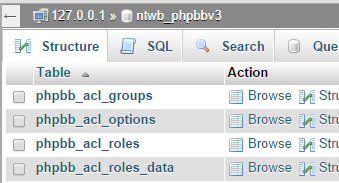
    Can you open up phpMyAdmin and post a screenshot similar to that of mine above showing the table names within your phpBB database please.

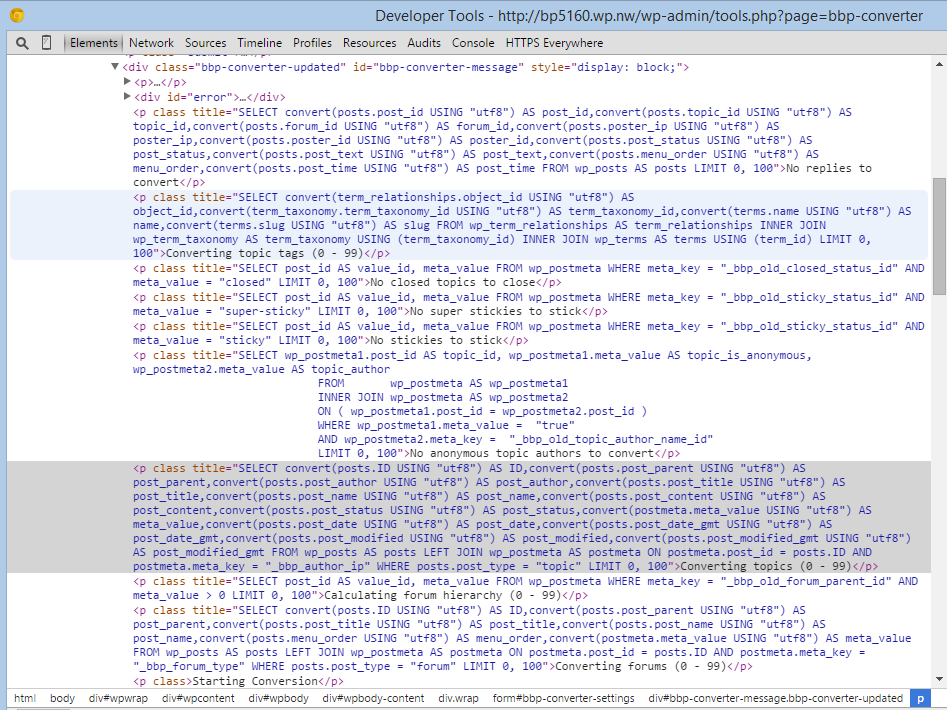
    As for a debug log, there kind of is one, if you right click e.g. “No topics to convert” and select inspect element you should see some SQL queries similar to the below screenshot (These are not phpBB in the screenshot, just what I have been working on)

    #150050
    muskratt
    Participant

    I ran it again using the phpbb_ prefix as directed however still nothing is imported.

    So is there some type of a debug log that is generated that I can look at?

    #149908
    Stephen Edgar
    Keymaster

    I see you do not have a database table prefix in your settings?

    Check your phpBB database tables, most likely they have a prefix of phpbb_

    Here is a snip from my phpBB database, as you can see the database is named ntwb_phpbbv3 and all my tables have a prefix of phpbb_, check what your database prefix is and try adding that to your settings.

    #149905
    Stephen Edgar
    Keymaster

    If you give it a shot let me know how it goes, might be able to help point things in the right direction and/or add some extra bits to the phpBB importer to at least help things along.

    #149904

    In reply to: My impressions so far

    Stephen Edgar
    Keymaster

    That ‘warning system’ will remain plugin territory for a while even though I have a specific use case that this is important for it, it will still remain that way for a while, just because the functionality CAN be performed does not explicitly mean that it should be included with bbPress core.

    As I mentioned above ‘Featured Plugins’ will most likely evolve to become a more refined list and the power and flexibility of bbPress allows us to do this without forcing/giving every user the ‘kitchen sink’ just because we can.

    “bbPress is forum software, made the WordPress way.” and just like WordPress’ philosophy we are making “Decisions, Not Options”. And for example this decision extends to user profile custom fields, if you want these for post authors in WordPress, you look to a custom function or plugin, bbPress is the same, a custom function or a plugin.

    bbPress utilizes WordPress Template Hierarchy to allow sites, theme authors and plugin developers to make amazing forum sites powered by bbPress and simply creating a set of pages that work with all the themes out there is not a one size fits all, some themes use tables, some divs, some unordered lists, responsive, non responsive, the combinations are endless and as said we try our best to ensure template compatability but removing the flexability just to limit designers and developers to no longer have these options available to them is something I doubt we will change for quite a while. We would like to include an additional set of default templates in bbPress, but that’s another project we just have not got to yet, bbPress already fully supports numerous templates though currently it only ships with one set.

    I come from a phpBB background and have spend many weeks in ‘other’ forums databases whilst supporting the ~25 importers included with bbPress, the current way the WordPress database schema is structured is partially a limitation on what options we have available to us and still keep bbPress light and compact without adding new tables to the database.

    #149849
    muskratt
    Participant

    I had phpBB selected and have tried it several times using the local copy of the database. Is there a debug option to see what is going on when the import is attempted?

    Server details:
    Ubuntu 14.04 LTS running Nginx with Apache on the back end. Database of course is MySQL.

    #149837
    Stephen Edgar
    Keymaster

    We are not supporting importing form a remote database at this stage, theoritically it shouldn’t be that difficult with the correct access in place, but not at this stage.

    It should work fine if you have a copy of your database locally though, most likely this is you didn’t select phpBB from the dropdown menu on the import screen.

    Robin: I had a horrid week last week and am still catching up, read through 1/2 of bbPress.org this arvo and I will write a heap of replies tomorrow 😉

    #149760
    muskratt
    Participant

    I’m running WP 3.9.1 and the latest copy of the plugin on a very vanilla site with not much on it yet.

    phpBB 3.0.12, Tap-a-talk is the only mod it’s running
    Database size: 20MB, about 6000 posts total

    I’ve tried this twice using the remote server (after adding the WP server’s IP to the allowed remote MySQL connections) as well as on the same local server doing a sqldump from the remote into the local box. Both times, I get the scrolling of text showing nothing to import/convert and it finishes without error (aside from the fact nothing is imported).

    This forum was originally vBulletin 3.x and it was converted to phpBB about a year ago but I don’t believe this should have much to do with it since there is no other modification/customization running except Tap-a-talk.

    Where to go from here?

    #149716
    pfswss
    Participant

    Hi Robin, so you don’t like feedback here? I seemed to have hit a sensitive nerve with you! I did try to make some positives as well as what I thought were honest concerns. I looked on the support forum and there were also other older threads with no replies, not just mine, If you can’t take feedback about what you do then I’m sorry to say you will never learn or grow. As for it been free, well I’m not going to go into a debate about that. But I believe there would be ways to make money out of this like here: http://www.packtpub.com/bbpress-complete-comprehensive-guide/book

    Rob, thanks for the reply. I have now put instructions into my post as suggested.

    I had found the theme by lying but from what I seen all it basically did was separate the man forum page to have borders in between the categories and that was it or is there more?

    Both that and the Suportte theme just seem to be a very simple white theme that I can’t see how they look like Vbulletin, Invision or PhpBB. This is the demo I found which is just a screenshot: https://camo.githubusercontent.com/0370bd78798f25ca777774b376651cc71ef4fff9/687474703a2f2f692e696d6775722e636f6d2f386c45694144442e6a7067

    Am I missing something?

    Your own layout looks promising, I hope it goes well.

    As for examples

    Just any thing that looks like a forum:

    here is one theme I do like, just a screenshotL http://invisionmodding.com/index.php?app=downloads&module=display&section=screenshot&record=1678&id=1408&full=1

    even IP board support forum is very basic: http://community.invisionpower.com/

    here are just some random links to IP board forums I found, nothing special but just demonstrating a forum look with a structure of a forum with a skin.

    osatuk.com/community/forums/
    mlbboards.com/
    community.simtropolis.com/

    #149673
    Robkk
    Moderator

    1./ Lack of Support – check out this topic, not one reply as I waited for several days. In the end I had to do it myself on hope and lucky for me I puled it off. I hope this improves.

    i saw this and had no idea what you were talking about, and i didnt have a correct answer, and since you solved it you could share so that people in the future that came across the same problem can find your topic and help themeselves in the future.

    2./ Lack of dedicated Styles and themes.

    phpbb inpsired forum theme by lynq

    https://github.com/EpicWebs/bbPress-starter-theme-epicwebs

    envatos support forum theme-is actually a wordpress theme in whole on github, idk if copying templates will work because this relies on 5 other plugins also

    https://github.com/syamilmj/Supportte

    I might make a better mobile responsive forum theme in the future and post it on github

    here is how my theme kind of looks like , the bbpress theme i will post on github will be loosely based on this

    My Forum Layout (in progress)

    It was impossible to find anything like a normal forum from Invision, Vbulletin or PhpBB.

    what would you like specifically like other forums??

    #149668
    pfswss
    Participant

    I was excited to find a wordpress forum that had good reviews and seemed the best solution after comparing a few.

    I’m happy I was able to import my old PhpBB forum without much problems due to what I believe is an improved importer.

    but I’m disappointed with 2 things:

    1./ Lack of Support – check out this topic, not one reply as I waited for several days. In the end I had to do it myself on hope and lucky for me I puled it off. I hope this improves.

    2./ Lack of dedicated Styles and themes. It was impossible to find anything like a normal forum from Invision, Vbulletin or PhpBB. There is nothing available that can make your forum look like those types of forums. There is one very basic template thing that does not do much but that is it from my many hours of research. Even the Themes section has nothing at all basically. I was expecting to find many dedicated BBPress themes. The good thing is most new themes will work with BBPress but they all look the same, simple with no organization etc.

    Despite all this I am excited to have moved my PhpBB forum to wordpress and I can now make use of plugins etc.

    I hope in the future BBPress improves these 2 issues.

    #149611
    pfswss
    Participant

    Hi, I have a forum to convert to BBPress. it does not have any mods that are important. Is is quite old and had a lot of topics, about 8,000 members mostly inactive.

    The reason I want to convert is I think it will be better to have it on wordpress and have more flexibility, plugins etc.

    I do already have a blog installed on the /blog directory and the phpbb forum is on the root directory. But the blog had all the users imported from the WP united plugin and I think this could cause issues so I plan to revert back to a default install.

    This is how I plan to do it:

    Backup everyone and research and follow procedures to import

    Backup wordpress posts and pages, there is not many

    Uninstall and Delete the blog and install again a fresh default blog in the /blog directory

    Install BBPress in a /forum directory

    Run the importer and import the forum.

    Now this is where I’m a little lost…

    I eventually want the forum to be back on the root directory, how will I do this?

    Is there anything else I should know before hand?

    #149574
    Robin W
    Moderator

    bbpress has a number of converters, including phpbb

    https://codex.bbpress.org/import-forums/phpbb/

    suggest you create a test site and give it a go. That will tell you if you need to get back to a vanilla version first.

    https://codex.bbpress.org/creating-a-test-site/

    to convert, just go into dashboard>tools>forums>import forums

    Stephen Edgar is the bbpress converter guru, and if you hit difficulties I’d suggest you post a new thread, and I’m sure he’ll help.

    NickUdd
    Participant

    Hi,

    I have just decided to go for bbpress. I have some questions I hope someone can reply on.

    Today I am on phpbb3 version 3.10 and some kind of unofficial version, phpbb3-seo, not supported by phpbb3 themselves. I made it a vanilla once and it can be done again.

    Since 5 years I am on a custom phpbb portal solution. I am after the CMS functionality. I have almost completed a bridge between phpbb and Drupal, but got cold feets on Drupal. I want to goo with WP!

    I wonder if there is a best practice for importing the db to bbpress? My DB has 90,000 posts and is over 350 MB in size. Will I have to go trough a vanilla? Can I bring with me the anonymous posts from deleted and anonymous users?

    Looking forward to your reply!

    Ps. If anyone want to give me an offer doing this for me I am open ears. I need one version now, and anonther version once the site is developed. We can exchange the DB trough Dropbox.

    Cheers

    #149392
    Robkk
    Moderator

    3. My main beef with bbPress is the way categories and forums are shown. Forums are placed under categories like sub-forums which looks un-forum like to me.

    bbpress has worked on this , https://bbpress.trac.wordpress.org/ticket/1958

    since you commented on my layout topic too, ill tell you which one i used , which is

    https://bbpress.trac.wordpress.org/timeline?from=2014-03-04T09%3A51%3A07Z&precision=second

    i copied all of his files from pastebin and used it as my own. then i style with css

    But another way to the have the layout lets say like phpbb , is download Lynqs starter theme.

    https://github.com/EpicWebs/bbPress-starter-theme-epicwebs

    3. can you give an example of how you would like it to look? doesn’t need to be a bbpress site

    heres an example of what he is talkingn about robin

    http://thefastdiet.co.uk/forums/

    http://teamoverpowered.com/forums/

    #149038

    In reply to: phpBB Import Error(s)

    Stephen Edgar
    Keymaster

    I added support for the anonymous/deleted phpBB user topics and replies, just finalizing all of this for the any other forums that also have this feature, SMF, Drupal, Vanilla.

    For the redirects I need to find a workaround to have WordPress correctly verify that viewtopic.php?f=3&t=9 is a valid URL, if we can do that then redirects could be included for imported forums and that would be awesome.

    #148928

    In reply to: phpBB Import Error(s)

    Stephen Edgar
    Keymaster

    Oh…. And you should also be able to map the Anonymous/Deleted phpBB users topics and replies also via those same mappings, I’ve just finished adding support for this with phpBB and bbPress around an hour ago.

    I’ll come back tomorrow and show you the SQL query for that, for now it’s late here and I’m done for the night, anything else I will look at tomorrow 🙂

    #148927

    In reply to: phpBB Import Error(s)

    Stephen Edgar
    Keymaster

    You wrote in your previous post:

    Sure thing, I’ll see what I can dig out. I’m going to be running the import a few more times over the coming weeks anyway because I need to make sure that I have the process down to a t before we decide to go live.

    Does this mean you have now gone live and a ‘few more imports’ has already happened and ‘coming weeks’ is time flies when having fun?

    You should find in your wp_postmeta table primarily two reference meta keys, _bbp_old_forum_id and _bbp_old_topic_id

    In the case below the new forum ID in wp_posts is 8789 for the old phpBB forum ID 53 and the new topic id in in wp_posts is 8803 for the old phpBB topic id 25743

    
    meta_id	post_id	meta_key	        meta_value	
    57514	8789	_bbp_old_forum_id	53
    57626	8803	_bbp_old_topic_id	25743
    

    With the above data in hand you should be able to map all your old phpBB forums and topic ID’s to the new bbPress forum and topic ID’s.

    #148898
    Stephen Edgar
    Keymaster

    The current phpBB importer only imports ‘extra’ user fields from the phpbb_users table.

    The following custom profile fields are what is currently imported, we store these in wp_usermeta

    
    		// Store ICQ (Stored in usermeta)
    			'from_fieldname' => 'user_icq',
    		// Store MSN (Stored in usermeta)
    			'from_fieldname' => 'user_msnm',
    		// Store Jabber
    			'from_fieldname' => 'user_jabber',
    		// Store Occupation (Stored in usermeta)
    			'from_fieldname' => 'user_occ',
    		// Store Interests (Stored in usermeta)
    			'from_fieldname' => 'user_interests',
    		// Store Signature (Stored in usermeta)
    			'from_fieldname' => 'user_sig',
    		// Store Location (Stored in usermeta)
    			'from_fieldname' => 'user_from',
    		// Store Avatar Filename (Stored in usermeta)
    			'from_fieldname' => 'user_avatar',
    

    The current implementation needs to explicitly named fields to import them, so having the import support custom named fields is not available to be used at this time, one day hopefully.

    With that said, with a list of fields names and the tables the fields are stored in these can easily be added to a customized phpBB importer.

    As to where to send these fields, if you are using BuddyPress, XProfile would be the ideal place to have these. Our importer doesn’t handle this though, again, maybe one day we can add something in BuddyPress to import ‘extra’ profile fields from bbPress. Probably the key thing here is we can get all your phpBB profile fields imported into wp_usermeta and then with a bit of MySQL these could be copied over to the BuddyPress XProfile table and everything would be awesome. 🙂

    EDIT: As all I’ve been doing the past ~5 days is working on the importers we do actually store the old phpBB user_id so mapping the old users after an import back to the old phpBB database should also not be an issue once bbPress 2.6 is released 🙂

    #148880
    mglasser
    Participant

    Does the importer handle the custom profile fields in phpbb3, sepcifically the functionality in version 3.10+? Phpbb3 now allows admins to create new custom profile fields, beyond the ones listed as imported kept in phpbb3_users. There are at least 4 related tables, starting with <phpbb3_profile_fields…>.

    Is it correct to think these custom profile fields should go into BuddyPress xprofile fields, or should they go into wp_meta (?) during bbpress import? If you happen to know, is there a way to import phpbb3 custom profile fields into BuddyPress if that is the appropriate target?

    Thanks, Mike

    #148772

    In reply to: Content Not Showing

    Stephen Edgar
    Keymaster

    I understand your frustrations throughout your posts above, but this is not bbPress, WordPress nor even Windows Azure fault, this all stems from somewhere along the line you were given bad advice that stated you have to use MSSQL and that is simply not true and is not supported by any of these parties.

    So based on your previous post to mine above, I suggest you delete WordPress from your Windows Azure site, create a Windows Azure MySQL database and install phpBB or whatever, I wish you luck.

    #148770

    In reply to: Content Not Showing

    Michael Bryner
    Participant

    Not really threatening, its a fact, even if it is volunteers working on it. Its WordPress.org project, but what makes no sense to me is that people say to use less plugins to make WordPress run better with less resources, but then we install a bbPress plugin for a forum to integrate with WordPress, but we are not using an all in one forum software like the others that are all out there for MySQL. So we have to add tons more plugins to get features you would get in a all in one forum software, and reduce the resources by doing it.

    I know what open source is, and really open source is not the best. It just give people that have no money to participate in helping with the project if they want, which to me does not sound promising. Paid using means better support and a more promising working solution. Not saying I am going to go out and buy one.

    Take a look at myBB, and phpBB. They are all in one forum softwares, and I would use them if I had MySQL option, but I don’t and the best out of hours of searching for a forum for my site at this time and I got 3 years free with Bizspark for my website at $150 month for that 3 years, and no separate income to just move over to another host with MySQL. I am stuck with bbPress, and I am just saying this is not much of an option to me, even if I just hoped that some day my topic and post just magically appeared out of the blue.

    I think I will skip waiting until 10 pm, and just take it off. Thanks for some help, but in reality nothing got done. I did what you asked me anyways, because I remembered doing them when you asked me to. So to just sit and hope a solution to hop right by with a forum on my site that no one that visits is trying to use, and can’t to me is pointless. Just a waste of website space.

    Facts here, and sometimes facts are hard to take. To me would make more sense that a WordPress.org project would be integrated into a all in one WordPress forum built in with no extra plugins, and then users have the option still to either use bbPress built in or turn it off and use another forum software, but looking to see a simpler solution through WordPress is not going to happen.

    Sorry, but what I just put is feedback, and I noticed now a days, companies no matter if they are making money or not, they rather not do anything with feedback, and just do it they way they want. I am surprised Microsoft is some what listening to their customers, but today not much is going on with feedback. Look how long bbPress has been available, and still is a separate plugin with more plugins for features.

    #148637

    In reply to: phpBB Import Error(s)

    Stephen Edgar
    Keymaster

    Thanks extra sets of eyes with all of this ‘import’ stuff is always handy, boat loads of data all just starts to look the same after a while 😉

    Indeed, ‘Reset Forums’ will remove everything bbPress, as long as you also check the ‘Delete Imported Users’ they will also be removed.

    The wp_bbp_converter_translator is not explicitly required, if your site can create this table bbPress uses it as part of the import process, if not it will just use the ‘out of the box’ WordPress database tables. It also gets deleted when resetting the forums. It also relates to the bugs I found yesterday that I am working on fixing and as I stated above I am pretty sure your imports are not using wp_bbp_converter_translator as if you were you wouldn’t have had any stickies.

    As to redirects you shouldn’t need that table for those, depending on your old phpBB permalinks
    some simple right up to some advanced .htaccess will get you what you want.

    A week or so back whilst messing about with splitting and merging topics I happened upon a WordPress feature for 301 redirection of old URL’s to new URL’s. I am yet to try this as it has only popped into my head as I wrote the previous paragraph that this may be something that could work so that imported topics and replies include full redirect support.

    So much so I just gave it a whirl, if I store and old topic slug e.g. viewtopic.php?f=3&t=9 I can query on the fly that topics new post ID and 301 redirect to it’s new permalink e.g. phpbb-v3-standard-topic 😉

    It still doesn’t quite work though due to some URL weirdness presumably with one or a combination of the .php, ? and & characters, I am quite sure we can do something here though 🙂

    #148593

    In reply to: phpBB Import Error(s)

    Stephen Edgar
    Keymaster

    Aside from what I wrote above I have spend most of today fixing a couple of niggling issues with the main converter.php that will cause some odd data import validation for users with a particular setup. This doesn’t affect your imports though because if it did you would not have had any stickies 😉

    I didn’t know these bugs were there until today as I am typically not affected by the issue either. I hope to get these patched tomorrow so I can continue working on what I had actually planned for the day.

    I am adding support to phpBB and SMF imports to fully support users who have been a) deleted, b) anonymous or c) guests users from these forums. They will be imported as bbPress ‘Anonymous Users’ keeping any legacy username with posts correctly attributed to these users.

    If you willing to check a couple of the integrity issues I mentioned above we can make sure that the phpBB importer is doing what it is supposed to and ‘data integrity’ is all good and you want to do the import with the above support included I’ll add some links back here on where to get the bits for this so you can add them to your setup and have another go at a ‘clean import’ with the above support.

    #148590

    In reply to: phpBB Import Error(s)

    Stephen Edgar
    Keymaster

    Stickies – the issue here seems to be that the phpBB stickies and announcements have all been imported as ‘super stickies’. There is actually a lot more than 20 posts (my estimate in the original post was waaay out – there was actually about 100 when I went in to un-stick them). These might have been fine had they imported as normal stickies – but having them as super-stickies had a hug impact on forum pages load times.

    Hmmmm… I see where your coming from, not sure what to do about this though, I think we should continue to support ‘stickies’ as part of the import process, I’ll have a think about this some more.

    User import – I thought at the time that it was probably a conflict with username and/or ID but having looked at the posts I’ve adopted, they are all from different users. I have 62 forum topics/replies under my name but looking at the live site, the original authors of these are all different users which makes no sense to me. What’s more is, I haven’t adopted all of the users posts, just like one or two from each user…

    I think this will come down to ‘data integrity’ the queries are quite accurate so if the results are inconsistent I can only really think that.

    Can you check via MySQL a couple of those if your happy playing with MySQL that is?

    …Following on, I now wonder if these are posts that should have been assigned to the ‘Anonymous’ user because I think I may have deleted that user at some point not realising it was a result of the import… I’ll add it back in and see if it fixes my problem.

    That is one possibility though if as you say they are inconsistent a bit more debugging will be needed. Adding the user ‘back in’ so to speak most likely won’t help as the existing topics/replies are already assigned to the admin user.

    I didn’t realise that adding a moderators only forum was that easy… I’ve been working with RobinW to integrate the bbp-private-groups plugin, maybe I don’t need that after all.

    I didn’t realise from those posts this is what your intentions were 😉

    Repair Tools – our forum has imported 72 Forums, 71,007 Topics, and 564,453 Replies. It’s a fairly large one, but I think I’ve heard of larger forums being imported into bbPress…

    Yes, there have been a handful (I can count them on one hand ) larger that this that I know of, but again theoretically it should not be an issue.

    That said because phpBB does not support ‘threaded replies’ there is nothing to be gained by running the repair tool ‘Recalculate the position of each reply’, so for now just avoid that tool.

    User login – I haven’t used a plugin for this, I’ve written it myself. It just does a simple ajax call using the admin-ajax and then calls wp_signon() to attempt to log you in. It’s a fairly simple one, I just need to know which hooks bbPress is using to run the conversions on and hopefully I can just call that action before/after trying to log them in.

    I’ll put this on my ‘todo’ list, which is open up bbPress source and read the inline docs, bbPress is extremely well documented source code, so feel free to beat me to that. 😉

Viewing 25 results - 526 through 550 (of 2,317 total)
Skip to toolbar