Search Results for 'forum css'
-
AuthorSearch Results
-
December 13, 2014 at 4:46 am #155524
In reply to: Show Me An Awesome Site Using bbPress
Robkk
ModeratorThere is two sites that run bbPress that i think should be in this showcase list.
This one is highly customized that you might think that it does not run bbPress .but if you look at some of the source code of the topic pages you will see it does.
CSS-TRICKS have been running bbPress for awhile now and i think they they use the plugin quite nicely too.
December 12, 2014 at 8:59 pm #155514In reply to: Sub Forum list – show content description
jmodine
ParticipantHow I did it is this. first I changed my css Using a child theme I just added this css to my style.css (Important to use a child theme so you don’t lose your changes.)
#bbpress-forums .bbp-forums-list li {
display: none !important;
}.bbp-forum-title{
display: block !important;
font-size: 22px;
font-weight: bold;
border-top: 15px solid blue;
boder-top-left-radius:5px;
boder-top-right-radius:5px;
-moz-border-radius: 5px;
-webkit-border-radius: 5px;
margin-top: 10px;
margin-bottom: 10px;
}.bbp-topic-title {
font-size: 16px !important;
}What this did is I made multiple forums instead of categories. when I made the forums I used the text area to include the descriptions. Left the main topic forums closed. so no one could post on there.
I then made sub forums (hence using my main forums as category tags) and again used the text area for the description while creating the forums. I left these open so post could be made in there.
Now I have all kinds of styling you can change. Play with the borders margins colors and text size until you get what you like. I also found the text size to be too small for the descriptions so I used the plug in tinymce advanced to add custom fonts, font-sizes and colors for the descriptions.December 12, 2014 at 6:41 pm #155506In reply to: Sub Forum list – show content description
ParticipantYes its all in the CSS here is my site forums if you like the look I can help you.
December 12, 2014 at 6:36 pm #155505ParticipantThe easiest way is to do a custom CSS. make a child theme first i recomend this plug in “Child theme configuration” Down load the zip file once you chose your settgings. upload the child theme through dashboard> appearance > theme > add new then use a text editor and make a style.css for your theme (bbpress will be overridden with it) I use eclipse for a text editor but notepad will work in the style css add this code
(this came directly from my site so it has a few changes you can change anything you like on it for more customization) you can see my forums lay out here#bbpress-forums .bbp-forums-list li { display: none !important; min-height: 50px; font-size: 18px; border: 3px solid black; border-top: 8px solid #871A1A; boder-bottom-left-radius:5px; boder-bottom-right-radius:5px; boder-top-left-radius:5px; boder-top-right-radius:5px; -moz-border-radius: 5px; -webkit-border-radius: 5px; margin-top: 10px; margin-bottom: 10px; } .bbp-forum-title{ display: block !important; font-size: 22px; font-weight: bold; border-top: 15px solid blue; boder-top-left-radius:5px; boder-top-right-radius:5px; -moz-border-radius: 5px; -webkit-border-radius: 5px; margin-top: 10px; margin-bottom: 10px; } .bbp-topic-title { font-size: 16px !important; }Like I said any of these values are changeable and you can add more or take some out. hope this helps.
December 8, 2014 at 9:54 pm #155336In reply to: Background color not affecting padding?! (seemingly)
Moderatorfirst remove all the CSS code you just posted , from where you are putting this custom css
it looks all jenky..haha
im going to use most of the CSS code i posted here
/* header and footer that says AUTHOR , POSTS , VOICES, TOPICS , FORUMS */

#bbpress-forums li.bbp-header,
#bbpress-forums li.bbp-footer {
background: #000 !important;
border-top: 1px solid #eee;
font-weight: bold;
padding: 8px;
text-align: center;
}

/* this is the background of the forums and topics that display the title, the freshness stats and so on. */

#bbpress-forums li.bbp-body ul.forum,
#bbpress-forums li.bbp-body ul.topic {
border-top: 1px solid #eee;
overflow: hidden;
padding: 8px;
background: #000;
}

/* this is the header that shows the post date and post ID */

#bbpress-forums div.bbp-forum-header,
#bbpress-forums div.bbp-topic-header,
#bbpress-forums div.bbp-reply-header {
background-color: #000;
}

/* try to make these two different types of dark shades if you care about having an AB color pattern of replies/topics/forums. */

#bbpress-forums div.odd,
#bbpress-forums ul.odd {
background-color: #000;
}

#bbpress-forums div.even,
#bbpress-forums ul.even {
background-color: #000;
}
here is the code to remove the text decoration from the forum titles
.bbp-forum-title,
.bbp-forum-title a {
text-decoration:none;
}
December 8, 2014 at 9:22 pm #155333Topic: Background color not affecting padding?! (seemingly)
in forum TroubleshootingApplesauce
ParticipantHi, I’ve changed the background color in my bbpress forum but for some reason the background color is not affecting the padding (or so it seems). I’ve searched online and found I may need to add overflow:hidden and even overflow:auto. I’ve tried to add this to many many variations and combinations of IDs and CLASSes (there are so many!) but I can’t figure it out.
I’m using a child theme from the 2014 WordPress theme but didn’t change too much.
My forum is at: http://www.pippenings.com/rv-living/rv-motorhome-life-forum/
Here is the CSS styling I’ve added to the forum so far (minus the child theme’s styling which was mostly used for changing colors…)
Can you please help me out?
#forums-list-0 .bbp-forum-title {
	font-size:1.6em;
	text-decoration:none;
}

#forums-list-0 .bbp-forum-title a:link {
	text-decoration:none;
}

#entry-content #bbpress-forums {
	background-color:#232d36;
	overflow:auto;

}

#bbpress-forums ul, #bbpress-forums li {
	background-color:#232d36;
		overflow:auto;

}

#bbpress-forums ul.bbp-replies, bbp-body, #bbpress-forums p {
	background-color:#232d36;
}
#bbpress-forums ul.forums-list-0 li.bbp-body {
	background-color:#232d36 !important;
		overflow:auto;
}
December 8, 2014 at 9:02 pm #155332In reply to: Change forum color
ParticipantHi, I can’t figure out how to create a new topic so i’m choosing this topic to post in because its topic title is the closest to what I’m needing help with.
I’ve changed the background color in my bbpress forum but for some reason the background color is not affecting the padding (or so it seems). I’ve searched online and found I may need to add overflow:hidden and even overflow:auto. I’ve tried to add this to many many variations and combinations of IDs and CLASSes (there are so many!) but I can’t figure it out.
I’m using a child theme from the 2014 WordPress theme but didn’t change too much.
My forum is at: http://www.pippenings.com/rv-living/rv-motorhome-life-forum/
Here is the CSS styling I’ve added to the forum so far (minus the child theme’s styling which was mostly used for changing colors…)
Can you please help me out?
#forums-list-0 .bbp-forum-title {
	font-size:1.6em;
	text-decoration:none;
}

#forums-list-0 .bbp-forum-title a:link {
	text-decoration:none;
}

#entry-content #bbpress-forums {
	background-color:#232d36;
	overflow:auto;

}

#bbpress-forums ul, #bbpress-forums li {
	background-color:#232d36;
		overflow:auto;

}

#bbpress-forums ul.bbp-replies, bbp-body, #bbpress-forums p {
	background-color:#232d36;
}
#bbpress-forums ul.forums-list-0 li.bbp-body {
	background-color:#232d36 !important;
		overflow:auto;
}
December 8, 2014 at 8:00 pm #155330Moderatoradd this anywhere you can put custom css
add !important at the end if it doesnt work at first too.
to shrink username , change 12px to something lower if you want to go smaller
#bbpress-forums div.bbp-reply-author a.bbp-author-name,
#bbpress-forums div.bbp-topic-author a.bbp-author-name {
clear: left;
display: block;
font-size: 12px;
}
to make user role disappear
#bbpress-forums div.bbp-forum-author .bbp-author-role,
#bbpress-forums div.bbp-reply-author .bbp-author-role,
#bbpress-forums div.bbp-topic-author .bbp-author-role {
display: none;
}
the IP is only seen by keymasters , and it is very useful if you want to block users who are spammers, but if you want to remove it just use this CSS.
span.bbp-author-ip {
    display: none;
}
December 8, 2014 at 7:36 pm #155327In reply to: Change forum color
Moderatorok this CSS changes every link color in bbPress to black
#bbpress-forums a {
	color: black;
}
and this CSS is for if you want any links in the topic/reply content to be a different color like blue, just like blog posts usually have.
#bbpress-forums div.bbp-topic-content a,
#bbpress-forums div.bbp-reply-content a {
	background: none repeat scroll 0 0 transparent;
	border: medium none;
	display: inline;
	font-weight: normal;
	margin: 0;
	padding: 0;
	color: blue;
}
also use some of the CSS that i posted here since you have a dark background.
December 8, 2014 at 6:23 pm #155320In reply to: Remove this code ? Look this link
Moderator.bbp-forum-header a.bbp-forum-permalink, .bbp-topic-header a.bbp-topic-permalink, .bbp-reply-header a.bbp-reply-permalink { display: none; }add this anywhere you can put custom css
December 7, 2014 at 11:33 pm #155283Topic: Change font size fro forum posts/replies
in forum Troubleshootingtonysyd
ParticipantI have a new forum, for recorder players. Older folk mostly, feedback indicates a larger font is needed.
I’m running WP 4.0.1, bbPress 2.5.4, and BuddyPress 2.1.1. Everythig is working nicely, the forum is at http://recorderforum.com/forum/ I’m using the mysitemyway Elegance theme
Looking at a previous bbPress forum post, I was able to increase Forum and Topic font size with the following CSS
#bbpress-forums a.bbp-forum-title,
#bbpress-forums a.bbp-topic-permalink {
font-size: 16px;
}Using the same method, I’d like to increase the font size for
– Forum posts/replies
– BreadcrumbsAny pointers gratefully received.
December 4, 2014 at 12:40 am #154819In reply to: Help with the final result
Moderatori thought i replied to this one..
pretty much the plugins stlye.css file will get you headed into styling bbPress the way you want it.
you copy the style.css file from the bbPress plugin folder and put it into a folder called css in your child theme then edit the new style.css file from there.
if its just small changes you can also put it into a custom css plugin of your choice.
more information on styling bbPress.
https://codex.bbpress.org/theme-compatibility/
December 4, 2014 at 12:37 am #154686In reply to: Help with the final result
Moderatoranything in the style.css file really.
more info on styling bbPress.
reading the rest of the docs wont be bad to read either 🙂
December 4, 2014 at 12:35 am #154994Topic: Remove lines between forums & topics
in forum TroubleshootingTalabrina
ParticipantHiya !
I’ve look everywhere and was unable to find any answer. (Even Firebug refuse to show me the thing a need to change)
I’m not a Noob in CSS / Html, but almost 😛I need to remove those white lines. (or change the color of it)
I’ve made some screenshot, if anyone could help!
(Sorry if my english is bad 🙁 )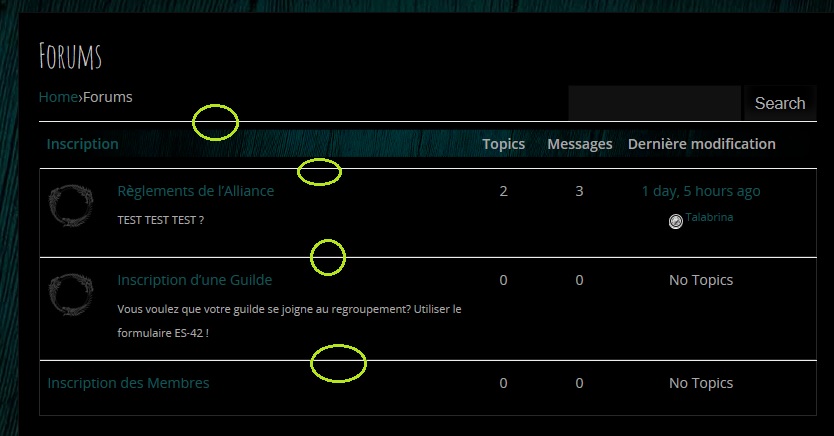

and my website : http://troubadours.olympe.in/forums
December 2, 2014 at 4:43 pm #155112izzyian
ParticipantThank you so much I found that the following css fixed my problem while using the 1st functions if then statement code
a.bbp-backto-forum {
    margin-right: 8px;
}
#subscription-toggle, #favorite-toggle {
    display: block;
    float: right;
    padding-right: 8px !important;
    padding-top: 0 !important;
}
December 2, 2014 at 3:30 pm #155110Moderatorwell also put this if statement around the link so that it woulnt show in the users topic favorites/subsritions/started lists
<?php if ( bbp_is_single_topic() ) : ?>

<a class="bbp-backto-forum" href="<?php bbp_forum_permalink(); ?>">Back to <?php bbp_forum_title(); ?></a>

<?php endif; ?>
the link looking a little off maybe because the developer of your theme customized it so that the css would affect it like this
div.forum-head-reply-tools a {so that any link would be affected the same
maybe removing the class in the code i gave you would fix that??
so maybe like this
<?php if ( bbp_is_single_topic() ) : ?>

<a href="<?php bbp_forum_permalink(); ?>">Back to <?php bbp_forum_title(); ?></a>

<?php endif; ?>
December 2, 2014 at 3:04 pm #155109In reply to: Removing avatars from topic list view
ModeratorI’ve typed a reply to you and submitted it but bbpress isn’t displaying it. If I try again it tells me I’ve already submitting that comment but it isn’t showing up?? Is this a bbpress bug or is my comment awaiting approval or something? Is there a limit to adding links in the post? I had 3.
no its not a bug its a spam prevention measure since the spam attack only 2 links can be posted now.
if you need to link us with more than 3 just post the url without the http://
i can just highlight and google search it.
—
this is for the padding.
#bbpress-forums li.bbp-body ul.forum,
#bbpress-forums li.bbp-body ul.topic {
overflow: hidden;
padding: 8px;
}
—
the tiny avatar CSS is ok but just so you know if it was any bigger the css will make the image distort and look blurry.
you can change the avatar size in the templates if you go to the loop-single-topic.php file and find something similar to
'size' => 14i think in your case it would be 16 maybeand change that number to 24
you should also do this to the loop-single-forum.php file too.
—
also add this additional CSS so you can remove the voice count number making everything awkward
.bbp-body li.bbp-topic-voice-count {
display:none;
}
to remove it in the templates go to loop-single-topic.php
and remove this
<li class="bbp-topic-voice-count"><?php bbp_topic_voice_count(); ?></li>December 2, 2014 at 9:53 am #155090In reply to: Reduce the description of the forum
galiulinr
ParticipantWith the CSS does not suit me, do not double content I need to cut in one place. I found the file loop-single-forum.php <div class=”bbp-forum-content”><?php bbp_forum_content(); ?></div> if it would be replaced by the_excerpt, the decision to come to me. I want to see short description
December 2, 2014 at 3:22 am #155078ParticipantWow thank you so much ! 🙂 … This is my loop replies php with the code in it, but I dont know if I put it in right because even though it shows, it does not appear in the same row as subscribe and favorites but rather a little above the row, and any css i added did not help.
<?php do_action( 'bbp_template_before_replies_loop' ); ?> <div id="topic-post-list" class="item-list" role="main"> <div class="forum-head-reply-tools"> <a class="bbp-backto-forum" href="<?php bbp_forum_permalink(); ?>">Back to <?php bbp_forum_title(); ?></a> <?php bbp_user_subscribe_link('before= '); ?> <?php bbp_user_favorites_link(); ?></div> <div class="clear"></div> <ul> <?php while ( bbp_replies() ) : bbp_the_reply(); ?> <?php bbp_get_template_part( 'loop', 'single-reply' ); ?> <?php endwhile; ?> </ul> </div><!-- #topic-<?php bbp_topic_id(); ?>-replies --> <?php do_action( 'bbp_template_after_replies_loop' ); ?>Here is a picture of the row so you can see the new button is a little above the row
http://bitfiu.com/wp-content/uploads/2014/12/button-example.pngDecember 1, 2014 at 7:20 pm #155073ParticipantThank you for that here is a little more info because i don’t understand where to place that code:
What I want to do is add a button ( which I will later style in my css) that will just take the user back to the forum (basically a button that is a breadcrumb).
I would place all the information here but bbpress reply box is not letting me for some reason. But you can read the information here where I placed it in the wrong section before I asked it here https://buddypress.org/support/topic/how-do-i-add-a-button-in-loops-replies-php-file/
December 1, 2014 at 3:47 pm #155061In reply to: How to get ride of empty space.
Moderatortry this
add it anywhere you add custom css
#bbpress-forums .bbp-body div.bbp-reply-author {
	margin: -15px 10px 10px;
	min-height: 100px;
	padding-left: 80px;
	position: relative;
	text-align: left;
	width: 100%;
}

#bbpress-forums div.bbp-reply-author a.bbp-author-name {
	clear: none;
	display: inline-block;
	margin-left: 0;
	word-wrap: break-word;
}

#bbpress-forums div.bbp-reply-author img.avatar {
	position: absolute;
	top: 15px;
	left: 0;
	width: 60px;
	height: auto;
}

#bbpress-forums div.bbp-reply-author .bbp-author-role {
	font-size: 12px;
	font-style: normal;
}

#bbpress-forums .bbp-body div.bbp-reply-content {
	clear: both;
	margin: 10px;
	padding: 0;
}
November 30, 2014 at 10:13 pm #155031In reply to: How do i change the color of the text and box?
SatanicDogooder
ParticipantHi those codes worked great on the bbpress forum paage! However they did not translate to the topics section. I added them to my child Css.styles.
http://satanicdogooder.com/forums/topic/a-good-deed-aric-u/#new-post
Any idea why the background of these pages did not take to the CSS change?
Thx,
The DoGooderNovember 22, 2014 at 6:03 am #154780In reply to: Unique member names
peter-hamilton
ParticipantBeen a while, spent quite a lot of time looking for a solution for the “name” issue.
Wordpress registration checks if a “username” is already used, this is great.
Buddypress is the problem cause they also add a “Name” field to registration, and this can be duplicate creating issues when multiple John Doe’s appear in my forums and activity.
Solution
I created a dirty solution by changing the label for (buddypress) Name to Username, and added a line of text urging new members to fill in the exact same name as the did in the “Username” field.
Although people can type whatever they want there, I hope most will just copy the first name.
This way the @name and username should be similar on all pages.
Then I also removed the option to change this name in the profile edit.php through CSS so no longer can people change their nicknames.
Unless a code savvy member goes to change the CSS in chrome, then the box will appear and they can change their names.Wishlist
A solution/function where Buddypress or BBpress copies the username and adds that in the nickname field by default.
Anyway, here is a link to my current register page:
P.H.
November 21, 2014 at 1:57 pm #154738In reply to: Truncated usernames
Moderatori took this css right from bbpress.org
add this anywhere you can add custom css
if it doesnt work add !important to the end like this 12px!important;#bbpress-forums div.bbp-reply-author a.bbp-author-name, #bbpress-forums div.bbp-topic-author a.bbp-author-name { clear: left; display: block; font-size: 12px; }the default size i think is usually 12px
so either use that or go lowerNovember 20, 2014 at 9:43 pm #154720Moderatortry adding this anywhere you can put custom css
#bbpress-forums #qt_bbp_reply_content_toolbar input { color: black; } -
AuthorSearch Results


