Search Results for 'code'
-
AuthorSearch Results
-
November 17, 2009 at 3:34 am #81459
In reply to: Backticks Not Working
chrishajer
ParticipantThere is no config option. What did you try and what happened when you did it? How was that different from what you expected? Is it possible the code is just not styled any differently in your theme?
You did read this right?
https://bbpress.org/forums/topic/html-tags-for-explanation-purposes#post-60673
November 17, 2009 at 2:23 am #81366In reply to: Profile information Mini Track
DKB
ParticipantI dont know which code i have to add and where in
mini-track.phpNovember 17, 2009 at 1:01 am #81418In reply to: Links not working in header
ParticipantTry removing the
float:left;from the div that wraps around all those image links. That messes up some other stuff on the page, but it makes the links clickable. You might need to do something else to format that area.November 17, 2009 at 12:46 am #81458In reply to: A few issues (Please Help)
Participant1. Just move the blocks of code in your template’s front-page.php to put the forums up top and the latest discussions on bottom.
2. There is a space for first name and last name in the profile, it’s just not required and not part of the sign-up. Why not direct them after signing up or logging in to change their password, and to complete their profile. Just provide them with a link to their profile page.
If you’re looking to make that information required, or part of the sign-up process, I’m not sure how to do that.
November 16, 2009 at 7:27 pm #81448In reply to: lost password
kenney
MemberIf you’re using 1.0.2, here is a password to log in with, and the hash you should insert into the bb_user.user_pass field (bb_user table, user_pass field) for your user:
insert this hash: $P$BlNSCHus7UmWzMPMh1c/MH71Mjj7kj/
log in with this password: n4gN#cO39wpL
Now change your password after you’re logged in.
You are so far over my head it’s terrible…Where do I find the line “bb_user.user_pass field (bb_user table, user_pass field)” & what and where in that line do I insert… do I login with this password “n4gN#cO39wpL” on the main login or Admin login or both…& what is the user name…I really appreciate your help but I am very illiterate with code of any sort…The version is not visable at the top or anywhere for that matter that I can see…I just started this forum about 3 weeks ago so it should be the new one…the URL is http://mysoberlifetoday.com maybe you can tell what version it is…thank you Chris
November 16, 2009 at 4:25 pm #81447In reply to: lost password
ParticipantYou can just edit the record directly to insert the hashed password, or you can use this SQL to update it:
UPDATEbb_usersSETuser_pass= “$P$BlNSCHus7UmWzMPMh1c/MH71Mjj7kj/” WHEREID=YOURNUMERICUSERIDIf your ID is 1, this would be the SQL:
UPDATEbb_usersSETuser_pass= “$P$BlNSCHus7UmWzMPMh1c/MH71Mjj7kj/” WHEREID=1That also assumes your table prefix is
bb_. Change it if you used something different.November 16, 2009 at 4:18 pm #81446In reply to: lost password
ParticipantIf you’re using 1.0.2, here is a password to log in with, and the hash you should insert into the
bb_user.user_passfield (bb_user table, user_pass field) for your user:insert this hash:
$P$BlNSCHus7UmWzMPMh1c/MH71Mjj7kj/log in with this password:
n4gN#cO39wpLNow change your password after you’re logged in.
November 16, 2009 at 4:13 pm #81445In reply to: lost password
ParticipantThe version will be in the admin section, on the bottom of every page.
http://chrishajer.com/bbpress/bbpress-version.png
Of course, without being able to log in, you aren’t going to be able to see that. If you haven’t removed it, the version is also showed in the
headsection of each forum page. It might look like this:<meta name="generator" content="bbPress 1.0.2" />I want to give you a password that will work with your version, so I need to know what version you are using.
November 16, 2009 at 4:05 pm #80385In reply to: WP plugins in deep integration
ParticipantSo, on this live site, why not just use
wp_list_pages('exclude=WHATVER_ID')– unless you’re not planning on using this wp_list_pages functionality on the live site in the future.I know that doesn’t resolve the issue of plugins apparently not working in your integration, but I am more concerned with the results at this point than figuring out where the problem lies with integration in general.
Can you just exclude pages in the
wp_list_pageson your forum?November 16, 2009 at 10:35 am #80459In reply to: Where is the word 'sticky' hidden?
Navin
MemberThis is the whole code I used btw:
<?php if ( bb_is_user_logged_in() ) : ?>

<?php else: ?>

<a href="http://domain/register.php" >Register free</a>

<?php endif; // bb_is_user_not_logged_in() ?>
November 16, 2009 at 10:34 am #80458In reply to: Where is the word 'sticky' hidden?
Member@nickaster thanks
I implemented it today, it works like a charm
 November 16, 2009 at 7:25 am #80384
In reply to: WP plugins in deep integration
arpowers
Membernot on this ‘live’ site… (my initial BBPress theme).. I actually duplicated the header code (using wp_list_pages etc…)
On my local server I use get_header() and I’m still having the issue.
November 16, 2009 at 7:23 am #81388In reply to: HTML tags for explanation purposes
Member< this is a test >November 16, 2009 at 6:19 am #81401hpguru
MemberMy plugins
* Akismet
* Human Test for bbPress
* BB Anonymous Posting
* Related Topics
* bbVideo
* Allow Images
* BBcode Lite
* BBcode Buttons Toolbar
* bbPress Smilies
* Topics Per Page
November 16, 2009 at 5:02 am #81454brayjason
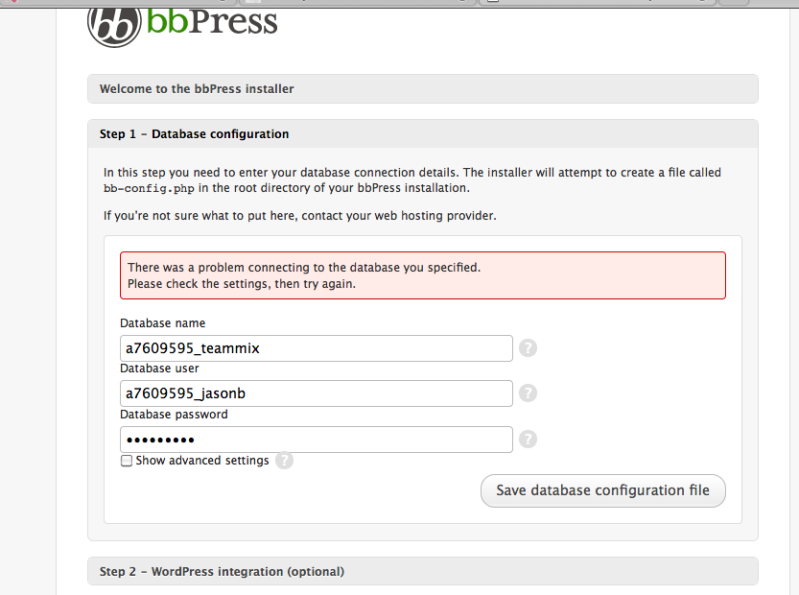
MemberHere is a screen shot of what I’m dealing with.

http://i19.photobucket.com/albums/b174/bmxpunker2005/screen.png?t=1258347755
November 15, 2009 at 11:37 pm #81400ParticipantI would stop using the Mass Delete Users plugin. I suspect it’s doing something that’s incompatible with 1.0 and something is going on with the users it deletes and the ones that are left behind. I would stop using that then do a recount in the admin. I’m not sure if recounting fixing user-related things that might have gotten borked.
I don’t think Allow Images, either BBcode plugin, BBvideo or Social It would cause any problem like this. Unless the problem occurs on threads with (or without) images or threads with (or without) video.) The Social IT appears to be on every post.
I’m not sure about Human Test for 1.0 – I don’t think I’ve ever tried it. I do have it working with a 1.0RC, I forget which version though. All you can do is try it. If it activates without error, that’s good. If you try to register and it prevents incorrect answers and allows correct answers, and the registration goes through, then it works.
I don’t think disabling Mass Delete is going to make everything better right away. I have a feeling that it’s doing something to the user data in the database, and that will remain there even after you deactivate the plugin.
The other possibility is something going on with the host. But if all the other software is running fine there, that’s probably not a problem.
November 15, 2009 at 11:09 pm #81399Marius-
Memberchrishajer, I use the following plugins:
Allow Images
BBcode Buttons Toolbar
BBcode Lite
BBvideo
Mass Delete Users
Social It
These are vital for me though, I got many users depending on these as core functions already. This problem did interestingly enough, occur after I had installed Mass Delete Users. Not imediatly though.
Deleting users works, but maybe it does something else that I can not see – that fucks up something else?
Do human test work for 1.02?
November 15, 2009 at 7:21 pm #81387In reply to: HTML tags for explanation purposes
ParticipantThat’s a single quote or apostrophe, not a back tick. On a US English keyboard, the single quote is on the same key with a double quote. The back tick is in the upper left corner or the keyboard, usually on the same key as the tilde (tilde requires shift.)
http://upload.wikimedia.org/wikipedia/en/5/51/KB_United_States-NoAltGr.svg
You want to use the upper left key in this keyboard layout around your code.
<?php e_('This is code'); ?>and ‘this is just inside single quotes’.November 15, 2009 at 7:16 pm #80383In reply to: WP plugins in deep integration
ParticipantOK, I see.
How are you getting your WordPress header to display in the forum? Did you just integrate deeply and the include the header
<?php get_header(); ?>?November 15, 2009 at 7:05 pm #81195In reply to: Question about Integration
fifthhouse
MemberI have a developer who does some work for me sometimes fixing up my blog, and this week he made a nice theme for me to match my wordpress theme
November 15, 2009 at 4:11 pm #81427In reply to: sticky not returned by get_sticky_topics()
billerby
MemberFound out the two ways to make it sticky
November 15, 2009 at 8:35 am #81382In reply to: Pretty-URLS
Olaf Lederer
ParticipantI’m sure they will offer a similar system as in WP in a future version
 November 15, 2009 at 1:24 am #32318
Topic: Links not working in header
in forum Themesedbarton1989
MemberFor the life of me I can’t see why although I’m sure it’ll become obvious. None of the navigation links in my header to elsewhere on the site work (even though the logo image does). The code looks fine to my eyes, why could this be?
November 14, 2009 at 11:59 pm #81358In reply to: Forum-Wide RSS -Feed for topics
Dailytalker
MemberMany thanks. That’s exactly what I was looking for.
November 14, 2009 at 9:14 pm #81385In reply to: HTML tags for explanation purposes
Adam Harley (Kawauso)
MemberPut them in backtick characters (see below the post field here) or in
<code>tags -
AuthorSearch Results