I have a theme-specific issue affecting the Skeleton WordPress theme. Basically, the front-end topic/reply editor loads the entire source code of the page.
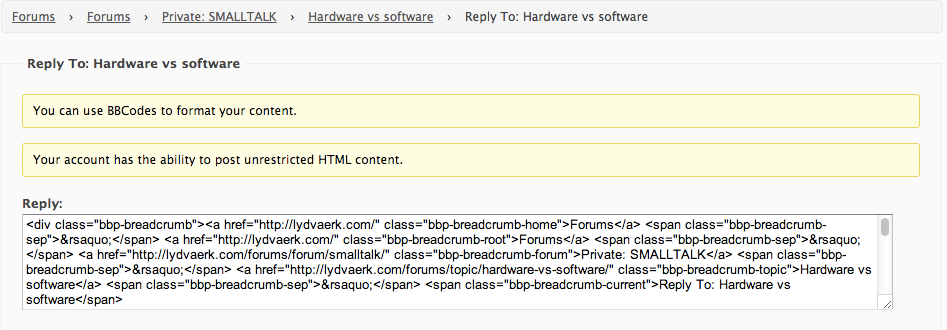
Any ideas?
Found out –
you can simply use Widgets inside your template.
I also installed the tehnik-bbpress-permissions plugin to not show the hidden forums topics and put this into my template:
<?php the_widget( 'Tehnik_BBP_Replies_Widget', $instance, $args ); ?>
This should work with the default BBP Replies Widget, too (just need to find out the name of it)
Will try a bit more customization today with an eye on https://codex.wordpress.org/Function_Reference/the_widget
Another possibility is manually:
	<?php do_action( 'bbp_template_before_topics_index' ); ?>

        <?php if ( bbp_has_topics( array( 'author' => 0, 'show_stickies' => false, 'order' => 'DESC', 'post_parent' => 'any', 'posts_per_page' => 5 ) ) ) : ?>
                <?php bbp_get_template_part( 'bbpress/loop', 'recent-topics' ); ?>
        <?php else : ?>
                <?php bbp_get_template_part( 'bbpress/feedback', 'no-topics' ); ?>
        <?php endif; ?>

	<?php do_action( 'bbp_template_after_topics_index' ); ?>
Sage words? Nope 😉
I had a quick look around https://wordpress.org/plugins/search.php?q=bulk+users and nothing really stood out.
The most users I have played around with is ~4,000 and that was too many also for the WordPress admin dashboard. I ended up doing everything I needed directly in phpMyAdmin with SQL queries.
A way to delete users an reattribute their posts/topics/replies to another user (mainly for a handful of folks who already had accounts on the WordPress side before migrating vBulletin over)
With only a handful of these use WordPress’ built in user delete tool, when you select to delete a user you have the option to delete all posts (including topics & replies) or keep them an attribute them to another user.
A way to “nuke” users who have spammed the forums. This would delete the user as well as all of their topics and replies.
First you are going to have to find the spam and record each user id associated and this is painful indeed! I am not to sure on the specifics but there probably is a way to get Akismet to check all of this for you.
A way to purge all users with no forum topics or replies (or posts, for that matter).
I think the quickest way for this would be in phpMyAdmin directly using an SQL query.
The query (Good to verify this stuff before you delete them)
SELECT ID FROM wp_users
WHERE ID NOT IN (SELECT DISTINCT post_author FROM wp_posts);
The delete queries (Any user without a post gets deleted)
DELETE FROM wp_usermeta WHERE user_id NOT IN (SELECT DISTINCT post_author FROM wp_posts);
DELETE FROM wp_users WHERE ID NOT IN (SELECT DISTINCT post_author FROM wp_posts);
Is bbPress really loading bunch of jQuery UI files?
<script type="text/javascript" src="http://localdollars.ge/wp-includes/js/jquery/ui/jquery.ui.core.min.js?ver=1.10.3"></script>
<script type="text/javascript" src="http://localdollars.ge/wp-includes/js/jquery/ui/jquery.ui.widget.min.js?ver=1.10.3"></script>
<script type="text/javascript" src="http://localdollars.ge/wp-includes/js/jquery/ui/jquery.ui.mouse.min.js?ver=1.10.3"></script>
<script type="text/javascript" src="http://localdollars.ge/wp-includes/js/jquery/ui/jquery.ui.resizable.min.js?ver=1.10.3"></script>
<script type="text/javascript" src="http://localdollars.ge/wp-includes/js/jquery/ui/jquery.ui.draggable.min.js?ver=1.10.3"></script>
<script type="text/javascript" src="http://localdollars.ge/wp-includes/js/jquery/ui/jquery.ui.button.min.js?ver=1.10.3"></script>
<script type="text/javascript" src="http://localdollars.ge/wp-includes/js/jquery/ui/jquery.ui.position.min.js?ver=1.10.3"></script>
<script type="text/javascript" src="http://localdollars.ge/wp-includes/js/jquery/ui/jquery.ui.dialog.min.js?ver=1.10.3"></script>
I only see them loaded on bbPress boards.
Can somebody confirm this? Or do I need to continiue searching for this dependances in my theme?
Because bbPress now does not really have anything fancy and jQuery style to load so many libraries.
In fact everything is done with PHP.
If this is true, can somebody also point me to places where it uses one.
@diggories
I edited the file plugin file called tabbed-login.php.
At line 176 edit the <div class=”userinfo”> so that it now reads…
		<div class="userinfo">
			<p><?php _e('You are logged in as ', 'tabbed-login'); ?> <strong><?php echo $user_identity; ?></strong></p>
			<p>
				<a href="<?php echo wp_logout_url($current_url); ?>"><?php _e('Log out', 'tabbed-login'); ?></a> |
				<?php if (current_user_can('manage_options')) {
					echo '<a href="' . admin_url() . '">' . __('Admin', 'tabbed-login') . '</a>'; } else {
					echo '<a href="' . bbp_get_user_profile_url( get_current_user_id() ) . '">' . __('Profile', 'tabbed-login') . '</a>'; }
					// Updated using bbp_get_user_profile_url( get_current_user_id() to link to BBPress profile page instead of the WP profile page
					?>
			</p>
		</div>
Hope this helps!
You shouldn’t have any as ‘anonymous’ unless for some reason the importer couldn’t convert a user for some reason, maybe because no email address with their old forum profile. This really shouldn’t be happening and if it is we need to have a look as to why this is happening and fix it.
I also presume you ran the repair tools after importing?
https://codex.bbpress.org/repair-forums/
@lwyndham thanks for the heads up, where did you place this code?
Just create a page in your menu system called forums wherever you want it, and add the following shortcode
[bbp-forum-index]
I’m afraid that doesn’t work either. I think it would look better if it could get removed in the source and not hidden with CSS.
I asked the theme developer and he told me it is a core-function, nothing to do with the theme Im using. I have my developing site under the following URL http://dala.se/forum – where you could see the “Reply To”.
I have tracked it down to the following files:
/wp-content/plugins/bbpress/includes/topics/template.php
Row: 1789-1806
function bbp_topic_last_reply_title( $topic_id = 0 ) {
	echo bbp_get_topic_last_reply_title( $topic_id );
}
	/**
	 * Return the title of the last reply inside a topic
	 *
	 * @param int $topic_id Optional. Topic id
	 * @uses bbp_get_topic_id() To get the topic id
	 * @uses bbp_get_topic_last_reply_id() To get the topic last reply id
	 * @uses bbp_get_reply_title() To get the reply title
	 * @uses apply_filters() Calls 'bbp_get_topic_last_topic_title' with
	 *                        the reply title and topic id
	 * @return string Topic last reply title
	 */
	function bbp_get_topic_last_reply_title( $topic_id = 0 ) {
		$topic_id = bbp_get_topic_id( $topic_id );
		return apply_filters( 'bbp_get_topic_last_topic_title', bbp_get_reply_title( bbp_get_topic_last_reply_id( $topic_id ) ), $topic_id );
	}
/wp-content/plugins/bbpress/includes/replies/template.php
Row: 471-491
function bbp_reply_title( $reply_id = 0 ) {
	echo bbp_get_reply_title( $reply_id );
}

	/**
	 * Return the title of the reply
	 *
	 * @since bbPress (r2553)
	 *
	 * @param int $reply_id Optional. Reply id
	 * @uses bbp_get_reply_id() To get the reply id
	 * @uses get_the_title() To get the reply title
	 * @uses apply_filters() Calls 'bbp_get_reply_title' with the title and
	 *                        reply id
	 * @return string Title of reply
	 */
	function bbp_get_reply_title( $reply_id = 0 ) {
		$reply_id = bbp_get_reply_id( $reply_id );

		return apply_filters( 'bbp_get_reply_title', get_the_title( $reply_id ), $reply_id );
	}
But tracking it further just lead me to a WP core file and function:
/wp-includes/post-template.php
Row: 102
Go in your css and find and add this display none!!
#bbpress-forums fieldset.bbp-form legend {
    display: none;
}
I want to style the bbpress colors, but I am not seeing my changes when I add custom CSS to my Genesis child theme (Dynamik Website Builder).
It is odd because I am using Firebug to isolate which parameters need to be changed, I can alter them within the firebug window and see them change to what I’d like to happen… then when I put that code in Genesis>Dynamik Custom>CSS (my child theme’s area to add to the CSS) it does not display.
Things like this have no effect:
#bbpress-forums div.odd, #bbpress-forums ul.odd {
    background-color: #222222;
}

#bbpress-forums div.even, #bbpress-forums ul.even {
    background-color: #444444;
}
Any advice?
Hi all,
I am currently trying to put together a home page that consists of the 20/30/50 recent posts in all forums (paginated).
I know that I can use the topic short code [bbp-topic-index], but this lists the whole topic rather than individual (single) posts.
The reason that I want to do this is that if someone posts a topic with images in I want those images to show on the home page to make it more interesting.
Can this be done with bbpress? I know that I can be done with IPS boards but not keen on their layouts.
Cheers,
Jayce
forums/user/test/
is rendering very weirdly:
<div class="entry-content" itemprop="text"><p>Profile Topics Started Replies Created Favorites Subscriptions Edit Profile Forum Role: Keymaster Topics Started: 0 Replies Created: 1</p>
</div>
which looks obviously incorrect because it’s missing html tags in between things.
I tried putting a die; at the bottom of templates\default\bbpress\user-profile.php and the page rendered properly, but all the other profile type pages are still broken. Removing everything from my functions.php doesn’t help either.
What could be going back and stripping out the html tags?
I am developing in a Genesis child theme and installed a bbPress Genesis Extend plugin.
Just wondering if this is possible – I am working on a live project at the moment which is requiring the addition of BuddyPress and bbPress functionality to a membership site running on Wishlist Member. Specs for the site as follows:
WP: 3.6.1
bbPress: 2.4
BuddyPress: 1.8.1
Wishlist Member: 2.71.1747
Site URL: http://www.thelawofattraction.com
The idea is that we are implementing a paid-for membership level managed by WLM and Infusionsoft. At the moment I have set auto role to ‘Blocked’ and reset the assigned bbPress user roles so that all existing (non-paying) members are set to this.
However, I’d like all new members registering as paid-for (Platinum+, platinumplus) to be assigned the Participant role.
I tried like so in my functions.php:
add_filter('bbp_get_user_role_map','custom_bbPress_role_map');
function custom_bbPress_role_map($role_map){
$role_map['platinumplus'] = bbp_get_participant_role();
return $role_map;
}
but although I can echo out the result of bbp_get_user_role_map() and see that this has worked in theory the Platinum+ members remain set as ‘Blocked’.
First time using bbPress so please forgive me if I’ve overlooked anything really obvious here, but any help would be appreciated.
Best,
Iain
Problem is because gdpress signature and adunit go in post with and the adunit plugin add the code before bbp-signature DIV…
We have two way, or add adunit code after bbp-signature DIV, or use another metod to add adunit after reply in the loop… for example, after 1 or 2 or 3 and etcc.. post, but not in one single reply.
For the moment i don’t have solutions, in plugin support page have another thread opened by another user… https://wordpress.org/support/topic/breaks-gd-bbpress-tools-signature-in-topic-between-posts?replies=2
With no reply… 🙁
I have bbpress loaded on my site and have already started creating forums…love it.
however, I created a page for the forum and put the shortcode there, but now my forum url is
http://www.nikkiinstitchescraftacademy.com/forums/forum/month-1-the-background-story/
is there any way to get rid of the double forum in there?
should i have put the shortcode someplace else?
thanks so much for your help!
Wordpress version 3.6.1
bbPress version 2.4
http://www.NikkiInStitchesCraftAcademy.com
Hi, i have a little bug with bbp signature.. if you have signature, these, go after ad unit … i now find a solution for this little issue!!
this is a code:
<div class="bbp-signature">forum signature</div>
You will find your user profiles at the following URL (Swap example.com for your domain)
http://example.com/forums/profile/username/
Also any username prefixed with imported_ eg. imported_username is because the user name username was already taken in WordPress. If both imported_username and username users are the same user go to the WordPress dashboards ‘User Panel’ and when you select the imported_username to be deleted you will be prompted to attribute all existing posts, topics, replies etc to another user, select the user username and now all posts, topics, replies etc will be under the single user username.
By way of an update. Adding a page and using shortcodes seems to have solved this
https://codex.bbpress.org/shortcodes/
The only tables you need are the ones you listed above:
- forum
- thread
- post
- tagcontent
- tag
- user
You may have a table prefix vb_ on your tables and you enter that on the import settings ‘Table Prefix’ field.
https://codex.bbpress.org/import-forums/vbulletin
Hello guys!
I have a specific question about adding forums, threads and replies in Bbpress.
Some times ago i made a script that’s sending data to fill the DB in wordpress – i just send via POST: author, post, title etc via php script, that add it all to DB. It was simple.
Now i have to make it in Bbpress, and there is a problem: besides the ‘wp_posts’ data i see many cells in ‘wp_post_meta’ when i create a forum, topic and a reply such as:
_bbp_topic_count
_bbp_total_reply_count
_bbp_forum_subforum_count
_bbp_reply_count
_bbp_last_active_time

etc
The problem is that I want to do it in the future delayed (this future posts date). And the question is: how do I write this posts and Bbpress helps me and refreshes that data in ‘wp_post_meta’.
I googled my problem and found this functions in functions.php:
  function bbp_update_topic_topic_id( $topic_id = 0 ) {
     $topic_id = bbp_get_topic_id( $topic_id );

     update_post_meta( $topic_id, '_bbp_topic_id', (int) $topic_id );

      return apply_filters( 'bbp_update_topic_topic_id', (int) $topic_id );
  }
That’s what I’m looking for? I will be happy if Bbpress has some API or xml-rpc method to add a topics and replies, but there is none 🙁
Thank you and sorry for my bad english.
Hi JJJ,
I really appreciate your effort on this forum!
I understand you can’t spend to much time here, but I guess your answers are still quite complicated for most of the bbpress users, an example would be great. I managed to write this with your hints, and some further googling. Thanks!
	function user_favorites_link( $args ) {
		$args['favorite'] = 'Maak favoriet';
		$args['favorited'] = 'geen favoriet meer';
		return $args;
	}
 add_filter( 'bbp_after_get_user_favorites_link_parse_args','user_favorites_link');
Hi jezza, i’ve add your great plugin, it works fine.. Thanks
Is possible in future version to have a css customization for the <div>, possibility to add text in adv in middle topic (where is present the date), and decide where put adv, for example, decide to add adv after, 1 or 2, or 3 etc.. users replies?
Regards…
The solution ended up being really simple. Just create a “recent posts” page (or call it whatever you want” and use the shortcode [ bbp-topic-index ].
Now I know this question has been asked every which way to sunday, but I just can’t figure it out for my particular setup. I’m a little annoyed at myself that i’ve been working w/ bbpress for a couple weeks and can’t figure it out on my own.
Now my home page url is simply mysite.com (id give you a link but its parked). So to clean up the breadcrumbs a bit I made the homepage static so I could use that as the archive/index page. That way breadcrumbs could just be “home > forum-name”.
Now a couple issues which I can’t seem to figure out. If my homepage is simply mysite.com what could I use as the forums slug? Based off of some previous semi-related topics posted here, I could just add the [bbp-topic-index] short code to the homepage in the high hopes it would redirect the “forums” breadcrumb to the homepage.
So the ultimate goal here, 2 breadcrumbs. Make homepage the archive/index page so the forum breadcrumbs would be home > forum-name”
Anyone got any ideas?


