Thank you for your answer Koendb!
Looks like I’m doing something wrong. After having copied your code into my functions.php under themes and customizr, both just as you wrote it and with the <?php and ?> as below, my webpage disappears and goes completely blank until I remove everything again. Why might that be?
<?php add_filter( ‘bbp_get_author_link’, ‘remove_author_links’, 10, 2); ?>
<?php add_filter( ‘bbp_get_reply_author_link’, ‘remove_author_links’, 10, 2); ?>
<?php add_filter( ‘bbp_get_topic_author_link’, ‘remove_author_links’, 10, 2); ?>
function remove_author_links($author_link, $args) {
$author_link = preg_replace(array(‘{<a[^>]*>}’,'{}’), array(”,”), $author_link);
return $author_link;
}
Add a filter that removes the links.
Copy the code below into your function.php file: (you might need to add <?php at the start and ?> at the end)
add_filter( ‘bbp_get_author_link’, ‘remove_author_links’, 10, 2);
add_filter( ‘bbp_get_reply_author_link’, ‘remove_author_links’, 10, 2);
add_filter( ‘bbp_get_topic_author_link’, ‘remove_author_links’, 10, 2);
function remove_author_links($author_link, $args) {
$author_link = preg_replace(array(‘{<a[^>]*>}’,'{}’), array(”,”), $author_link);
return $author_link;
}
BBPress adds some jQuery dependent javascript to the header which breaks the defer loading (cause a javascript error).
Javascript will be insert by setup_actions in bbpress/templates/default/bbpress-functions.php
add_action( 'bbp_head', array( $this, 'head_scripts' ) );
Would it be possible to make this script independent of jQuery or otherwise insert it with wp_enqueue_script and set its dependency of jQuery?
I also want to know how to remove this action. I tried:
global $BBP_Default;
remove_action( ‘bbp_head’, array( $BBP_Default, ‘head_scripts’ ) );
Thanks for your attention. I will need this fixes to get WP Defer Loading work with BuddyPress, see: https://github.com/bassjobsen/wp-defer-loading/issues/5
Hiya,
I’m trying to hide the “allowed tags” bit of the reply form and decided to try and use the bbp_get_allowed_tags filter.
However, the filter doesn’t seem to want to work. I’ve added the following to my theme’s functions.php:
function sibs_bbp_get_allowed_tags($retval){
	var_dump($retval);
	return $retval;
}
add_filter('bbp_get_allowed_tags', 'sibs_bbp_get_allowed_tags' );
This produces no effect though, almost as if the filter isn’t even working.
Am I using it wrong? Kinda confused…
Oh, and I realise this might not be the best way to hide the “allowed tags” feature. I’ll probably just use another method, but I’d like to discover what’s wrong with what I’ve done here anyway.
Thanks
Hi Bookkus, I have exactly the same problem here.
I’m using a child theme of BP default. bbPress 2.3.2, BP 1.7.3, WP 3.5.2.
The pages generated by bbPress follow my theme styling fine:
http://community.allen-heath.com/forums/forum/me
However when I use a bbPress shortcode, the styling / font goes wrong:
http://community.allen-heath.com/forums
http://community.allen-heath.com/forums-activity
Have you ever fixed this?
I am trying to add a button to update single topic on click. Using do_action & add_action(‘update_topic’,’bbp_update_topic’,10,2); and to show button I have added: add_filter( ‘bbp_theme_before_topic_title’, ‘update_button’ ); however since the code to show the button is inserted in ‘bbp_theme_before_topic_title’ the do_action is called in every topic title on page refresh. How can I isolate the do_action to work on one single topic title at a time and only fire on button click? I am really lost on this one and appreciate any ideas or suggestions.. Thanks in advance!
That plugin looks fine to use with bbPress 2.x, you just need to download either the bbpress-close-old-posts.php file and upload it to your plugins folder, or download the .zip, extract to a folder and upload that folder to your plugins folder.
But since it’s not listed at bbpress.org plugins list, I’m not sure if it’s safe or even compatible with my current install.
You will at times find many themes and plugins that are not hosted on WordPress.org, sometimes they are proprietary code, other times they are just quick snippets of code, it doesn’t mean they are unsafe and usually a quick note to the author will confirm if they work with the latest version of bbPress.
btw, searching for “lock” at bbpress.org plugins, at the bottom of the page you will see: ”Viewing 1 to 4 (4 total)” but there are only 3 plugins listed.”
Thanks, this is a known issue and will hopefully be fixed soon.
The CSS class for this widget is bbp-login-form
This is exactly what I need but I’m getting a fatal error when I try to activate the plugin:
Parse error: syntax error, unexpected T_STRING in /xyz-mysite/wp-content/plugins/changeauthors.php_/changeauthors.php on line 36
I copied the code exactly off github, turned it to a php file, zipped it and then uploaded as a plugin.
Many thanks for this, this makes sense and looks like a logical solution.
But, I’ve realised my issue is probably bigger than I thought. It’s not just a sidebar issue but more fundamental. When viewing or posting a new topic or reply the forum ‘jumps’ out of its parent page.
e.g –
(Viewing forum1 which is embedded in page1 using shortcode)
When I post a new topic my url changes to:
/’forum-root-slug’/’topic-slug’/
and so I have ‘jumped-out’ of my original location. This is not what I want to happen. I want the user to stay within the current location. And so, sidebar1 should also stay there without any hacks/workarounds, and sidebar2 should also stay in place for page2 which contains forum2 etc.
So going forward:
==> Any idea how to set a dynamic ‘forum-root-slug’ so that it is whatever the parent location is?
Could try this:
add to template: <?php bbp_forum_id(); ?>
This way you’ll see the ID-number of a forum when you display it.
Say, forum 1 has number xxx, 2 yyy, 3 zzz.
Remove the line above from your template.
Add this to the sidebar:
<?php
$forum = bbp_get_forum_id();
if ($forum == xxx) {
echo ‘code forum 1’;
} else if ($forum == yyy) {
echo ‘code forum 2’;
} else if ($forum == zzz) {
echo ‘code forum 3’;
}
?>
If you want to add a shortcode, you can do it this way in php.
echo do_shortcode(‘[shortcode]’);
Hope this will work 🙂
Hi R,
Removing the search bar is easy; it’s a bbpress option. I don’t know the exact option description, cause my bbpress is in dutch, but should state something like this:
[forum options] –> [allow to search through all of the forum]
To remove the forums link the ‘ugly’ way, just add this to your .css file:
article.forum h2.entry-title a { display: none; }
I heavily edited all of my templates (both wp and bbpress), so don’t know how to remove the HTML, but I guess you’ll find your code in a content(-xxx).php file.
The text ‘Forums’ is probably echo’d by the_title()
Hi, this is a css conflict issue… find it in your css:
.reply a {
    border-bottom: 2px solid rgba(0, 0, 0, 0.1);
    bottom: -2px;
    display: inline-block;
    font-family: 'BebasNeueRegular',sans-serif;
    font-size: 0.875rem;
    font-style: normal;
    height: 20px;
    padding: 6px 10px 2px;
    position: absolute;
    right: 0;
}
Now you try to remove: position: absoloute…
And they appear in correct position.. You must to change your css style.. If you search in this forum have other person wich your same problem…
I also do that but no change. i face same problem
Note: I am displaying forum on page(in wordpress)and use code
[bbp-forum-index]. Am i using right?
Thank you for that link.
In all honesty it doesnt make much sense to me as im not very good with coding etc.
I was hoping ti was a simple , find this file delete this code.
But thank you
That seems odd, can you refresh your permalinks and also run the repair tools on your forums and let me know the results.
https://codex.bbpress.org/repair-forums/
This could be an issue with your rewrite rules. To fix this try resetting your permalinks. In your WordPress Administration Screens navigate to Settings > Permalinks, select a different permalink structure and save. Then select your preferred permalink structure and save again.
You will want to take a look at modifying some templates for your theme, details on getting started with this are here: https://codex.bbpress.org/theme-compatibility/
Trying to reproduce your issue and I cannot reproduce it accurately, if I search for a password protected topic I actually see both the topic and the reply in the search results, you should also see both.
I presume you are creating these (or protecting them after the fact) in the backend?
(/wp-admin/edit.php?post_type=topic), what I assume should be the case is that if you are manually protecting the topic you should manually protect the replies (/wp-admin/edit.php?post_type=reply) also.
In short bbPress doesn’t support password protected forums, topics & replies officially, yet. There is ‘some’ support in the backend and partially in some of the templates but we haven’t got ‘all of it’ in bbPress yet.
You will also have issues when browsing the topics via eg http://example.com/topics/ and not see the actual topics list. There are probably a few more places where this will break also.
Create a ticket on trac to remind us to look at this for a future bbPress release.
(It will also act as a subtle reminder to keep it in mind whilst other code is written)
https://bbpress.trac.wordpress.org/
Hello, I am trying to remove the Header 2 that says forums , please see the attached picture and the search box. I dont know much about code, but I do the inspect and can delete it but I dont know the actual files to remove this.
Can anyone help please.
what i need to remove: HERE 
What i need as end result : HERE 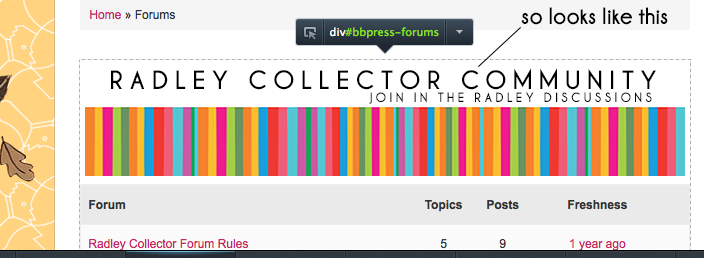
@antonyc You can change the ‘Forum Root’ in bbPress settings
See the docs here for the hows and where https://codex.bbpress.org/forum-settings/#forum-root-slug
And @ricov4 if you have SSH acces try
netstat -anp | grep -i mysql
@freewpress,
1. copy file loop-search-reply.php to your theme folder
2. Open it and find <?php bbp_reply_content(); ?> in line 57 or near it.
Change it with
<?php if ( !post_password_required(bbp_get_reply_topic_id()) ) {  bbp_reply_content();  }
else {
?>
<span class="your_message_class">Sorry, you can't read this reply.</span>
<?php } ?>
Anyway, I hope the plugin authors check this issue.
OK, now I would like to change something in the template of the shortcode. Does anybody know where I can find these?


