Skip to:
Content
Pages
Categories
Search
Top
Bottom

Search Results for 'code'

Viewing 25 results - 13,076 through 13,100 (of 32,503 total)
  • Author
    Search Results
  • #140478
    Stephen Edgar
    Keymaster

    I think you will find the docs for that reference the_content in a WordPress context.

    For bbPress things are similar but the following best explains it though in this case it was related to Jetpack, the methodology is still the same though.

    https://bbpress.org/forums/topic/social-media-share-button-missing/#post-125857

    This won’t work out of the box, and is by design. Jetpack hooks sharing options to the end of the ‘the_content’ filter. bbPress doesn’t use this filter, because blog content doesn’t have the same rules as forum content does; they work differently. To make it work, Jetpack’s sharing options would need to hook into bbp_get_topic_content and bbp_get_reply_content instead.

    Someone could write a piggyback function to do this, but it may be more difficult than this first step once you’ve gotten this far. Replies don’t use the same “premalink” logic as topics, forums, pages, and posts do, since they are technically children of topics. There could be other quirks, too.

    #140473
    Stephen Edgar
    Keymaster

    The best place to start would be the WordPress Plugin Developer Center
    https://wordpress.org/plugins/about/

    And checkout the bbPress Codex https://codex.bbpress.org/context/developer/

    #140468
    xmasons
    Participant

    Currently the new feature (bbPress 2.5) of Subscribe to Forum returns plain text email. Perhaps this was a conscious decision to implement it in that way. I’d implore either changing the content-type default to TEXT/HTML or be given an option within the admin settings.

    Typically you would only need to add the following:

    add_filter('wp_mail_content_type',create_function('', 'return "text/html";'));

    …before @wp_mail

    Stephen Edgar
    Keymaster

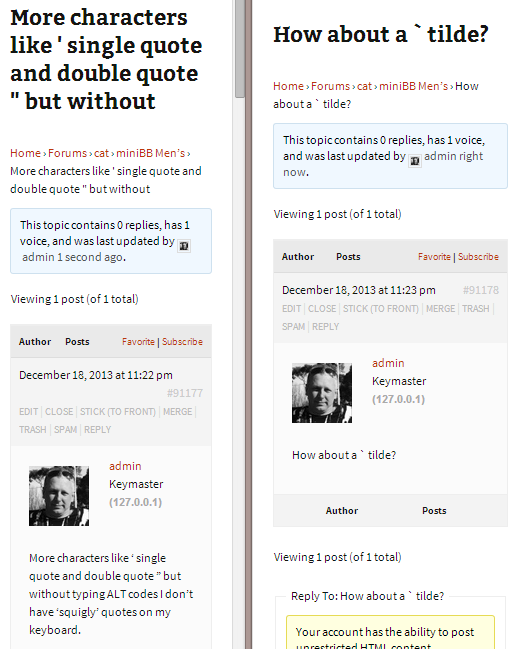
    Yes, that was what I inferred by ‘back end’ & ‘front end’ that I tried it from both places that we can create topics, the front end and the back end.

    The one thing I did do, that I have just tested against was I had copied and pasted the the ‘content’ from the back end to create the topic in the front end.

    I just manually typed the following into the ‘front end’ for single quote ', double quote " and

    `

    tilde symbols.

    I am also using a clean install and the Twenty Thirteen theme so like yourself I am a little perplexed as to why we are seeing something different.

    #140454

    In reply to: Forum Size

    Lynqoid
    Participant

    Your background image doesn’t stretch full width, so you would have to look at either making it longer, or removing it and just have a solid colour.

    The code can either go inside your style.css or if you want to do it properly you can follow the instructions here: https://codex.bbpress.org/theme-compatibility/ and then edit the files inside /css/ in your theme files.

    #140453
    Lynqoid
    Participant

    I would highly recommend looking into learning a little CSS, even a small amount can let you achieve a lot in bbPress and even WordPress.

    Something you can do for example is: #bbpress-forums { background-color: #ffffff; color: #000000; } – this is just an example.

    Good luck! 🙂

    #140452
    Lynqoid
    Participant

    I would recommend learning a bit of css, even a little CSS lets you do amazing things with bbPress and even WordPress!

    Some like: bbp-title { line-height: 20px; } This is just an example. I don’t know the exact html of your website.

    Good luck!

    #140451
    ronthai
    Participant
    #140450
    Rollsjoyce
    Participant

    I removed the following text (between the dots) from the user-details.php
    Now it is no longer possible to edit the profile in the bbpress profile overview. But when I want to update this plugin it will be possible to edit again. Do you have a better solution so it is still erased after an update of this plugin?

    <span class=”bbp-user-edit-link”>
    …..” title=”<?php printf( esc_attr__( “Edit %s’s Profile”, ‘bbpress’ ), bbp_get_displayed_user_field( ‘display_name’ ) ); ?>”><?php _e( ‘….Edit…..’, ‘bbpress’ ); ?>
    </span>
    #140447

    In reply to: Forum Size

    Subtopic
    Participant

    Also where to put the code haha.

    #140444
    Stephen Edgar
    Keymaster

    If your theme has a template with sidebar maybe page.php then make a copy of that file and rename it to bbpress.php

    #140441
    Stephen Edgar
    Keymaster

    You can try the ‘Remap existing users to default forum roles’ repair tool to see if that fixes the bbPress Roles: https://codex.bbpress.org/repair-forums/

    I had a quick look at https://wordpress.org/plugins/role-scoper/ and they make no specific mention of supporting bbPress’ ‘Dynamic Roles’ and that could be where the core of the issue is.

    Yes, Role Scooper is the issue and it appears there will be no longer further development or support:

    https://wordpress.org/plugins/role-scoper/faq/

    With the production release of Press Permit, is Role Scoper still supported?
    Basic Role Scoper support (bug fixes but not necessarily plugin conflict resolution) will be provided while WP 3.6.x is the active WordPress version. Compatibility with WP 3.7 and beyond is not assured, as I do not plan any further unfunded development of the Role Scoper code base. Further development and support will be available on a consulting basis as indicated on agapetry.net, but I will encourage migration to Press Permit – a superior platform with a sustainable funding model.

    The good news is the new plugin ‘Press Permit’ does support bbPress’ Dynamic Roles 🙂

    https://wordpress.org/plugins/press-permit-core/
    Customize bbPress forum permissions

    #140439
    Stephen Edgar
    Keymaster

    Updated 🙂

    Subscriptions
    Forum participants can elect to subscribe to a forum or topic. They will be notified when a new topic is created in a subscribed forum or a new reply is posted to a subscribed topic. Subscribed forums and topics will appear on their forum user profile.
    https://codex.bbpress.org/forum-settings/

    #140438
    Stephen Edgar
    Keymaster

    Just set the ‘Forum Order’ of your forums to whatever order you want them displayed in.

    https://codex.bbpress.org/getting-started-with-bbpress/#creating-your-first-forum

    #140437
    kokocipher
    Participant

    could you share your code :3 ? Where do you copy the codes for the widgets?

    #140436
    Stephen Edgar
    Keymaster

    Cool, glad your taking a look at it.

    “It seems to have appended an extre Re: in front of each (so they read Re:Re:Topic)”

    The Re: should only be added to the title of a reply, this should not be adding them to the topics and this shows that the SQL in the importer isn’t quite matching up with your database.

    The SQL queries below are based on the Kunena1.php importer and use the prefix jos_ as the table prefix for the bbPress importer.

    When the importer fails you should see an error message like the following:
    WordPress database error: [Unknown column 'kunena_categories.locked1' in 'field list']

    In this particular case the importer was looking for jos_kunena_categories.locked1 where jos_kunena_categories is the table name and locked1 is the field name. I used ‘locked1’ as a way to force an error to show the example, so if I knew my version of the database should be looking at the field locked instead of locked1 you can find the 'from_fieldname' => 'locked1' in Kunena1.php and update that with the correct field mapping 'from_fieldname' => 'locked',.

    Another way you can go about this is to jump directly into phpMyAdmin and test each of the following SQL queries, there are primarily four queries are as follows:

    Again I used prefix jos_ for my database and you will need to change this to match your own database table prefix.

    Forums

    
    SELECT 
    kunena_categories.id AS id,
    kunena_categories.parent AS parent,
    kunena_categories.numTopics AS numTopics,
    kunena_categories.numPosts AS numPosts,
    kunena_categories.name AS name,
    kunena_categories.description AS description,
    kunena_categories.ordering AS ordering,
    kunena_categories.locked AS locked 
    FROM jos_kunena_categories AS kunena_categories
    

    Topics

    
    SELECT 
    kunena_messages.thread AS thread,
    kunena_messages.catid AS catid,
    kunena_messages.userid AS userid,
    kunena_messages.ip AS ip,
    kunena_messages_text.message AS message,
    kunena_messages.subject AS subject,
    kunena_messages.time AS time,
    kunena_messages.locked AS locked 
    FROM jos_kunena_messages AS kunena_messages 
    INNER JOIN jos_kunena_messages_text AS kunena_messages_text 
    ON kunena_messages_text.mesid = kunena_messages.id 
    WHERE kunena_messages.parent = 0
    

    Replies

    
    SELECT 
    kunena_messages.id AS id,
    kunena_messages.catid AS catid,
    kunena_messages.thread AS thread,
    kunena_messages.ip AS ip,
    kunena_messages.userid AS userid,
    kunena_messages.subject AS subject,
    kunena_messages_text.message AS message,
    kunena_messages.time AS time 
    FROM jos_kunena_messages AS kunena_messages 
    INNER JOIN jos_kunena_messages_text AS kunena_messages_text 
    ON kunena_messages.id = kunena_messages_text.mesid 
    WHERE kunena_messages.parent != 0
    

    Users

    
    SELECT 
    users.id AS id,
    users.password AS password,
    users.username AS username,
    users.email AS email,
    users.registerDate AS registerDate 
    FROM jos_users AS users
    

    That’s a bit to digest so I’ll leave it at that for now and it is probably as clear as mud unless you are a seasoned SQL junkie.

    If anything I wrote above doesn’t make sense just ask away and remember 🙂
    https://en.wikipedia.org/wiki/No_such_thing_as_a_stupid_question

    #140430
    fishfanatix
    Participant

    I’m having issues with the font or background color on my bbpress forums page. The font is to light I cant read anything. Can someone please explain to me how to change the color. I’m a beginner at all this so I don’t know any css but I can look it up. I tried to do it under the stylesheet under editor but I cant find the code. my website is fishfanatixblog.com and click the buy/sale/trade tab and see it.

    #140422
    Lynqoid
    Participant

    You could copy out the widget code and rename it to create your own widget and then include it in your functions.php

    #140418
    diggeridoo
    Participant

    Hi all,
    I’m searching about this topic here but I can’t solve this.
    I want to put a sidebar in all the pages generated by bbpress: forums, topics, search… etc.
    This works in the main page I’ve created for forum with [bbp-forum-index] shortcode and assigning a sidebar within my theme.
    But, for the auto-generated pages (mentioned above) it uses full width by default.
    ¿How can I change this?

    Thanks!

    I’m on WP 3.7.1 and bbPress 2.5.1-5217

    #140398
    Lynqoid
    Participant

    Could you create a class then initalize it inside the bbPress code and use a getter to grab the values you need?

    #140397

    In reply to: Forum Size

    Lynqoid
    Participant

    Hi!

    You can achieve this with a relatively small amount of css:

    .bbpress #sidebar { display:none; }
    .bbpress #left-div { width: 100%; }

    You will need to create a new image for your background though as it is currently not long enough, then you can add a little more CSS for that too.

    Good luck!

    #140396
    Stephen Edgar
    Keymaster

    Arghhhhhh….. I still can’t reproduce this error using “Luminescence LiteVersion: 1.1.9”

    Do you have any custom templates in your themes folder?

    eg. \wp-content\themes\luminescence-lite\bbpress

    #140386
    Stephen Edgar
    Keymaster

    The classes are set by the following:

    <body class="topic bbpress single single-topic... <- bbp_is_single_topic
    <body class="forum-archive bbpress archive... <- bbp_is_forum_archive
    <body class="bbp-user-page single singular bbpress... <- bbp_is_single_user
    <body class="bbp-view bbpress... <- bbp_is_single_view

    Take a look at the source for any others here

    #140381
    sixf00t4
    Participant

    it seems it was semi addressed – https://bbpress.org/forums/topic/subscribe-to-new-forum-topics/

    Subscriptions
    Forum participants can elect to subscribe to a topic. They will be notified when a new reply is posted and subscribed forum topics will appear on their forum profile.

    https://codex.bbpress.org/forum-settings/

    #140378
    Stephen Edgar
    Keymaster

    – Open up the WordPress admin users section
    – Click delete on imported_LinDan94
    – Check the box “Attribute all posts to:”
    – Select the username LinDan94 from the dropdown
    – Click ‘Confirm Deletion’

Viewing 25 results - 13,076 through 13,100 (of 32,503 total)
Skip to toolbar