Hi,
I have a forum where my users need to be able to have the option to view in two languages. I have added the necessary language files and when any language is defined, it works fine.
But I need users to be able to choose language of their choice. Is there any way to do it?
I did find a plugin,
bbpress language switcher
and an updated version of it.
bbpress language switcher updated
but it does not work for current version of bbpress. I tried to update it but there are too many functions that I am not familiar with.
Is there some other similar plugins?
On a related note, how is the language options provided in this page? (under the subpages heading)
bbpress in your language
Dear tharsheblows, I know this function, but I will only deactivate 2 or 3 bbcodes – e. g. “img”.
This bbcode does not work.
https://www.dropbox.com/s/kkeoj8bqrs0jok5/Topic.png
Ive searched everywhere and tried everything I found to redirect the BBPress profile and before I will give up I thought to make a request in this forum.
Ive tried this in the .htaccess with no success:
RewriteEngine on
RewriteRule ^forums/users/(.*)/?$ http://www.mysite.com/dashboard/listings/$1 [L,R=301]
Ive tried the Redirection WP plugin and its redirecting the forums/users/(.*)/ where I want but it is also redirecting http://www.mysite.com/forums/users/favorites/ and all the profile links and I DO NOT want this since my idea is to redirect the BBPress profile into a main profile and link the favorites and the topics started from there.
Ive also found this code but I cant get it to work:
add_action(‘bb_init’, ‘profile_redirect’);

function profile_redirect() {

if (is_bb_profile() && $_GET != ‘edit’ && $_GET != ‘favorites’) {

$user = bb_get_user($_GET);

if ($user) wp_redirect(“http://www.example.com/members/” . $user->user_nicename);

}

}
Please help me to do this and I am willing to pay up to $100 for a working solution but I need it as soon as possible.
To change the user profile url, you can use this – it will build a link to the /profile/username and return that in the bbp_get_user_profile_url function in includes/users/template.php :
add_filter('bbp_pre_get_user_profile_url', 'mjj_profile_link');
function mjj_profile_link( $user_id ){
	$user_info = get_userdata( $user_id );
	$user_nicename = $user_info -> user_nicename;
	return '/profile/' . $user_nicename;
}
This would go in your functions.php file or bbpress-functions.php if you’re using that. Never modify those files in the admin area, only do them if you have ftp access and can undo anything that goes wrong!
I was able to figure out how to do something similar, though not exactly what you need. I added the lines
<?php
	$id = bbp_get_user_id();
	header('Location: ../profile/?user='.$id);
?>
to the top of user-details.php. My project loads to a profile page with a GET request, but if you could find the function that returns the desired username you can redirect to any page you want. It’s a dirty fix but it works well for me.
Thanks for the code! I just modified it by commenting out the add user contacts section and using the Register Plus Redux field (which requires users to pick a school upon registration).
I then added code to echo a hyperlink. For each new school I will add new hyperlink code. So far it seems to be working!
function clb_school_replies_author() {

echo get_user_meta(bbp_get_reply_author_id(), 'rpr_testfield', true);

if (get_user_meta(bbp_get_reply_author_id(), 'rpr_testfield', true) == 'school1')
echo nl2br ("\n<a href=http://www.school1.edu target=_blank>School 1 Web Page</a>");

if (get_user_meta(bbp_get_reply_author_id(), 'rpr_testfield', true) == 'school2')
echo nl2br ("\n<a href=http://www.school2.edu target=_blank>School 2 Web Page</a>");
@slprof
If you want to try just the latest reply, then try
function change_reply_order() {
$args['order'] = 'DESC';
$args['posts_per_page'] = '1';
return $args;
}
add_filter('bbp_before_has_replies_parse_args', 'change_reply_order');
But I suspect it will have some weird effects on the site, and of course you’ll never see anything but the latest post, so if pupil a posts and a minute laters pupil b, then you’ll never see pupil a’s.
or do you mean that for each topic, pupil a would be pupil a’s reply, pupil b would see pupils b’s reply etc.?
@slprof
Try putting this in your functions file
function change_reply_order() {
$args['order'] = 'DESC';
 return $args;
}
add_filter('bbp_before_has_replies_parse_args', 'change_reply_order');
I haven’t tested, so come back if it doesn’t work, it should do topic then replies with latest at top
I mean the bbcodes above the forum editor. Is it not possible to delete individual buttons.
https://www.dropbox.com/s/kkeoj8bqrs0jok5/Topic.png
No effect, if I comment out line 109
Many thanks
bbpress largely picks up on your wordpress theme, use any of thevdefault ones and you’ll get a great look.
I use twentyten very successfully.
and look at the set up guides
Codex
if you mean the bbpress shortcodes, they’re held in
includes/common/shortcodes.php
at the simplest just comment out line 109
ie change to
//add_shortcode( $code, $function );
bbpress upgrades will overwrite this, so keep a note to change again as bbpress upgrades are issued.
Hi.
I am getting this error.
Notice: bbp_setup_current_user was called incorrectly. The current user is being initialized without using $wp->init(). Please see Debugging in WordPress for more information. (This message was added in version 2.3.) in /home/xxx/public_html/xxx/wp-includes/functions.php on line 3245
I saw some of people asked about this question for previous versions. Its supposed to be fixed.
I am using
Debug : True
Wordpress : 3.9
bbPress Version 2.5.3
Is there any simple solution to delete default bbcodes. In which file the default bbcodes defined. Many thnaks for any hint.
Try
#bbpress-forums  input[type='text'], textarea{
background : blue !important ;
}
Theme: modified portfolio press:
/*
Theme Name: Portfolio Press
Description: Portfolio Press is a responsive theme for showcasing your photography, art, web sites, or other projects. It also works nicely as a regular blog site. An options panel is included for uploading logos and and changing the layout. There’s also support for the image, gallery and quote post formats. Visit the demo site or watch the video screencast for set up instructions.
Author: Devin Price
Author URI: http://wptheming.com/
Theme URI: http://wptheming.com/portfolio-theme/
Version: 1.7
License: GNU General Public License
License URI: license.txt
Tags: white, black, gray, two-columns, left-sidebar, right-sidebar, flexible-width, custom-menu, full-width-template, microformats, post-formats, rtl-language-support, theme-options, translation-ready
Credits:
Portfolio was built on the solid foundation of Toolbox:
https://wordpress.org/extend/themes/toolbox
Reset default browser CSS.
Based on work by Eric Meyer: http://meyerweb.com/eric/tools/css/reset/
MODERATOR EDIT: I removed the ~1200 lines of code here, use pastebin or a gist on GitHub for big code dumps.
@jakoblanglois has it right, to fix the last issue he describes when just need to modify the breadcrumbs behaviour a bit…
Uncheck the ‘Forum Prefix – Prefix all forum content with the Forum Root slug (Recommended)’ in bbPress settings and then the last bit…
Upon further testing, I noticed that this will not edit the breadcrumbs and will show Home > Forums (linking to domain.com/forums).
Tweak the settings of the breadcrumb using some custom arguments, this is based on the code here though what I have below just removes the ‘forums root’ from the breadcrumb…
<?php
/*
Plugin Name: bbPress - Custom Breadcrumbs
Plugin URI: https://gist.github.com/ntwb/7781901
Description: bbPress - Custom Breadcrumbs
Version: 0.1
Author: Stephen Edgar - Netweb
Author URI: http://netweb.com.au
*/

add_filter('bbp_before_get_breadcrumb_parse_args', 'ntwb_bbpress_custom_breadcrumb' );

function ntwb_bbpress_custom_breadcrumb() {

	// Forum root
	$args['include_root']    = false;

	return $args;
}
Copy the above into a file named ntwb_bbpress_custom_breadcrumb.php in your plugins folder 🙂
If I understood you correctly this is what you’re after.
When in the dashboard, navigate to Settings > Reading.
Change the option that’s called Front page displays to a static page and choose the home page (assuming you’ve created a page to be the front page).
Now navigate to Pages > All Pages and edit the page you selected to be your home page (usually “home”).
Enter the shortcode [bbp-forum-index] and then publish.
For a full list of available shortcodes, visit https://codex.bbpress.org/shortcodes/
Upon further testing, I noticed that this will not edit the breadcrumbs and will show Home > Forums (linking to domain.com/forums). I also tested this by changing the forum root slug in Settings > Forums to “home” (the page I have set to be my front page) and it now shows Home > Home
I am unsure as to how this would be fixed though…
I am not sure how Register Plus Redux registers the new profile fields though an alternate way would be to use user_contactmethods
https://codex.wordpress.org/Plugin_API/Filter_Reference/user_contactmethods
So here is an alternate method using that method as a single standalone plugin:
I’m not saying there is anything wrong with the method you used, just an alternate method.
You could add as many or few extra fields as you want 😉
Source: https://gist.github.com/ntwb/11241301
<?php
/*
Plugin Name: bbPress - CLB Add user school to reply author details
Plugin URI: https://gist.github.com/ntwb/11241301
Description: bbPress - CLB Add user school to reply author details
Version: 0.1
Author: Stephen Edgar - Netweb
Author URI: http://netweb.com.au
*/

function clb_user_contact_methods( $user_contact ){

	/* Add user contact methods */
	$user_contact['school'] = __('School Name');

	return $user_contact;
}
add_filter('user_contactmethods', 'clb_user_contact_methods');

function clb_school_replies_author() {

	echo get_user_meta(bbp_get_reply_author_id(), 'school', true);

}
add_action( 'bbp_theme_after_reply_author_details', 'clb_school_replies_author' );
As it displays in each reply under the author details
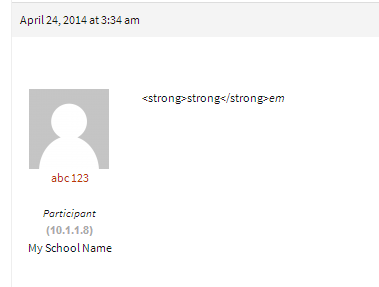
As it displays on a users profile page
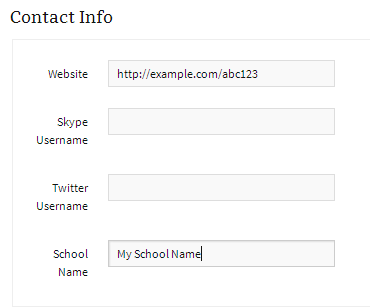
I don’t know if it is the most efficient solution, but I found something that works.
I created a new profile field with Register Plus Redux (new field called rpr_testfield).
I then modified bbp profile information with the following code, starting on line 26…
$usermeta = get_userdata( $user_id, 'rpr_testfield' );
echo $usermeta->rpr_testfield;
if ($usermeta->rpr_testfield == 'school name from profile')
echo "<a href="http://www.hyperlink?pID=19" target="_blank">School web page</a>";
Now all posts include the name of the user’s school with a hyperlink to the school webpage.
Looks good, I like that you have the template notices using the colors from your theme, many people miss styling those and it is always the first thing I look for 😉
Take a look at the shortcode [bbp-stats] to display the forum statistics.
https://codex.bbpress.org/shortcodes/
Also the page template page-forum-statistics.php to get some good ideas on adding your stats .
would I *only* be allowed to add a tags with a class (no, I don’t know why either but just pretend…) and not able to add the default img, blockquote, etc tags?
Correct, with the example you posted you would only be able to add an a anchor HTML element with a class CSS class eg. <a class="my-css-class">description</a> note as you removed href from the allowed tags you wouldn’t be able to use <a href="http://example.com">description</a>
I had a similar question last year but never really figured it out – gave up when I decided it didn’t matter: https://bbpress.org/forums/topic/using-wp_filter_kses-filter-for-bbpress-posts/
I fully appreciate this highlights how little I know these things! And thank you. 🙂 This has been a really interesting discussion.
This highlights how little I knew 12 months ago, if I don’t know I don’t answer a question unless I can provide something that IS helpful, we are all constantly learning 🙂
Not at this stage it isn’t ‘out of the box’ you could modify the templates (in a child theme of course) and get the desired effect.
A good starting point for this is the code behind the concept of the following topic:
I have created a bbPress starter theme with a phpBB look and feel
You also reorganize some of your forum structure:
eg.
From:
-The Hunt
–Worldwide
—Los Angeles / Orange County
—New York
—Online
—SF Bay Area
To: (As unless you plan on including other planets and galaxies worldwide is kind of moot 😉
-The Hunt
–Los Angeles / Orange County
–New York
–Online
–SF Bay Area
Maybe use some other bbPress/BuddyPress conditional tags
bbPress Conditional Tags
Template Tag Reference
Note: The BuddyPress codex page is undergoing some updates. There are a few that are now depreciated, you can find an accurate list here.
I also wrote a plugin that makes it super easy to see what conditional tags are being used on a page 🙂
https://wordpress.org/plugins/query-monitor-bbpress-buddypress-conditionals/
(You first need to install https://wordpress.org/plugins/query-monitor/)
You could write some custom code to do it in a child theme though it would probably be quicker to fork an existing plugin that will do it for you with bbPress.
@imath’s BuddyPress plugin comes close to what you want I think and would be a good starting point to convert it from BuddyPress to bbPress.
https://wordpress.org/plugins/bp-avatar-suggestions/
Hi, I am using is_bbpress() in page.php to check whether I am in a bbPress context. It seems BuddyPress and bbPress are sharing the same profile page. Therefore, when the latter is being displayed, bbPress is being defined, and this triggers wrong behavior in my code. So, how can I check a bbPress or BuddyPress profile page is being displayed so I can fix my code? thx.


