Search Results for 'code'
-
AuthorSearch Results
-
July 16, 2014 at 2:08 am #149201
In reply to: Vbulletin to bbPress Import – Replies Missing
Stephen Edgar
KeymasterOk, maybe the pre v3.0.0 never included ‘topic tags’ so the best solution is to delete or comment out this section in
vBulletin3.phpBasically remove the code between lines #293 and #334 in
vBulletin3.phpbbPress 2.5.4https://bbpress.trac.wordpress.org/browser/tags/2.5.4/includes/admin/converters/vBulletin3.php#L293
https://bbpress.trac.wordpress.org/browser/tags/2.5.4/includes/admin/converters/vBulletin3.php#L334I hope to get the updates that I have been doing over the past week and a bit finished by the end of the week and it would be great if I could get a few people to test theme out 🙂
July 16, 2014 at 1:41 am #149197In reply to: Vbulletin to bbPress Import – Replies Missing
themefurnace
ParticipantI believe I did get this error :
[Table 'vbulletincopy.tagthread' doesn't exist]The version is 3.0.0 RC8
Thanks
July 16, 2014 at 1:35 am #149195In reply to: Vbulletin to bbPress Import – Replies Missing
KeymasterI’m still not having any issues with my vBulletin 3 databases 🙁
First up, once the import is finished the progress window should look something like this:
Repair any missing information: Continue
Conversion Complete
No threaded replies to convert
Converting replies (79500 - 79599)
Converting replies (79000 - 79499)
...
Converting replies (300 - 399)
Converting replies (200 - 299)
Converting replies (100 - 199)
Converting replies (0 - 99)
Converting topic tags (0 - 99)
No super stickies to stick
Calculating topic stickies (0 - 99)
Converting topics (5000 - 5099)
Converting topics (4900 - 4999)
...
Converting topics (200 - 299)
Converting topics (100 - 199)
Converting topics (0 - 99)
Calculating forum hierarchy (0 - 99)
Converting forums (0 - 99)
Delete users WordPress default passwords (0 - 99)
Converting users (0 - 99)

Starting Conversion
In particular, do you get to see the
Conversion Completewithout any errors shown?Do you ever (or even know if you can remember) if you see the importer is actually converting topic tags per
Converting topic tags (0 - 99)or do you see an error along the lines ofWordPress database error: [Table 'vbulletincopy.tagthread' doesn't exist]Also @themefurnace what version of vBulletin is it specifically? v3.1? v3.2? v3.81? etc
July 16, 2014 at 12:48 am #149192In reply to: customizing bbpress admin links
Robkk
Moderatori got the topic sticky link to show using
<?php echo bbp_get_topic_stick_link(); ?>i got it the code between the
libut it shows both the sticky and supersticky link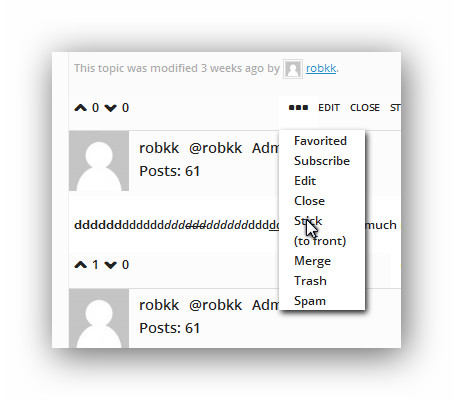
@robin-w is there any arguments that i could use to display 1 link at a timeall the code that talks about the sticky link is in the 2717 in template.php in includes/topics
i have a feeling that i could do something with this code on 2774 but idk
	// Combine the HTML into 1 string
		$retval = $r['link_before'] . $stick_display . $super_display . $r['link_after'];

		return apply_filters( 'bbp_get_topic_stick_link', $retval, $r );
	}
July 15, 2014 at 7:57 pm #149175In reply to: How to remove "Change Topic"?
KeymasterYou want to change line #109 in
form-topic.php
https://bbpress.trac.wordpress.org/browser/tags/2.5.4/templates/default/bbpress/form-topic.php#L109From:
<?php if ( !bbp_is_single_forum() ) : ?>To:
<?php if ( ! ( bbp_is_single_forum() || bbp_is_topic_edit() ) ) : ?>July 15, 2014 at 3:07 pm #149166In reply to: customizing bbpress admin links
Moderatorbasically it adds if-topic and if reply choices
thank you for this!!! now it displays the right links on the right post type
When I click any ‘topic tools’ it’s just the first topic that displays
it works on only the first post type per page for some reason , so the first reply on the second page would also have the ‘topic tools’
and like i said before i have to probably make a jquery version of this instead of css so it could work on all the posts
there is still some bugs right now like if i put
<?php echo bbp_get_topic_sticky_link(); ?>
it doesnt workalso i only named it topic tools cause it was the first thing i thought about , it could be named options or whatever , this dropdown menu is intended to work on all posts.
July 15, 2014 at 2:14 pm #149161In reply to: Favorites and subscription count
Robin W
Moderatorwhat are you planning to count, topics, forums or both?
and if you count a forum as subscribed, do you want to count all the topics within that forum as subscribed?
the list of forums/topics subscribed to is held in usermeta under WP__bbp_subscriptions and an example would look like
5682,13255,13098,13394,13456,13497,13550,13575,13636,13652,13669,13705,13750,13769,13620,14017,14222,14375,14469
so it would count a forum and a topic each as 1.
you could add a check to see which were topics and which forums and display separately.
You’d access it using a function like
$user_id = wp_get_current_user()->ID;
$check=get_user_meta( $user_id, 'WP__bbp_subscriptions' ,false);
some if statement here in case it's blank
then set a counter to zero
foreach ( $check as $count ) {
increment the counter in here
maybe one count if it's a topic and another if its a reply?
}
then carry on to a display
Favorites are held in ‘WP__bbp_favorites’
If you want some code to display the results, look at my topic count plugin
https://wordpress.org/plugins/bbp-topic-count/
Hope that’s sufficient to get you going to a solution, come back if you need more help
July 15, 2014 at 1:55 pm #149160In reply to: bbpress SQL Injection
ModeratorYou need to start working your way through these resources:
https://codex.wordpress.org/FAQ_My_site_was_hacked
https://wordpress.org/support/topic/268083#post-1065779
http://ottopress.com/2009/hacked-wordpress-backdoors/Anything less will probably result in the hacker walking straight back into your site again.
Additional Resources:
Hardening WordPress
http://sitecheck.sucuri.net/scanner/
http://www.unmaskparasites.com/
http://blog.sucuri.net/2012/03/wordpress-understanding-its-true-vulnerability.htmlJuly 15, 2014 at 12:53 pm #149156In reply to: Deleting Log of edits
kimberlyywp
ParticipantYes, that is exactly where I put the code. I didn’t have caching software at all but just installed it and flushed the cache and we’re good now! Thank you for your help!
July 15, 2014 at 12:06 pm #149155Topic: Using SSL on login – redirect loop
in forum TroubleshootingChakelan
ParticipantHello!
I added
define('FORCE_SSL_ADMIN', true);in wp-config.php, so that the login is done with https://.This seemed to work fine, but then I tried to click on “Lost Password” and I got a message telling me that there was a redirect loop.
Does anyone know how to fix this?
Thank you very much in advance.
July 15, 2014 at 11:55 am #149154Moderatorcan you come back and post your code for 2
that’s why I need your to post your code, so that I can work out where it’s wrong 🙂
July 15, 2014 at 9:54 am #149149In reply to: Post-import cleanup help needed
pixelnated
ParticipantIf it helps anyone this will help you see all your bbpress duplicate topics at a glance with the duplicate ID
** Note these are just selects so they will not delete any data **select post_type , post_date , post_title , post_content , max(id) as dup_id, count(*) as dupe_count from wp_posts where post_type in ('forum', 'topic', 'reply') group by post_type , post_date , post_title , post_content having count(*) > 1 order by post_type, post_date, dup_idWe can then take a variation of that and have it give us the start and end duplicate ranges for each post_type with counts of rows we expect to be impacted.
select post_type, min(dup_id) as start_dup, max(dup_id) as last_dup, count(*) as total_recs
from
(
select
		post_type
      , post_date
      , post_title
      , post_content
      , max(id) as dup_id,
      count(*) as dupe_count
from
		wp_posts
where
		post_type in ('forum', 'topic', 'reply')
group by
		post_type
      , post_date
      , post_title
      , post_content
having count(*) > 1
) i
group by post_type
of course you need to verify but this should help get you on your way
July 15, 2014 at 9:43 am #149146In reply to: How to remove "Change Topic"?
Leonyipa
ParticipantI tried to remove the code, but I cannot figure out which piece of code I should remove :S
July 15, 2014 at 9:16 am #149145In reply to: How to make similar bbpress forum to QuicSprout one?
ModeratorAmazing work man, thanks so much.
your welcome 😀
I need to figure out where to post each code in my theme,etc.
Should I also put codes in bbPress plugin, or not? Since it might get deleted once updated, right?
you copy bbpress templates into your child theme so its okay when bbpress updates, i explain exactly what template to copy and also i show you a snippet of where to put the code by the original code.
you put custom css into anything that can handle custom css
in bbpress.css in your child theme(you copy the original in your child theme)
in your child themes css stylesheet
the jetpack plugin module custom css
a standalone custom css pluginJuly 15, 2014 at 8:58 am #149144In reply to: Possible issue untrashing topics
slayne76
ParticipantHi Stephen,
thanks for the reply. I looked at the trac but it’s not strictly related, since it refers to the spam/trash/admin links on the front end.
What I noticed instead, (and you can test yourself and let me know) is simply as this: in the backend (wordpress admin area) when a topic is in the trashcan, and you click untrash (the same thing you would do with posts, pages, custom post types when you put the in the trashcan) you get the default nonce wordpress error. You simply “CAN’T” untrash something directly inside wordpress.
I was hoping that anyone else could try the same and give me confirmation that the issue exists (in the code i posted I was able to indentify the problem as well)If you, or anyone else, can confirm there is this issue, I (or you, or whoever wants to) can open a ticket in the trac so it gets fixed asap 🙂
July 15, 2014 at 7:49 am #149143Topic: Favorites and subscription count
in forum Troubleshootingelaborate
ParticipantI’m trying to find a way to display a given user’s raw subscription or favorites count in a fashion similar to how
bbp_get_user_reply_count_raw()andbbp_get_user_topic_count_raw()work.I’ve tried to use an existing function like
bbp_get_user_subscriptions()with a counter but I figure I need to query the database. I’m still learning PHP though so if anyone sees a way to do it like that then please let me know.Thank you.
July 15, 2014 at 5:08 am #149133Topic: WordPress and bbpress search
in forum Troubleshootingacornale
ParticipantAt the moment, I have a standard WordPress search box on the top of my page. It seems to return posts and pages but not bbpress forums or topics.
I can use the bbpress shortcodes to display a forum search but I don’t want two search boxes.
Is there a way to extend the native wordpress search so it returns posts, pages, topics and forums?
At the moment, it seems I can search bbpress OR search wordpress posts / pages. I want to search both?
July 15, 2014 at 4:26 am #149132In reply to: How to make similar bbpress forum to QuicSprout one?
Pavle123
ParticipantWow @Robkk
Amazing work man, thanks so much. I will need few days to set everything up.
I need to figure out where to post each code in my theme,etc.
Should I also put codes in bbPress plugin, or not? Since it might get deleted once updated, right?
July 15, 2014 at 4:17 am #149128In reply to: customizing bbpress admin links
ModeratorI’ve loaded all that, my display is slightly different, but that will be styling.
When I click any ‘topic tools’ it’s just the first topic that displays, and this does so in a stacked fashion, so I can only see the first tool.
However, I played a bit with the loop single reply, and would the following help?
<div class="dropdown" id="dropdown">
				<input type="checkbox" id="drop1" />
        <label for="drop1" class="dropdown_button">Topic Tools</label>
		<?php if (bbp_is_topic(bbp_get_reply_id()) ) { ?>
		<ul class="dropdown_content">
            <li class="active"></li>
              <li> <?php echo bbp_get_reply_edit_link(); ?></li>
              <li><?php echo bbp_get_reply_spam_link(); ?></li>
              <li><?php echo bbp_get_reply_move_link(); ?></li>
        </ul>
		<?php } ?>
		<?php if (bbp_is_reply(bbp_get_reply_id()) ) { ?>
		<ul class="dropdown_content">
         <li class="active"></li>
			<li><?php echo bbp_get_reply_spam_link(); ?></li>
             <li><?php echo bbp_get_reply_move_link(); ?></li>
         </ul>
		<?php } ?>

    </div>
basically it adds if-topic and if reply choices
July 15, 2014 at 3:27 am #149126In reply to: Deleting Log of edits
ModeratorOk, the code works (just retested it on my site), but the link you supplied is not using it.
are you sure you put
/* =Revisions
————————————————————– */

#bbpress-forums .bbp-topic-content ul.bbp-topic-revision-log,
 #bbpress-forums .bbp-reply-content ul.bbp-topic-revision-log,
 #bbpress-forums .bbp-reply-content ul.bbp-reply-revision-log {
 Display : none !important ;
 }
in
wp-content/themes/divi/style.css
Do you have caching software running?
July 14, 2014 at 7:59 pm #149123In reply to: How to make similar bbpress forum to QuicSprout one?
Moderator@netweb no problem
ok i understand , idk why i posted the link to their images haha
and i got it figured out , just wasnt showing up for some reason on my local site after i just changed the word new topic to new thread …was kind of weird.
the last thing is just paste this code above
<?php do_action( 'bbp_template_before_topics_index' ); ?><a class="bbp-new-topic-button" href="#new-post">New Thead</a>it should show the droplink
July 14, 2014 at 7:29 pm #149122In reply to: How to make similar bbpress forum to QuicSprout one?
KeymasterNice work @robkk, looks really good and thanks for helping out, much appreciated 🙂
One thing, I did remove the link to the direct link to quicksprout envelope/mail images, more than happy to take inspiration of sites design and write awesome code as you have above. We should not be grabbing the sites image assets (or any assets actually) as they may not be open source and/or royalty free. There are plenty of resources on the net for open source/royalty free icons/images 😉
I’ll tell you the rest when im done , because right now im having some trouble
What are you having trouble with? Anything I can help out here to get you sorted?
July 14, 2014 at 2:14 pm #149118In reply to: Deleting Log of edits
ParticipantI just changed the code and put that in the style.css and I’m still seeing the edits: http://livessoonforgotten.com/members-3/user-groups/in-memorandum/forum/topic/test-memorial/
July 14, 2014 at 1:57 pm #149116In reply to: customizing bbpress admin links
Moderatorok i havent gone too much far into this as you may think though
but you can try it as it is now to test it out
these are both in my functions.php in my child theme
im just showing the reply link on both topics and replies, i have gd bbpress tools so there is also a quote link//change admin links displayed function change_admin_links ($r) { $r['links'] = apply_filters( 'rw_reply_admin_links', array( 'reply' => bbp_get_reply_to_link ( $r ) ), $r['id'] ); return $r['links'] ; } add_filter ('bbp_reply_admin_links', 'change_admin_links' ) ; //change admin links displayed function change_topic_admin_links ($r) { $r['links'] = apply_filters( 'rw_topic_admin_links', array( 'reply' => bbp_get_topic_reply_link ( $r ) ), $r['id'] ); return $r['links'] ; } add_filter ('bbp_topic_admin_links', 'change_topic_admin_links' ) ;I have this in my loop-single-reply.php at the bottom ,
i havent added all the admin links, plus this doesnt work on replies it only works on the topic , i need to use a jquery on click function instead of all css dropdown menu
<div class="dropdown" id="dropdown">
				<input type="checkbox" id="drop1" />
        <label for="drop1" class="dropdown_button">Topic Tools</label>
        <ul class="dropdown_content">
            <li class="active"></li>
              <li> <?php echo bbp_get_reply_edit_link(); ?></li>
              <li><?php echo bbp_get_reply_spam_link(); ?></li>
              <li><?php echo bbp_get_reply_move_link(); ?></li>
        </ul>

    </div>
here is all my custom css , i have this in my themes custom css plugin
.dropdown {
    display: inline-block;
    margin: 0px 10px;
    position: relative;
  float:right;
}

.dropdown .dropdown_button {
    cursor: pointer;
    width: auto;
    display: inline-block;
    padding: 2px 10px;
    border: 1px solid #AAA;
    border-radius: 0px;
    font-weight: bold;
    color: #222;
    line-height: 16px;
    text-decoration: none !important;
    background: none repeat scroll 0% 0% #FFF;
}

.dropdown input[type="checkbox"]:checked + .dropdown_button {
    border-width: 1px;
    border-style: solid;
    color: #222;
    background: #FFF;
}

.dropdown input[type="checkbox"] + .dropdown_button .arrow {
    display: inline-block;
    width: 0px;
    height: 0px;
    border-top: 5px solid #6B7FA7;
    border-right: 5px solid transparent;
    border-left: 5px solid transparent;
}

.dropdown input[type="checkbox"]:checked + .dropdown_button .arrow { border-color: white transparent transparent transparent }

.dropdown .dropdown_content {
    position: absolute;
    border: 1px solid #777;
    padding: 0px;
    background: white;
    margin: 0;
    display: none;
}

.dropdown .dropdown_content li {
    list-style: none outside none;
    margin-left: 0px;
    line-height: 16px;
    border-top: 1px solid #FFF;
    border-bottom: 1px solid #FFF;
    margin-top: 2px;
    margin-bottom: 2px;
    width: 86px;
}

.dropdown .dropdown_content li:hover {
    background: #999;
  color:#222;
}

.dropdown .dropdown_content li a {
    display: block;
    padding: 2px 15px;
    color: #222;
    text-decoration: none !important;
    white-space: nowrap;
    background: #ffffff;
    border-bottom: 1px solid #999;
}

.dropdown .dropdown_content li:hover a {
    color: #222;
    text-decoration: none !important;
  background:#999;
}

.dropdown input[type="checkbox"]:checked ~ .dropdown_content { display: block }

.dropdown input[type="checkbox"] { display: none }
July 14, 2014 at 1:45 pm #149115In reply to: Deleting Log of edits
ParticipantI did drop that code in the style.css but it didn’t change anything. Is it possible that something is overwriting it?
-
AuthorSearch Results

