On the main content (url: forums/topic-tag/android/) is loaded content-archive-topic.php template with following code:
<?php bbp_get_template_part( 'loop', 'topics' ); ?>
loop-topics.php contains
<?php while ( bbp_topics() ) : bbp_the_topic(); ?>

			<?php bbp_get_template_part( 'loop', 'single-topic' ); ?>

		<?php endwhile;
		wp_reset_query();?>
So it loads topics with android tag.
On the sidebar I have this code
if ( bbp_has_topics( array( 'author' => 0, 'show_stickies' => false, 'order' => 'DESC', 'post_parent' => 'any', 'paged' => 1, 'posts_per_page' => $number_of_topics ) ) ) :
		bbp_get_template_part( 'loop', 'mytopics' );
	else :
		bbp_get_template_part( 'feedback', 'no-topics' );
	endif;
It should load all recent topics from all forums but it loads topics with android tag, and it happens when I’m on this page forums/topic-tag/android/
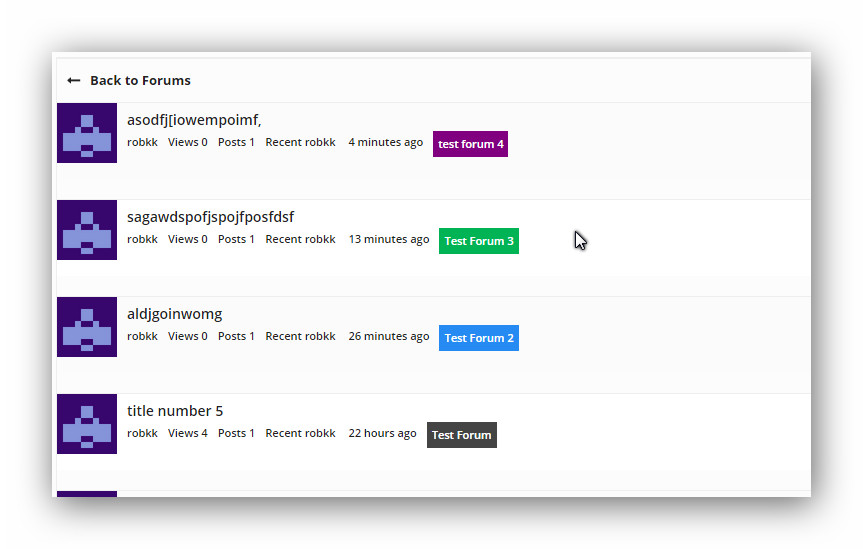
"if i would i suggest something , for looks i guess would be color coordination for forums and topics, if you switch to topic freshness instead of forum archive.

so the layout would be

title of topic
started by: (user) in (color of forum) title of forum

or just the title of the forum with the color of the forum as a background/

imo thats the only suggestion i really want"
My impressions so far
finally got this done , but i bet there is a better way of doing it instead of how i did it.
will post tutorial later if i find a better way.
And I moved your topic to a separate topic and wrapped some code backticks 😉
What happens if you create a new third user? Does the same weirdness occur?
Looking at the backwpup_admin is this from a plugin creating a WordPress custom role? Maybe https://wordpress.org/plugins/backwpup/?
If that is the case what happens when you disable this plugin and try updating the roles?
Again with that plugin disabled what happens when you create another new user?
I check out your site and this f* code just not work. I see that rewrite rules from my plugin not added via add_action ('bbp_init', 'bbp_permalinks_rewrites_init', 29); hook. It’s means that:
- Hook deleted by other plugin (hm).
bbp_init doesn’t exists.- My head is broken.
Maybe someone get us some tips that to check or that to do.
So full issue,
If I go to the top level (category) forum
Home
this work and show the forums below it however if you try and access the forums
Home
for example you get a 404 error
Trying to access individual topic
Home
for example works.
Creating a New Forum by itself with no parent also works.
However when I add a parent to it, it gives me a 404 Error when I try to view it.
I have this forum set to type category
Home
this currently has two children
both of which show a 404 Error when you try to open them (even when you ‘view’ from the edit screen.
However when I go into and edit these forums to have no parent, then click view. I can see them
This has happened since upgrading to WordPress 4.0
This behavior persists even with all other plugins disabled on the site
This narrows it down to something happening with the parenting of forums
I don’t really code in PHP so cant really give much more insight.
Any help would be appreciated, if any more info is required please ask
Thx
John
Hi, sorry for kicking this topic, but I’m having a problem probably related to this.
I have a site with 2 admins/keymasters. As soon as I activate bbPress the other admin loses his role. Apon checking the database I find for him the wp_capabilities change from:
a:1:{s:13:"administrator";b:1;s:14:"backwpup_admin";b:1;s:13:"bbp_keymaster";b:1;}
to:
a:1:{s:15:"bbp_participant";b:1;}
When adjusting his rights in All Users -Edit the only roles available are: Subscriber, Contributor, Author and Editor.
And when I disable bbPress and go into All Users -Edit, I can have the full list of roles (Keymaster, Participant, Blocked, Spectator, ..). These are forum roles, not general WordPress roles. Even in the database I find the 2nd admin (actually the 1st admin btw) now has the wp_capabilities a:1:{s:13:"bbp_keymaster";b:1;}, which is clearly bbp related.
I’m running WordPress 4.0 with main plugins Theatre (http://wordpress.org/plugins/theatre/), WordPress SEO (by Yoast), Contact Form 7 and some minor plugins for adjusting posts, background and the like (nothing role related).
Based on the names of the table names you mention just leave the table prefix blank.
Did you select vBulletin3 from the dropdown?
This sadly is not easily solved, details are in the following codex article:
https://codex.bbpress.org/import-forums/import-troubleshooting/
It’s
if ( bbp_has_topics( array( 'author' => 0, 'show_stickies' => false, 'order' => 'DESC', 'post_parent' => 'any', 'paged' => 1, 'posts_per_page' => $number_of_topics ) ) ) :
		bbp_get_template_part( 'loop', 'mytopics' );
	else :
		bbp_get_template_part( 'feedback', 'no-topics' );
	endif;
I’d like to find a way to target a specific forum called “board”. Is there a conditional for this? Something like (bbp_is_single_forum('board') [which didn’t work]? What I am trying to do is create a forum that is accessible only to users with certain capabilities (using s2Member). (There are a number of forums on the site, accessible to all site members.) I can either do this through the functions file or if I could create a specific page template for use only with that forum (and all topics under that forum) I could change the access via the template. I wish the “private” function could be customized so that access could be provided just to specific users, admin or not. Any pointers in the right direction would be greatly appreciated!
I’m using the following in my theme’s functions.php, although for some reason is_bbpress() isn’t working on Buddypress Group Forums for me.
    if( ! function_exists( 'my_dequeue_bbp_scripts' ) )
    {
        function my_dequeue_bbp_scripts()
        {
            if( function_exists( 'is_bbpress' ) )
            {
                if( ! is_bbpress() )
                {
                    wp_dequeue_style('bbp-default');
                    wp_dequeue_style('bbp-default-rtl');
                }
            }
        }
    }
    if( ! is_admin() ) add_action( 'wp_enqueue_scripts', 'my_dequeue_bbp_scripts' );
Currently if I access the user’s profile of bbpress (ex: http://example.com/forums/users/admin/) then it’ll list the profile, topics started, replies started….) from the viewing user.
Is there a shortcode that allow me to display forum user’s profile by user’s id from anywhere besides original bbpress url( ex: http://example.com/test/ )?
I found the bug in plugin with some validates. Never liked if ($var) constructions. if ($var !== false && $var !== '') better to understand 🙂
Just replace content of plugin.php in plugin folder:
https://github.com/korobochkin/bbPress-permalinks-with-id/blob/master/plugin/plugin.php
Tested on brand new WordPress install only with bbPress and my plugin with default theme – works as… haha.
Great response form S2member team !
I’m just a humble user not a dev, but hopefully netweb or JJJ will be in contact with the S2 guys.
For those that have been bitten by this, I know how painful it is, in the early days I just upgraded plugins and wordpress in the belief that they would work until one day my site broke, and I was in panic for 8 hours when I had least time to fix it.
When WordPress announced auto upgrade, I was very suspicious that anyone could release software confident that it would not screw up any of the several thousand plugins based on how it worked!
So the following for those bitten, and others who do not want to be bitten going forward !
If you are not happy for your site to be down for 24+ hours then :
1. Turn off wordpress auto update !
2. Create a test site https://codex.bbpress.org/creating-a-test-site/
yes that takes time, but the comfort of not doing stuff live is fantastic !
3. Don’t do upgrades of wordpress/plugins for the first week (UNLESS they are deemed critical), let others find the faults – yes I know that is bad to say, and if no one upgraded we’d never make progress, and I write plugins that I need people to upgrade to, etc. etc., but many people’s site’s aren’t critical, and if your is, don’t be leading the charge !
4. Check the support forum for the upgrade
for wordpress https://wordpress.org/support/forum/how-to-and-troubleshooting
or your plugins support page
you’ll soon find out if there are issues
5. Upgrade your test site first, the spend some time checking all the critical bits
6. When you’re happy that your test site works, then make the move in live
I really feel for those who have been sent into panic, but maybe the above will help for next time
@rafaeldejongh I think you need to create a test site :
https://codex.bbpress.org/creating-a-test-site/
This will let you work out what’s woring in comfort !
I just happened upon the following post on foliovision.com:
https://foliovision.com/2014/09/wordpress-original-bbpress
The key points are:
We still use bbPress version 1 on some of our websites. It’s powerful and integrates well with WordPress. Alas the recently released upgrade to WordPress 4.0 breaks the integration
WordPress 4.0 changed the cookie format and also the hash function, so without this fix bbPress won’t understand that you are logged in.
I’ve added a link also in the codex http://codex.bbpress.org/legacy/integrating-with-wordpress/
Note: This is only relevant for bbPress 0.9/1.x “Legacy” stand alone version of bbPress and NOT the current bbPress 2.x plugin for WordPress.
I’ve already seen a couple people with the problem but without much avail, I’m not running any plugins mentioned yet I still experience the problem after updating to WordPress 4.0
I’ve already reverted my wordpress installation as I can’t really put the forum out for more than a day, I’m running the following plugins on my site:
Adminimize
AdSense Click-Fraud Monitoring Plugin
amr shortcode any widget
BAW Login/Logout menu
bbPress
bbPress Custom CSS File
BulletProof Security
GD bbPress Tools
Google Adsense Dashboard
Google Analytics Dashboard for WP
Inactive User Deleter
Limit Login Attempts
Theme My Login
WP User Avatar
Does anyone know what plugin could be causing the problem if this isn’t a problem with BBpress?
I’ve already seen a couple threads but without much avail, I’m not running any plugins mentioned in that thread yet I still experience the problem after updating to WordPress 4.0
I’ve already reverted my wordpress installation as I can’t really put the forum out for more than a day, I’m running the following plugins on my site:
Adminimize
AdSense Click-Fraud Monitoring Plugin
amr shortcode any widget
BAW Login/Logout menu
bbPress
bbPress Custom CSS File
BulletProof Security
GD bbPress Tools
Google Adsense Dashboard
Google Analytics Dashboard for WP
Inactive User Deleter
Limit Login Attempts
Theme My Login
WP User Avatar
Does anyone know what plugin could be causing the problem if this isn’t a problem with BBpress?
thanks hugo…i added that code to the functions.php and that got the first topic to show within the sticky threads. Im still missing all my standard topics and and all replies. Is there a way to do that in the functions?
A written to the S2 member thread:
A better fix – on a copy of content-single-topic.php in a bbpress folder in the theme-
is to find the line:
<?php if ( bbp_show_lead_topic( ) ) : ?>
and change it to:
<?php if ( bbp_show_lead_topic( $show_lead = true ) ) : ?>
Even better than that is to write this as a filter run from functions.php probably until such time as a true reason and solution is provided.
This function added to your themes functions file should also achieve the same requirement and can be removed after things have been cleared up.
function show_bbp_lead_topic_true() {
$show_lead = true;
return $show_lead;
}
add_filter('bbp_show_lead_topic', 'show_bbp_lead_topic_true');
There is a hack suggested on the S2 member github thread that I would not advise using but if people do then modify a copy of the file not the core one!
The fix suggests circumventing the template part include in content-single-topic.php calling single-topic-lead.
@johnjamesjacoby
The issue appears to be – in S2 members case? that the conditional check on bbp_show_lead_topic() is returning false when it was returning true, why? not sure why at the moment.
Hi @stigolsen
What you should try :
(- read https://codex.bbpress.org/amending-bbpress-templates/ )
– create a folder named “bbpress” in your theme’s folder
– create a loop-forums.php file in it
– copy+paste the content linked in loop-forums.php (click the third button just above the first line of code in pastebin.com, then use Ctrl+C to copy)
– upload this new file in its new folder on your server
That should be OK. Be careful when you update your theme, the loop-forums.php may be deleted.
I’m newbie with wordpress, where can fix this?
View post on imgur.com
I search in all code, but I find no way to edit size of this bar
Hi,
Im a total newbie and I have the socute theme trying to integrate this code.
I have this “socute child theme” that holds the folders : cache, woocommerce and woocommerce_2.0x.
There are not wp-content/your-theme/bbpress/ in the child theme. So where should I put the file loop-forums.php?
In my socute original theme I find the loop-forums.php in the following folder: wp-content\plugins\bbpress\templates\default\bbpress
Should I remover this file from this place, edit it by removing everything that is already in that file and paste the code that you suggest? And where to put the file afterwards when I dont have the directories you are telling me about?
And one last question:
What should I do with the code written below “RAW Paste Data”?
I really appreciate if some of you please can help me with this total newbie questions. It will help me have a good start with learning this.
Thanks
All the best, Stig


