The code I provided doesn’t mess with the bullets. That’s handled by your theme. You could try something like below, but it hides the arrow bullets for those forum listings.
.hentry ul ul.bbp-forums-list li i {
    background: none;
}
To fix the breadcrumb title, use the below instead.
function my_change_forum_root_breadcrumb_title( $args = array() ) {
	$args['root_text'] = 'The EcoPsi Forums';
	return $args;
}
add_filter( 'bbp_before_get_breadcrumb_parse_args', 'my_change_forum_root_breadcrumb_title' );
@robin-w I beg to differ a little, the behaviour seems to suggest it is something else going on.
It is only child forums that seem to be having this issue.
If a forum is is set up as a child of a forum (set as type category) the result is a 404 Error.
if that link is broken (the forum has been set to have no parent) then the forum loads.
The permalink doesn’t change ?forum=general query string is the same for both. This is with all plugins disabled and on different themes.
There must be something that works differently code wise between the two.
Seems very odd.
It has also worked quite happily for the last year on default permalinks with the current plugin setup quite happily.
Something has changed the method in the way that it works, either through a bbpress release or WordPress 4.0 release
John
Dude you are awesome.
Thank you so much.
A couple of things: The counts are gone but now the bullets are layered over the names of the forums. Is there a way to leave the main theme’s bullets alone but in the Forum bbPress reverts to generic bullet points that it’s compatible with?
http://ecopsi.org/forums/
Also I must have made a mistake with the breadcrumb code.
// Custom breadcrumb label for bbPress
function my_change_forum_root_breadcrumb_title( $args = array() ) {
	if ( ! empty( $args ) ) {
		$args['root_text'] = 'The EcoPsi Forums';
	}
	return $args;
}
add_filter( 'bbp_before_get_breadcrumb_parse_args', 'my_change_forum_root_breadcrumb_title' );
thanks but it does in fact kill the page if I add text above the shortcode. My theme is Divi and I’m on the latest WP and all. Pretty generic actually.
You have to trash the forums page where you added the shortcode. Then you have to empty the trash so that the forums page is completely gone. Then forums will display without the shortcode.
It’s both. bbPress is setup to automagically create the /forums page out of thin air. If you’d like to add some other text to this page, you may do that as well. If you do create an actual forums page, as it seems you have, all that’s needed is to add the forums shortcode where ever you’d like the forum index to appear. In this case, just add [bbp-forum-index]. There are a number of other shortcodes that can be used for similar purposes that can be found here https://codex.bbpress.org/shortcodes/.
The numbers represent the topic/post counts of each individual forum. For instance “Cognition (0, 0)” is equivalent to “Cognition (0 topics, 0 posts).”
In your theme’s functions.php file you can add the below to remove the counts:
function my_remove_list_forums_counts( $args = array() ) {
	if ( ! empty( $args ) ) {
		$args['show_topic_count'] = false;
		$args['show_reply_count'] = false;
	}
	return $args;
}
add_filter( 'bbp_after_list_forums_parse_args', 'my_remove_list_forums_counts' );
To change the breadcrumb root add the below code to the same functions.php file as above:
function my_change_forum_root_breadcrumb_title( $args = array() ) {
	if ( ! empty( $args ) ) {
		$args['root_text'] = 'This used to be Forums';
	}
	return $args;
}
add_filter( 'bbp_before_get_breadcrumb_parse_args', 'my_change_forum_root_breadcrumb_title' );
I think you may be inferring the import doesn’t ever actually finish?
If that is the case see the docs here: https://codex.bbpress.org/import-forums/import-troubleshooting/
Thanks for this link Stephen. It is relaoding again from where it stoped. Fingers crossed 😉
– Once the import hangs, click stop, take a note of where it was up to, e.g. Converting 11,299 – 11,300
– Click start again and the import will continue from where it left off
Once the import finishes you will be prompted with a link to the repair tools, you need to run each of these after importing so bbPress, you can’t do this until everything is imported.
Edit: I think you may be inferring the import doesn’t ever actually finish?
If that is the case see the docs here: https://codex.bbpress.org/import-forums/import-troubleshooting/
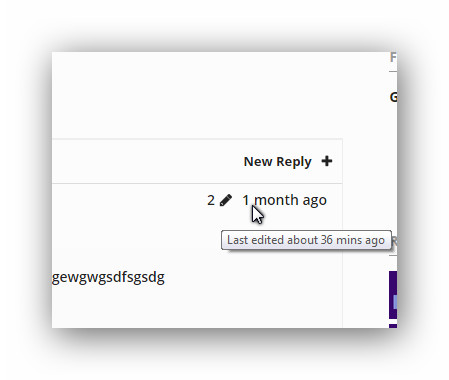
discourse like revision log
shows only when edits occur , shows only number of edits, on hover shows last time ago of edit.
i had two functions of code that could calculate number of edits on the post.
1 is the one i have now which calculates from when i inserted the code i believe.
the other just had a count of previous edit logs, but it had a kind of bug and showed up on all posts with the same number.
might make a tutorial on this, have to consult i guess robin or stephen if the code is good to use or not.
Why, this is fabulous! Thank you so much for your help!!
I tested with your modified code for about an hour, and can’t seem to find any issues. I will post an update in case I do discover any problems…
But this does appear to be the solution to searching single bbpress forums, including private ones in Buddypress. Thanks to you, @tobyhawkins! 🙂
Interesting… WP_query has a tag parameter, lets try resetting that
Try
if ( bbp_has_topics( array( 'author' => 0, 'show_stickies' => false, 'order' => 'DESC', 'post_parent' => 'any', 'paged' => 1, 'posts_per_page' => $number_of_topics,  'tag' => '') ) ) :
		bbp_get_template_part( 'loop', 'mytopics' );
	else :
		bbp_get_template_part( 'feedback', 'no-topics' );
	endif;
I was installing bbPress on my website, using the Tools > Forums > Import forums. It was going okay until it reach converting replies. My forum have 52 600 messages in 18 000 subjects from 1200 users.
– I visited the url mysite.com/forums and I see it well, but at first sights it seems there is no replies at all in every message.
– Here is what I see in the yellow box.
Can you tell me what to do from here ? (as nothing keep going, but the little wheels keeps tuning)
Converting replies (2200 - 2299)
Converting replies (2100 - 2199)
Converting replies (2000 - 2099)
Converting replies (1900 - 1999)
Converting replies (1800 - 1899)Converting replies (1700 - 1799)Converting replies (1600 - 1699)Converting replies (1500 - 1599)Converting replies (1400 - 1499)Converting replies (1300 - 1399)Converting replies (1200 - 1299)Converting replies (1100 - 1199)Converting replies (1000 - 1099)Converting replies (900 - 999)Converting replies (800 - 899)Converting replies (700 - 799)Converting replies (600 - 699)Converting replies (500 - 599)Converting replies (400 - 499)Converting replies (300 - 399)Converting replies (200 - 299)Converting replies (100 - 199)Converting replies (0 - 99)
No tags to convertNo super stickies to stick
No stickies to stick
Converting topics (5000 - 5099)
Converting topics (4900 - 4999)Converting topics (4700 - 4799)Converting topics (4600 - 4699)Converting topics (4500 - 4599)Converting topics (4400 - 4499)Converting topics (4300 - 4399)Converting topics (4200 - 4299)Converting topics (4100 - 4199)Converting topics (4000 - 4099)Converting topics (3900 - 3999)Converting topics (3800 - 3899)Converting topics (3700 - 3799)Converting topics (3600 - 3699)Converting topics (3500 - 3599)Converting topics (3400 - 3499)Converting topics (3300 - 3399)Converting topics (3200 - 3299)Converting topics (3100 - 3199)Converting topics (3000 - 3099)Converting topics (2900 - 2999)Converting topics (2800 - 2899)Converting topics (2700 - 2799)Converting topics (2600 - 2699)Converting topics (2500 - 2599)Converting topics (2400 - 2499)Converting topics (2300 - 2399)Converting topics (2200 - 2299)Converting topics (2100 - 2199)Converting topics (2000 - 2099)Converting topics (1900 - 1999)Converting topics (1800 - 1899)Converting topics (1700 - 1799)Converting topics (1600 - 1699)Converting topics (1500 - 1599)Converting topics (1400 - 1499)Converting topics (1300 - 1399)Converting topics (1200 - 1299)Converting topics (1100 - 1199)Converting topics (1000 - 1099)Converting topics (900 - 999)Converting topics (800 - 899)Converting topics (700 - 799)Converting topics (600 - 699)Converting topics (500 - 599)Converting topics (400 - 499)Converting topics (300 - 399)Converting topics (200 - 299)Converting topics (100 - 199)Converting topics (0 - 99)Calculating forum hierarchy (0 - 99)Converting forums (0 - 99)Delete users WordPress default passwords (1300 - 1399)Delete users WordPress default passwords (1200 - 1299)Delete users WordPress default passwords (1100 - 1199)Delete users WordPress default passwords (1000 - 1099)Delete users WordPress default passwords (900 - 999)Delete users WordPress default passwords (800 - 899)Delete users WordPress default passwords (700 - 799)Delete users WordPress default passwords (600 - 699)Delete users WordPress default passwords (500 - 599)Delete users WordPress default passwords (400 - 499)Delete users WordPress default passwords (300 - 399)Delete users WordPress default passwords (200 - 299)Delete users WordPress default passwords (100 - 199)Delete users WordPress default passwords (0 - 99)Converting users (1300 - 1399)Converting users (1200 - 1299)Converting users (1100 - 1199)Converting users (1000 - 1099)Converting users (900 - 999)Converting users (800 - 899)Converting users (700 - 799)Converting users (600 - 699)Converting users (500 - 599)Converting users (400 - 499)Converting users (300 - 399)Converting users (200 - 299)Converting users (100 - 199)Converting users (0 - 99)No data to cleanStarting Conversion
hi i install bbpress 2.5.4 on wordpress 4.0
i design my theme ,but bbpress forum not show but if i use shortcode my forums will show but i want work without short code , i dont know what to do ?
my site : Siavashg.ir/forum/
how can i fix it ?!
Yes. That’s not ideal. I think the problem is the bbp_pre_get_posts_normalize_forum_visibility function in bbpress > includes > forums > functions.php.
I’m not going to vouch for the security of this (although I think the logic is ok and cursory testing seems to bear this out) but you can get round this by changing your my_bbp_filter_search_results function to the following:
function my_bbp_filter_search_results( $r ){

    //Get the submitted forum ID (added in gethub > bbpress > form-search.php)
    $forum_id = sanitize_title_for_query( $_GET['bbp_search_forum_id'] );

    //If the forum ID exits, filter the query
    if( $forum_id && is_numeric( $forum_id ) ){

        $r['meta_query'] = array(
            array(
                'key' => '_bbp_forum_id',
                'value' => $forum_id,
                'compare' => '=',
            )
        );

        $group_id = bbp_get_forum_group_ids( $forum_id );
        if( groups_is_user_member( bp_loggedin_user_id(), $group_id[0] ) )
        {
            function my_allow_all_forums () { return true; }
            add_filter( 'bbp_include_all_forums', 'my_allow_all_forums' );
        }
    }

    return $r;
}
add_filter( 'bbp_after_has_search_results_parse_args' , 'my_bbp_filter_search_results' );
To negate the danger of plugins forgetting to manage permissions for posts properly the normalize function visibility automatically steps in on any WP_Query activity and shuts it down, but apparently doesn’t account for the possibility of forums being private, but viewable by low level users within the group context. By adding the filter only when searching on a single forum and then only if the logged-in user is a member of the correct group I think I have accounted for the security issues, but I’m not enough of a php expert to be 100% confident that I haven’t missed something.
On the main content (url: forums/topic-tag/android/) is loaded content-archive-topic.php template with following code:
<?php bbp_get_template_part( 'loop', 'topics' ); ?>
loop-topics.php contains
<?php while ( bbp_topics() ) : bbp_the_topic(); ?>

			<?php bbp_get_template_part( 'loop', 'single-topic' ); ?>

		<?php endwhile;
		wp_reset_query();?>
So it loads topics with android tag.
On the sidebar I have this code
if ( bbp_has_topics( array( 'author' => 0, 'show_stickies' => false, 'order' => 'DESC', 'post_parent' => 'any', 'paged' => 1, 'posts_per_page' => $number_of_topics ) ) ) :
		bbp_get_template_part( 'loop', 'mytopics' );
	else :
		bbp_get_template_part( 'feedback', 'no-topics' );
	endif;
It should load all recent topics from all forums but it loads topics with android tag, and it happens when I’m on this page forums/topic-tag/android/
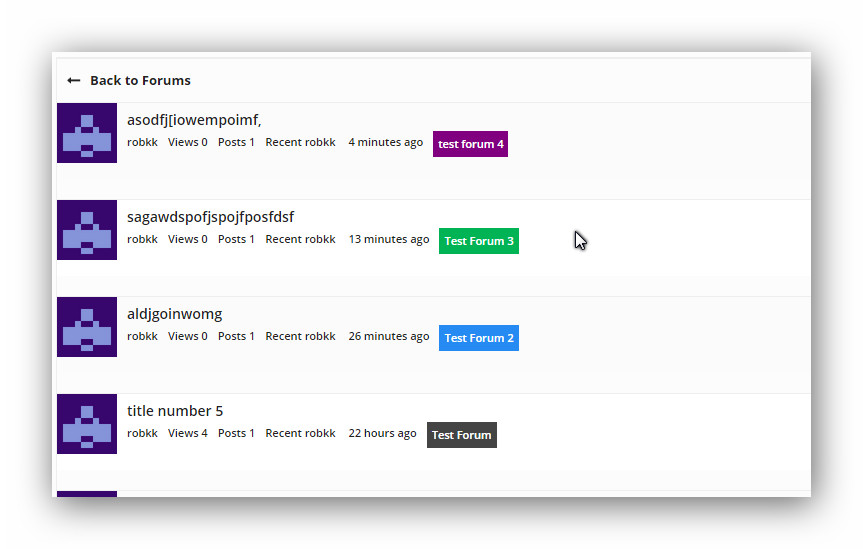
"if i would i suggest something , for looks i guess would be color coordination for forums and topics, if you switch to topic freshness instead of forum archive.

so the layout would be

title of topic
started by: (user) in (color of forum) title of forum

or just the title of the forum with the color of the forum as a background/

imo thats the only suggestion i really want"
My impressions so far
finally got this done , but i bet there is a better way of doing it instead of how i did it.
will post tutorial later if i find a better way.
And I moved your topic to a separate topic and wrapped some code backticks 😉
What happens if you create a new third user? Does the same weirdness occur?
Looking at the backwpup_admin is this from a plugin creating a WordPress custom role? Maybe https://wordpress.org/plugins/backwpup/?
If that is the case what happens when you disable this plugin and try updating the roles?
Again with that plugin disabled what happens when you create another new user?
I check out your site and this f* code just not work. I see that rewrite rules from my plugin not added via add_action ('bbp_init', 'bbp_permalinks_rewrites_init', 29); hook. It’s means that:
- Hook deleted by other plugin (hm).
bbp_init doesn’t exists.- My head is broken.
Maybe someone get us some tips that to check or that to do.
So full issue,
If I go to the top level (category) forum
Home
this work and show the forums below it however if you try and access the forums
Home
for example you get a 404 error
Trying to access individual topic
Home
for example works.
Creating a New Forum by itself with no parent also works.
However when I add a parent to it, it gives me a 404 Error when I try to view it.
I have this forum set to type category
Home
this currently has two children
both of which show a 404 Error when you try to open them (even when you ‘view’ from the edit screen.
However when I go into and edit these forums to have no parent, then click view. I can see them
This has happened since upgrading to WordPress 4.0
This behavior persists even with all other plugins disabled on the site
This narrows it down to something happening with the parenting of forums
I don’t really code in PHP so cant really give much more insight.
Any help would be appreciated, if any more info is required please ask
Thx
John
Hi, sorry for kicking this topic, but I’m having a problem probably related to this.
I have a site with 2 admins/keymasters. As soon as I activate bbPress the other admin loses his role. Apon checking the database I find for him the wp_capabilities change from:
a:1:{s:13:"administrator";b:1;s:14:"backwpup_admin";b:1;s:13:"bbp_keymaster";b:1;}
to:
a:1:{s:15:"bbp_participant";b:1;}
When adjusting his rights in All Users -Edit the only roles available are: Subscriber, Contributor, Author and Editor.
And when I disable bbPress and go into All Users -Edit, I can have the full list of roles (Keymaster, Participant, Blocked, Spectator, ..). These are forum roles, not general WordPress roles. Even in the database I find the 2nd admin (actually the 1st admin btw) now has the wp_capabilities a:1:{s:13:"bbp_keymaster";b:1;}, which is clearly bbp related.
I’m running WordPress 4.0 with main plugins Theatre (http://wordpress.org/plugins/theatre/), WordPress SEO (by Yoast), Contact Form 7 and some minor plugins for adjusting posts, background and the like (nothing role related).
Based on the names of the table names you mention just leave the table prefix blank.
Did you select vBulletin3 from the dropdown?
This sadly is not easily solved, details are in the following codex article:
https://codex.bbpress.org/import-forums/import-troubleshooting/
It’s
if ( bbp_has_topics( array( 'author' => 0, 'show_stickies' => false, 'order' => 'DESC', 'post_parent' => 'any', 'paged' => 1, 'posts_per_page' => $number_of_topics ) ) ) :
		bbp_get_template_part( 'loop', 'mytopics' );
	else :
		bbp_get_template_part( 'feedback', 'no-topics' );
	endif;
I’d like to find a way to target a specific forum called “board”. Is there a conditional for this? Something like (bbp_is_single_forum('board') [which didn’t work]? What I am trying to do is create a forum that is accessible only to users with certain capabilities (using s2Member). (There are a number of forums on the site, accessible to all site members.) I can either do this through the functions file or if I could create a specific page template for use only with that forum (and all topics under that forum) I could change the access via the template. I wish the “private” function could be customized so that access could be provided just to specific users, admin or not. Any pointers in the right direction would be greatly appreciated!


