Skip to:
Content
Pages
Categories
Search
Top
Bottom

Search Results for 'code'

Viewing 25 results - 7,976 through 8,000 (of 32,505 total)
  • Author
    Search Results
  • #166161
    DevynCJohnson
    Participant

    @Robkk , thank you for your time.

    1. I did see the option for oEmbeds. However, after disabling oEmbeds and using WP-Sweep to remove all oEmbeds, WP-Sweep still finds oEmbeds after a few days. Currently, I wrote my own code to disable them.

    5. The Report content plugin has not been updated since November of 2014.

    12. True, I have tried BuddyPress’s upload-avatar feature and the various upload-avatar plugins, but they no longer work after I upgraded by website to HTML5. Notice that I mentioned that I can still upload media via the backend. My backend is using HTML4. You are right though, this is probably something for WordPress to implement rather than BBPress.

    #164318
    illwriteit
    Participant

    This is a rather huge branch off of the forum that was offered by Sceko in this topic:

    bbPress like Flarum

    The default view shows all topics, color coded with a unique font awesome icon assigned to each category.
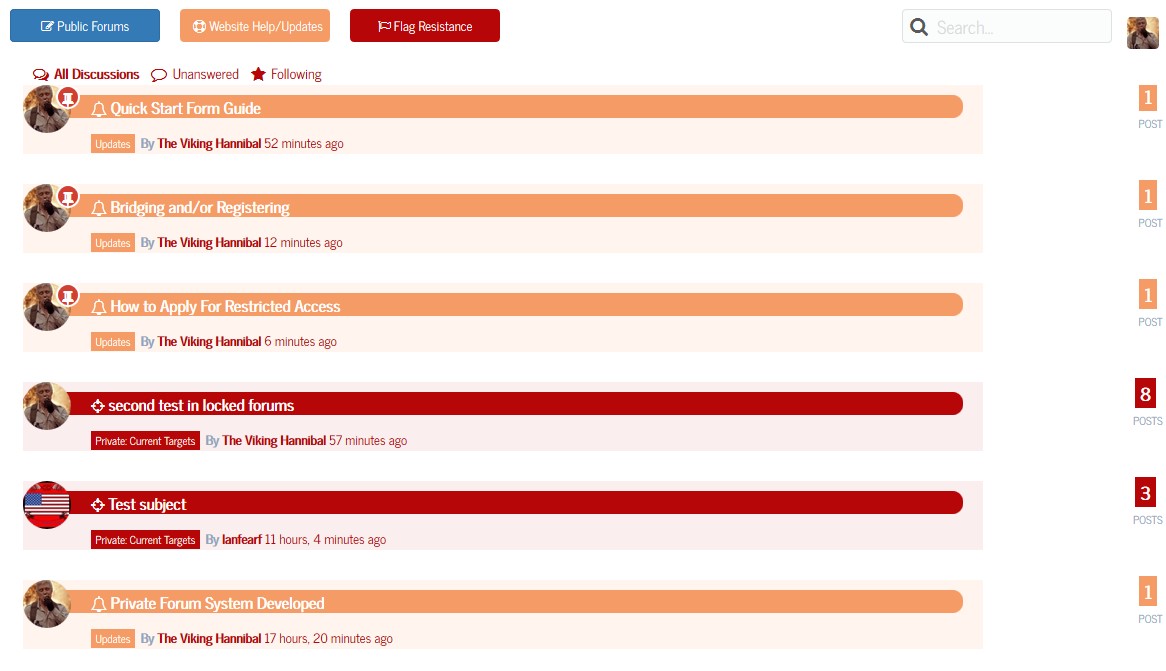
    View One

    If you click on one of the main categories, whether it be public, support, or the restricted area, it will now show all topics including children forums of that particular category in this view. It also shows all children forums of that category as well:
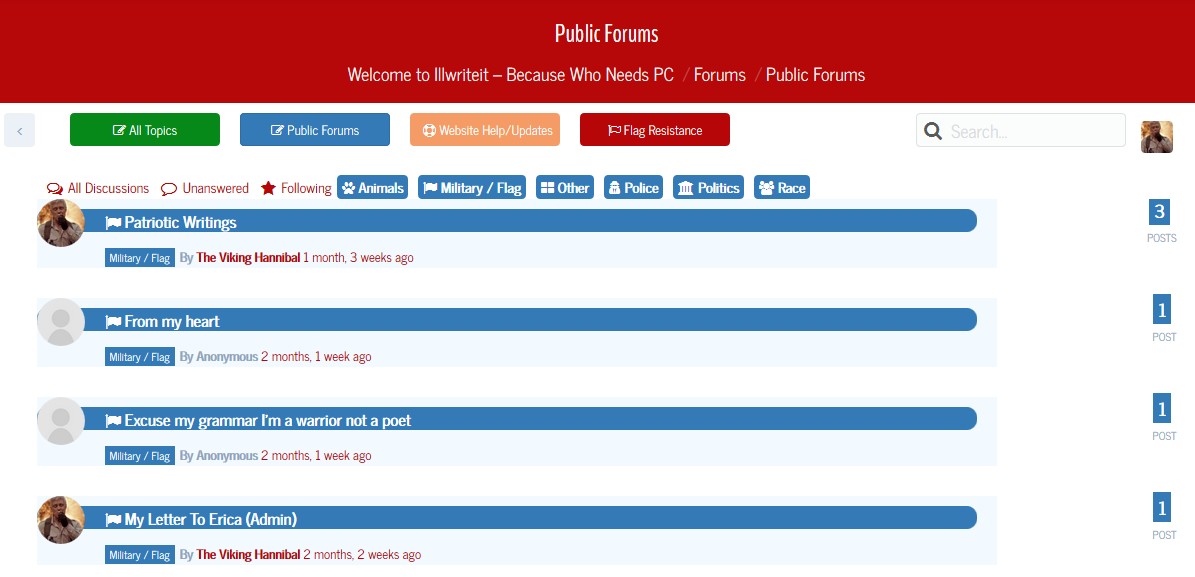
    View 2

    Last but not least the reply look for viewing a topic shows not only the badges from mycred, but the picture rank as well.
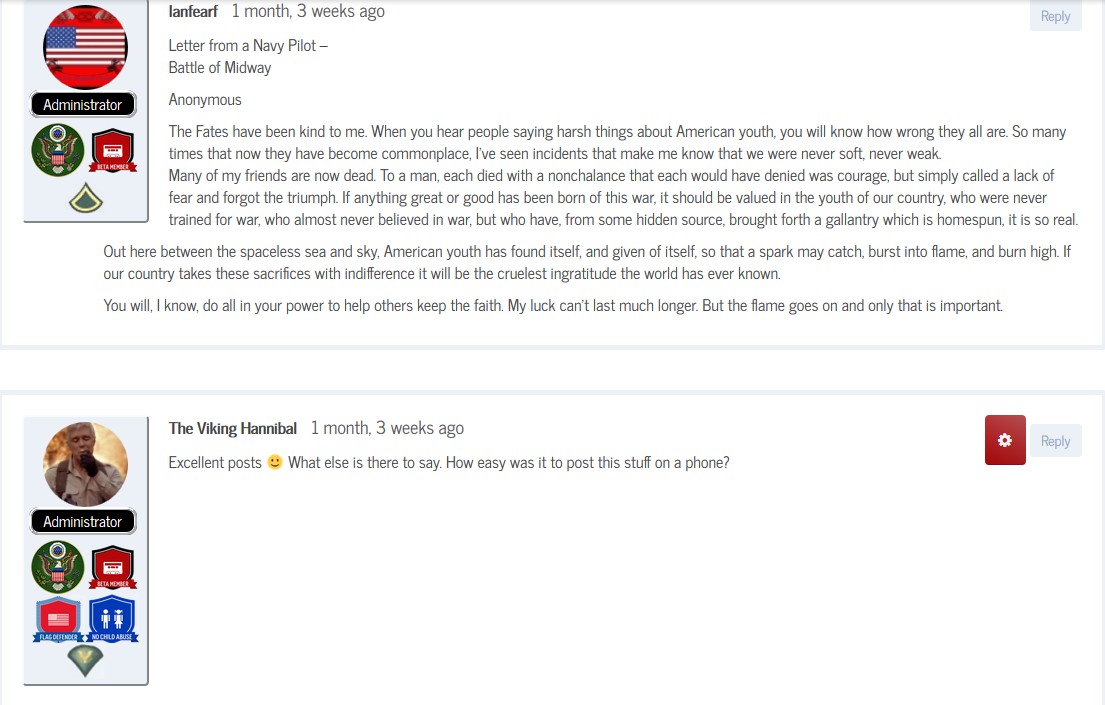
    Topic view

    Robkk
    Moderator

    I think the the urls to the replies should be okay by default.

    Are you using a plugin for custom reply notifications?? I know some may have a wrong shortcode in place of the notification emails for new replies in topics that would link to the single replies.

    #166137
    Robkk
    Moderator

    Sorry for the really late reply, but see if this helps you. I know it is not duplicating and instead moving, but I feel like this is what you are trying to do.

    Common Tasks

    #166128
    Robkk
    Moderator

    Sorry for the late reply, I just approved your topic.

    Does it not work like this if you enabled the forum prefix??

    http://yoursite/forums/view/latest-topics/

    Also if you used the view shortcodes, it should be that specific page url.

    #165681
    aluxi33
    Participant

    These two bbpres shortcodes I added to my Main Menu are not working. They were working fine yesterday but not it says ‘That page can’t be found’.

    My website: http://mysite.com/recent-replies/

    http://mysite.com/view/latest-topics/

    #166126
    Robkk
    Moderator

    Sorry for the late reply, I just approved your topic.

    The files you may want to edit are.

    loop-search-forum.php
    loop-search-topic.php
    loop-search-reply.php
    loop-search.php

    These templates are in the bbPress plugin, and you can copy them over into your child theme so that customizations won’t be lost after a bbPress plugin update.

    I am not sure if expression engine only searches for topics, but I cannot find how to exclude certain posts from the forum search.

    You can also use some search enhancing plugins if you want. There are some plugins that search custom post types like Search Everything. I have also seen users hook up Google Custom Search too.

    #166120
    Robkk
    Moderator

    I think you disabled the forum search or just haven’t enabled it.

    As an alternative you can also include the bbPress posts into the regular WordPress search.

    Plugin, snippet, hack to include bbpress topics in wordpress search

    From what I could see, on your bbPress pages there was blog post data like the continue reading button.
    You may need to create a bbpress.php file to get rid of all the post meta data on your bbPress pages.

    Getting Started in Modifying the Main bbPress Template

    #166118
    Robkk
    Moderator

    Sorry I didn’t see approve the topic you created last week, but I did approve this one.

    Right now I am just going to go through this list real quick right now, but I might discuss more later today or after you reply again.

    • 1 – THere is an option to enable/disable oembeds, maybe disabling feeds could be useful though. SEO options may stay in a seperate plugin, but it depends on what specific things, maybe custom titles since you mentioned that.
    • 2 – SEO might be best if it was a seperate plugin like Yoasts plugin. The most important meta tags for your forums are the title and description tag, all the others are handled by either WordPress/your theme or another SEO plugin.
    • 3 – I can’t really say much about bbcodes, you can already use the html tags. You probably want something like spoiler tags I bet.
    • 4 – I can’t really say much about this either, it’s really a toss up. There needs to more people wanting this feature in core possibly? It might be better to have the autosuggest feature in the forum search instead.
    • 5 – Toss up for the external links plugin. I really like the Report content plugin.
    • 6 – bbPress already does this and the devs have this in mind for users. There probably shouldn’t be options for everything possible though, the settings area might become cluttered.
    • 7 – Yeah, maybe.
    • 8 – Not sure, I need a devs opinions on this.
    • 9 – There was a plugin that use to customize things like this, and it seems to be removed from the WordPress plugin repository.
    • 10 – I think I made a trac ticket about this, this might be possible with some other pieces of code implemented into bbPress 2.6.
    • 11 – You can easily do this with an SEO plugin.
    • 12 – I don’t think those plugins require flash to be used?? BuddyPress already has an upload avatar function. Heck it might be good for WordPress to implement something like this but they want users to use the Gravatar service, which is pretty handy though.
    • 13 – Grunion Contact Form is in the Jetpack plugin now. I don’t think bbPress should have a contact form module in it.
    • 14 – I think this might matter more in your theme. I think the bbPress templates are fine though.
    #166089
    DevynCJohnson
    Participant

    I am the owner and admin of http://dcjtech.info/ and I love computer programming. Not only do I love programming, but I love to help other developers. I would like to contribute to BBPress by offering some suggestions and ideas.

    Please keep in mind that these are just my ideas; I understand that the BBPress team has ideas, needs, and concerns of their own that they must address. In addition, even though I learned a lot about the WordPress and BBPress framework and inner workings, I admit that there are some parts that I may have over-looked or mis-understood. In summary, I am trying to help make BBPress better and more powerful based on what I know, and I want to contribute my ideas as a thanks to all the developers that have spent time and effort making BBPress what it is today.

    Now, for my ideas –

    1. BBPress needs more options and configurable items – the more customizable, the better. Obviously, some developers are concerned about confusing or overwhelming users, so make a special admin page for “advanced” or “miscellaneous” options. Some additional options I think are needed or helpful include disable/enable feeds, specific control over oEmbeds and auto-embed-links, and settings for SEO/SMO control (discussed in #2).

    2. Settings and controls for Search Engine Optimization (SEM) and Social Media Optimization (SMO) – SEM and SMO are important to many web admins. Adding options to configure such features may be wise. The “author” meta tag (and others) could be generated on a per-topic basis (if the admin enables such a feature). Here are some links for HTML5 meta tags for SEM and SMO (https://github.com/h5bp/html5-boilerplate/issues/1674 && https://gist.github.com/charlesmudy/b3740c73d5f4d5d5c1f4 && https://thomas.vanhoutte.be/miniblog/dynamic-html5-meta-tags-for-wordpress-header-php-file/)

    3. Integrate BBCodes and Shortcodes – This may be something the WordPress should do, or the BBPress developers could pass this idea to them. Add features and options for BBCodes. I think that merging “bbpress2 BBCode” (https://wordpress.org/plugins/bbpress-bbcode/), “bbpress2 shortcode whitelist” (https://wordpress.org/plugins/bbpress2-shortcode-whitelist/), and some ideas from GD BBpres Tools (https://wordpress.org/plugins/gd-bbpress-tools/).

    4. Add topic auto-suggestion – This feature can easily be added by merging this plugin – https://wordpress.org/plugins/bbpress-auto-suggest-topics-based-on-new-topic-title/ .

    5. Integrate other small, but helpful plugins – “External Links” (https://wordpress.org/plugins/sem-external-links/) and “BBPress Report Content” (https://wordpress.org/plugins/bbpress-report-content/) seem like candidates for merging.

    6. Disable/Enable BBPress modules/parts – Obviously, some people may not like or want “BBPress Report Content” or other plugins and features I suggest for merging and adding. The best solution may be to provide a special options page for disabling/enabling certain “BBPress modules” and features. For instance, I use “BBPress Report Content” and I disabled (and I dislike) the BBPress “SPAM” admin-link in my forums. Having more detailed and advanced options may help people like me. Also, more advanced options would (hopefully) make people less likely to edit core files.

    7. Export/Import BBPress settings – Correct me if I am wrong, but I do not think BBPress has an easy way to export/save settings to be imported to use as a backup or transfer/share settings.

    8. View counter – I think it would be useful to many people to have a “view counter” feature such as I have programmed in my website (http://dcjtech.info/forum/articles/general-computing/). It would be great if BBPress included options for view counters such as displaying topic views in the BBPress-Notice and forum columns (like where I replaced “voices/replies” with “views/viewed”.

    9. Options to custom notices and other messages – Some people (like me and others seen on this BBPress forum) want to change “voices” or remove it. Having easy options for this may be helpful.

    10. Better forum access control – I would find it helpful to be able to specify that on a particular forum or sub-forum that users with particular permissions can only create new topics or reply.

    11. Remove “Topic:” from title – I see a need for some people (like me) to be able to easily configure the appearance of titles (both on the page and in the HTML “title” tag).

    12. Implement a built-in avatar system (perhaps BuddyPress or WordPress should use this rather than BBPress) – This would allow local avatars and provide a way for Gravatar to be disabled or used as a secondary. True, BuddyPress provides a way to upload avatars, and “Basic User Avatars” and “Simple Local Avatars” are plugins offering that feature. However, after upgrading my theme to HTML5 and removing Flash from my browser, I can no longer upload avatars using any of the three mentioned possibilities (backend or frontend). However, I can still upload media via the backend (w/o Flash) and via the frontend (with Flash). NOTE: I do list “plupload.full.min.js” and other similar scripts in Autoptimze “Exclude list”.

    13. Perhaps, “Grunion Contact Form” should be updated and integrated in BBPress.

    14. 100% HTML5 Compliant – I have not studied BBPress in this perspective, so it is possible that I may be very wrong or the developers have a plan already. However, use of HTML5 (or the option to do so) would be helpful.

    If you see any features on my website that you want to implement in BBPress, feel free to let me know and then I can give you the code and tell you how I did it. Also, I use my own style sheets for BBPress, BuddyPress, and some plugins. I have been able to increase performance and decrease size by using a CSS minifier (http://csscompressor.com/) and implementing ideas from errors given by a CSS checker (http://csslint.net/). I saw significant improvements even before I changed the style sheets to specifically suit my website.

    By the way, making BBPress templates that can be placed in the regular WordPress template was a great idea and feature for BBPress; smart thinking BBPress developers.

    Robkk
    Moderator

    Sorry for the late reply, your topic was marked as spam and I had to manually approve it.

    Bulk accepting users in groups might be better to ask the BuddyPress support team.

    I did find this though, so maybe ask them to see if they would add it to core/or if the code snippet would help you.

    https://gist.github.com/rohmann/6151699

    #166110
    Robkk
    Moderator

    This is CSS from your theme that is causing the issue.

    .x-bbp-item-info-content .x-bbp-item-info-author .bbp-author-name, 
    .x-bbp-item-info-content .x-bbp-item-info-author .bbp-author-role, 
    .x-bbp-item-info-content .x-bbp-item-info-author .bbp-author-ip {
        display: block;
        font-size: 9px;
        letter-spacing: 1px;
        text-transform: uppercase;
        overflow: hidden;
        text-overflow: ellipsis;
        white-space: nowrap;
    }

    Using this Custom CSS could fix your issue. Place the custom CSS where you can put CSS code snippets like a custom CSS plugin, some option in your theme, etc. Add !important if it still does not work.

    .x-bbp-item-info-content .x-bbp-item-info-author .bbp-author-name, 
    .x-bbp-item-info-content .x-bbp-item-info-author .bbp-author-role, 
    .x-bbp-item-info-content .x-bbp-item-info-author .bbp-author-ip {
        overflow: visible;
        text-overflow: inherit;
        white-space: inherit;
    }
    #166105

    In reply to: MyBB 1.8 to bbpress

    erich199
    Participant

    Here is the fix I worked out to get the importer to work properly.

    The problem I was having was the user accounts were not being imported due to some outdated usermeta fields in the database. I simply removed the sql code from the current importer script, re-ran, and it worked correctly.

    I wanted to share the code of that mybb import script. The file name is Mybb.php.

    
    <?php
    
    /**
     * Implementation of MyBB Forum converter.
     *
     * @since bbPress (r5140)
     * @link Codex Docs https://codex.bbpress.org/import-forums/mybb
     */
    class MyBB extends BBP_Converter_Base {
    
    	/**
    	 * Main Constructor
    	 *
    	 * @uses MyBB::setup_globals()
    	 */
    	function __construct() {
    		parent::__construct();
    		$this->setup_globals();
    	}
    
    	/**
    	 * Sets up the field mappings
    	 */
    	public function setup_globals() {
    
    		/** Forum Section *****************************************************/
    
    		// Forum id (Stored in postmeta)
    		$this->field_map[] = array(
    			'from_tablename' => 'forums',
    			'from_fieldname' => 'fid',
    			'to_type'        => 'forum',
    			'to_fieldname'   => '_bbp_forum_id'
    		);
    
    		// Forum parent id (If no parent, then 0, Stored in postmeta)
    		$this->field_map[] = array(
    			'from_tablename'  => 'forums',
    			'from_fieldname'  => 'pid',
    			'to_type'         => 'forum',
    			'to_fieldname'    => '_bbp_forum_parent_id'
    		);
    
    		// Forum topic count (Stored in postmeta)
    		$this->field_map[] = array(
    			'from_tablename' => 'forums',
    			'from_fieldname' => 'threads',
    			'to_type'        => 'forum',
    			'to_fieldname'   => '_bbp_topic_count'
    		);
    
    		// Forum reply count (Stored in postmeta)
    		$this->field_map[] = array(
    			'from_tablename' => 'forums',
    			'from_fieldname' => 'posts',
    			'to_type'        => 'forum',
    			'to_fieldname'   => '_bbp_reply_count'
    		);
    
    		// Forum title.
    		$this->field_map[] = array(
    			'from_tablename' => 'forums',
    			'from_fieldname' => 'name',
    			'to_type'        => 'forum',
    			'to_fieldname'   => 'post_title'
    		);
    
    		// Forum slug (Clean name to avoid conflicts)
    		$this->field_map[] = array(
    			'from_tablename'  => 'forums',
    			'from_fieldname'  => 'name',
    			'to_type'         => 'forum',
    			'to_fieldname'    => 'post_name',
    			'callback_method' => 'callback_slug'
    		);
    
    		// Forum description.
    		$this->field_map[] = array(
    			'from_tablename'  => 'forums',
    			'from_fieldname'  => 'description',
    			'to_type'         => 'forum',
    			'to_fieldname'    => 'post_content',
    			'callback_method' => 'callback_null'
    		);
    
    		// Forum display order (Starts from 1)
    		$this->field_map[] = array(
    			'from_tablename' => 'forums',
    			'from_fieldname' => 'disporder',
    			'to_type'        => 'forum',
    			'to_fieldname'   => 'menu_order'
    		);
    
    		// Forum dates.
    		$this->field_map[] = array(
    			'to_type'      => 'forum',
    			'to_fieldname' => 'post_date',
    			'default'      => date('Y-m-d H:i:s')
    		);
    		$this->field_map[] = array(
    			'to_type'      => 'forum',
    			'to_fieldname' => 'post_date_gmt',
    			'default'      => date('Y-m-d H:i:s')
    		);
    		$this->field_map[] = array(
    			'to_type'      => 'forum',
    			'to_fieldname' => 'post_modified',
    			'default'      => date('Y-m-d H:i:s')
    		);
    		$this->field_map[] = array(
    			'to_type'      => 'forum',
    			'to_fieldname' => 'post_modified_gmt',
    			'default'      => date('Y-m-d H:i:s')
    		);
    
    		/** Topic Section *****************************************************/
    
    		// Topic id (Stored in postmeta)
    		$this->field_map[] = array(
    			'from_tablename' => 'threads',
    			'from_fieldname' => 'tid',
    			'to_type'        => 'topic',
    			'to_fieldname'   => '_bbp_topic_id'
    		);
    
    		// Topic reply count (Stored in postmeta)
    		$this->field_map[] = array(
    			'from_tablename'  => 'threads',
    			'from_fieldname'  => 'replies',
    			'to_type'         => 'topic',
    			'to_fieldname'    => '_bbp_reply_count',
    			'callback_method' => 'callback_topic_reply_count'
    		);
    
    		// Topic total reply count (Includes unpublished replies, Stored in postmeta)
    		$this->field_map[] = array(
    			'from_tablename'  => 'threads',
    			'from_fieldname'  => 'replies',
    			'to_type'         => 'topic',
    			'to_fieldname'    => '_bbp_total_reply_count',
    			'callback_method' => 'callback_topic_reply_count'
    		);
    
    		// Topic parent forum id (If no parent, then 0. Stored in postmeta)
    		$this->field_map[] = array(
    			'from_tablename'  => 'threads',
    			'from_fieldname'  => 'fid',
    			'to_type'         => 'topic',
    			'to_fieldname'    => '_bbp_forum_id',
    			'callback_method' => 'callback_forumid'
    		);
    
    		// Topic author.
    		$this->field_map[] = array(
    			'from_tablename'  => 'threads',
    			'from_fieldname'  => 'uid',
    			'to_type'         => 'topic',
    			'to_fieldname'    => 'post_author',
    			'callback_method' => 'callback_userid'
    		);
    
    		// Topic Author ip (Stored in postmeta)
    		$this->field_map[] = array(
    			'from_tablename'  => 'posts',
    			'from_fieldname'  => 'ipaddress',
    			'join_tablename'  => 'threads',
    			'join_type'       => 'INNER',
    			'join_expression' => 'USING (tid) WHERE replyto = 0',
    			'to_type'         => 'topic',
    			'to_fieldname'    => '_bbp_author_ip'
    		);
    
    		// Topic content.
    		// Note: We join the 'posts' table because 'threads' table does not have content.
    		$this->field_map[] = array(
    			'from_tablename'  => 'posts',
    			'from_fieldname'  => 'message',
    			'join_tablename'  => 'threads',
    			'join_type'       => 'INNER',
    			'join_expression' => 'USING (tid) WHERE replyto = 0',
    			'to_type'         => 'topic',
    			'to_fieldname'    => 'post_content',
    			'callback_method' => 'callback_html'
    		);
    
    		// Topic title.
    		$this->field_map[] = array(
    			'from_tablename' => 'threads',
    			'from_fieldname' => 'subject',
    			'to_type'        => 'topic',
    			'to_fieldname'   => 'post_title'
    		);
    
    		// Topic slug (Clean name to avoid conflicts)
    		$this->field_map[] = array(
    			'from_tablename'  => 'threads',
    			'from_fieldname'  => 'subject',
    			'to_type'         => 'topic',
    			'to_fieldname'    => 'post_name',
    			'callback_method' => 'callback_slug'
    		);
    
    		// Topic parent forum id (If no parent, then 0)
    		$this->field_map[] = array(
    			'from_tablename'  => 'threads',
    			'from_fieldname'  => 'fid',
    			'to_type'         => 'topic',
    			'to_fieldname'    => 'post_parent',
    			'callback_method' => 'callback_forumid'
    		);
    
    		// Sticky status (Stored in postmeta))
    		$this->field_map[] = array(
    			'from_tablename'  => 'threads',
    			'from_fieldname'  => 'sticky',
    			'to_type'         => 'topic',
    			'to_fieldname'    => '_bbp_old_sticky_status',
    			'callback_method' => 'callback_sticky_status'
    		);
    
    		// Topic dates.
    		$this->field_map[] = array(
    			'from_tablename'  => 'threads',
    			'from_fieldname'  => 'dateline',
    			'to_type'         => 'topic',
    			'to_fieldname'    => 'post_date',
    			'callback_method' => 'callback_datetime'
    		);
    		$this->field_map[] = array(
    			'from_tablename'  => 'threads',
    			'from_fieldname'  => 'dateline',
    			'to_type'         => 'topic',
    			'to_fieldname'    => 'post_date_gmt',
    			'callback_method' => 'callback_datetime'
    		);
    		$this->field_map[] = array(
    			'from_tablename'  => 'threads',
    			'from_fieldname'  => 'lastpost',
    			'to_type'         => 'topic',
    			'to_fieldname'    => 'post_modified',
    			'callback_method' => 'callback_datetime'
    		);
    		$this->field_map[] = array(
    			'from_tablename'  => 'threads',
    			'from_fieldname'  => 'lastpost',
    			'to_type'         => 'topic',
    			'to_fieldname'    => 'post_modified_gmt',
    			'callback_method' => 'callback_datetime'
    		);
    		$this->field_map[] = array(
    			'from_tablename'  => 'threads',
    			'from_fieldname'  => 'lastpost',
    			'to_type'         => 'topic',
    			'to_fieldname'    => '_bbp_last_active_time',
    			'callback_method' => 'callback_datetime'
    		);
    
    		// Topic status (Open or Closed, MyBB v1.6.10 open = null & closed = 1)
    		$this->field_map[] = array(
    			'from_tablename'  => 'threads',
    			'from_fieldname'  => 'closed',
    			'to_type'         => 'topic',
    			'to_fieldname'    => 'post_status',
    			'callback_method' => 'callback_topic_status'
    		);
    
    		/** Tags Section ******************************************************/
    
    		/**
    		 * MyBB v1.6.10 Forums do not support topic tags out of the box
    		 */
    
    		/** Reply Section *****************************************************/
    
    		// Reply id (Stored in postmeta)
    		$this->field_map[] = array(
    			'from_tablename'  => 'posts',
    			'from_fieldname'  => 'pid',
    			'from_expression' => 'WHERE replyto != 0',
    			'to_type'         => 'reply',
    			'to_fieldname'    => '_bbp_post_id'
    		);
    
    		// Reply parent forum id (If no parent, then 0. Stored in postmeta)
    		$this->field_map[] = array(
    			'from_tablename'  => 'posts',
    			'from_fieldname'  => 'fid',
    			'to_type'         => 'reply',
    			'to_fieldname'    => '_bbp_forum_id',
    			'callback_method' => 'callback_topicid_to_forumid'
    		);
    
    		// Reply parent topic id (If no parent, then 0. Stored in postmeta)
    		$this->field_map[] = array(
    			'from_tablename'  => 'posts',
    			'from_fieldname'  => 'tid',
    			'to_type'         => 'reply',
    			'to_fieldname'    => '_bbp_topic_id',
    			'callback_method' => 'callback_topicid'
    		);
    
    		// Reply author ip (Stored in postmeta)
    		$this->field_map[] = array(
    			'from_tablename' => 'posts',
    			'from_fieldname' => 'ipaddress',
    			'to_type'        => 'reply',
    			'to_fieldname'   => '_bbp_author_ip'
    		);
    
    		// Reply author.
    		$this->field_map[] = array(
    			'from_tablename'  => 'posts',
    			'from_fieldname'  => 'uid',
    			'to_type'         => 'reply',
    			'to_fieldname'    => 'post_author',
    			'callback_method' => 'callback_userid'
    		);
    
    		// Reply title.
    		$this->field_map[] = array(
    			'from_tablename' => 'posts',
    			'from_fieldname' => 'subject',
    			'to_type'        => 'reply',
    			'to_fieldname'   => 'post_title'
    		);
    
    		// Reply slug (Clean name to avoid conflicts)
    		$this->field_map[] = array(
    			'from_tablename'  => 'posts',
    			'from_fieldname'  => 'subject',
    			'to_type'         => 'reply',
    			'to_fieldname'    => 'post_name',
    			'callback_method' => 'callback_slug'
    		);
    
    		// Reply content.
    		$this->field_map[] = array(
    			'from_tablename'  => 'posts',
    			'from_fieldname'  => 'message',
    			'to_type'         => 'reply',
    			'to_fieldname'    => 'post_content',
    			'callback_method' => 'callback_html'
    		);
    
    		// Reply parent topic id (If no parent, then 0)
    		$this->field_map[] = array(
    			'from_tablename'  => 'posts',
    			'from_fieldname'  => 'tid',
    			'to_type'         => 'reply',
    			'to_fieldname'    => 'post_parent',
    			'callback_method' => 'callback_topicid'
    		);
    
    		// Reply dates.
    		$this->field_map[] = array(
    			'from_tablename'  => 'posts',
    			'from_fieldname'  => 'dateline',
    			'to_type'         => 'reply',
    			'to_fieldname'    => 'post_date',
    			'callback_method' => 'callback_datetime'
    		);
    		$this->field_map[] = array(
    			'from_tablename'  => 'posts',
    			'from_fieldname'  => 'dateline',
    			'to_type'         => 'reply',
    			'to_fieldname'    => 'post_date_gmt',
    			'callback_method' => 'callback_datetime'
    		);
    		$this->field_map[] = array(
    			'from_tablename'  => 'posts',
    			'from_fieldname'  => 'edittime',
    			'to_type'         => 'reply',
    			'to_fieldname'    => 'post_modified',
    			'callback_method' => 'callback_datetime'
    		);
    		$this->field_map[] = array(
    			'from_tablename'  => 'posts',
    			'from_fieldname'  => 'edittime',
    			'to_type'         => 'reply',
    			'to_fieldname'    => 'post_modified_gmt',
    			'callback_method' => 'callback_datetime'
    		);
    
    		/** User Section ******************************************************/
    
    		// Store old User id (Stored in usermeta)
    		$this->field_map[] = array(
    			'from_tablename' => 'users',
    			'from_fieldname' => 'uid',
    			'to_type'        => 'user',
    			'to_fieldname'   => '_bbp_user_id'
    		);
    
    		// Store old User password (Stored in usermeta serialized with salt)
    		$this->field_map[] = array(
    			'from_tablename'  => 'users',
    			'from_fieldname'  => 'password',
    			'to_type'         => 'user',
    			'to_fieldname'    => '_bbp_password',
    			'callback_method' => 'callback_savepass'
    		);
    
    		// Store old User Salt (This is only used for the SELECT row info for the above password save)
    		$this->field_map[] = array(
    			'from_tablename' => 'users',
    			'from_fieldname' => 'salt',
    			'to_type'        => 'user',
    			'to_fieldname'   => ''
    		);
    
    		// User password verify class (Stored in usermeta for verifying password)
    		$this->field_map[] = array(
    			'to_type'      => 'users',
    			'to_fieldname' => '_bbp_class',
    			'default'      => 'MyBB'
    		);
    
    		// User name.
    		$this->field_map[] = array(
    			'from_tablename' => 'users',
    			'from_fieldname' => 'username',
    			'to_type'        => 'user',
    			'to_fieldname'   => 'user_login'
    		);
    
    		// User nice name.
    		$this->field_map[] = array(
    			'from_tablename' => 'users',
    			'from_fieldname' => 'username',
    			'to_type'        => 'user',
    			'to_fieldname'   => 'user_nicename'
    		);
    
    		// User email.
    		$this->field_map[] = array(
    			'from_tablename' => 'users',
    			'from_fieldname' => 'email',
    			'to_type'        => 'user',
    			'to_fieldname'   => 'user_email'
    		);
    
    		// User homepage.
    		$this->field_map[] = array(
    			'from_tablename' => 'users',
    			'from_fieldname' => 'website',
    			'to_type'        => 'user',
    			'to_fieldname'   => 'user_url'
    		);
    
    		// User registered.
    		$this->field_map[] = array(
    			'from_tablename'  => 'users',
    			'from_fieldname'  => 'regdate',
    			'to_type'         => 'user',
    			'to_fieldname'    => 'user_registered',
    			'callback_method' => 'callback_datetime'
    		);
    
    		// User display name.
    		$this->field_map[] = array(
    			'from_tablename' => 'users',
    			'from_fieldname' => 'usertitle',
    			'to_type'        => 'user',
    			'to_fieldname'   => 'display_name'
    		);
    
    		// Store Signature (Stored in usermeta)
    		$this->field_map[] = array(
    			'from_tablename' => 'users',
    			'from_fieldname' => 'signature',
    			'to_type'        => 'user',
    			'to_fieldname'   => '_bbp_mybb_user_sig',
    			'callback_method' => 'callback_html'
    		);
    
    	}
    
    	/**
    	 * This method allows us to indicates what is or is not converted for each
    	 * converter.
    	 */
    	public function info()
    	{
    		return '';
    	}
    
    	/**
    	 * This method is to save the salt and password together.  That
    	 * way when we authenticate it we can get it out of the database
    	 * as one value. Array values are auto sanitized by WordPress.
    	 */
    	public function callback_savepass( $field, $row )
    	{
    		$pass_array = array( 'hash' => $field, 'salt' => $row['salt'] );
    		return $pass_array;
    	}
    
    	/**
    	 * This method is to take the pass out of the database and compare
    	 * to a pass the user has typed in.
    	 */
    	public function authenticate_pass( $password, $serialized_pass )
    	{
    		$pass_array = unserialize( $serialized_pass );
    		return ( $pass_array['hash'] == md5( md5( $password ). $pass_array['salt'] ) );
    	}
    
    	/**
    	 * Translate the post status from MyBB v1.6.10 numeric's to WordPress's strings.
    	 *
    	 * @param int $status MyBB v1.6.10 numeric topic status
    	 * @return string WordPress safe
    	 */
    	public function callback_topic_status( $status = 0 ) {
    		switch ( $status ) {
    			case 1 :
    				$status = 'closed';
    				break;
    
    			case 0  :
    			default :
    				$status = 'publish';
    				break;
    		}
    		return $status;
    	}
    
    	/**
    	 * Translate the topic sticky status type from MyBB v1.6.10 numeric's to WordPress's strings.
    	 *
    	 * @param int $status MyBB v1.6.10 numeric forum type
    	 * @return string WordPress safe
    	 */
    	public function callback_sticky_status( $status = 0 ) {
    		switch ( $status ) {
    			case 1 :
    				$status = 'sticky';       // MyBB Sticky 'topic_sticky = 1'
    				break;
    
    			case 0  :
    			default :
    				$status = 'normal';       // MyBB Normal Topic 'topic_sticky = 0'
    				break;
    		}
    		return $status;
    	}
    
    	/**
    	 * Verify the topic/reply count.
    	 *
    	 * @param int $count MyBB v1.6.10 topic/reply counts
    	 * @return string WordPress safe
    	 */
    	public function callback_topic_reply_count( $count = 1 ) {
    		$count = absint( (int) $count - 1 );
    		return $count;
    	}
    
    }
    

    Hope this helps someone else who is switching over from MyBB to WordPress.

    #166101
    gptxffa
    Participant

    I wanted to forums to show New topics on top and the forum index below so I did the following as instructed by Robkk:

    Go to Settings > Forums and change the forum root to show Topics by Freshness.

    Then add this function to your child themes functions.php or into a functionality plugin.
    function recent_bbpress_topics() {
    echo do_shortcode(“[bbp-forum-index]“);
    }

    add_action(‘bbp_template_after_topics_index’,’recent_bbpress_topics’);

    Now I have noticed that the Forum Index which is below the most recent topics does not display the proper time and date in the “freshness” column.

    Any thoughts?

    #166100
    LexiconLuthor
    Participant

    http://northfloridafishkeepers.com/forums-2

    as you can see the pictures next to people’s names are microscopic. Please tell me there is a simple css code that will fix this

    #166082
    Denna Gherlyn
    Participant

    Hello,

    I’ve a caching(?) problem and I’ve no idea how to solve it.

    I use bbpress on a single website in a multisite wordpress installation with the [bbp-forum-index] bbcode on a custom page as front page.
    Now I realised that then I’m moving topics or deleting some of them the topic- and post-counter as the freshness column doesn’t update. There still seems to be a topic but then clicking on the forum there isn’t.
    My first suspect is the cache but after smashing the F5 button and manually clearing the browser cache it’s still there. Also topics deleted a long time ago are still in the freshness column but not in the topic- and post-counter.
    We’re not using any caching plugins. The only thing that comes near a caching plugin is the plugin wordfence that has a caching option, but that function is disabled. I also deactivated the plugin but nothing changed.

    Now I’m quite confused. Does someone know of any problems with following plugins?

    What I’ve tried:
    – deactivating wordfence
    – use the Twenty Fifteen theme instead of evolve (on a test page same result if I move topics between different main categories or parent forums)

    What I use:
    – WordPress 4.3
    – bbPress 2.5.8
    – evolve theme 3.4.3 with a child theme
    on http://hackish.codes/hcforum/
    test website: http://hackish.codes/testpage/

    These plugins are active together with bbpress (on both the test website and the productive forum):
    – Breadcrumb NavXT 5.2.2
    – Redux Framework 3.5.7
    – Wordfence Security 6.0.15
    – WPML Multilingual CMS 3.2.6 (active on multisite but deactivated through the WPML intern deactivation)
    – WP Statistics 9.5.3
    – BuddyPress 2.3.3
    – WP Hide Admin Bar 2.0
    – Orbisius Child Theme Creator 1.2.8

    #166071
    Robkk
    Moderator

    Did you try flushing your permalinks and possilbly checking if it is a plugin issue?

    Troubleshooting

    Also check if the users role is in fact have participant forum role.

    #166065
    Robkk
    Moderator

    I looked in the source code and I see no Open Graph tags on your bbPress pages, and it all seems to be working fine to me.

    #166045
    Robkk
    Moderator

    Try this.

    Create a child theme if you haven’t already, and copy the bbPress template files into your child theme.

    This guide will tell you what folders containing files you can copy over into your theme.

    Theme Compatibility

    #166041
    Robkk
    Moderator

    @sittle

    Use the view shortcode to display it in a page.

    [bbp-single-view id="desc"]

    #166032
    erich199
    Participant

    Hi,
    I’ve tried to use the forum converter and it does import the board, but it isn’t importing users. Is there something special I need to to to get the user account migrated over?

    It’s giving me this error

    WordPress database error: [Unknown column 'users.msn' in 'field list']

    Thanks for the help.

    #166023

    In reply to: Replies cutting off

    karl.lundgren
    Participant

    @robkk

    The bbpress plugin has 4 css files. I’ve inserted that css code into all 4 and the problem remains.

    #166022

    In reply to: Add/Change User roles

    Robkk
    Moderator

    it would work like this though

    #bbpress-forums .community .bbp-author-role {
      background-color: blue;
    }

    or

    #bbpress-forums .team .bbp-author-role {
      background-color: yellow;
    }
    #166020
    Robkk
    Moderator

    I just tested on my test site, and I do not really see an issue with the OG tags. Maybe there is something else. You may need to try some troubleshooting.

    Troubleshooting

    #166013

    In reply to: Add/Change User roles

    sbskamey
    Participant

    Ahh, that’s brilliant. It works! Thanks so much! You’re a god!

    My last question is about changing the background colours. I’m using your code:

    function rk_show_role_classes($classes) {
        $replyid = bbp_get_reply_author_id();
        $bbp_get_role = bbp_get_user_display_role($replyid);
        $bbp_display_role = strtolower($bbp_get_role);
    	  
      
    	$classes[] = $bbp_display_role;
    	return $classes;
    }
    add_filter( 'bbp_get_topic_class','rk_show_role_classes' );
    add_filter( 'bbp_get_reply_class','rk_show_role_classes' );

    and added in some css, like you said:

    .communitymember .bbp-author-role {
      background-color: blue;
    }

    This may seem like a basic question, but am I suppose to amend your code in any way? If so, I have tried multiple variations of it (logic guess work), and a few variations of css, with no luck.

    Please could you guide me as to what I need to change on your code to get it to work?

    Thanks again,
    Kam

Viewing 25 results - 7,976 through 8,000 (of 32,505 total)
Skip to toolbar