Skip to:
Content
Pages
Categories
Search
Top
Bottom

Search Results for 'code'

Viewing 25 results - 6,426 through 6,450 (of 32,505 total)
  • Author
    Search Results
  • #174727
    Kineta
    Participant

    sorry, that should be:

    
    ( function($) {	
    $(document).ready(function() {	
    
       // all the javascript goes here...
    
    });
    } )( jQuery );
    #174725
    Kineta
    Participant

    If you look at a javascript debugger are you getting a console error that reads something like “Failed to execute ‘insertBefore’ on ‘Node’” (I can’t remember the exact text)?

    If not then it’s probably a different issue than what I was dealing with.

    If you’re getting that error, it’s because a function in bbPress is trying to move the TinyMCE editor. Since the above code is an overwrite of the addReply.moveForm function, it needs to be loaded after the bbPress script. Because my example is using jquery you might need to make sure it’s in the right place for that. I’m not sure, you might need to change the $ to ‘jQuery’. Or write the code to use vanilla javascript. I have my .js file set up for jquery, following the Twentysixteen theme: everything is between:

    ( function($) {	
    $(document).ready(function() {	
    
       // all the javascript goes here...
    
    })
    })
    #174716
    tikimojo
    Participant

    Hello everyone,

    I’m new to bbPress so it’s all learning curve here.

    I’ve been asked to show a search feature for forum posts, and it seems that bbPress will do this, but I can’t figure out how to turn it on.

    This page here implies that it should be appearing at the top of the page, but that’s not happening on my development site.

    Search

    Is there some way to turn search on? What am I missing?

    #174713
    tmc5005
    Participant

    I installed the unconfirmed plugin. This plugin lists all of my members that have registered and is supposed to allow me to resend or send them the activation code e-mail so they can activate their membership. When I select an e-mail that is registered to send the activation e-mail, I see a message in my backstage view stating that the activation e-mail is sent.
    The problem is that even though I see a message saying the e-mail is sent it never is sent. I have no idea how to fix this?
    Thank you for your help!

    #174710
    Kineta
    Participant

    @maketheest – sounds like the error coming from the bbPress code, which uses “insertBefore”. Make sure the overwrite is being called *after* the bbPress javascript. Or try clearing your browser cache. Also make sure all the divs & textarea is named the same as my js – or change accordingly.

    The heart of it is that the TinyMCE editor doesn’t like being moved around in the DOM, which is what the bbPress function is trying to do. You need to remove it first, then re-initialize it after moving the container. The last piece is to put the parentId, which is passed by the function, into the hidden field (should have the id of bbp_reply_to) that accompanies the editor.

    #174708
    maketheest
    Participant

    @Kineta
    I have added your code on custom.js on my theme but error still appeared : Uncaught TypeError: Failed to execute ‘insertBefore’ on ‘Node’: 2 arguments required, but only 1 present.

    #174702
    dani8519
    Participant

    Hi there

    here an picture i want my forum:
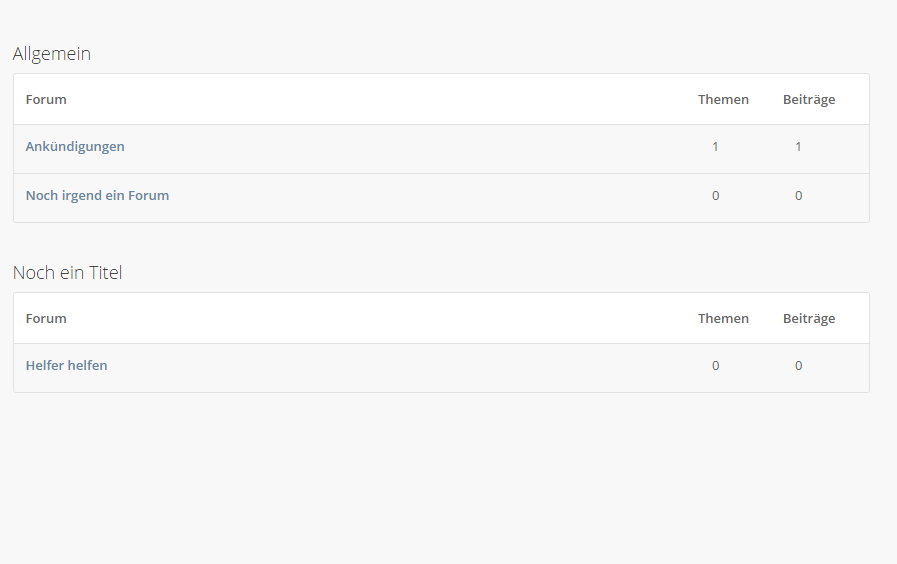
    thats what i want

    how i dit it?

    i get an new site and add shortcodes like [bbp-single-forum id=3234]

    now the breadcrumbs are linking on the “original” root “/forums” link… so i have think, ok, make an site with the perma link on /forums/ and add the shortcodes…

    but when i dit this, my site looks like this:
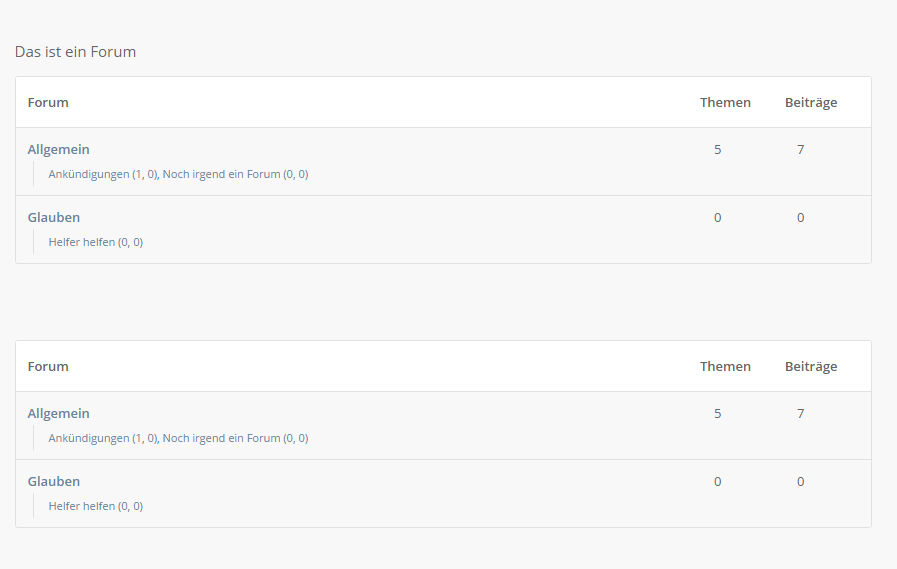
    site now:

    so, can you please help me change “only” the one breadcrumbs to my custom site, or what can i do the “originally” “/forums/” works correctly with the shortcodes?

    thank you very much

    greetz

    #174697
    Kineta
    Participant

    You can try putting this inside a .js file in your theme. You’ll have to adjust the tinymce editor settings in this code to your liking.

    addReply = {
    		moveForm : function(replyId, parentId, respondId, postId) {
    			
    			// remove the instance of tinymce before moving it's container
    			tinymce.remove('#bbp_reply_content');
    			// it can't possibly be this easy:
    			$('#post-container-'+parentId).after($('#'+respondId)); 
    			
    			tinyMCE.init({   
    				selector: 'textarea', 
    				plugins: 'hr, wplink, textcolor, paste, image, media, wpemoji, emoticons, charmap, fullscreen',
    				forced_root_block : "",
    				menubar: false,
    				toolbar1: 'styleselect,bold,italic,underline,strikethrough,blockquote,bullist,numlist,alignleft,aligncenter,alignright,fullscreen',
    				toolbar2: 'fontsizeselect,forecolor,outdent,indent,hr,charmap,emoticons,image,media,link,unlink,wp_help'
    			  });
    			
    			// write the correct reply-to id to the hidden field that stores it
    			// this prevents the wrong id inserted because we're returing false at the end of the function.
    			$('input#bbp_reply_to').val(parentId)
    			
    			// return false to prevent page reload, losing all the work.
    			return false; 
    		}
    	}
    #174695
    Kineta
    Participant

    Funny, I could have sworn reply notifications worked when we were first testing and trying to find a forum platform that met our needs. Must have hallucinated that!

    Email notifications are fine for some things, but on a very active discussion board they would be overwhelming.

    I’ve been trying to hack the code in the includes/extend/buddypress/notifications.php file. But I’m pretty green with both php and wordpress/bbpress development. It does look like all the parts are there to extend it. But I’m a bit perplexed about some things in the code.

    #174679
    AlexanderCnb
    Participant

    Should this still work? It doesn’t seem to close the topics in my case. Just wondering if it’s me doing something wrong or that this doesn’t apply anymore.
    WordPress version: 4.5.2
    bbPress version: 2.5.9
    Child theme: Canvas WooThemes

    This is the code I’ve got in the plugin now, from all the code @robin-w provided.

    <?php 
    
    /*
    Plugin Name: BBPress Close Old Posts
    Description: Close BBPress 2.0+ posts that haven't been updated in X days. 
    Author: Raygun
    Version: 0.1
    Author URI: http://madebyraygun.com
    
    This program is free software; you can redistribute it and/or modify it under the terms of the GNU General Public License as published by the Free Software Foundation; either version 2 of the License, or (at your option) any later version.
    This program is distributed in the hope that it will be useful, but WITHOUT ANY WARRANTY; without even the implied warranty of MERCHANTABILITY or FITNESS FOR A PARTICULAR PURPOSE. See the GNU General Public License for more details.
    You should have received a copy of the GNU General Public License along with this program; if not, write to the Free Software Foundation, Inc., 51 Franklin St, Fifth Floor, Boston, MA 02110-1301 USA
    */ 
    
    register_activation_hook(__FILE__, 'bbpress_topic_scheduler');
    
    add_action('bbpress_daily_event', 'bbpress_close_old_topics');
    
    function bbpress_topic_scheduler() {
     wp_schedule_event(time(), 'daily', 'bbpress_daily_event');
    }
    
    function bbpress_close_old_topics() {
    	// Auto close old topics
    	$topics_query = array(
    		'author' => 0,
    		'show_stickies' => false,
    		'parent_forum' => 'any',
    		'post_status' => 'publish',
    		'posts_per_page' => -1
    	);
    	if ( bbp_has_topics( $topics_query ) )
    		while( bbp_topics() ) {
    			bbp_the_topic();
    			$topic_id = bbp_get_topic_id();
    			$topic_date = strtotime( get_post( $topic_id, 'post_date', true ) );
                    $forum_id = bbp_get_topic_forum_id($topic_id);
                    if ($topic_date < strtotime( '-1 day') && $forum_id == 1276 )
                        bbp_close_topic( $topic_id );
    		}
    }
    ?>
    #174671
    Kineta
    Participant

    This bug isn’t just in Chrome. It’s actually because TinyMce editor doesn’t like being moved around the DOM, which is what the the function in bbPress is trying to do – tying to move the editor under the post you’re replying to.

    I wish this bug would get fixed, but in the meantime you can overwrite the javascript function in a .js file in your theme. This is what I did – remove the editor before moving the containing element, then reinitialize it. Works well for me.

    FYI: in case you don’t know javascript well – this needs to be inside jquery $(document).ready()

    // overwrite bbPress's broken function that moves the reply form under the replied to post in threaded topics
    	
    	addReply = {
    		moveForm : function(replyId, parentId, respondId, postId) {
    						
    			tinymce.remove('#bbp_reply_content');
    			// it can't possibly be this easy:
    			$('#post-container-'+parentId).after($('#'+respondId)); 
    			
    			tinyMCE.init({   
    				selector: 'textarea', 
    				plugins: 'hr, wplink, textcolor, paste, image, media, wpemoji, emoticons, charmap, fullscreen',
    				forced_root_block : "",
    				menubar: false,
    				toolbar1: 'styleselect,bold,italic,underline,strikethrough,blockquote,bullist,numlist,alignleft,aligncenter,alignright,fullscreen',
    				toolbar2: 'fontsizeselect,forecolor,outdent,indent,hr,charmap,emoticons,image,media,link,unlink,wp_help'
    			  });
    			
    			// write the correct reply-to id to the hidden field that stores it
    			// this prevents the wrong id inserted because we're returing false at the end of the function.
    			$('input#bbp_reply_to').val(parentId)
    			
    			// return false to prevent page reload, losing all the work.
    			return false; 
    		}
    	}
    #174669
    Kineta
    Participant

    I achieved this by using jquery/javascript to set those fields to be hidden, then copy over the value from the field that’s visible to the hidden fields.

    I’ll post my code if you’d like. It’s easy enough to do.

    #174668
    truelux
    Participant

    I would like to remove the LINK associated with the Admin username.

    I placed the following into my child-theme’s functions.php file:

    /* Remove link urls from forum author instances */
    add_filter( 'bbp_get_author_link', 'remove_author_links', 10, 2);
    add_filter( 'bbp_get_reply_author_link', 'remove_author_links', 10, 2);
    add_filter( 'bbp_get_topic_author_link', 'remove_author_links', 10, 2);
    function remove_author_links($author_link, $args) {
    $user_id = bbp_get_reply_author_id( $reply_id );
    			$user_info = get_userdata($user_id);
    			$bbpadmin = $user_info->user_login;	
    	if ($bbpadmin == "ADMINUSERNAME") {
    		$author_link = preg_replace(array('{<a[^>]*>}','{}'), array(" "), $author_link);
    		return $author_link;
    		} else {
    		return $author_link;
    		}
    }

    This works fine but I noticed the link still appears when viewing “last responded.” Removing the link from just Admin helps with security since the username won’t be out in the public.

    #174636

    Topic: Edit Filter

    in forum Troubleshooting
    jawittdesigns
    Participant

    When you go to edit a topic or reply what filter is used to render the content in the editor.

    The issue I’m having is I have markdown support for the forum instead of the normal code button.

    So I use three back ticks at the beginning and end for code blocks. It works fine until you go to edit. Something is stripping out 2 of the back ticks on the code block.

    I figure its a filter, but I can’t figure out which one.

    bbPres v2.5.9
    WordPress v4.5.1

    #174624
    David Tierney
    Participant

    Yes, if a functions file exists, you would copy and past it there, anywhere before the closing php tag if there is one at the end of the functions file. You should see bunches of code in your functions.php file so you do not want to break up any group of code, just like the group above needs to be together with itself as he wrote it.

    IF you do not have a functions.php file in your child theme, you can create one. Read up here to learn more. https://codex.wordpress.org/Functions_File_Explained

    #174616
    Stephen Edgar
    Keymaster

    Regarding option 1, is it even possible and does such a script exist?

    Yes, there one, maybe two scripts, but they are quite out of date.

    Regarding option 2, what are the required wp_postmeta keys I would need to generate?

    Have you looked at the internals of any of the ~25 importers included with bbPress?

    phpBB and SMF are the two most “feature complete” in that they import nearly 100% of the required wp_postmeta fields.

    A basic example version of an importer is included, Example.php in the `/includes/admin/converters/ folder, its fairly basic, when comparing it with either the phpBB or SMF importers it might make more sense. There is also some initial documentation on modifying this yourself https://codex.bbpress.org/getting-started/importing-data/import-forums/custom-import/

    If you upload to https://gist.github.com/ or somewhere, take a screenshot of it from phpMyAdmin I’ll happily help you get it up and running.

    Also, I suggest using bbPress 2.6-alpha, loads of importer improvements over bbPress 2.5.9, you can grab it from here https://bbpress.org/download/

    #174604
    wilsonca
    Participant

    I’m having the same problem except that it is erratic. Sometimes the login goes well and other times users are unable to login. In every case, however, the user is directed to the Home page instead of the Forum page. When things don’t go well, a user clicks on the Forum page where it shows that he is not logged in, even though he just logged in.

    I do not understand any of the above fixes. I am certainly a newer Newbie than the original poster. I already have half a dozen or so participants trying to use the forum, so I can’t afford to uninstall, reinstall, or otherwise upset the current status of the forum.

    I’m hoping someone here can explicitly tell me just how to correct this problem especially if it involves adding/replacing/editing code since I have no idea where to begin when it comes to this.

    Thank you.

    mvaneijgen
    Participant

    I have the link but I need to add the username in the url and I don’t see how I can get that in the .PO file

    /leden/USERNAME/forums/abonnement/

    Other topic is there maybe a way for really active people on the forum to unsubscribe from emails and just see the notification counter on the website,

    #174587
    Kineta
    Participant

    This is my code, fwiw. I don’t want any role but keymasters to add tags. Participant level is working as expected i.e *not* showing but the moderator level is still showing the tag field.

    add_filter( 'bbp_get_caps_for_role', 'my_bbp_role_caps', 10, 2 );
     
    function my_bbp_role_caps( $caps, $role ) {
       if ( $role == 'bbp_participant' ) {
          $caps['assign_topic_tags'] = false;
       }
       if ( $role == 'bbp_moderator' ) {
          $caps['assign_topic_tags'] = false;
       }
       return $caps;
    }
    #174584

    In reply to: Forum List

    Robin W
    Moderator

    not quite sure what you are after.
    can you not use the shortcodes

    https://codex.bbpress.org/features/shortcodes/

    #174554
    Soul
    Participant

    Thank you Robkk for your reply.
    This works fine.
    One question. As i can see it is only after author details. Is it possible to put it after the reply either? like on the screenshot.
    What will be the action code for this section?

    Thanks

    Best regards

    #174540
    Stephen Edgar
    Keymaster

    Having created a 2nd keymaster user this sounds like a plugin conflict, follwo the steps here to see if you can narrow down which plugin is causing the conflict

    https://codex.bbpress.org/getting-started/troubleshooting/#plugins

    #174539
    Stephen Edgar
    Keymaster

    For the bbp_setup_current_user issue see:

    bbp_setup_current_user was called incorrectly

    Most likely all the above replies which are *not* the same thing, they are all different errors are caused by the same thing though, a plugin or theme conflict.

    See this https://codex.bbpress.org/getting-started/troubleshooting/

    #174538
    Robkk
    Moderator

    Maybe try something like this I guess. Place this php code snippet into your child themes functions.php file or use a plugin like functionality.

    add_action( 'bbp_theme_after_reply_author_details', 'rkk_add_reply_link' );
    add_action( 'bbp_theme_after_topic_author_details', 'rkk_add_reply_link' );
    function rkk_add_reply_link() {
     if ( is_user_logged_in() ) {
    	echo bbp_get_reply_to_link();
     }
    }
    #174536
    Robkk
    Moderator

    @zimmermannc You can use this code php code snippet/plugin and it will put the forum form in bbPress user profiles for users that can moderate.

    https://gist.github.com/ntwb/9887310

Viewing 25 results - 6,426 through 6,450 (of 32,505 total)
Skip to toolbar