See this https://codex.bbpress.org/bbpress-in-your-language/
It’s the same process for both bbPress & BuddyPress
How can I get the new topic form of a particular forum to show outside of bbpress?
I am looking at the form-topic.php file and see all the required actions, but how can I use it outside of the forum. The form-topic.php does not show what forum it is being used under. If I wanted it to post to a certain forum, I supposed I would have to define some variable when outside of bbpress?
hi there – new to bbPress
followed you instructions on getting started; created my forums page and added a few forums & topics, yet the forums page layout is one continuous string of text.
any advice on how to address this?
WordPress 3.8.1
bbPress Version 2.5.3
http://cynergycrossfit.com/cynergisticlife/forums/
appreciate your help!
Thanks again @robin-w. I do not feel this needs to be a paid job for a developer. I am just trying to figure out how bbpress inserts data into the tables.
I have manually populated a “wp_posts” table and filled in all the rows as a topic made in the forums shows, although the one I manually added does not show up. I have even got my form to post to specific columns and they still do not show up in the forums.
There must be something simple I am missing.
I guess the developers don’t visit their own forum anymore?
Please, I need to know how to change the labels ‘Forum’ to another word, everywhere in bbpress, can you help me? thanks a lot in advance.
This may be too late for the OP, but this worked for me:
In my customized form-user-edit.php:
1. Disable the normal Input (as the OP did):
<input type=”text” name=”email” id=”email” value=”<?php bbp_displayed_user_field( ‘user_email’, ‘edit’ ); ?>” disabled=”disabled” class=”regular-text” tabindex=”<?php bbp_tab_index(); ?>” />
2. Add a Hidden Input, which Inputs the existing Email value.
<input type=”hidden” name=”email” id=”email” value=”<?php bbp_displayed_user_field( ‘user_email’, ‘edit’ ); ?>” />
If you look at the bbpress file: bbpress/includes/common/template.php, at lines 1621 and 1622, you can see that this is how the User_ID was entered (ie, via a Hidden input).
For me, so far so good. I hope this was of some help. –Bill
If anyone is looking for this, here is the answer:
Turning no-follow links to do-follow
not in the core, but I believe this plugin does what you want
https://wordpress.org/plugins/bbpress-direct-quotes/
is this just replies? and just in back office?
I seem to remember somewhere that there was an issue with bbPress and localhost – something to do with the IP address resolution, but can’tv remember what it was and how it was fixed, so this may not be relevant !
Looks like it is bbpress selecting the default page from your theme, which looks like a tree columns one.
Your “about” page is full screen, so if that’s what you want, suggest you make a copy of whatever .php that is using (eg fullwidth.php) from your theme file, and then rename the copy file to bbpress.php and put it in the same theme folder as the original. Then bbpress will use that as it’s page file.
– How to hide the WP toolbar by default when a user registers?
I found this code to add in functions.php theme file:
add_filter('show_admin_bar', '__return_false');
– I use the bbPress’ form register template, how to redirect users to a specific page after submit and not to the WP’s form login?
I found this code to add in functions.php theme file:
function bbp_form_register_custom_redirect()
{
   return 'URL here'; // Ex : return get_permalink(73);
}

add_filter('bbp_user_register_redirect_to', 'bbp_form_register_custom_redirect');
But with this code, when there is an error (like username already exists), the redirect is not effective.
Any idea?
Does bbPress not have this feature?
@mordauk: In the trac you posted a screenshot which shows a link to subscribe to forums. This links is at the top of the forums, in the header row. Can you tell me if this is where the link was positioned in the final release as I can’t find it in my installation?
bbPress 2.5.3
WordPress 3.8.1
twentyeleven theme.
Many thanks
Glyn
Can’t explain,
The back office “replies” just not work ! see :
wordpress 3.8.1
bbpress 2.5.3
hueman theme
dev version, localhost.
Hi Guys.
Looking at the trac I can see that forum subscriptions has been implemented in bbpress 2.5:
https://bbpress.trac.wordpress.org/ticket/2299
…but I can’t see how to subscribe to a forum.
I have “Allow users to subscribe to forums and topics” enabled in the dashboard and am using bbpress 2.5.3
Hello,
I install a bbPress forum for a support website. Our customers should be able to register to the forum, but should not have access to the WP admin. So I have few questions about that:
– How to separate customer users who have only access to the forum, and admin users who have access to WP admin panel?
– How to hide the WP toolbar by default when a user registers?
– I use the bbPress’ form register template, how to redirect users to a specific page after submit and not to the WP’s form login?
– In the mail with password, how to change URL by a specific page and not to the WP’s form login?
I think that’s all for now…
Thanks!
ok, think the ones on the page link are around line 90 (my .css is different, so exact lines may vary) – look for
#bbpress-forums li.bbp-header,
#bbpress-forums li.bbp-footer {
	background: #f3f3f3;
	border-top: 1px solid #eee;
	font-weight: bold;
	padding: 8px;
	text-align: center;
}

#bbpress-forums li.bbp-header {
	background: #eaeaea;
}
and change background to the same as above.
They may be some others as you go through. Come back with any that are still niggling, and I’ll chase them down for you.
As you are making changes to bbPress templates, make a copy of the file onto your PC, and keep a list of what you changed, as any bbPress updates will override this file.
You should revisit child themes when you get some more time, as this is a better way to do it, but the way you’re doing will work fine (and was what I did in the early days!).
Ok, I’d try deactivating all the plugins (except bbPress!) and see if it then works.
If it doesn’t work with all the plugins disabled, switch to default theme such as twentyten and see if it then works.
If it works with plugins disabled, add back the plugins one at a time and see which one is causing the conflict.
Thanks for the reply @robin-w. I have browsed my db files and noticed the bbpress tables are located inside wp_posts?
I figured they would have their own prefixes/tables. Anyways, would you mind showing me an example of how it could post say my html form name as a topic in a bbpress specified forum?
I already have the form setup and know how to post it, although I am not as familiar with sql and such.
Thank you, I appreciate it!
Hello,
Can someone give me advices to do the following please?
I would like new replies in a topic placed in this order:
TOPIC A
– Post 1
— Reply to Post 1
— Reply to Post 1 and to Reply 1
– Post 2
– Post 3
– Post 4
– Post 5
— Reply to Post 5
– Post 6
Replies to a post would be shifted to the right (just reduced in size and with float to the right for example)
For the moment in my bbpress it is like this:
TOPIC A
– Post 1
– Post 2
– Post 3
– Post 4
– Reply to Post 1
– Reply to Post 1 and to Reply 1
– Post 5
– Post 6
– Reply to Post 5
I think this way is not really easy to follow when a reply to a post is, for example, after 4 pages…
If someone can tell me which file I need to edit to do this change it would be really appreciated thanks 🙂
Hello @jamestranm , can you share how you did it please?
Want to do the same thing for the reply section and the topics section ^^
(I would like topics in bbpress with the same template as my wordpress theme comments)
thank you!
@netweb
I don’t need their role or title. For some reason the avatars will just not come up in the loop outside of the mychild/bbpress/loop-single-forum.php files and mychild/bbpress/loop-single-topic.php. So it works fine on index pages.
I’ve tried all of the but nothing
Here’s what the code looks like right now:
<?php $args = array( 'post_type' => 'topic', 'posts_per_page' => 10 );
			$the_query = new WP_Query( $args );?>

<?php if ( $the_query->have_posts() ) : ?>

  <!-- pagination here -->

  <!-- the loop -->
  <?php while ( $the_query->have_posts() ) : $the_query->the_post(); ?>
   <?php bbp_author_link( array( 'post_id' => bbp_get_forum_last_active_id(), 'size' => 32 ) ); ?>

	<a class="bbp-topic-permalink" href="<?php bbp_topic_permalink(); ?>" title="<?php bbp_topic_title(); ?>"><?php bbp_topic_title(); ?></a>
  <?php endwhile; ?>
  <!-- end of the loop -->

  <!-- pagination here -->

  <?php wp_reset_postdata(); ?>

<?php else:  ?>
  <p><?php _e( 'Sorry, no posts matched your criteria.' ); ?></p>
<?php endif; ?>
This worked for getting the original post author, but I need the latest active poster to appear<?php echo get_avatar( get_the_author_meta( 'ID' ), 32 ); ?>
Is there a wordpress function equivalent for this function: bbp_get_forum_last_active_id() that I can use with get_avatar() ?
What file do these functions reside in? Maybe I could copy the functions out and make new ones in mychild/functions.php or see if something wrong and replace the file?
Thank you for the help!
There is a broad outline here: https://codex.bbpress.org/import-forums/
Some more Vanilla specif info here: https://codex.bbpress.org/import-forums/vanilla/
Essentially you should be able to open up your Vanilla Config file in a text editor:
eg. /public_html/dev/vanilla/conf/config.php
`
// Database
$Configuration[‘Database’][‘Name’] = ‘ntwb_vanilla2’;
$Configuration[‘Database’][‘Host’] = ‘localhost’;
$Configuration[‘Database’][‘User’] = ‘ntwb_wpdev’;
$Configuration[‘Database’][‘Password’] = ‘abc123’;
`
Use the values you have in the bbPress importer screen.
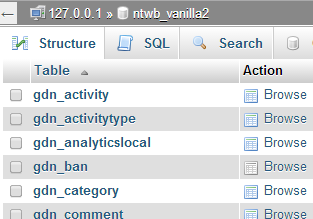
To get the table prefix you might have to open phpMyAdmin on your hosting providers control panel (cPanel)
In this image my table names have a gdn_ prefix, this is what you would use.
I am pretty sure gdn_ is the default and used by most installs.
Hi!
We have a private forum so we expect that all bbpress pages are hidden from visitors that is not logged in. However, we found out that all user Profile pages are visible to normal non-logged in visitors. http://example.com/forums/users/username
Is this the normal behavior of BBPress? Or is there a plugin that prevents this?
Thanks!


