Hi guys.
Do you know where I can find the file to edit the bbpress profile page for members ?
And how do I get those links (last topics, last replied, subscriptions, favorites, edit) on the profile page ? I only see the text of the number of replies, answers and if it is a administrator or user…
thanks
without spending time looking at defkon’s solution, I could say.
However if you get the page template working, then copying that to a bbpress.php will ensure that bbpress uses it, and you can revert the page.php back to how it was, so it shouldn’t have any implications elsewhere on your site
Yea I forgot to mention I had tried that fix Robin, sorry.. I did some more searching and found
that one person fixed it using a multisite install and another
https://wordpress.org/support/topic/bbpress-forum-homepage-displaying-oddly
Pinboard with BBPress
I’m in the process now of trying Defkon1’s solution from the first url
Hi there,
I have a site using latest versions of buddypress and bbpress. My users can create groups that contain a forum. In addition I use the “group email subscription” plugin, to keep users in groups updated. This works as a charme.
However, some of the group users now want to have subforums in their groups, in order to have a better overview. As soon as we had created the subforums, we discovered a bug: New posts now dont show up in the activity stream of the group. In addition, it does not reset the “last active” flag of the group. Furthermore, and this is my real problem, the email notifications does not work anymore.
Anything I can do here to get subforums with groups working properly?
Thanks and regards!
Think it’s as simple as
is_bbpress()
so try
<div class="breadcrumbs">
    if(function_exists('bcn_display') && is_bbpress())
{
bcn_display();
}</div>
Haven’t checked the syntax, I’ll let you do that
Hi all,
First of all I am big newbie in bbpress and I would like to know where I can find the file to edit the bbpress profile page for members ?
Could you also tell me how do I get those links (last topics, last replied, subscriptions, favorites, edit) on the profile page ? I only see the text of the number of replies, answers and if it is a administrator or user…
Thanks
Regards,
Hello, I help run a university student organization WP site with Buddy Press. I’m getting a fatal error when trying to activate the plug-in. I’m using the latest WP, Buddy Press and trying to install the latest bbPress.
/site/folder/wp-includes/plugin.php on line 199
Fatal error: Call to undefined function bbp_get_user_role() in /site/folder/wp-content/plugins/bbpress/includes/core/update.php on line 355
Because Google searches are giving me nothing, it’s rather maddening. Thanks!
thanks @robin-w !
I’ve tried to use all the avatar functions found in the documentation in the wp_query(), but none are working. I’ve tried it locally with newer updates of buddypress/bbpress and live with a fresh install and nothing.
This is the actual tag I want to use:
<?php bbp_author_link( array( 'post_id' => bbp_get_topic_last_active_id(), 'size' => 14 ) ); ?>
They work perfectly in the mychild/bbpress/loop-single-topic.php , but I just can not get it to work in the query! Is there anything I am missing, or doing wrong?
Thanks for the help!
In my opinion it Looks like bbpress is selecting the default page from installed theme, which have a tree columns. I had the same problem on forum on my site hotmax. Now its working great.
bbp_get_time_since
I found it in these files
bbpress\includes\topics\template-tags.php
bbpress\includes\replies\template-tags.php
bbpress\includes\forums\template-tags.php
bbpress\includes\common\widgets.php
bbpress\includes\common\functions.php
Now what I need to edit to remove the rest of the decimal?
I want to ask because I am a beginner in php
I am using WordPress MS (version 3.8.1) with bbpress and buddypress.
I have the wp-admin folder on the host server password protected as a security measure.
There are two things occurring that I cannot figure out:
1) When a logged-in user tries to go to any forum, or a topic, the web browser is asking for a password to access wp-admin. Entering the password or clicking cancel does not appear to change anything. This does not happen when someone is not logged in.
2) When logging out from the “edit profile” screen, the user again gets the password request, and after clicking cancel is taken to a registration/lost password default screen.
These things occur on both Firefox and IE. Thanks in advance for any help I can get to solve this annoying issue. 🙂
There was a lack of help from the community but I figured out a way to hook into bbpress’s admin links “bbp_get_reply_admin_links” from there Basically exploded the $content and put my link inside, imploded and had to write some new request handling, check permissions beyond what “current_user_can” can do. From there wamm bamm boom everything works.
yes, you can customise for bbpress only – I’m actually adding this to the documentation as I write this, as it’s not obviously there !
Wow ! That’s great, just what i need. And i can customize it for bbPress only …
Sorry if this is in the docs and i haven’t found it.
yes, no problem.
Make a copy of your theme page template that is full width, rename it bbpress.php and put in into your theme directory. bbPress will then use this for all it’s layout.
Hi,
I started a bbPress to test and i have a huge problem.
My theme have a few page templates, including full width pages and pages with sidebars. bbPress, in my case, uses full width for the index and a sidebar page template for the topics.
I want bbPress to use the full width template everytime, but i don’t know if the modification needs to be made to bbPress or my template.
Maybe someone can help me with that ?
Regards.
For bbPress specific functions, you’ll generally find the functions in template-tags.php files
bbp_get_forum_last_active_id()
is in forums
wp-content/plugins/bbpress/includes/forums/template-tags.php
You want to use the /dev branch of both projects:
https://translate.wordpress.org/projects/bbpress/dev/sv/default
https://translate.wordpress.org/projects/buddypress/dev/sv/default
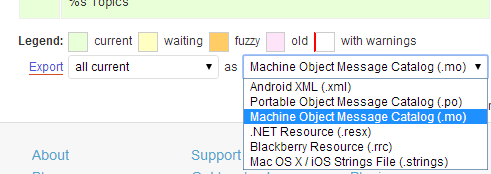
On each of the above pages select ‘.mo’ from the dropdown at the bottom of the page and click export.
Rename each file to buddypress-sv.mo & bbpress-sv.mo
The extra instructions on the BuddyPress site might also help, I’ll try to get the bbPress updated soon also.
https://codex.buddypress.org/developer/translations/
ok, suggest you start by running a forum repair – probably not the cause, but would eliminate
dashboard>tools>forums>repair – run one at a time
Then I’d be looking at a conflict in plugins. Disable all plugins except bbpress and see if you still have the issue. If it goes away, re-enable plugins one at a time to work out which is causing the conflict. If that doesn’t work, switch to a default theme (say tewentytwelve) and see if that fixes it.
yes,
Dashboard>settings>forums>forum root slug to change the urls and breadcrumbs – just change forums to what you want it to say
Tp change the forum heading on the forums list, make a copy of
wp-content/plugins/bbpress/templates/default/bbpress/loop-forums.php
and place this in a folder
/wp-content/themes/%your-theme%/bbpress/
see https://codex.bbpress.org/step-by-step-guide-to-setting-up-a-bbpress-forum-part-3/ for a tutorial on this subject
Then edit line line 19 which says
<li class="bbp-forum-info"><?php _e( 'Forum', 'bbpress' ); ?></li>
to
<li class="bbp-forum-info"><?php _e( 'Elephant', 'bbpress' ); ?></li>
and it will say elephant instead of forum.
‘Thats the odd part, they are both using the default…and switching between the various different templates doesn’t seem to modify it. The theme has an internal setting that allows you to dictate how many ‘columns’ are shown. I can get it to show full page if I switch that around, but then my article page is also shown full (one column) I’m looking at the code further to try and figure out how to isolate one from the other’
Think that’s the route to go.
bbPress looks at the root of your theme for “bbpress.php” as a page template. if it doesn’t find it, it’ll use your themes “page.php”.
It sounds like your “page.php” page (whatever it’s called), has a parameter to set the columns, so within this they’ll be an “if” statement which is setting this.
What I think you need to do is as suggested in my first post. Copt the page file and call it “bbpress.php”. You should be able to find in that file where it is using the setting to create the columns and take this out. Alternately look in the twentyfourteen theme for the full page template and compare this to your file. You should be able to cobble the two together to get it to work.
If none of that works, (or alternately!) contact the theme developer to see if they have a solution.
You would need to make some custom templates
See https://codex.bbpress.org/theme-compatibility/
And there are a few other docs here https://codex.bbpress.org/
@netweb Thank you! But I have found this https://translate.wordpress.org/projects/bbpress/2.3.x/sv/default but how do I get it in my .mo file? Sorry, but Im a newbie to this! =(


