Hi everyone,
bbpress is my first forum I have never installed on my blog.
Something is so confuse for me, when I or one of my users create/reply a topic we have to wait 30 min – 1 Hr to see it (it doesn’t appear before)
Is there way to fix it ?
@jslom
Do you fancy having a go at seeing if you can get this going for a bbpress entry !
Come back and let us know.
Just thought I’d reply to przwilson:
I had the same problem and spent an entire day looking for the code. But I just found it.
IT’s at bbpress/includes/common/shortcodes.php
Around line 522 for me you’ll see the “largest” and “smallest” stuff. Edit it there and your problem is fixed. All you need to do is change the numbers.
Cheers.
 SK
SKParticipant
I just posted a topic with title “Last post date-time instead of Freshness” in bbpress.org support forums. It doesn’t appear anywhere. But when I tried again, I got a “duplicate” message. Please can you check and advise?
When a user tries to edit their reply, the “Edit” button links to: http://www.achievementfest.com/index.php/forums/topic/%5BTHREAD NAME]/edit/
Which goes to a 404 error. I am using WordPress 3.6.1, and bbPress 2.5.3-5249. I had been using a previous version of bbPress, with the same issue, and tried updating it to see if the problem resolved.
I cannot find anything about setting up the edit page, so, I don’t know if I missed a step.
Does anyone have a suggestion, please?
SKParticipant
Ticket https://bbpress.trac.wordpress.org/ticket/2031
One feature that I struggle a bit in why bbPress broke from the norm is Freshness. It is customary to have the last column for “Last post” which includes the date-time of last post (topic/reply) and the author of last post.
bbPress has decided to use “Freshness” instead of “Last post” as title. Instead of date-time, it displays time-since.
Perhaps time to move to the more convention approach here. Probably good for performance too – won’t need to calculate freshness.




I’m very new to bbpress but have been working with WordPress for quite a while. I have a WordPress form (displayed using a custom page template) to post solution here: http://pinkishhue.com/an-alternative-to-tdo-mini-forms-for-wordpress/#workingsolution
Perhaps this code could be altered to insert the post as a forum post instead of a regular post? Sounds like it shouldn’t be too complicated (maybe!)
Hope that helps.
I’ve seen this issue before but I can’t remember what it is 🙁
I searched here on bbPress but nothing, a Google search does show lots of bbPress v1.x forum sites with this error bug.
Do you have any other plugins or custom functions that are adjusting/using server time?
Yes, I was giving you the sort of code you need to write, in this case to write stuff to usermeta.
As I said this is not a bbPress issue as bbPress just uses wp-posts, so you’d do better on their forum
“On this forum you have a nice clean bar showing create topic favorites and subscriptions, how can I create this on my forum. Does not have to be exactly the same but similar.”
Answered in another post
“Not sure if that’s the correct way to go about it but seems to work!”
Suggest you read the setting up guides for how and where to change templates
Codex
“Also how can i fix the subscribe button/link as it is not displayed very well as you can see here. ”
Agree, not quite sure where this displays, will look when I get a moment
‘Also i created a page which i put the shortcode for new topic form which i link to from the main forum page as a button. this is great but the form does not display well on the page. How can i fix this? the forum is really spaced out as you can see here ‘
Not quite sure what this photo is showing, the button or the resultant page? Can you post the method or code you used on the “main forum page”
If I give a user ‘Keymaster’ permissions, they can see the topic, but not with Participant permissions. WP 3.8.1, BB 2.5.3, Theme 2013
Also using User Role Editor
I note that I cannot view BBPress permissions in the user role editor panel.
I could migrate to another role editor, but this might be a bit complex as we have a number of roles…
Any thoughts?
You should create a bbpress directory under your theme
ie
wp-content/themes/yourthemename/bbpress
and copy any bbpress templates to there.
bbPress will then use these instead of the default template ones
Otherwise any templates you alter will be overwritten by any upgrades and you’ll have to do the work all over again !
I have the below code in my menu to add login & register. it is working fine but I just want to redirect the profile link to bbpress profile page instead of going to wp-login. Currently user role displays in the place of register after logged in, it will be great if some one help me to get “Welcome username” and link to bbpress profile page.
Thanks so much in advance…
add_filter(‘wp_nav_menu_items’, ‘add_login_logout_link’, 10, 2);
function add_login_logout_link($items, $args) {
if( $args->theme_location == ‘top-menu’ ) {
$loginoutlink = wp_loginout(‘index.php’, false);
$registerlink = wp_register(”, ”, false);
$items .= ‘<li class=”menu-item login”>’. $loginoutlink .” . ‘<li class=”menu-item register”>’ . $registerlink . ”;
}
return $items;
}
I did it again after having refreshed the browser, but nothing,
then I deleted the cookies, switched off and restarted the pc but nothing changed, deleted and reinstalled bbpress, but nothing new happened
And more I noticed that there are into the different files of bbpress some messages that report the name ‘forum’ and they remain like that even if I changed the slugs, i.e. ‘This forum contains 1 topic, and was last updated by admin 22 minutes ago.’
So I entered each file to delete the instruction for breadcrumb, and try to find those messages, one by one to change ‘forum’ into the word of my choice, but it is a long job to do…
hi all,
currently i am facing one issue with bbpress + buddypress. i was installed and avtivated both plugins it is working but When clicking on any specific group it takes a very long time to load and then has a never-ending page of that group repeating itself over and over. same for forum option in groups page.
when i deactivate any one plugin it is working fine please tell me what can i do?
i am new in buddypress and bbpress
REPEAT : It would take a long time to go through what you would need to do – Basically it is all to do with styling and functions.
The problem is that in answering this question I’d need to explain firefox and firebug, css, php bbpress structure and lots more.
But to get you started – THIS IS NOT THE SOLUTION – but a couple of lines that will see you get further forward. you’ll need to look at “inline” as well to get the is horizontal.
You could do a bar several ways, but the easiest is create a copy of your page template for bbpress to use
see https://codex.bbpress.org/step-by-step-guide-to-setting-up-a-bbpress-forum/ section 8
and then play with the following
in css add
#subnav {
background: none repeat scroll 0 0 #2020ff;
border-bottom: 1px solid #BBBBBB;
font-size: 12px;
margin-top: 81px;
}
and in you bbpress page template put under the header
<div id=”subnav”>
<ul id=”nav-user” class=”menu”>
Register
Lost Password
</div>
Hi all so i have been playing with my bbpress install a little to get what i want and am almost there!
All i would like to do now is tidy it up a little but could do with some help!
On this forum you have a nice clean bar showing create topic favorites and subscriptions, how can i create this on my forum. Does not have to be exactly the same but similar.
Also how can i fix the subscribe button/link as it is not displayed very well as you can see here. 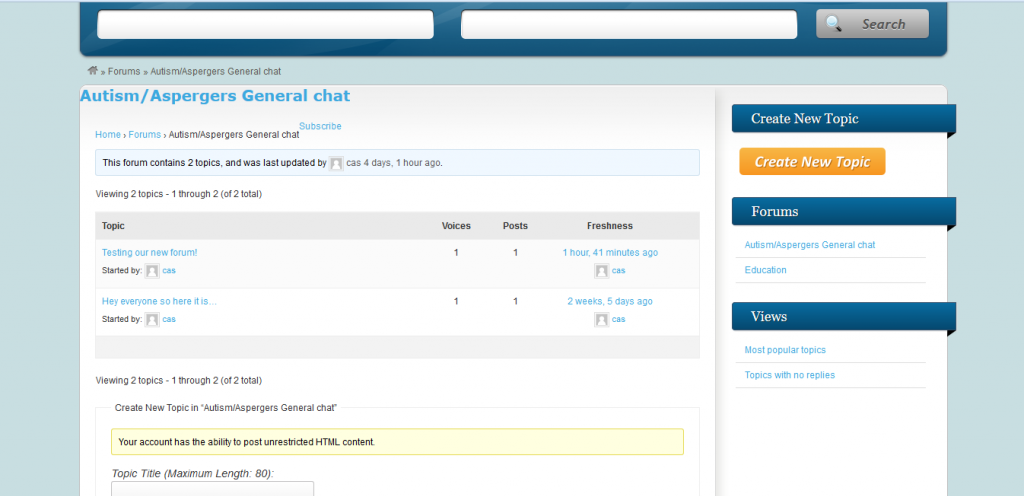
Also i created a page which i put the shortcode for new topic form which i link to from the main forum page as a button. this is great but the form does not display well on the page. How can i fix this? the forum is really spaced out as you can see here 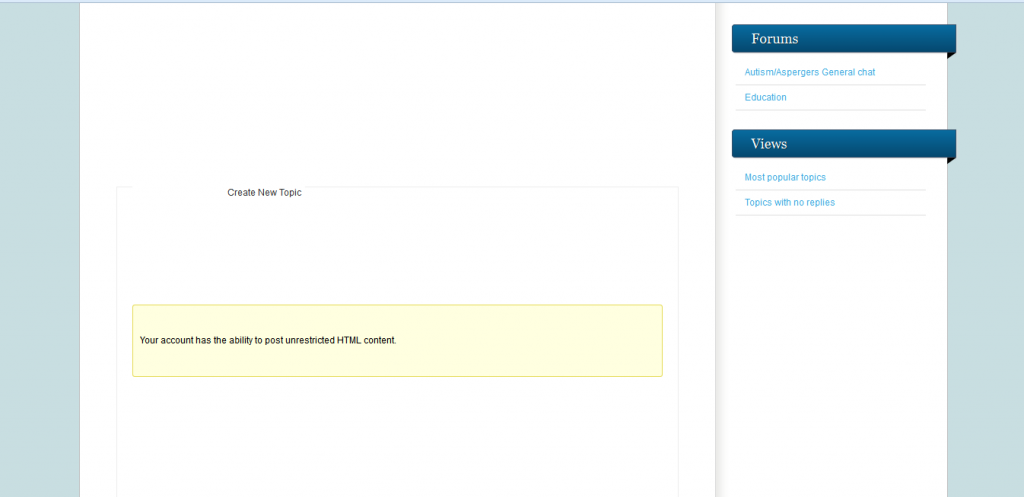
Any help on any of this would be great
Really a wordpress not a bbPress question, and quite a techy area
This is the code that I use to add a location to user details, which should help get you started.
//this function adds the updated town and county info to the database
function bbp_edit_user_tc( $user_id ) {
	$town = ( $_POST['town'] ) ;
	$county = ($_POST['county'] ) ;

	// Update town user meta
	if ( !empty( $town ) )
		update_user_meta( $user_id, 'town', $town);

	// Delete town user meta
	else
		delete_user_meta( $user_id, 'town' );

	//Update county user meta
	if ( !empty( $county ) )
		update_user_meta( $user_id, 'county', $county);

	// Delete county user meta
	else
		delete_user_meta( $user_id, 'county' );
}
add_action( 'personal_options_update',         'bbp_edit_user_tc' );
add_action( 'edit_user_profile_update',        'bbp_edit_user_tc' );

}
It would take a long time to go through what you would need to do – Basically it is all to do with styling and functions.
The basics are covered in the documentation in the codex https://codex.bbpress.org/ and some of the step by step stuff and layout will help you.
umm, Now I’m a bit confused.
The filter only affects the bbp breadcrumb, so that fact that your theme doesn’t have breadcrumbs is irrelevant.
If you just add that code to your themes functions, it will be used by bbPress as it loads and not display.
I presume that’s where you put the previous code to change to blogs? If not try that code again!
Whilst you can add it to a default theme such as twenty eleven, keep a note of it, as any theme upgrade will overwrite it. you should consider a child theme to let you make changes without affecting the core code and themes see https://codex.bbpress.org/step-by-step-guide-to-setting-up-a-bbpress-forum-part-2/ for some info on child themes
it seems to be a never ending story hahah 🙂 thanks a lot for helping me
there is no breadcrumb into this theme ‘twenty eleven’: no page and no posts has it, other than the page which contains bbpress shortcode…
I searched in bbpress editor, for the code you wrote, but I didn’t find it exactly
hmmm…my version works perfectly, one email per topic or reply.
bbPress uses WordPress to email, and the line in bbress notify is
`@wp_mail($email, $subject, $body, $headers);
`
Maybe that something within your wordpress/host setup is causing the issue (I suspect from yoru comments you already think this might be the case).
I’d suggest you do a test. in Dashboard>settings>discussion enable “email me whenever anyone posts a comment” and then post a comment to a blog (not bbPress). If you get more than one email, then it is not a bbPress problem, and try posting it to https://wordpress.org/support/ for help.
Well, it was kind of a disaster today. I set all the moderators to get the topics and replies. Suddenly everyone was getting multiple emails for one topic or reply. I had to change the settings back to just the owner (me) getting the notifications for the meanwhile until I can figure out why these emails are being duplicated.
The problem is that I can’t figure out what email address(s) bbPress uses to send these emails and how it obtains it/them. (I do understand that the plugin uses the User’s email addresses in Users as the addressee) We are getting emails from the standard Bluehost box but also emails from the team@ourblog.com address as well.
So my inbox filled up with 3 copies of each post and then all the moderators started emailing me to tell me that they were receiving multiple emails too.


