Hi,
Stupid question but where should I go to change/update to allow bbpress to allow the cite tag?
Thanks, I’ve slightly amended it to get it to display on all pages and added it to the documentation
Layout and functionality – Examples you can use
Thanks again for posting your solution !
I’ve just added the code I think you’re after to the documentation viz
Layout and functionality – Examples you can use
Come back if that’s not what either of you were after !
I have done a little more investigation (with a slightly different configuration). I created a new “test” topic as one user. I logged out and logged in as a different user and attempted to respond to the test topic and I received the following error:
Fatal error: Call to undefined function bp_notifications_add_notification() in /nas/wp/www/staging/cbblogers/wp-content/plugins/bbpress/includes/extend/buddypress/notifications.php on line 124
My configuration was:
bbPress v2.5.3
buddyPress v1.8.1
Wordpress v3.8.1
site url: http://cbblogers.staging.wpengine.com
Thanks much,
bbPress notifications of the type “bbp_new_reply” are showing up as blank in Buddypress. (I have also posted a ticket in the buddyPress forum about this issue: http://buddypress.org/support/topic/notification-still-not-being-displayed/)
As of today, my user notification page contains 43 “blank” notifications.
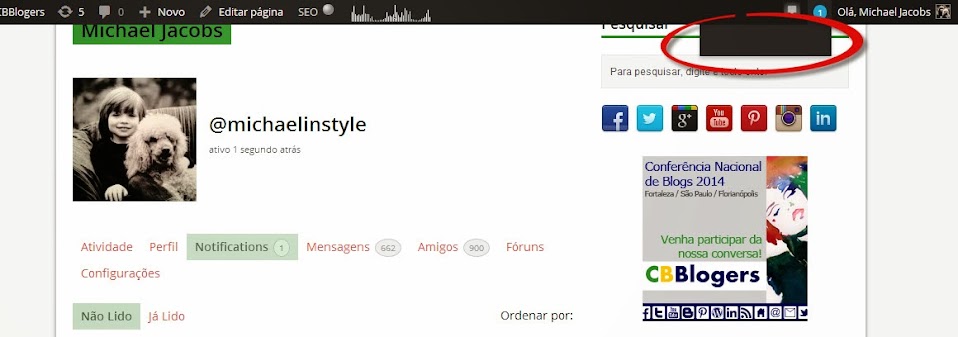
1 – When I mouse over the notification circle in the header of the page, the list of notifications is displayed as blank, even when I have notifications pending. Screenshot: https://lh5.googleusercontent.com/-gvkfWwp6rSg/Uu5iQpXEayI/AAAAAAAAM-0/tA7ok02oXC4/w958-h337-no/buddypress+blank+notification+list.jpg
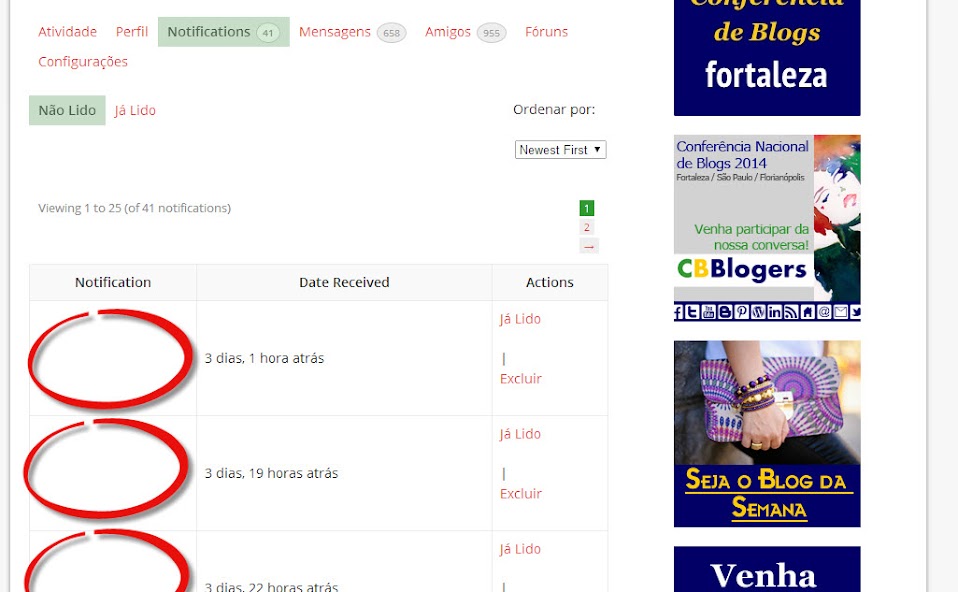
2 – When I click on the notification circle, I am taken to the list of current notifications, but the title of the notifications in each row is blank. Screenshot: https://lh4.googleusercontent.com/-OqKLmC4t_-c/UyWU-1tw42I/AAAAAAAANfc/MgSf8atB4mw/w958-h592-no/notifications+screenshot.jpg
Here are a couple of rows from the notifications database table:
201438 2 15959 2483 forums bbp_new_reply 3/11/14 16:11 1
201443 2 1064 2101 forums bbp_new_reply 3/11/14 17:33 1
201464 2 15959 2347 forums bbp_new_reply 3/12/14 13:07 1
201468 2 15959 2494 forums bbp_new_reply 3/12/14 16:43 1
Here is my current configuration:
bbPress v2.5.3
buddyPress v1.9.1
Wordpress v3.8.1
site url: http://www.cbblogers.com
Please help….
Thanks much,
Michael
@angeliti – suggest you contact the plugin site – they claim to be bbpress compatible.
https://optimizepress.zendesk.com/hc/en-us
‘Could you please tell me the same as above check box for the bbpress registration form.’
I Haven’t used gravity forms myself, but if you are using the bbpress login widget , then you should be able to add a page called say “register” and then call the gravity form from within that, and add that url to the widget.
@1lizcollins
Don’t know why it happened. try Dashoboard>tools>forums.reapir forums and run one at a time to see of this fixes your links.
It could also be worth checkint that you haven’t got a plugin or theme issue, although neither would cause a plugin to disappear.
Check other plugins
Check that no other plugins are affecting this.
Turn off all other plugins, and see if that fixes the problem. If the problem is resolved, add back one at a time to see which is causing the conflict.
Check themes
If plugins are not the cause, then it may be a theme issue. Switch to a default theme, such as twentytwelve, and test.
@adenslayer
This seems to be a known issue with this plugin viz :
https://wordpress.org/support/topic/wpsc-support-tickets-bbpress-conflict?replies=1
I see you’ve also posted to the plugin site, so hopefully the plugin author will come back to you.
I spoke with someone who suggested using bbPress since it’s a custom post type and writing a custom WP_QUERY.
I have this same issue. Turns out once I disable wpsc Support Tickets, BBPress returns.. Any idea how I can fix this issue?
Step 6 of the instructions reads:
That is, go to wp-content > plugins > bbpress > bbp-themes > bbp-twentyten.
There is no bbp-themes.
What do I do?
Hello!
I’m hitting exactly the same issue that @mralexweber describes on this post:
http://bbpress.org/forums/topic/first-post-not-showing/
I’m using OptimizePress plugin to protect my content, and looks like that plugin is causing the issue. Although I’ve contacted their support team, I need a temporary solution ASAP because this is blocking me from releasing my product :S
I’ve noticed that the OptimizePress documentation says this:
Attn Developers: Filters can be suppressed dynamically, using this technique:
query_posts(“suppress_filters=true”);
get_posts() auto-suppresses filters.
So I was thinking that maybe I could somehow use bp-custom.php and this technique to solve the issue… The problem is I don’t know how to do it 🙂
Anyone has any ideas??
Thanks SOOOOO much!!!
Could you please tell me the same as above check box for the bbpress registration form.
As you can see at the bottom of the screenshot I am missing the checkbox. The text ist standing there:

Hi there,
Several days ago BBPress disappeared from my WP site (I was running current versions of WP & BBpresss). The links in the dashboard were gone, and it looked af if the plugin itself had been deleted (no files when I looked via ftp, no plugin visible, etc). I reinstalled it today, and many but not all of my topics reappeared in the admin panel, but only 2 are visible on the front end of the forum. So weird! Can anyone help me solve this? I’m at a loss…
Bump – because this is the first Google Search result on bbPress slowing down sites.
Everything I read about bbPress said it’s light weight and integrates well into WordPress. Integration was excellent, but the website speed suffered significantly. I finally had to uninstall it and will need to look for a lighter weight forum plugin.
Click here to see a screen shot of the P3 Plug-in profiler results.
bbPress was responsible for half the load time of all active plugins (bbPress was a fresh install – with no forum activity). I had 24 plugins running total which means bbPress was taking longer to load than 23 other plugins combined. With results like that, there has to be a way to make bbPress more efficient either through caching or making bbPress more efficient when it searches for its short codes (which I believe is why bbPress loads on every page).
I’ve seen this concern on a few forums and really want to see bbPress be successful. If anyone has had success speeding up bbPress or believes my experience was an anomaly, please let us know. Thank you.
Website – WordPress 3.8.1 Multisite, BuddyPress 1.9.2., bbPress 2.5.3
This has just been fixed by the WP-E-Commerce team
https://github.com/wp-e-commerce/WP-e-Commerce/commit/824f56a36ad18fcfed3419ee4430f52a602cae52
It is part of the Version 3.8.14-dev version so presumably once v3.8.14 is released it will include the bbPress fix 🙂
Sorry, this functions seems to return the topic title, not the forum title. I have ‘googled’ around and got this:
$forum_object = get_queried_object();
$forum_id = $forum_object->forum_id; // get the forum id, is it right?
$forum_title = get_forum_name( $topic->forum_id ); // get forum title by id
$forum_class = sanitize_title_with_dashes($forum_title); //sanitize
Not working since get_forum_name doesn’t work outside bbpress (inside WordPress header). Any other idea on how get the forum title (not the topic) and use as body class on WordPress? Thank you.
You should be able to find a WordPress plugin that will let you do that
https://wordpress.org/extend/plugins/
bbPress uses the same login system as WordPress, so if you find one for WordPress it will also work with bbPress
Tried to disable hypercache and akismet in bbpress settings but it doesn’t help 🙁
Thank you very much for your replys.
I made a lot to get this toolbar work. Here is a list of things I already done to solve my problem:
- deleted every JavaScript
- deleted the code of the functions.php file
- deactivated every plug-in
- changed bbpress.php to page.php
- commented the bbPress-CSS in style.css out
- commented parts of my bbpress.php out
- enable the Visual Editor
…and I changed my theme to the default “Twenty Ten” theme and the toolbar appeared. The problem is my theme but I don’t know why. 🙁
JavaScripts are deleted and I will add header.php and footer.php files. I hope this is the solution but I don’t think so.
Hi there,
I am using bbPress 2.5.3-5249, WP 3.8.1 and theme dw-minion on http://www.blogperle.de.
My user contacted me with the information that he can’t create a topic.
Errormessage: ERROR: Your topic cannot be created at this time.
I found out, that the german word “Aufforderung” is the reason that the error message appears.
Every time I tried to use “Aufforderung” the bbpress denied to create (and edit) the post.
Wherever I used it in title or in bodytext, it does not work. I checked every user role. Only with Administrator rights it works with this word.
I checked within “Settings” > “Discussion” > “Comment-Blacklist” if this word is there. It is not.
Any help for this? Aufforderung means “challenge” (to sb. to do sth.) or better “request”.
Hi,
Please let me know if login to the forum via FB/G+ is/will be available.
Thanks!
Sowmya
I made the copy and make a try, but it doesnt work.
What I did is copy exactly the content of page.php, and name it bbpress.php, should I add anything else to the bbpress.php file?? I also keep in the theme folder page.php