Search Results for 'bbpress'
-
AuthorSearch Results
-
April 14, 2014 at 8:18 am #145028
In reply to: How to Change bbpress Colors
Robin W
ModeratorWhich tends to suggest that you are having the issue rather than that the codex doesn’t work !
css is loaded at various times, and changes can be overwritten by later loads.
Try putting ‘!important’ after a few to see if that helps, if so then apply to all. This tells the code not to apply later changes.
eg
#bbpress-forums li.bbp-header {
 background: #eaeaea !important;
 }
April 14, 2014 at 8:04 am #145025In reply to: bbpress sidebar at bottom of page
Chucky_PS
ParticipantHello,
I am using a page called forums and the shortcode [bbp-forum-index] but the sidebars do not appearance.
I have located the page_sidebar.php and copy in the theme directory as bbpress.php.
How can I to select the page sidebar? Actually the space to sidebars is reserved but the sidebars do not appears. Click in any discussion to check it out.
http://www.jailbreakup.com/foro/
Thanks in advance
April 14, 2014 at 7:39 am #145023In reply to: Resize Avatar with Simple Local Avatar
Stephen Edgar
KeymasterThis is not a bbPress issue, bbPress only uses the standard WordPress avatars.
Check out the FAQ and/or support forum for the plugin you are using that let’s users upload their own avatar.
April 14, 2014 at 5:11 am #145013In reply to: Videos (youku)
KeymasterThe WordPress language pack for
zh_CHincludes the following code:
https://i18n.trac.wordpress.org/browser/zh_CN/tags/3.8.1/dist/wp-content/languages/zh_CN.php#L8483 /** 84 * Youku wp_embed handler 85 * 86 * Embed code last updated: 87 * Wed, 06 Jun 2012 00:36:11 -0400 88 * 89 * Feel free to submit or correct URL formats here: 90 * https://cn.wordpress.org/contact/ 91 * 92 * @since 3.4.0 93 */ 94 function wp_embed_handler_youku( $matches, $attr, $url, $rawattr ) { 95 $embed = sprintf( 96 '<embed src="http://player.youku.com/player.php/sid/%1$s/v.swf" allowFullScreen="true" quality="high" width="480" height="400" align="middle" allowScriptAccess="always" type="application/x-shockwave-flash"></embed>', 97 esc_attr( $matches['video_id'] ) ); 98 99 return apply_filters( 'embed_youku', $embed, $matches, $attr, $url, $rawattr ); 100 } 101 wp_embed_register_handler( 'youku', 102 '#https?://v\.youku\.com/v_show/id_(?<video_id>[a-z0-9_=\-]+)#i', 103 'wp_embed_handler_youku' );So as you should be able to have this in WordPress posts and pages etc that ‘should’ flow on down to bbPress to allow you to use youku 🙂
April 14, 2014 at 5:08 am #145012In reply to: Videos (youku)
KeymasterHi 🙂
bbPress follows WordPress list here https://codex.wordpress.org/Embeds
Oh…. Look… You should be able to 🙂
Are you running WordPress with
define('WPLANG', 'zh_CH');in yourwp-config.php?April 14, 2014 at 4:49 am #145009In reply to: Forum vs Blog permalinks
KeymasterWordPress can only have one page titled
page_nameand use the slugpage_namethus this then extends to bbPress.I thought we had a bbPress ticket for this on Trac but I can’t find it right now https://bbpress.trac.wordpress.org
April 14, 2014 at 3:29 am #145005KeymasterProbably you should use http://chamabox.co.ke/forums/feed and http://chamabox.co.ke/topics/feed, any bbPress page, section, forum topic, just add
/feedto the end of the URL and you should be good to go.That said, I see the feeds are broken, it looks like either the ‘wdsi-slide_in’ or ‘mailchimp’ plugins are injecting content into bbPress’ RSS feeds. What happens with these plugins disabled?
April 14, 2014 at 3:11 am #145003In reply to: add custom profile field or group as signature?
KeymasterThere are a few bbPress signature plugins, maybe one of these will do what you are looking for
https://wordpress.org/plugins/search.php?q=signature+bbpressApril 14, 2014 at 3:06 am #145001KeymasterIt shouldn’t have done that 🙁
I’d suggest going to ‘Tools’ -> ‘Forums’ and resetting your forums which will delete all forums, topics and replies and optionally imported users and have another go at it.
You would probably be best setting up a test install of WordPress and bbPress to make sure the import finishes successfully.
If you find it keeps doing this please create a support ticket in Trac and I’ll take a look at why it isn’t working. https://bbpress.trac.wordpress.org/
April 14, 2014 at 2:58 am #145000In reply to: Displaying a custom field in profile page
KeymasterHere is another way to do custom profile fields:
https://codex.wordpress.org/Plugin_API/Filter_Reference/user_contactmethods
bbPress will display any of of these fields you add or remove for a users profile page, as many of few as you like.
April 14, 2014 at 2:46 am #144999In reply to: Display latest post excerpt under Freshness
KeymasterIf when you decide to come back to this you’ll want to use
the_excerpthttps://codex.wordpress.org/Function_Reference/the_excerpt
There are varios examples scattered throught this site also
April 14, 2014 at 2:38 am #144996In reply to: Make topic only visible to author and mod.
KeymasterThere are a couple of weird things happen with bbPress and setting them to ‘private’ from the backend, we just haven’t tested it thoroughly enough.
There is a ticket on Trac somewhere, can’t find it at the moment though 🙁 https://bbpress.trac.wordpress.org
There is also a plugin that gives each user their own forum that no other users can see, I am not sure if moderators have access to this forum or just the user and the keymaster.
The name of that plugin? I have no idea, I can’t remember the name of it, what I do remember is that this feature has nothing to do with the name of the plugin nor is the feature even included in the description. It is an idea not fully implemented and approx 75% of the code is just sitting in the background doing nothing. So if I remember what it is I’ll come back and update this. 😉
April 14, 2014 at 2:03 am #144995In reply to: Want to replace Subscribe option with Unsubscribe
KeymasterThere are a few plugins that offer this functionality: https://wordpress.org/plugins/search.php?q=bbpress+subscribe
April 13, 2014 at 8:04 pm #144992In reply to: Same design a bbpress support forum
KeymasterThanks for sharing your code and and yes some more docs on this would be great.
Anyone can add docs to the bbPress codex https://codex.bbpress.org/
You just need to login with the same username and password you use here on bbpress.org
https://codex.bbpress.org/wp-login.php
Have a look at the current pages and or create a new page
April 13, 2014 at 7:32 pm #144991In reply to: Want to replace Subscribe option with Unsubscribe
kiwi3685
ParticipantThis cannot be achieved at this stage with bbPress, the only option is to ‘Opt-In’ and there is no availability to have the defaults the other way around.
Is there any chance of this being changed at some time? Perhaps as a config option? Being subscribed by default is the most requested feature by users on my forum.
April 13, 2014 at 5:33 pm #144990In reply to: Forums Not Showing Poster's Profile Info?
ModeratorNot a buddypress expert, but suggest you try with all plugins except bbpress and BP deactivated. If that fixes, re-enable one at a time to find the problem.
If plugins doesn’t fix, switch to a default forum such as twentytwelve, and test again.
Come back and let us know if any of that helped.
April 13, 2014 at 4:03 pm #144987In reply to: html links not working :(
ModeratorbbPress is tested with wordpress default themes. It maybe a conflict – you need to check plugins and themes
Plugins
Deactivate all but bbpress and see if this fixes. if it does, re-enable one at a time to see which is causing the error.
Themes
If plugins don’t pinpoint the problem, switch to a default theme such as twentytwelve, and see if this fixes.
April 13, 2014 at 3:59 pm #144984In reply to: bbpress moderation tools not working
ModeratorbbPress is tested with wordpress default themes. It maybe a conflict – you need to check plugins and themes
Plugins
Deactivate all but bbpress and see if this fixes. if it does, re-enable one at a time to see which is causing the error.
Themes
If plugins don’t pinpoint the problem, switch to a default theme such as twentytwelve, and see if this fixes.
April 13, 2014 at 3:54 pm #144982In reply to: How to Change bbpress Colors
ModeratorApril 13, 2014 at 3:08 pm #144981Topic: How to Change bbpress Colors
in forum Troubleshootingchimerapro
ParticipantHello, ive been trying to figure out exactly what i need to do to make bbpress match the theme on afewunited.com check under community page and you can see it can anyone help me solve this issue? im new to all this css/html5 stuff.
April 13, 2014 at 12:20 pm #144976In reply to: Which files to edit avatars ?
Moderatoryou can’t – wordpress and bbpress use a language called php to create the html code, so this code does not appear anywhere, it is made up of lots of function and css calls.
Sorry !
April 13, 2014 at 12:09 pm #144973Topic: Background White Font White. How to Change
in forum TroubleshootingAdonismoet1608
Participanttheme: Analytical Lite
the latest version of wordpress and bbpressmy font,background, and reply background is white
so all text is hidden.i have tried applying the codes from styling crib into my theme css but it still dosent work.
does anyone have anycode to change the back ground
April 13, 2014 at 10:43 am #144969In reply to: Which files to edit avatars ?
vegas778
ParticipantOn which files I can find these HTML CODES :
<span class="bbp-topic-started-by">Started by: <a href="https://bbpress.org/forums/profile/renai42/" title="View renai42's profile" class="bbp-author-avatar" rel="nofollow"><img alt='' src='https://secure.gravatar.com/avatar/9cc0474d583be1164e47317a42b158c3?s=14&d=retro&r=G' class='avatar avatar-14 photo' height='14' width='14' /></a> <a href="https://bbpress.org/forums/profile/renai42/" title="View renai42's profile" class="bbp-author-name" rel="nofollow">renai42</a></span><span class="bbp-topic-freshness-author"><a href="https://bbpress.org/forums/profile/crzyhrse/" title="View crzyhrse's profile" class="bbp-author-avatar" rel="nofollow"><img alt='' src='https://secure.gravatar.com/avatar/c92f6fbad5b684dd17d1fde21aff8c24?s=14&d=retro&r=G' class='avatar avatar-14 photo' height='14' width='14' /></a> <a href="https://bbpress.org/forums/profile/crzyhrse/" title="View crzyhrse's profile" class="bbp-author-name" rel="nofollow">crzyhrse</a></span>Thank in advance.
April 13, 2014 at 9:55 am #144966Topic: bbpress moderation tools not working
in forum Troubleshootingjef3000
ParticipantI installed the most recent bbpress version. Everything went well, except for the inline moderation tools: delete, split, close, … When you click one, the pages reloads, but nothing happens.
URL: http://tinyurl.com/pchoupn
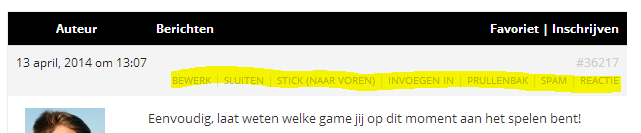
Any idea’s?
Thanks in advance!April 13, 2014 at 8:24 am #144959In reply to: Display latest post excerpt under Freshness
Moderatoryes, but you’d need some php, so depends what you mean by ‘I don’t really know PHP’
the plugin bbp-last-post plays with code in this area, so take a look at that
https://wordpress.org/plugins/bbp-last-post/
and look at
bbpress/includes/common/wdgets.php for how to put a title in
-
AuthorSearch Results

