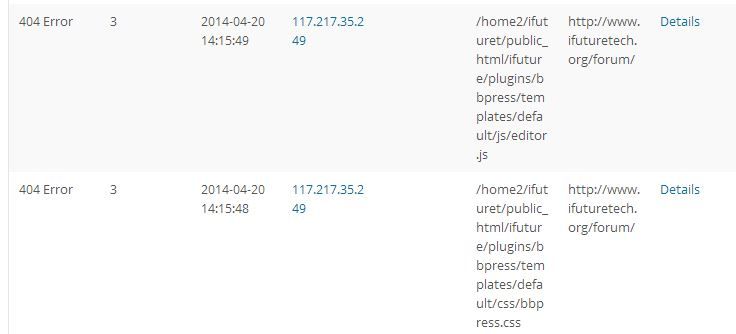
And the conflict appears to be with WP e-commerce Version 3.8.13.4 When I deactivate that plugin the links magically appear, but it doesn’t display the number of users correctly.
WP e-Commerce has one known issue in 3.8.13 that I know of, it is fixed for 3.8.14 though this appears to be a different issue:
Trying to Edit Reply causes infinite redirect loop
Maybe post a question on their support forums here https://wordpress.org/support/plugin/wp-e-commerce
Can anyone help on this wp-modal plugin?
http://codex.bbpress.org/modal-login-in-a-menu/#%c2%a01-install-wp-modal-login
I managed to follow the set up instruction all ok and can see the login/out pop up and can login ok. But can’t register new user! after entering new username/email and click ‘signup’ it’s reading…’checking credential’ and then back to register page again, nothing happens.
What have I done wrong?
This was my solution:
I installed WP DB manager, went to the empty/drop menu of the plugin and selected any bbpress entries under drop which deletes data in the table (they all cluster so it will be easy to find). I then installed bbpress and it works.
Warning: please backup database before you fiddle with it!
I have followed the directions on how to get the files into my theme page but WP and I are not friends and I am completely lost. I purchased a theme called Gamecenter. That is where I uploaded the files for this starter theme. In the bbPress Theme Options area I need to enter IDs or classes to hide sidebar options. I have no idea what the IDs or classes are. In the dashboard the theme has its own settings and I can change the look to no sidebar, left sidebar, right sidebar, etc. I want a right sidebar for the site except for the forums. I have looked in all the templates that are listed on the right but I have no idea what I am looking for. Here is the page where the forums are – http://www.thepsijicorder.com/psijic-order-forums/ – please help a lost soul who can’t figure this out!
It would be great to have an alternative to the Groups feature in BuddyPress so you’re not forced to use their extensive override of the bbPress profiles, which is not that well designed if you’re not interested in the rest of the package.
I can’t contribute much in the form of PHP development, but please ask if you think I could help out some other way.
Thanks for your attention.
I have copied the template (fullpage.php), renamed to (bbpress.php) and put into the root.
But, the sidebar shown, because calling code of sidebar in the “footer.php” template.
And when i delete the calling code of footer from bbpress.php i have lost all plugins (counters in footer) which shown in the bbpress.php page.
Thanks in advance.
My ites forum: http://med.gn24.net/forum
Hi
I too am having issues with seeing the admin area of bbpress
Brand new site with no content yet
WordPress 3.8.2 running Twenty Thirteen theme.
Installed plugins:
Post Expirator
SimpleLinks
TinyMCE
WordPress FAQ Manager
WP-Filebase
WP e-Commerce
With these plugins active, I am able to get to the Forum activity on the dashboard, but that’s it. Interestingly, there is only one user in my WPinstall, but the forums activity is displaying 19?
And the conflict appears to be with WP e-commerce Version 3.8.13.4 When I deactivate that plugin the links magically appear, but it doesn’t display the number of users correctly.
We need to run WP e-commerce and would like to run bbpress if the conflict can be resolved.
Sounds perfect 🙂 I’d happily help but to be honest this is my first project with bbpress so I’m not sure I’d be of much assistance. Sounds like you have it under control anyway – Great stuff!
Conveniently I’m at my parents for dinner…
This is on an iPad 2iPad 3… And moving the cursor around to edit text works fine…
Now editing the original post with an iPad 3,iPad Air and still fine.
So a 2, 3 and 5/Air iPads are working fine to post and/or edit and/or change cursor location.
With all that said I have also experienced this exact same issue here on bbPress.org using my iPad. As each of these 3 iPads were originally mine and are now my parents yet I can’t reproduce the issue any longer.
Kindly help me. How to filter the topic using the custom fields.
I have created the custom fields using the GD Custom posts and taxonomy tools. I need to filter. I have followed this step but its not working.
http://internet-alacarte.com/adding-custom-fields-to-bbpress-topics-then-filtering-topics-by-custom-fields-using-views/
Thanks in advance.
https://wordpress.org/plugins/bbp-views/
* Visit Admin > Users
* Tick the box next to your account
* Use the right-most drop-down and select “Key Master”
* Save the page
I’ll note again that under normal circumstances this should happen automatically when activating bbPress. Sorry it didn’t, and I’m curious to know any other plugins you may have installed (to see if there’s some conflict with one of them that prevented this.)
Hey!
So thank you so much. I did not follow that tutorial on how to create the bbPress subdirectory in my theme. I built this theme from scratch and read somewhere that bbpress first looks in your theme files for the template files and had already moved everything exactly the way you described. I found that link in the file and BAM! THANKS SO MUCH!
Adding for completeness: I have bbpress-functions.php and bbpress.php in the main theme directory, not in the bbpress subdirectory.
You can take out <?php bbp_forum_subscription_link(); ?> in content-single-forum.php . I have a bbpress directory in my theme (eg mytheme/bbpress/) where I’ve copied the entire default template and those files overwrite the default theme which I got from templates/default/bbpress in the plugin.
So you’d have something like yourtheme/bbpress/content-single-forum.php. I’m looking at this https://codex.bbpress.org/theme-compatibility/step-by-step-guide-to-creating-a-custom-bbpress-theme/ and getting confused but I have a feeling you’ll work it out! Anyway, that’s where that code is.
I have seriously looked everywhere and I am not sure what else to do. I am somewhat a noob to bbPress but not at all to the wordpress way of things. Iam a freelance developer. For the life of my I cannot find how to remove the subscription link from the pagination. The best I could do was float it to the right of the page, I do not want to display:none it because I want it show on replies. If anyone knows where I can remove this I would be very grateful. Thank you in advance.
Shane
PS here is a link to where I would like it removed:
http://kun.webrevllc.com/themen/kunst/
Oh, WP 3.8.2 and BBPress 2.5.3, thanks!
For the topics archive showing all topics, you can use the shortcode [bbp-topic-index] on a normal WordPress page.
“All replies” is slightly different. You could use the Recent Replies widget (https://codex.bbpress.org/widgets/) if you had a page with a widget for the content but if you wanted a proper archive page, I think you’d have to make a new template for it. I think it’s one of those things that if enough people ask for it, it might get prioritised for future versions but that’s just a guess. If you are comfortable making page templates, I can post how I did a “latest posts” page (posts = new topics + replies).
I’m not sure what part of the menu you mean, I’m sorry. Do you mean how “support” (with a link to /forums) is highlighted above even when you’re on a topic page? They use a custom nav file:
https://meta.trac.wordpress.org/browser/sites/trunk/buddypress.org/public_html/wp-content/themes/bb-base/header-nav.php
If I were trying to replicate that, I would use jQuery to add the current-menu-item class to the top forums list item – not that it’s is the right way to do it, it would just be the easiest for me to do and to maintain. You’d need to add it to a javascript file in your template or make one and then include it. If you’re interested, I can post that code – you will need to add a custom class to your forums menu item too.
Sorry, I know that wasn’t too terribly helpful!
I want to keep my menu navigation to present that they’re under the current page(menu), but bbpress doesn’t keep highlight on the menu to show the state when they go to individual topic or reply page.
I would have wished that bbpress topic or reply would have a WordPress Template page to be linked like as a normal wordpress sub-pages so that I don’t need any workaround in the first place. In other words, all the bbpress topics or replies must be only displayed on the page that admin users created.
created WP page slug: forums -> topics (all topics here) -> replies (all replies here)
Anyway for now, how can I make the menu like this site?
This is community software – why not get involved and crack open the plugin, see what it does and add it to the core bbpress software
To get started and learn about how to create a patch that is in the format we use here (and the entire WordPress Trac ecosystem) here are a couple of docs to get you on your way:
https://make.wordpress.org/core/handbook/working-with-patches/
https://make.wordpress.org/core/handbook/working-with-patches/create-a-patch-using-tortoisesvn/
http://blog.ftwr.co.uk/archives/2005/11/03/windows-wordpress-toolbox/
bbPress’ SVN repo URL is https://bbpress.svn.wordpress.org/trunk
John,
This is significant. Are you logged in as administrator when you are posting?
If this is the case, then it may be a theme problem and not anything to do with bbPress.
thank you, Matoca
Everything was working fine few days ago. But from yesterday any topics i create or my members doesn’t go under forum. I tried again and again but no luck. I upgraded my wordpress to 3.8.2 and installed nextscript snap plugin couple of days ago. I tried deactivating snap, but that doesn’t solve the issue. I’m not sure what to do now, i asked few of my buddies, their bbpress is working fine with with wordpress 3.8.2, any suggestions are appreciated.
Wordpress Version: 3.8.2
BBpress Version: 2.5.3
Forum Link: http://www.nullnix.org/chat-boards/
From bbPress.org:
bbp_reply_author_link( array( 'sep' => '<br />', 'show_role' => true, 'size' => 100 ) );
To set a good expectation, these forums move relatively slowly. If you’re anxious about replies to this topic, tick the “Notify me” box and you’ll get an email when someone replies without the need to bump the topic.
@a42 this absolutely has NOTHING to do with Heartbleed. It’s so non-related, it’s almost inflammatory to advertise otherwise.
When you activate bbPress, you should be assigned the “Key Master” role, and redirected to the bbPress about page in your dashboard. If that’s not happening, that’s a bug, and you should assign yourself the Key Master role to have access to bbPress’s admin areas.
ok, is that as customizable as bbpress in the free version ?
(a shame that I have to look else where for some else as bbpress is highly customzable…)
Robin,
Yes, I understand. The description “can’t post” is very vague and certainly was not meant to confuse you. In her email copy posted above she finally described that the keyboard is not coming up. This happened to her twice, once after upgrading her ios on her iPhone and then again when she upgraded the ios on her iPad. So I am assuming this is a conflict with the ios release 7.0.4.
None of the other moderator are having trouble posting so I felt sure it must be something directly related to ios 7.0.4, bbPress and how bbPress signals the device to fill in the topic or reply form correctly. She can navigate the website and read the forum fine.
I use a google nexus tablet and I sometimes notice idiosyncrasies with scrolling down a forum page. But I am able to get a keyboard when I want to write a reply.
I have posted to the theme developer as well. Perhaps they will have a better idea of how this conflict is happening.
Thank you for your help!
matoca