Search Results for 'bbpress'
-
AuthorSearch Results
-
May 19, 2014 at 10:22 am #146585
In reply to: WP Symposium converter for bbPress
lagrou
ParticipantFirst, not sure what’s the best way to proceed with updates at GitHub. Could you create a pull request, shall I fork your own repo or create a new branch, or simply update my own master ?
if I understand correctly is that I could choose the ‘Sun Dreesses’ forum to be the default forum selected when clicking ‘New Toipic’ from the WPS forums hopme page it will default to showing the ‘Sun Dresses’ forum as the destination for my topic unless I select another forum?
Yes, the form will default to that category in its dropdown list of categories. It’s of little use, and as you stress, we can ignore this. I was only clarifying forum vs. categories in WPS, and why we can drop callback_forum_type() in your update of the converter / importer.
I haven’t tried the WPS groups but I will create one and see what we can (or cannot) do with them.
I considered that the content could at least be imported, then the admin would do whatever he wants to with that content. But maybe the groups ownership and membership will be impossible to mimick at bbPress level solely, so it’s better to avoid importing rather than making public content that was private to begin with…?
I’m adding a Users section to your own version of the converter module (based on other converters available). If we want to import user-related settings, like forums/topics subscriptions and favorites, is this possible ? WPS uses usermeta, and I would assume bbPress does so…?
Your last comment about attachements and avatars is well noted, I’ll check what could be done outside of bbPress.
May 19, 2014 at 9:51 am #146583Topic: Bbpress use post_id , how ?
in forum Requests & Feedbackjanfeng
ParticipantWordpress use /%postname%/ and Bbpress use /%post_id% , how ?
May 19, 2014 at 7:44 am #146581In reply to: SimplePress Import
tonytomov
ParticipantHello,
I have a very old Simple:Press version – 4.3.1.
I want to migrate to bbPress, but not sure if this can be done.Is this possible?
Thank you in advance.Kind Regards
May 19, 2014 at 5:27 am #146579Topic: bbp-forum-info
in forum Installationbidum00
ParticipantMy forum page shows my forums correctly, but I want to make the column title say Tournaments instead of Forum. How do I make this change?
I’m using bbpress 2.5.3, wordpress 3.9.1
May 19, 2014 at 4:57 am #146575In reply to: Forum Page not working
Stephen Edgar
Keymaster@jeremyers1 Have a look at your themes support site to seee if they support bbPress, if you cannot find any mention send them an email or post on their support forums.
May 19, 2014 at 1:29 am #146571In reply to: Tranlation does not work for me
KeymasterAnd also you module works with polylang. So for all who need Multilanguage forum bbpress and polylang is perfect solution.
Thanks for this, I’ll rember this for the next person who asks 🙂
May 19, 2014 at 1:29 am #146572In reply to: Tranlation does not work for me
KeymasterAnd also you module works with polylang. So for all who need Multilanguage forum bbpress and polylang is perfect solution.
Thanks for this, I’ll rember this for the next person who asks 🙂
May 19, 2014 at 1:28 am #146570In reply to: Forum Page not working
KeymasterMay 19, 2014 at 1:24 am #146568In reply to: User profile pages not displaying correctly
KeymasterI updated the
bbpress.phpfile: https://gist.github.com/ntwb/1d884eb7bb889906285d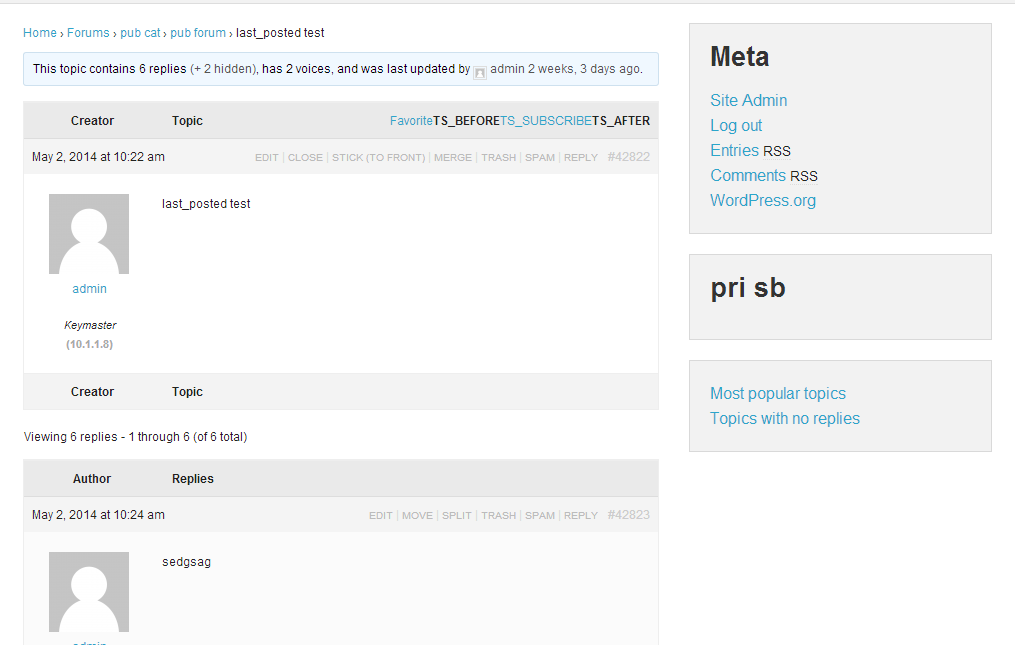 May 19, 2014 at 1:22 am #146566
In reply to: Tranlation does not work for me
Anonymous User 7823331
InactiveThank you very much. You were right. Problem was my mistake “-” instead od “_”.
And also you module works with polylang. So for all who need Multilanguage forum bbpress and polylang is perfect solution.
Thank you very much. I will make a donation, since your module is perfect and also your help was so prompt.
May 18, 2014 at 10:22 pm #146562In reply to: User profile pages not displaying correctly
inventor1
ParticipantUpdate problem is fixed using Stephen’s original solution, lol.
I was using a mac text editor that was adding additional characters to the bbpress.php after I was saving. I edited it directly in the ftp program!!May 18, 2014 at 10:20 pm #146561In reply to: User profile pages not displaying correctly
KeymasterThat is a little disappointing 🙁
If you look at the HybridCore 1.5.5 included with the Spine 2.0 theme there is full support for bbPress built into HybridCore and for whatever reason Spine is not taking advantage of that functionality.
I just downloaded Spine and tweaked the
index.phpandbbpress.phpfiles so bbPress will work with your theme, I haven’t the time to fully test if ‘everything’ works but it looks like it does. Both files go in and replace any files of the same name in the root of your theme folder e.g./wp-content/themes/spine.https://gist.github.com/ntwb/1d884eb7bb889906285d
You could also create a WordPress child theme to put them in which would be a little cleaner and save any pain during theme upgrades. I would expect themehybrid.com to have some tutorials on this so you can get some value for your $29 investment 😉
(Ignore some of the oddities you see in these pics,
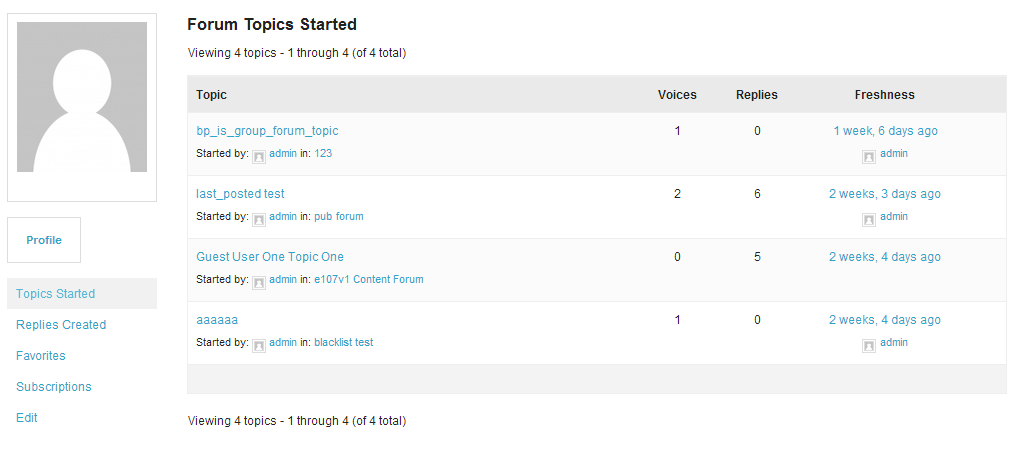
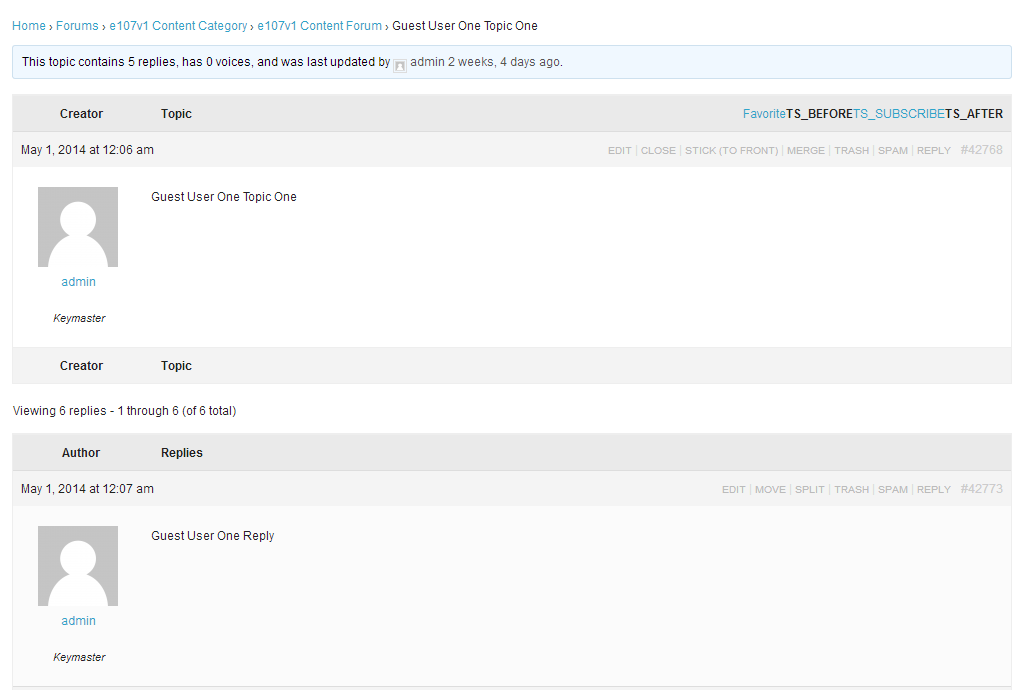 May 18, 2014 at 9:53 pm #146560
In reply to: User profile pages not displaying correctly
ParticipantAll they told me was that the theme does not support bbpress and I’m out of luck : (
May 18, 2014 at 9:49 pm #146559Topic: Single Forum Topic on WordPress Homepage
in forum TroubleshootingArjun S Kumar
ParticipantHello,
To start with, I’m on bbPress 2.5.3 and WP 3.9.1
I currently display a list of topic titles (say 5) from a particular forum on my homepage using the bbPress Recent Topic widget that comes along with the installation.
I want to show the most recent topic from this forum and the first reply made to it on my homepage. Any thoughts or inputs will be helpful!Thanks
May 18, 2014 at 8:04 pm #146557In reply to: User registration on multisite
KeymasterI’ll try to take a look at this this week, there are a couple of ‘gotchas’ when running bbPress in WordPress Multisite. I’ll try to document said findings on the codex and create/update any tickets on Trac.
May 18, 2014 at 7:39 pm #146554In reply to: Tranlation does not work for me
Keymaster‘It should work’ on a clean installation, I use a translation for approx half the sites I develop bbPress and it works perfectly. I just tested Slovak and is working as expected 🙂
I found the issue… You need to name the files
bbpress-sk_SK.moandbbpress-sk_SK.pousing the_underscore character not the-hyphen.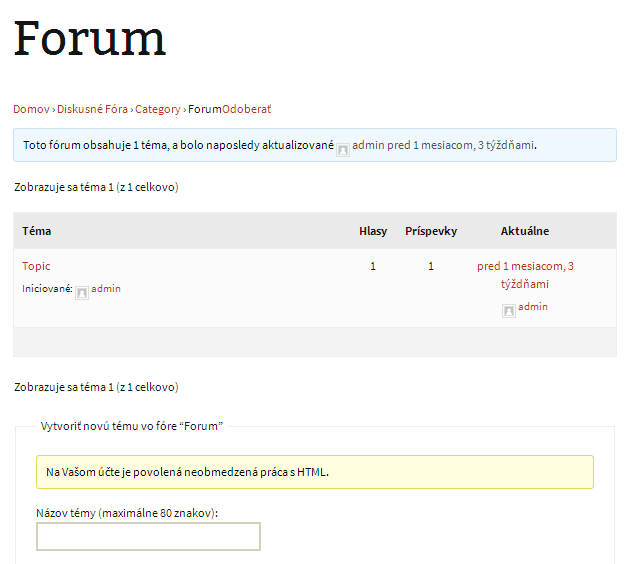
I have never tried the ‘Polylang’ plugin and I had a quick look in their support forums but couldn’t find any information if they support bbPress or not, maybe posting a question in their support forums may get an answer from others who have tried and had success or not, at least that way you can find out if Polylang is compatible with bbPress.
May 18, 2014 at 7:14 pm #146551In reply to: How to achieve this function?
KeymasterTake a look at the following plugins:
https://wordpress.org/plugins/bbpress-vip-support-plugin/ (You need to get an updated version of this via the support forums for this to work https://wordpress.org/support/plugin/bbpress-vip-support-plugin)
May 18, 2014 at 6:58 pm #146549In reply to: User profile pages not displaying correctly
KeymasterbbPress is a 100% actively developed plugin and is compatible with a huge percentage of the ~2,500 themes on WordPress.org, I suggest you contact your themes support forum and ask for some advice on using bbPress with that theme.
May 18, 2014 at 5:14 pm #146544In reply to: Adding forum category titles
piratescott
ParticipantMay 18, 2014 at 3:44 pm #146538In reply to: User profile pages not displaying correctly
ParticipantI guess I can just wait 6 months to 2 years for bbpress developers to fix this issue, lol, it appears bbpress is still being worked on and developed lol.
May 18, 2014 at 3:32 pm #146537In reply to: User profile pages not displaying correctly
Participantupdate: I tried with renaming the page.php from twenty twelve theme and twenty eleven theme and the same thing happens with the user profile pages, so that means that bbpress is not compatible with the newer themes??
May 18, 2014 at 3:18 pm #146535In reply to: User profile pages not displaying correctly
ParticipantCan you guys look at the forum now, I included the bbpress.php as mentioned above. The navigation in the user profiles works like before but everything is messed up a bit.
May 18, 2014 at 2:20 pm #146534In reply to: 404 Error Within Forums
Robin W
ModeratorYour arcade-basic theme claims to be compatible with bbpress, so I’d also look at plugins
Plugins
Deactivate all but bbpress and see if this fixes. if it does, re-enable one at a time to see which is causing the error.
May 18, 2014 at 2:16 pm #146533In reply to: 404 Error Within Forums
ModeratorMay 18, 2014 at 2:12 pm #146531In reply to: CSS Plugin
Moderator@blankstage – great – I only started with wrodpress and bbpress 13 months ago, and have learnt a fantastic amount since then !
-
AuthorSearch Results

