Okay I am here with “New Thread button”
1)Downloaded folder content-archive-topic.php from my bbPress plugin folder.
2)Uploaded whole folder to my child theme
here is how it looks now

On top of the code in that folder I added this code :
<?php do_action( 'bbp_template_before_topics_index' ); ?>

<a class="bbp-new-topic-button" href="#new-post">New Thead</a>
So now my folder looks like this
<?php do_action( 'bbp_template_before_topics_index' ); ?>

<a class="bbp-new-topic-button" href="#new-post">New Thread</a>

<?php

/**
 * Archive Topic Content Part
 *
 * @package bbPress
 * @subpackage Theme
 */

?>

<div id="bbpress-forums">

	<?php if ( bbp_allow_search() ) : ?>

		<div class="bbp-search-form">

			<?php bbp_get_template_part( 'form', 'search' ); ?>

		</div>

	<?php endif; ?>

	<?php bbp_breadcrumb(); ?>

	<?php if ( bbp_is_topic_tag() ) bbp_topic_tag_description(); ?>

	<?php do_action( 'bbp_template_before_topics_index' ); ?>

	<?php if ( bbp_has_topics() ) : ?>

		<?php bbp_get_template_part( 'pagination', 'topics'    ); ?>

		<?php bbp_get_template_part( 'loop',       'topics'    ); ?>

		<?php bbp_get_template_part( 'pagination', 'topics'    ); ?>

	<?php else : ?>

		<?php bbp_get_template_part( 'feedback',   'no-topics' ); ?>

	<?php endif; ?>

	<?php do_action( 'bbp_template_after_topics_index' ); ?>

</div>
Unfortunatlelly I am unable to see new thread link anywhere, what am I doing wrong guys? @netweb @robkk ?
ok, so in your PC create a file called bbpress.php
(you can use notepad for this)
then dump this code into it
<?php

/**
 * bbPress - Forum Archive
 *
 * @package bbPress
 * @subpackage Theme
 */

get_header(); ?>

	<?php do_action( 'bbp_before_main_content' ); ?>

	<?php do_action( 'bbp_template_notices' ); ?>

	<div id="forum-front" class="bbp-forum-front">
		<h1 class="entry-title"><?php bbp_forum_archive_title(); ?></h1>
		<div class="entry-content">

			<?php bbp_get_template_part( 'content', 'archive-forum' ); ?>

		</div>
	</div><!-- #forum-front -->

	<?php do_action( 'bbp_after_main_content' ); ?>

<?php get_sidebar(); ?>
<?php get_footer(); ?>
save it and using ftp copy it to get
wp-content/themes/%yourthemename%/
where %yourthemename% is the name of your theme
so you end up with
wp-content/themes/%yourthemename%/bbpress.php
bbpress will then use this template
Come back and let us know how you get on !
Vikaria brings up an excellent example. We would like our topics to order exactly like they do on the bbpress.org homepage. Any suggestions or advice as to what we may be doing wrong and how to remedy the situation? Thanks!!
Exactly – the same way the most recent topic posts are listed in order of recency on the main http://www.bbpress.org page.
Hi guys,
This is my first question about this bbPress, I’m a new developer and I have quite a few difficulties to learn and use this plugin, writing this message to ask about one thing what I need to put on my forum. That is the description below the title of the forum is here:
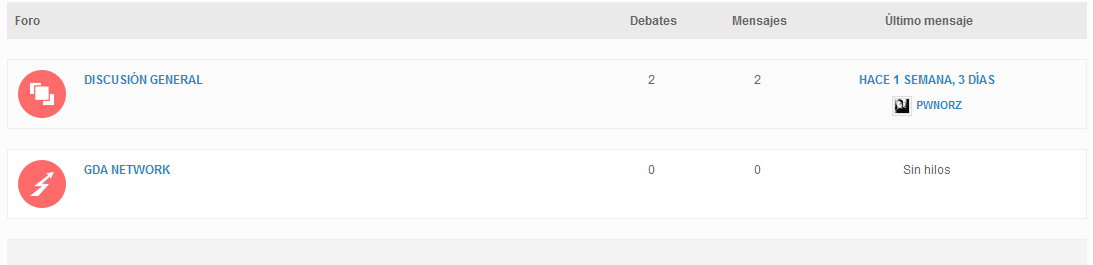
I could only put it in the forum:
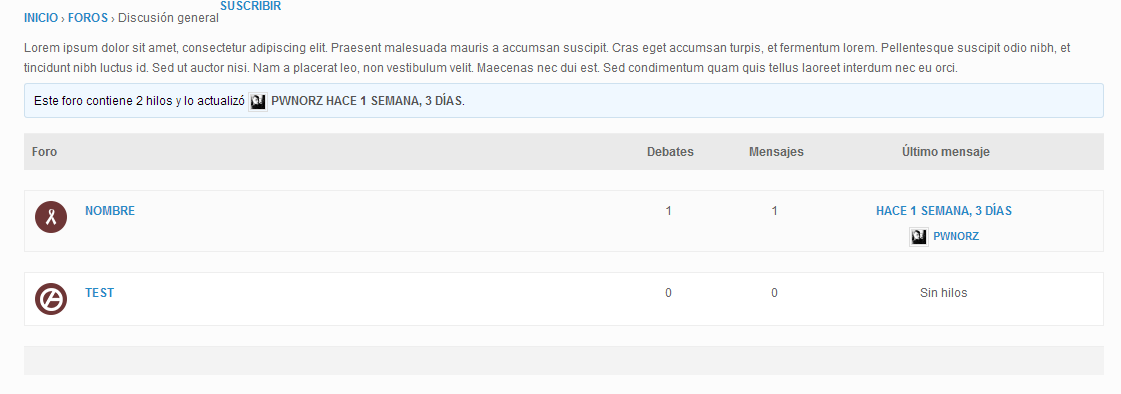
Website: http://test.grupodeartes.com/forums/
Thank you very much, I hope you can help me.
Hey Guys,
We would like the topics on the Forum index page to display in order of Freshness. I understand this to be the default behavior, but for some reason our forum is not using that ordering.
http://cornerstonecollective.com/forum/
I have looked in settings and dug into the source code looking for a way to set the order to use the appropriate meta data, which I believe to be _bbp_last_active_time, but cannot seem to find the answer. Any suggestions would be most appreciated!
Thanks!
WordPress Version: 3.9.1
bbPress Version: 2.5.4
Website: http://cornerstonecollective.com/forum/
@pavle123 damn your confused haha
read everything carefully
Look at the code i tell you to put in templates carefully , it is just a snippet of the template with each new code in it. So you have to copy the original template to your child theme. find where the new code on here is placed, compare it to the original and place the new code in your copy of the templates in your child theme.
nothing goes into your child theme functions.php
How to make similar bbpress forum to QuicSprout one?
you copy bbpress templates into your child theme so its okay when bbpress updates, i explain exactly what template to copy and also i show you a snippet of where to put the code by the original code.
you put custom css into anything that can handle custom css
in bbpress.css in your child theme(you copy the original in your child theme)
in your child themes css stylesheet
the jetpack plugin module custom css
a standalone custom css plugin
if your still confused read https://codex.bbpress.org/step-by-step-guide-to-setting-up-a-bbpress-forum-part-2/
It would be useful if you could share the link or something.
Have you pasted the forum shortcode on a page?
Forums
[bbp-forum-index] – This will display your entire forum index.
Oh crap, do you mean I should copy the whole folder content-archive-topic.php inside my theme? Well that makes sense 🙂
Here is what I did :
1) Uploaded content-archive-forum.php to my child theme folder.
2) Added this piece of code at the bottom
<?php do_action( 'bbp_template_after_forums_index' ); ?>

</div>

<?php echo do_shortcode("[bbp-stats]"); ?>
3) Added this CSS in my style.css of child theme (CSS is not working unfortunately, not sure why?)
.bbp-stats .bbp_stats {
    list-style-type: none;
    display: block;
    text-align: center;
    margin-left: 0px;
    float: none;
}

.bbp-stats .bbp_stats li {
    margin: 0;
    display: inline-block;
    padding: 5px;
}
So, now stats are shown at the bottom, but CSS is not targeting the stats.
Okay about “new thread button” I was unable to make it work. Here is what I did.
1) I added content-archive-topic.php folder from my bbPress plugin content-archive-topic.php into my child theme folder.
2)Added this code
<?php do_action( 'bbp_template_before_topics_index' ); ?>

<a class="bbp-new-topic-button" href="#new-post">New Thead</a>
At ABOVE the content-archive-topic.php
<?php

/**
 * Archive Forum Content Part
 *
 * @package bbPress
 * @subpackage Theme
 */

?>

<div id="bbpress-forums">

	<?php if ( bbp_allow_search() ) : ?>

		<div class="bbp-search-form">

			<?php bbp_get_template_part( 'form', 'search' ); ?>

		</div>

	<?php endif; ?>

	<?php bbp_breadcrumb(); ?>

	<?php bbp_forum_subscription_link(); ?>

	<?php do_action( 'bbp_template_before_forums_index' ); ?>

	<?php if ( bbp_has_forums() ) : ?>

		<?php bbp_get_template_part( 'loop',     'forums'    ); ?>

	<?php else : ?>

		<?php bbp_get_template_part( 'feedback', 'no-forums' ); ?>

	<?php endif; ?>

	<?php do_action( 'bbp_template_after_forums_index' ); ?>

</div>

<?php do_action( 'bbp_template_after_forums_index' ); ?>

</div>

<?php echo do_shortcode("[bbp-stats]"); ?>
But its not working for me.
Any ideas?
I have the battle site and test. Installed on the test, the forum is working. When moved to the combat, an empty page. Disable plugins, reinstalled. Does not work, no errors. But the page is blank
Hm, okay I did not know where elswehere to put it.
<?php

/**
 * Archive Topic Content Part
 *
 * @package bbPress
 * @subpackage Theme
 */

?>

<div id="bbpress-forums">

	<?php if ( bbp_allow_search() ) : ?>

		<div class="bbp-search-form">

			<?php bbp_get_template_part( 'form', 'search' ); ?>

		</div>

	<?php endif; ?>

	<?php bbp_breadcrumb(); ?>

	<?php if ( bbp_is_topic_tag() ) bbp_topic_tag_description(); ?>

	<?php do_action( 'bbp_template_before_topics_index' ); ?>

	<?php if ( bbp_has_topics() ) : ?>

		<?php bbp_get_template_part( 'pagination', 'topics'    ); ?>

		<?php bbp_get_template_part( 'loop',       'topics'    ); ?>

		<?php bbp_get_template_part( 'pagination', 'topics'    ); ?>

	<?php else : ?>

		<?php bbp_get_template_part( 'feedback',   'no-topics' ); ?>

	<?php endif; ?>

	<?php do_action( 'bbp_template_after_topics_index' ); ?>

</div>
So this obviously does not go into css, so do you know where inside my child theme should I put the content-archive-topic.php code?
bbpress will use the default page template for the main index rather than the specific page template set in the page – so your setting in the forum page won’t apply.
There are several ways around this, but as your plugin is a paid one, I can’t see the code to recommend the best solution.
So first off I’d post a query onto their support site
Outstanding Support
they probably have come across bbpress before and will know the answer. You could tell them that bbpress uses ‘is_bbpress()’ to see if it is a bbpress page, that might help them.
Hello,
So I just started using bbpress over the weekend and so far I’m really liking it. There is only one issue I’m having that I can’t seem to figure out. I am using this plugin:
Custom Sidebars Pro
to allow me the function of different sidebars for different pages. It has worked perfectly for 90% of the forums pages except for the top level forum page. That is the only one that I can’t seem to get to use a sidebar other then the default one. At the moment, what I have done is manually made a page with the same slug as the top level forum page, left it blank except for the option that this other plugin enables to change the sidebars. Have a look at it here:
http://www.mythechllc.com/forums
if you look at the public forums page, you will see the side bar is what I want it to be, but if you look at the top level forums page, it reverts back to the default.
Hi. A couple of updates ago, our Site-Wide Forum began delivering new topic notices and notices to the site admin/s erratically. I have been trying to track down the cause ever since. Our host helped me find undelivered email and we noticed an incorrect listing of the site address (see header below). Will you please tell me how I can correct this, and will you please address this in your next update? The site notifications and BuddyPress Forum notifications seem to be going out fine. Thank you.
Sincerely,
Sura (Webmaster, not a developer – so please explain things 🙂
soi-seattle-kinship.org
WP 3.9.1
Dandelion Theme w/child theme: Sufi Order International v2
bbPress 2.5.4-5380
BuddyPress 2.0.1
Easy WP SMTP 1.0.9
—-
from: SOI-Seattle Kinship <mail@soi-seattle-kinship.org>
to: noreply@oi-seattle-kinship.org
date: Wed, Jul 16, 2014 at 4:21 PM
subject: [SOI-Seattle Kinship] Testing New Notification Plug-in #1
signed-by: soi-seattle-kinship.org
I have a site setup using buddypress and bbpress forums. There are multiple forums that are all private-only visible to users logged in. I tried creating a hidden user group with a hidden forum attached to it. It ended up making all the other forum topics disappear to regular (subscriber/participant) users. Admin could see them all though. I end up deleting the user groups and unchecking that functionality but it doesn’t reset itself and I have to restore the site to a previous version.
Why is it doing this? I would like to have a couple user groups that will be either private or hidden and forums linked to them. Some people will be on one or the other and some people may be in both. I also will have forums that are private and only visible to users that are logged in. Any help will be appreciated!
1. bbpress plugins add exactly as normal wordpress plugins
Dashboard>plugins
Bbpress will try and use your theme, you may want to visit the set up guides
Step by step guide to setting up a bbPress forum – Part 1
2. depending on your theme, you should see the ability to add a topic at the end of each forum.
You can add a ‘topic’ add in your sidebar using the text widget and putting
<a href="/add-new-topic/">Create a new topic</a>
in the text
Hello,
I’m using WP 3.9 and BBpress 2.5.4
1) I see no place to add BBpress plugins or themes inside the wp settings area for Forums.
2) On my forums there is no “Add Topic” button or form so how do people create new topics inside the forum?
Please advise/help!
Thanks
Joe
Echoing what Stephen said above, these issues are not actual issues (with bbPress 1.x or 2.x) and in are in no way responsible for anything that could have happened to your site.
When something is not installed incorrectly, of course it isn’t going to work correctly. These issues are akin to installing your TV with the screen facing the wall, and complaining that you can’t see it from the couch. 🙂
If it so happens any security issues are found in any version of bbPress, please do not publicly report them in these forums. Instead, responsibly disclose us:
https://codex.wordpress.org/FAQ_Security
We try to be really good about fixing any security issues ASAP.
View post on imgur.com
Widget name: (bbPress) Topic Views List
how to edit this widget?
Hi there,
Im having problems viewing the user profile on my BBpress forum integrated in my website. When i try to click on the username of someone that has posted (for example – in the topics section) it takes you to a ‘page not found’ – 404 error page.
Does anyone know how i can fix it so that it takes them to the profile page?
I am using my own bespoke custom theme
Thank you
Hey guys, I’ve been looking everywhere for this
I installed bbpress and made a forum ( just testing ).
I want my forum to be full width and without the side bar. Tried the “1 column full width” layout and some custom css.
The best I’ve got is a no-full-width forum WITHOUT side bar in the /forum/ page.
But further than that like /forum/topic/… the side bar reappear.
My site is http://mmo4teens.netai.net/ and my theme is Stargazer Colloquium.
Any help is appreciated.
Thanks in advance.
Ok, maybe the pre v3.0.0 never included ‘topic tags’ so the best solution is to delete or comment out this section in vBulletin3.php
Basically remove the code between lines #293 and #334 in vBulletin3.php bbPress 2.5.4
https://bbpress.trac.wordpress.org/browser/tags/2.5.4/includes/admin/converters/vBulletin3.php#L293
https://bbpress.trac.wordpress.org/browser/tags/2.5.4/includes/admin/converters/vBulletin3.php#L334
I hope to get the updates that I have been doing over the past week and a bit finished by the end of the week and it would be great if I could get a few people to test theme out 🙂
Indeed I can confirm this is happening, feel free to create a ticket and if you have a patch add that also https://bbpress.trac.wordpress.org/, if not I’ll try to get some time later in the week to have a look.
When I convert existing forums to categories, the topics inside don’t show but the page does load.
There is something weird here, I haven’t quite found all the issues relating to this but I am sure it is part of what I am looking at in https://bbpress.trac.wordpress.org/ticket/2647
Could you please give me specific details on what you are doing:
e.g.
– Create a new forum via the ‘new forum’ in the backend
– Change the above new forum type to ‘category’ and update
– Visit http://example.com/forums/myforums
– Click this
– Click that
Result:
When I go here, I expect the forum to something something
Expected result:
The forum should do this and that and not do xyz or 123


