I’m theming out BBPress for the first time, and so far everything is pretty straight forward and enjoyable.
First roadblock: I love how the BBPress forum shows topic stats to the left of their topics. How are they printing those stats? I’m not asking for styling help, but just the PHP to use to get that information.
Thanks anyone!
bbPress on Github is empty or something wrong? https://github.com/bbpress I see the empty repository all time.
Hi. I noticed that bbpress.org have some changes in the design. I have some comments about it. I think it will be useful, because I see an errors in the design.
My point is – make most important things on the pages larger and use high contrast colors. Secondary components, like counters. categories, tags – smaller and low contrast.
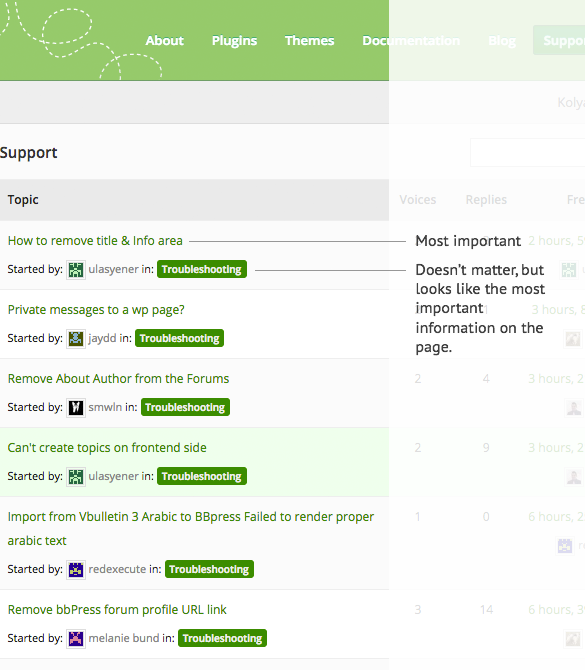
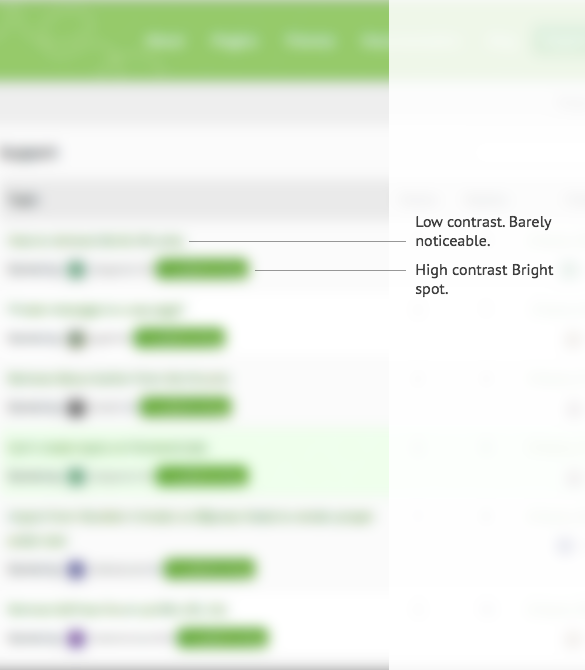
For example, checkout any github issue page — the header much larger than colored labels and also hight contrast.
Thanks for your response. I want to remove from all bbpress pages.
Please, anyone, i need help. I imported my vbulletin3 with arabic language to bbpress, import goes well but the reder of text failed. please see attached file for the output of the render. Thanks.
http://saudielection.com/ar/convertedarabicvb.JPG
Do you want to remove these from all bbpress pages ie forums, topics, profiles etc. ot just from a particular area, eg just from individual topics
I just write this on trac. Needs to be restricted for users to see other attachments, they did not uploaded.
function filter_my_attachments( $wp_query ) {
    if (is_admin() && ($wp_query->query_vars['post_type'] == 'attachment')) {
        if ( !current_user_can( 'activate_plugins' ) ) {
            global $current_user;
            $wp_query->set( 'author', $current_user->id );
        }
    }
}
add_filter('parse_query', 'filter_my_attachments' );
add_filter( 'bbp_after_get_the_content_parse_args', 'tp_bbpress_upload_media' );

function tp_bbpress_upload_media( $args ) {
$args['media_buttons'] = true;

return $args;
}
Stephen, I too am getting errors while trying to import my phpbb forum into bbpress. I updated phpbb this morning to most recent version, no mods (v. 3.1.2). I just installed bbpress today in my WordPress site.
When I use the import tab under Tools > Forums, I enter my info, and here’s what I get:
*******************
WordPress database error: [Unknown column ‘forums.forum_topics’ in ‘field list’]
SELECT convert(forums.forum_id USING “utf8”) AS forum_id,convert(forums.parent_id USING “utf8”) AS parent_id,convert(forums.forum_topics USING “utf8”) AS forum_topics,convert(forums.forum_posts USING “utf8”) AS forum_posts,convert(forums.forum_topics_real USING “utf8”) AS forum_topics_real,convert(forums.forum_name USING “utf8”) AS forum_name,convert(forums.forum_desc USING “utf8”) AS forum_desc,convert(forums.left_id USING “utf8”) AS left_id,convert(forums.forum_type USING “utf8”) AS forum_type,convert(forums.forum_status USING “utf8”) AS forum_status FROM phpbb_forums AS forums LIMIT 0, 100
*******************
Please help, thanks!
Is there a way to make bbpress private messages to appear on a wp page, so that i can put it in the menü?
ok, sorry for delay – putting in ‘bumps’ tends to not get you help as many of us work on ‘topics with no replies’ and you have replies 🙂
Put the following in your functions file
function rew_role_show () {
$displayed_user = bbp_get_reply_author_id() ;
$role = bbp_get_user_role( $displayed_user);
if ( bbp_is_user_keymaster($displayed_user) ||$role == 'bbp_moderator')  {
echo '<li>' ;
echo 'I im in supporting group';
echo '</li>' ;
}
}

add_action ('bbp_theme_after_reply_author_details', 'rew_role_show') ;
Functions files and child themes – explained !
It is awesome!
Here I am struggling to extend my theme to support bbPress, and then I see this!
Hi ok am reactivating source code – i managed to hide the url, but i dont actually want to do that i want to make it so it doesnt link otherwise you have “started by “. Another idea can i link it to their profile page which is not part of bbpress “http://photohunters.org/photohunters/my-profile/”
site page
http://photohunters.org/photohunters/forum/2nd-hand-market/
i really do appreciate your help – am just trying to strip the forum down to the bare minimum
thank you
Melanie
If you have done the following:
– disable ALL plugins one by one (not just ones you think could be causing it)
– activated a default theme
– used the repair tools
– re-saved permalinks
And it’s still broken, then the only next thing you can do is create a local installation of bbPress and test the reverse way, test it’s working, add your theme, test it’s working, add one plugin and keep going till it breaks.
Good luck with your site.
Hi Lynqoid, am afraid the above does not seem to work, added to my child theme css, then added to bbpress.css.
There must be somewhere in the bbpress.css where i can disactivate, or delete, but for the life of me cant find it!
Do you have any other advice?
thank you
melanie
Yes and i’ve no plugins related with bbpress. I deactivated them all and also tried to repair roles from the repair tool.
Not working 🙁
Have you re-saved the permalinks?
I have written an article on how to troubleshoot bbPress it fixes a lot of issues if you follow the steps, especially 404 errors.
http://www.epicwebs.co.uk/bbpress-tutorials/how-to-troubleshoot-bbpress/.
Good luck with your site.
I have recently removed bbPress from one of my websites without any issue (the forum was never used).
Naturally if you add more functionality to your website, especially a forum that will have more writing to the database from your users it’s going to add a hit to performance, but that’s always going to happen. I’m going to guess that your server won’t be able to compete with FB and G+ but it could run smoothly if you have good hosting.
Hi there, my installation of BBpress is acting strangely. Some of my forums produce a 404 error when clicked. I no longer see a “forums” options in the dashboard nenu, settings or tools.
This is for a private site, running Buddypress and BBpress.
Please help me solve this,
Rich V
Login then visit this page to view: http://sealfit.com/members-home/coaching-forum/
http://sealfit.com
user: rich@sealfit.com and password baja99
Hi Robin – I really do appreciate you time and effort, sometimes it is difficult as you want a site to work perfectly and sometimes there is no response so you tend to panic… i apologise for sounding irritated – it was panic as we go live in a few days
in my css i added
.bbp-author-avatar {display: none;}
and worked great, but now i need to remove the link on a users name as i dont want any profiles, this is a simple forum and the users already have a seperate profile page on the site and it would just complicate.. the workaround that i tried to apply (in previous post) mucks up everything, so i just need to know where to go to disable, i have a duplicated bbpress to my child theme so all my changes go there – so i need to know which file contains the info to disable or if the user links have a distinctive class that i can disable
thank you in advance
Melanie
sorry this support forum is manned by volunteers so we do this in our spare time and for free.
I presume you got this code from
http://www.digitspeak.com/blogging/wordpress/remove-bbpress-forum-profile-url-link/
when you say
the avatar reappears which i managed to get rid of – is there another workaround?
can you explain a bit more about
i managed to get rid of
what did you do?
ok, you’re stating stuff that I’m finding hard to visualise/understand, and adding further info which again is not clear.
It’s not that you are not trying to explain, it’s just that as I can’t see your site, and issues with themes, plugins, and servers can be many and varied, there’s not a quick ‘do this’ answer.
de-installing and re-installing rarely fixes 🙂
So as I can’t see your site to start with lets eliminate theme and plugins
Plugins
Deactivate all but bbpress and see if this fixes. if it does, re-enable one at a time to see which is causing the error.
Themes
If plugins don’t pinpoint the problem, as a test switch to a default theme such as twentytwelve, and see if this fixes.
Come back with the results – If that finds a fault it doesn’t mean you can’t use that theme or that plugin, just that we know where the issue is.
If that doesn’t fix try
Dashboard>settings>permalinks and just click save – you don’t need to change anything – that just re-sets the links and sometimes fixes issues.
If not then also let us know your forums slug dashboard>settings>forums and look for the forums root slug.
Also let us know your permalink setting Dashboard>settings>permalinks
Insights very welcome!
I’m a tech savvy but not a technical person evaluating bbpress for my own site (www.troublesometots.com – bbpress is not currently loaded there) and I have a few questions I’m hoping you experienced users can help me with.
I’ve got a moderately high-traffic site (half million page views monthly) and have a lively community of 4-5K members spread over G+ and FB and I’m considering moving that community to a centralized self-hosted location using bbpress. Here are my questions:
1) From what I gather, from a SEO perspective, creating my folder in a subfolder (ie. http://www.troublesometots.com/community) is better then creating a sub-domain or separate site. IF I do that and IF my vibrant community follows me back to my site (not a given for sure) so that I have 4-5K active members on my self-hosted forum, is this going to negatively impact my site performance? And if site performance will degrade would it be better to host the forum separately (sub-domain or separate domain) so that I can better manage the performance of the blog site vs. forum site?
2) If my vibrant community isn’t willing to abandon FB and come to my bbforum, can I delete it later without mucking up my site? Meaning what if a few hundred people come and post/discuss stuff for 6-12 months but then we agree that it’s not really happening. Can I just delete the bbpress (and all related plugins) and go back to my old standard blog? Will this “clean out” any content that was created in the forum? Or is it more complicated than that.
Any insights would be very welcome – thanks for your thoughts!
Cheers,
Alexis
Hi,
my bbpress Topic Forum link leads to the 404 page.
http://www.yildirim.reisen/reise-forum/
I have checked the bbpress, buddypress settings, the other pluggins and also the parmalinks etc. but don’t know what causes this issue.
Thanks for support!
This is a great way to fix the issue of the descriptions in the individual forums (but why offer it if they don’t show up anywhere, bbPress? Could this be on a wish list?).
Does anyone know how to add a qualifier for Safari? It looks fine in IE, Chrome and Mozilla, but not Safari (and of course, my clients use that). It doesn’t line up as nicely.
Thanks!
Sorry Robin W but it’s an intranet and can’t be accessed from outside our corporate network.
My guess is I’m going to have to completely remove bbpress and start over. …again


