Search Results for 'bbpress'
-
AuthorSearch Results
-
July 19, 2007 at 8:10 pm #59205
In reply to: Help with an if/then statement
outchy
Memberi tried upgrading before and as you can imagine, it broke a lot my stuff so i had to go back down because i couldn’t figure out how to fix it all. and just so you know, i always upgrade my wordpress the day it comes out but this time i was a little out of my league with bbpress. i don’t waste people’s time, i’ve tried everything i know how.
July 19, 2007 at 8:00 pm #59056fel64
MemberThe difference between actions and filters is unclear. In principle, filters are supposed to let you modify data and actions give you a chance to respond to events. This is reflected most in the fact that with a filter, you have to return some data which will be used instead of the data given to you in the first place. For actions, you don’t.
The syntax is this:
do_action('action_name', [$argument1, [$argument 2 [...]]]);

apply_filters('filter_name', [$argument1, [$argument 2 [...]]]);
I don’t recommend making changes to the core, of course. But if you have to, you would change the last line of topic_time() from this:
echo _bb_time_function_return( $time, $args );to this:
echo apply_filters('template_time', _bb_time_function_return( $time, $args ));and then change the line in the plugin further up to this:
add_filter('template_time', 'freshness_latestlink', 101);taking out the
//that comment it out. Also, I’m not sure what topic_class*() is?But yeah, don’t modify the core. Much better to stick to the template change from above.
 July 19, 2007 at 7:26 pm #59055
tisme
Member> Probably better to say that not all functions have _hooks_ or _filters_, since pluggable refers to them being overwritable with another function (see bb-includes/pluggable.php).
oh, yes right you are, thanks for pointing that out!
so, evidently post_time() just doesn’t have a hook to callback our custom filter. I failed to modify it by the proper way.
fel, could you please show me how it should be modified to have an apply_filter hook?
PS
couldn’t get the subtle difference between ‘filters’ and ‘actions’:
> *Actions* Your plugin can respond to the event by executing a PHP function, which might do one or more of the following:
…
Modify what is displayed in the browser screen (admin or end-user)
> *Filters* are functions that WordPress passes data through, at certain points in execution, just before taking some action with the data (such as adding it to the database or sending it to the browser screen).
which filter or action for instance could be added to the topic_class*() if any?
July 19, 2007 at 6:04 pm #59054MemberIn principle it’s possible to do so by replacing all the template functions with custom functions that call a custom filter first, but it probably wouldn’t work out overall (not everyone would do it, plugins would still have to be written for forums without this, changes to the core would have to be replicated …).
Probably better to say that not all functions have _hooks_ or _filters_, since pluggable refers to them being overwritable with another function (see bb-includes/pluggable.php).
You could request this in trac I suppose. Might be quite a decent feature in the future.
July 19, 2007 at 5:54 pm #59225In reply to: Plugin: Plugin browser for bbPress
LMD
ParticipantHmmm, great idea, but it doesn’t cope with complex plugins very well yet.
For example, Avatar Upload and Private Messaging (which doesn’t even show up in the browser for some reason), where files need to be placed in different locations to the my-plugins folder.
Still, useful to know when new versions of plugins come out.
July 19, 2007 at 5:21 pm #59053Member> You have to change the template
he-he that’s what I *had to* do initially. so, it appears not all the template_functions.php are ‘pluggable’.
could the actual template be remade in such a way that most functions it uses everywhere (like post_time) to be pluggable (like the post_title), or it’s too late on the template level and core post_time() has to be modified to allow formatting filters to be applied?
July 19, 2007 at 2:53 pm #56711In reply to: Plugin: Avatar Upload
_ck_
ParticipantI have found and fixed a bug that was preventing the display of the newly uploaded avatar:
https://bbpress.org/plugins/topic/46/page/3?replies=48#post-400
(no more sleep(3) needed)
July 19, 2007 at 2:47 pm #59052MemberOoh. Probably. Nice idea.
<?php

/*

Plugin Name: Freshlink

Description: Turns freshness into a link to the latest post

Author: tisme, fel64

*/

function freshness_latestlink( $fresh ) {

global $topic;

$felgtlpl = get_topic_last_post_link($topic->topic_id);

return "<a href='$felgtlpl'>$fresh</a>";

}


//add_filter('', 'freshness_latestlink', 101);

?>
Unfortunately there doesn’t seem to be a filter for it – only for modifying the actual time, not the text output. Since topic_time() also directly writes to the HTML, you can’t modify it first. You have to change the template, from
<?php topic_time(); ?>to
<?php echo freshness_latestlink( get_topic_time() ); ?>July 19, 2007 at 2:01 pm #59051Memberoh, implementing this as a plugin even cooler, thank you!
is it possible modify it by a similar way just a little bit, so that “Topic Freshness” (topic_time() ?) would return a hyper-link to the topic_last_post_link()?
July 19, 2007 at 1:39 pm #2130Topic: Plugin: Sphere related content for bbPress
in forum PluginsSam Bauers
ParticipantThis plugin adds a Sphere link to topic pages which allows you to search the Sphere service for related content to your topic.
It does a similar job to the Sphere Related Content plugin for WordPress
It’s easiest to just to install it and have a look to find out what it does.
July 19, 2007 at 1:17 pm #59178In reply to: plugin: Markdown
Memberhttp://rapidshare.com/files/43804950/felise.php.html
Hmm. Still don’t know about a name. Ignore the name there and upload, activate.
In addition to what I said last post,
*bolded stuff* => bolded stuff
_italic words_ => italic words
**notbold** => *notbold*
__notitalic__ => _notitalic_
link@http://somerealurl… => link
“link text blah”@http://somerealurl… => link text blah
#, *, -, (1, 2, 3), (a, b, c) =
> <ul/ol><li> .... </li> .... </ul/ol>(Numbers, letters need to be in order. Any punctuation after it will also be accepted.)>>Name[post#] => >> Name
(Not italicised or bolded in: u*blah*, _ blah_)
I believe that covers everything. I’ll have a look at Markdown, see if it does anything cool that I’d want too.

The last one is pretty neat but mostly for another plugin that I have on my site that’s also unreleased. Might ask for plugin space for that one now I guess.
Oh, also worth noting that standard behaviour for this plugin is ‘compiling’ the text when the post is saved. That means that it doesn’t make your forum any slower (all the work is done when the post is saved) and that if at any point you remove this plugin, old posts written with it will look exactly the same so you can do that anytime without problems.
[Edit] Markdown is … complicated. When I wrote this, I wrote it to go along with bbPress, so it’s a lot simpler. It doesn’t support stuff like paragraphing because bbPress already does that. And I wrote it so you wouldn’t have to remember anything, but so that the stuff you’d write anyway is formatted nice. No need to think what the syntax is or anything like that. I like what it did with blockquotes. I’ll put in some syntax for blockquotes, even if having to put
>in front of every line sounds tiresome. But what do people think about italicising or bolding inside words? I took it out to avoid unintentional formatting, but Markdown has it in (for stuff like un*fucking*believable) and now I’m not so sure.July 19, 2007 at 1:16 pm #59224In reply to: Plugin: Plugin browser for bbPress
ParticipantMmmmmm…… Choc.O.I.P.
I don’t think there’s much point in trying to align this tool with manually installed plugins. It’s easy enough to remove the manually installed plugins and then re-install using the browser (provided they are in the repository and not hosted elsewhere of course). The re-installed plugin even picks up the old plugin’s settings. I’m managing all my plugins this way now.
July 19, 2007 at 1:09 pm #59050MemberI wrote a plugin to do that. Just upload and activate this.
<?php
/*
Plugin Name: Page »
Plugin URI:
Description: Adds » to the end of topic titles, linking to latest post.
Author: fel64
Version: 0.7
Author URI: http://www.loinhead.net/
*/
if (!function_exists('is_tags')) {
function is_tags()
{
return is_tag();
}
}
if (is_front() || is_forum() || is_tags()) {
add_filter('topic_title', 'fel_addlatestlink', 101);
}
function fel_addlatestlink($title)
{
global $topic;
$felgtlpl = get_topic_last_post_link($topic->topic_id);
$title = $title . ' <a href="' . $felgtlpl . '"> » </a>';
return $title;
}
?>July 19, 2007 at 12:55 pm #59049Member+1 for wider (800px) template.
also, default “Reply” input textarea is too small (get scrolled) and
‘background: url(images/bg.png) #ccc fixed center top;’ makes it somewhat slow.
so far, wp.com forums layout by the Matt Thomas is the best layout of all bb forums I had a chance to see.
nice addition would be to have a link to the “Latest Post” on the front page/forum posts index table — it’s a matter of just a couple of lines to be added to the front-page.php/forum.php — makes a big deal to quickly get on a last post of multi-page posts w/o having to redundantly load a 1st page of the thread.
July 19, 2007 at 11:59 am #59177In reply to: plugin: Markdown
Memberwow, that’d be totally cool!
at the first glance “TextControl” seems to be a rather complicated plugin by itself, though.
I just thought if the “Markdown PHP” (which is quite small and relatively simple — hence less bugs and problems) can successfully work with WP, it should also work w/ bbPress…
perhaps, I do miss something and it can’t without having to be redone heavily?
Edit:
oh, I get it (just download plugin itself) “TextControl” require_once(‘text-control/markdown.php’); — I thought authors did their own implementation of Markdown.
July 19, 2007 at 11:46 am #59176In reply to: plugin: Markdown
Participant“her” plugin is for admin… yes… and very dangerous to override to allow visitors to have that kind of override…
Do you want me to port “TextControl” to bbpress?
It has markdown among many other options.
http://dev.wp-plugins.org/wiki/TextControl
http://ckon.wordpress.com/2006/08/14/updated-version-of-text-control-that-works-with-wp-21/
July 19, 2007 at 11:39 am #59175In reply to: plugin: Markdown
Memberhello fel,
some name suggestions:’bbMark’, ‘markMini’ etc and possible permutations

italic, bold, blockquote and link is basically what I need.
ck removed a lot of filters, I’ve tried remove them too — works better, but his plugin is for admin user level, isn’t it?
I just can’t dig it: how do I encode HTML back to Markdown at ‘edit_text’?
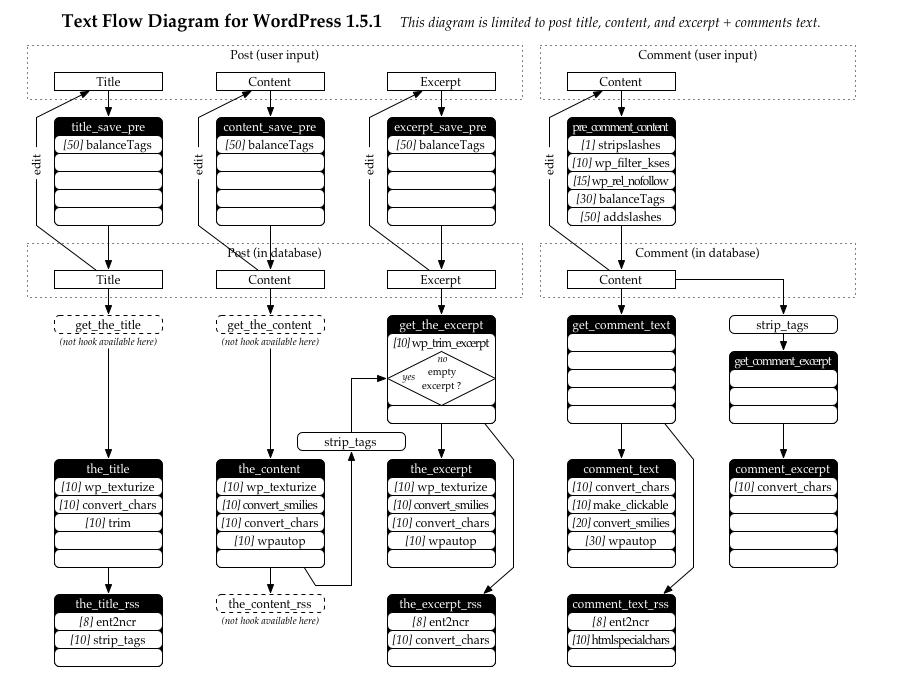
PS a bit of documentation on “bbPress text flow” (something like: http://www.michelf.com/img/blog/wordpress1.5-text-flow.png) wont hurt
July 19, 2007 at 9:23 am #59164In reply to: Few questions..
Ziyphr
MemberThanks for your help everyone, I think I’ll be giving bbPress a try.
July 19, 2007 at 8:37 am #59223In reply to: Plugin: Plugin browser for bbPress
ParticipantOkay the plugin list is blank for me. It did seem to pull down the plugin list. But I don’t see any new plugins offered?
Oh duh, I just re-read that it won’t show any plugins it hasn’t installed itself.
Can’t that just be copied from the bbpress table?
But wait, shouldn’t it show new available plugins not installed yet?
July 19, 2007 at 8:27 am #59222In reply to: Plugin: Plugin browser for bbPress
ParticipantInteresting – checking it out in a moment.
It will be helpful to more tightly knit the bbpress community.
I was thinking of making a voluntary plugin that would ping a bbpress stats site either nightly or weekly with your number of members, total topics, total posts. It would make a showcase for bbpress possibilities.
Right now it’s hard to get a count of the number of installed bbpress users. I’ve tinkered with various search engine commands and come up with an active number of 200-300 but this could be wrong do to path or file renaming (or template editing).
July 19, 2007 at 7:48 am #59221In reply to: Plugin: Plugin browser for bbPress
M
MemberAnd here I imagined the secret to be some way to transport chocolate through the internet! This is good too . . . just not as good.
July 19, 2007 at 6:41 am #59220In reply to: Plugin: Plugin browser for bbPress
Trent Adams
MemberFinally, no more secrets. They are too hard to keep!
Trent
July 19, 2007 at 6:14 am #2129Topic: Plugin: Plugin browser for bbPress
in forum PluginsParticipantNow available in the “Extend” area.
http://bbpress.org/plugins/topic/57
This plugin adds a plugin browser to the administration area of bbPress. Using this browser you can view the latest versions of the plugins available via the official bbPress plugin repository, you can install them and also upgrade them when new versions become available.
Neat-o!
This plugin used to be known as the super secret plugin
Note: the plugin only manages plugins that it has installed, it won’t magically find all your existing plugins. However, re-installing is a trivial exercise through the browser.
July 18, 2007 at 11:22 pm #59191In reply to: BBPress Integration with MY login sistem
MemberJuly 18, 2007 at 11:21 pm #56541In reply to: Strut Your bbPress!
ihatestarbucks
MemberAfter over 5000 posts and 3 million unique visitors, I’ve finally made it professional. (or at least one step closer) ihatestarbucks.com is now running bbpress! feel free to drop in and vent your spleen or share your kudos.
-
AuthorSearch Results