Skip to:
Content
Pages
Categories
Search
Top
Bottom

Search Results for '\"wordpress\"'

Viewing 25 results - 9,026 through 9,050 (of 26,865 total)
  • Author
    Search Results
  • #150744

    In reply to: My impressions so far

    pfswss
    Participant

    Jimi, yeah that is looking promising. I think you are a great asset for this project and you speak a lot of sense and know your stuff. I hope people listen to you and take your thoughts seriously and onboard.

    I reverted my main forum back to phpbb unfortunately last night. it’s a bit of a mess right now as I also have no internet working properly and I still have files to upload. I wasted quite a few days on that but I have no one to blame but myself for not researching enough. I wanted to move forward but I went backwards. I like wordpress so I feel a bit disappointed with all this.

    We only progress when we can listen and learn! Constructive criticism should be welcomed not shut out or taken personally. There is great potential here but a little lack of acceptance of what people really want.

    thanks and all the best!

    Stephen Edgar
    Keymaster

    Strange, try resetting your permalinks. In your WordPress Administration Screens navigate to Settings > Permalinks, select a different permalink structure and save. Then select your preferred permalink structure and save again.

    #150739
    Stephen Edgar
    Keymaster

    Cool, thanks for kicking this off 🙂

    Lets start with the layout structure and a “Table of Contents”, I added these recently and these are a good place to start and closely match not just the BuddyPress Codex layout guides but also much of WordPress also (Links to these below).

    Getting Started, Theme Development ,Plugin Development, Participate & Contribute and Developer Resources

    The Codex is now fully setup with an ‘Automated Table of Contents’ sidebar, see this section on how to acheive this, also the “breadcrumb” will also ‘sync’ up with this table of contents structure.

    For now ignore the ‘related posts’, these should also update based on the table of contents plus we are going to move the functions from their current location in the codex, I’ll detail those plans later.

    Links to topics on the forums for each section/page of the codex is a great idea, we can do this fairly easily. 🙂

    The ‘About’ page is part of the blog, the categories are the categories of the blog posts on the site and this is an automatically generated list, same with tags. Also many of the visible (and there are many not visible) of links from the ‘About’ page is from before we had the codex setup, thus much of the content throughout those links is either duplicated or redundant. A third set of duplicated content is our Trac home page https://bbpress.trac.wordpress.org that we need to redo and sync up with the same content (or at least links) to the correct content on the bbPress codex. A fourth location will be the actual source code of bbPress which primarily is on the plugin homepage https://wordpress.org/plugins/bbpress/. The fifth source would be basically identical to the fourth though is contained in a separate file and that will be for the plugin homepage on GitHub https://github.com/bbpress/bbpress.

    BuddyPress has a Google Docs “Table of Contents” here and I have just forked and edited that spreadsheet for us here on bbPress. I have set the permissions so anyone with this link can edit the spreadsheet, with some luck it won’t be vandalised, if this happens we can change this setting to “edit only” for verified editors.

    Before we change any of the existing URL’s for documents in the codex (e.g. Moving the FAQ into the “Getting Started” section) we will need to make some redirects behind the scenes so existing links will be forwarded to the new links.

    A good place to start would be extracting the sections from the awesome guides Robin has already contributed to build up our “Table of Contents” and once we are happy with what we have for starters in the “Table of Contents” we can then start updating the actual codex pages.

    A few references where we can reuse content and build up our table of contents can be found throughout existing WordPress and BuddyPress projects:

    BuddyPress Codex


    https://make.wordpress.org/core/handbook/
    https://make.wordpress.org/support/handbook/
    https://make.wordpress.org/docs/tag/handbooks/

    Project Status

    Hanlin1Q85
    Participant

    guys, i met a very wired problem. Everything is ok until this morning. My english is not good. BbPress forum page and category page shows 500 internal error. But all other pages including my home page, post page, and even the topic page, users’ profile page are working.

    (working)Homepage http://www.maldiveschina.com/
    (working)topic page http://www.maldiveschina.com/topic/被毁的中央格兰德岛假期

    (500 error)forum page http://www.maldiveschina.com/forums
    (500 error)forum category page http://www.maldiveschina.com/forum/after/complain

    WordPress: 3.9.2
    bbPress Plugin: 2.5.4-5380
    theme: SmartMag 1.5.1
    Apache 2.2.25
    Php 5.2.17

    [Wed Aug 13 01:56:54 2014] [error] [client 91.207.4.58] Premature end of script headers: index.php, referer: http://www.maldiveschina.com/forums
    [Wed Aug 13 01:56:55 2014] [error] [client 91.207.4.58] Premature end of script headers: index.php, referer: http://www.maldiveschina.com/forums
    [Wed Aug 13 01:56:57 2014] [error] [client 91.207.4.58] Premature end of script headers: index.php, referer: http://www.maldiveschina.com/forums
    [Wed Aug 13 01:56:58 2014] [error] [client 91.207.4.58] Premature end of script headers: index.php, referer: http://www.maldiveschina.com/forums

    [Wed Aug 13 10:10:41 2014] [error] [client 202.111.50.76] Premature end of script headers: index.php, referer: http://www.maldiveschina.com/wp-admin/edit.php?post_type=forum
    [Wed Aug 13 10:10:42 2014] [error] [client 202.111.50.76] Premature end of script headers: index.php, referer: http://www.maldiveschina.com/wp-admin/edit.php?post_type=forum

    I have reinstalled the bbpress plugin, but the problem is still there.

    pl give me some suggestion, thank you so much!

    #150728
    Stephen Edgar
    Keymaster

    This appears to have nothing to do with bbPress, please post on the plugins support forum you are trying to resolve an issue with or post on the general WordPress support forums.

    Support Forums

    Stephen Edgar
    Keymaster

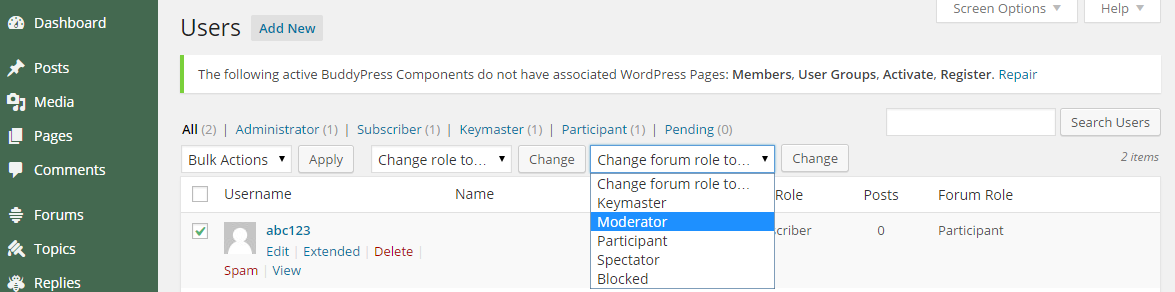
    Firstlt, you can change a users role via the WordPress User screen, just scroll down towards the bottom of the page or you can change them in ‘bulk’ via the standard WordPress Users panel.

    As to why your users can’t edit their own posts is most likely a conflict with either a plugin or your theme, try switching to the Twenty Fourteen theme and see if it works, if not start deactivating your plugins one by one until a user with the participant role can edit their own topic/reply and you’ll have found the plugin causing the conflict.

    Venutius
    Participant

    I’ve just discovered my bbpress Participants are unable to edit their own posts.

    Anyone any ideas as to why?

    Also, I can’t for the life of me find where I change a bbpress users role to change them to a mod etc. It’s not an option in the wordpress edit user profile section. Could someone be kind enough to point me in the right direction?

    #150713

    In reply to: My impressions so far

    Jimi Wikman
    Participant

    @robkk no one want a bloated software.

    It’s important to separate function from form in these discussions. A function like forum grouping with drag and drop has no impact on loading time in the front end yet it is a very powerful function that make it possible to expand BBP to a forum without having to sacrifice the Bulletin board feeling. If you want things just the way things are you just place all forums in one category.

    Same thing with moderation or usergroups. It does not impact anything in the frontend, yet it will make a world of difference for managing the forum. If you don’t want to use it you just ignore it. No bloating, but a world of difference.

    Then when we come to form we should put things like group icons and topic ratings as plugins. these are hardly used by all and as such they should be optional for those that want/need them.

    I however see an issue with plugins the way both WordPress and BBPress plugins are setup a lot now and that is that each plugin have their own set of CSS and JS. If I add 20+ plugins that usually mean that I will have 20+ CSS and JS files clogging up the browser stack. the total sum of the files are usually very small, but the sheer number will slow the site down considerably.

    If you have worked with WordPress installations with a lot of plugins you know that it’s a serious pain in the butt to try to get minification and combining JS/CSS to work properly. It’s either that the order of things are wrong or the minification mess something up in one or more files and you get stuck spending hours trying to find what is causing the mess. And even chained and minified the number of items in the browser stack still cause delays in the DOM rendering.

    This is why I think as much as possible should be added into as few plugins as possible and that is why I think that Buddypress and BBPress should merge and some basic functionality should be included in the core. I know that this is not what the bulletin board users may want to hear, but if BBPress are to reach a wider audience and become a forum plugin that will appeal the great userbase of WordPress, then I say this is something that need to be done.

    With around 70 million installations of WordPress we can assume that 1% at least have need of a good forum. Thats 700.000 BBPress installations that should be out there right now and I am not sure if that is the case or not? In my opinion BBPress should have at least 2.5 million installations by now as I know that the demand for forums are very high and people are searching high and low for any forum that will merge with WordPress.

    I know that alot of people here want a watered down and minimalistic bulletin board and I would say you are in majority since that is what BBPress is today. However I have a feeling that sooner or later someone will realize that the majority of users out there don’t want that and they will fork BBPress and go towards a more forum oriented software. When that happens I fear that that fork will boom in a major way and that will eventually reduce BBPress as developers will go where the userbase is and there is just so much you can optimize (of course you can ALWAYS optimize and refactor things, but it might now be very fun or productive for the users) in a minimalistic bulletin board.

    I think that BBPress is at a good place right now and before the end of the year with forum grouping in place and perhaps a little better organization of this website we should see more users starting to enjoy BBPress and not just bulletin board lovers 😉

    #150710
    RChadwick
    Participant

    I’ve been looking for a forum for my WordPress site, and everyone keeps pointing me back to bbPress. Problem is, I absolutely hate the way it looks. Mentally, I find it confusing to find and read messages. Is there a supported plugin that will make bbPress look like more traditional forums?

    #150698

    In reply to: Text Color and Font

    Robkk
    Moderator

    only thing i can do now is i guess suggest something else ,

    https://wordpress.org/plugins/bbpress-post-toolbar/

    it has font style, and font color .

    but it hasnt been updated in years and adds 2-4 seconds extra loading time to your site.

    it would be a great plugin still if it was updated or forked on github.

    #150691
    Robkk
    Moderator
    #150676
    desiamerican26
    Participant

    Hello friends,

    There is an issue that I been encountering on my website while posting on facebook. It doesn’t show the image when I post on FB, but when I use the Facebook Debugger and scrape new info through it, then it works fine. I am not sure why it’s acting like that.

    I do have some plugins that might be causing the issue. I have Shareaholic Share but I deactivated the Meta Tags under that and then I have Facebook OGP, WordPress SEO

    Is there a way to have a better link posting on facebook or any social site without having that issue? Or some code that will work perfect without plugins or anything?

    Please help.

    Thank You
    Regards,
    Nik
    My Website: http://www.desi-american.com

    #150667

    In reply to: My impressions so far

    Robin W
    Moderator

    I do hope that BBPress will eventually cater to everyone’s needs

    I do hope it won’t 🙂

    bbpress suits many many thousands of forum providers, by being simple and easy, which is what many want.

    Complex forums with loads of features that I’ll never use is not what I’m after. There are lots of bb’s out there for those that want all signing all dancing, and just as wordpress is not for all, so is bbpress.

    #150666

    In reply to: My impressions so far

    pfswss
    Participant

    Jimi, I was also disappointed when I installed BBPress and found it to be very unlike a forum I had known in the past. Out of the box it is too simplistic with several themes I tried it with. I just wanted a forum look but this does not seem possible unless you hire developers or are a really good coder with loads of time.

    I do appreciate the effort of the developers as an open source software. unfortunately I had the wrong impression from reading reviews of several wordpress solutions as they all pointed to this one as the best. To be blunt I would not like to try the worst ones.

    I have had a lot of issues, many plugins are not compatible and I still have nothing that looks remotely like a normal forum. I actually just searched to how to enable PM’s and that is when I found this post and another which says basically you need to install the Buddypress which is an overkill it seems.

    I do hope that BBPress will eventually cater to everyone’s needs but sadly I think I have to look at another solution and revert back to my PHPBB forum form 2 weeks ago. Then I will consider going with IP board or Vbulletin.

    Jimi, can you tell me why you stopped using IPB?

    #150665

    In reply to: Help with styling css

    Robkk
    Moderator

    if you mean like this http://thefastdiet.co.uk/forums/

    follow this topic https://bbpress.trac.wordpress.org/ticket/1958

    and read tharsheblows posts and take his code

    or read Bob1nz and go to his pastebin links and take his

    #150646
    Stephen Edgar
    Keymaster

    A quick look at the “Track’ theme, it looks like if you copy archive.php to bbpress.php that will resolve most of your issues. (Source: archive.php)

    After you have done the above remove the following line from your bbpress.php copy:
    get_template_part('content');

    #150645
    Stephen Edgar
    Keymaster

    All of bbPress will sit within the ID id="bbpress-forums" which makes CSS styling even easier and is far from new, I think it has been there since bbPress became a plugin 🙂

    A quick look at the “Track’ theme, it looks like if you copy archive.php to bbpress.php that will resolve most of your issues. (Source: archive.php)

    Edit: Do the above but remove the following line from your bbpress.php copy:
    get_template_part('content');

    #150644
    A.I. Sajib
    Participant

    I did actually. I tested on Tracks WordPress theme which happens to be free yet awesome theme. But on the forum topic page, for mysterious reasons, only the first post from the topic is visible. Posts from second and onwards don’t show up at all. A programmer would probably fix this in a moment but I’m not really a coder, so I’m looking for something else.

    Thanks for your help.

    #150641
    Stephen Edgar
    Keymaster

    Hey @microdot, glad you found us after I closed down your other posts 😉

    Check this out https://codex.bbpress.org/moderation-and-blacklisting/

    Also what setting do you have in WordPress discussion settings for:

    Before a comment appears Before a comment appears Comment must be manually approved

    I think that is most likely the culprit, what happens if you uncheck that?

    #150639
    Stephen Edgar
    Keymaster

    You use WordPress themes for the bbPress 2.x plugin.

    You can customize the bbPress templates for your theme by modifying them yourself, bbPress also includes full support for custom themes though there are very few of these.

    I’d suggest finding a WordPress theme that suits your needs and then tweak the CSS for the bbPress section of your site.

    #150634
    Stephen Edgar
    Keymaster

    bbPress is tested and works on PHP 5.2.4 and later https://bbpress.org/about/requirements/

    We ensure that bbPress (and the same for WordPress) is to work 100% on PHP 5.2.4 and up, thus including PHP 5.3.x, 5.4.x & 5.5.x.

    We have also begun experimental testing testing with PHP 5.6 alpha and HHVM.

    #150627
    Stephen Edgar
    Keymaster

    A standard bbPress User Profile Edit link should look something like this:

    http://example.com/forums/users/username/edit/

    Similar here on this site your edit profile link should be:
    https://bbpress.org/forums/profile/azafuel/edit/

    Users ‘can’ edit their profile in WordPress backend with the /wp-admin and that is because we are a WordPress plugin that uses WordPress’ users for bbPress so both are valid URL’s for user profiles.

    #150624
    Stephen Edgar
    Keymaster

    You can also just use a WordPress theme that includes support for bbPress.

    Just as BuddyPress has a ‘tag filter’ in WordPress’ theme repo, bbPress will also have a tag here in the not too distant future 🙂

    https://wordpress.org/themes/tag-filter/

    For now though you should simple search the themes for “bbPress”

    https://wordpress.org/themes/search.php?q=bbpress

    #150619
    Stephen Edgar
    Keymaster

    I have a customised version of the importer for vBulletin 5.

    There are a couple of tweaks that are needed though to bring it in-line with the current importer updates. The issue is with the way our current import script is setup we need to heavily tweak not just the import script but also our main converter.php file to handle the complex SQL joins need.

    If your familiar with SVN you can checkout the 2440-converter.php.2.diff​ patch in the following ticket along with vBulletin5.php, if not let me know and I’ll upload full files of these somewhere.

    https://bbpress.trac.wordpress.org/ticket/2440

    #150612
    giuseppe23
    Participant

    Peter thankyou but I tried like this and I just did again with yours now but didn’t change anything
    I did this one wich worked fine:

    .bbp-breadcrumb {
    	color: #fff;
    }

    Code above changed the color to white but codes below didnt change anything.

    .bbp-breadcrumb p a {color: #fff;}
    .bbp-breadcrumb-home {color: #fff;}
    .bbp-breadcrumb-current {color: #fff;}

    I have a black background of my wordpress site and site color is white for blog but for bbpress I changed only the header and footer background colors and used the code below

    #bbpress-forums a{
    	color: #000;
    }
    #bbpress-forums {
    	color: #000;
    }

    So I did this because bbp-topic has white background and in this case the links became #000 as site background but the breadcrumbs are on the top where the background is black too and I need to change the breadcrumb link color to white …

Viewing 25 results - 9,026 through 9,050 (of 26,865 total)
Skip to toolbar