Skip to:
Content
Pages
Categories
Search
Top
Bottom

Search Results for '\"wordpress\"'

Viewing 25 results - 8,951 through 8,975 (of 26,865 total)
  • Author
    Search Results
  • #151296
    MeFirst
    Participant

    Hello everyone,

    I would like to know if and how I can assign a default role in bbpress for users who registered. I have my forums set up that people who are not registered at all cant see or access some forums, while registered users can see and access those forums. Right now I have to manually assign every new registered user to that specific group. Is there a option I can link the wordpress role of participant to a group in bbpress?

    #151275
    GamingOrdinance
    Participant

    yep, all the same information and still coming up with:

    WordPress database error: [Table 'db502829828.node' doesn't exist]
    SELECT convert(node.node_id USING "utf8") AS node_id,convert(node.parent_node_id USING "utf8") AS parent_node_id,convert(forum.discussion_count USING "utf8") AS discussion_count,convert(forum.message_count USING "utf8") AS message_count,convert(node.title USING "utf8") AS title,convert(node.node_name USING "utf8") AS node_name,convert(node.description USING "utf8") AS description,convert(node.display_order USING "utf8") AS display_order,convert(node.node_type_id USING "utf8") AS node_type_id,convert(forum.allow_posting USING "utf8") AS allow_posting FROM node AS node LEFT JOIN forum AS forum USING (node_id) WHERE node.node_type_id = "Category" OR node.node_type_id = "Forum" LIMIT 0, 100
    #151274
    luisc9
    Participant

    Good night everyone!

    I am new to bbpress, but not new to WordPress.

    Could you please be so kind and explain clearly (for a newbie like me 🙂 ), what are the steps to fix this issue?

    We have a website with wordpress and bbpress with responses whose order get’s altered… And this has direct impact in our visitors experience.

    Thanks in advance for your patience.
    Regards
    Luis

    #151267
    Stephen Edgar
    Keymaster

    1- You would need a ‘membership’ plugin that supports bbPress, there are a few in the WordPress plugin https://wordpress.org/plugins/
    2- You can fully customize bbPress to match any theme or custom design you want, see the docs for more info. https://codex.bbpress.org/

    #151263
    Stephen Edgar
    Keymaster

    Upgrade your WordPress install from v3.5 to v3.9.2

    bbPress minimum requirements are WordPress v3.6 (this will also be bumped very shortly to v3.7)

    https://wordpress.org/plugins/bbpress/

    #151262

    In reply to: disable pingbacks

    Stephen Edgar
    Keymaster

    bbPress does not have pingbacks enabled for it’s post types, they are explicitly disabled.

    Could you be more specific and post a link to some examples and I’ll take a look.

    * Is it happening on all three bbPress custom post types?

    * forum, topic and reply are the tree post types and a link to one of each that this is happening with will allow me to investigate why.

    * I can’t think of a plugin for bbPress that changes the ping status of the custom post types but just in case can you disable all your plugins except bbPress and create a new forum, a topic in that forum and a reply to that topic and then create a WordPress post with a link to each of the three and see if you see any pingbacks.

    #151259
    pezarro
    Participant

    Hello,

    I operate a WordPress Network on WordPress version 3.5

    I have installed bbPress 2.5.4

    When an user that is “admin” for the specific site goes to the dashboard, the forums, topics, and replies buttons in the leftcolum appear.

    The forums, topics, and replies buttons in the leftcolum dashboard disappear if you double click on the top left dashboard icon unless I make the user a “Super Admin” for the entire WordPress network.

    What do you suggest to fix this?

    Thanks,

    #151258

    In reply to: Mass spam attack

    Sam Rohn
    Participant

    these 3 plugins are very effective in eliminating spambots and other spammers on wordpress/bbpress site

    i use all 3 with no apparent problems, but read the notes for each plugin, all need to be properly configured and stop spammer reg can be very aggressive, stop spam reg and bad behavior will both check visitors against a blacklist of known spammers and will deny them access to reg and posting forms etc

    https://wordpress.org/plugins/bad-behavior/

    https://wordpress.org/plugins/stop-spammer-registrations-plugin/

    https://wordpress.org/plugins/wangguard/

    #151257
    EzYRiDaH
    Participant

    Hi Stephen / @netweb

    I was finally able to run a complete conversion without any restarts. The MyBB SQL of the database was 435,9 Mb big. We cleaned a lot of the old forum. It contained 1 million+ messages, close to 40k topics and a 400+ members.

    The conversion ran for roughly 48 hours on a MacBook Air with i7, 8Gb memory and a 500Gb Solid State drive under MAMP.

    For people who want to do such a big conversion, I also had to tweak a lot of the PHP ini files to import such a big query and get maximum throughput. Below a summary. It took me a while to find all the necessary settings.

    Copy /applications/mamp/library/support-files/my-huge.cnf and rename to /Applications/MAMP/conf/my.cnf
    Change in my.cnf setting [mysqld] max_allowed_packet = 1000M
    Change in /Applications/MAMP/bin/php/php5.5.10/conf/php.ini settings
    max_execution_time = 259200,
    max_input_time = 259200,
    memory_limit = 6144M,
    upload_max_filesize = 1000M,
    post_max_size = 1000M,
    mysql.connect_timeout = 1000.
    Add or change in Applications/MAMP/bin/phpMyAdmin/config.inc.php setting $cfg['ExecTimeLimit'] = 0;
    Don’t forget to restart MAMP.

    I ran the conversion with the following settings: Rows Limit 10,000 and Delay Time 0. During the conversion my memory was around 50% and CPU was very low. Most likely it is possible to squeeze out more performance.

    I did a lot of random checks and the outcome seems ok-ish. Not quite sure about some things and have some questions. Please bear with me 😉

    Some topics are not combined correctly. All replies are separate topics. The ‘Recalculate the parent topic for each post’ does not fix this. I ran all repair queries btw. An option in the Topics interface to combine these, would be ace 😉 Is it possible to correct this with a query? My SQL skills are too limited unfortunately.

    The Repair Forums option ‘Recalculate the position of each reply’ does not work. It creates a white screen. Load problem?

    myBB accepts spaces in the login name. Unfortunately WordPress does not. The conversion leaves the spaces in the login name. Is it possible to correct this with an SQL? Is there another workaround? Correcting them one by one is not my preference 😉

    Two forums are created double. The copies do not contain any topics or replies, so it is easy to remove them. Just thought you should know 😉

    The original myBB forum contained 1mlj+ messages and 36k+ discussions. The converted forum contains 109k subjects. That can be explained because of the first issue. But it only contains 830k replies. It could be that myBB adds subjects and replies to messages, but the difference is a bit too big. Is it possible to do an SQL checksum to check the expected output?

    Thanks in advance for your time!

    #151254
    GamingOrdinance
    Participant

    Hi

    im trying to import my XenForo to my BBPress and im having trouble as this is coming up:

    WordPress database error: [Table 'db502829828.user' doesn't exist]
    SELECT convert(user.user_id USING "utf8") AS user_id,convert(user.username USING "utf8") AS username,convert(user.email USING "utf8") AS email,convert(user_profile.homepage USING "utf8") AS homepage,convert(user.register_date USING "utf8") AS register_date,convert(user.custom_title USING "utf8") AS custom_title,convert(user_profile.status USING "utf8") AS status,convert(user_profile.signature USING "utf8") AS signature,convert(user_profile.location USING "utf8") AS location,convert(user_profile.occupation USING "utf8") AS occupation,convert(user_profile.about USING "utf8") AS about FROM user AS user LEFT JOIN user_profile AS user_profile USING (user_id) LIMIT 0, 100
    No users to convert
    Starting Conversion

    My forum link: community.gamingordinance.com

    #151246

    In reply to: Mass spam attack

    Stephen Edgar
    Keymaster

    This really isn’t a bbPress issue, it is more of a WordPress issue.

    Your web host should be able to do some things via firewall rules.

    A good starter doc is https://codex.wordpress.org/Combating_Comment_Spam , conceptually it is the same thing, you have some ‘content’ that spammers want to get in on, in this case rather than comments it’s your bbPress forums and/or topics.

    bbPress uses WordPress user system for user authentication (login registration etc)

    I know it’s probably ideally not what you were looking for but is the state of things.

    A couple more thoughts would be to verify your Akismet API key is valid and Akismet is actually catching what spam it can. I’d also look to adding “capcha” plugin that supports the bbPress, there’s a few of these in WordPress plugin directory.

    #151242
    Stephen Edgar
    Keymaster

    Check out some of our docs, scroll down past the main headers on the following link and you’ll see some tutorials: https://codex.bbpress.org/

    If you want a capcha for your site search the WordPress plugins for “bbPress Capcha”, there are a couple of these I think from memory.

    #151240
    Dane Gould
    Participant

    Hi there

    We are experiencing a ‘mass spam attack’ that is overloading the database on our web host server. Our web hosts SGIS have looked into this and have deleted 75,000 spam attacks this week that have taken place from May to August 2014 (there were only a few hundred in the 14 months preceding this).

    Investigation has seems to show that the spam attack is linked to the bbpress forum plugin in our website. We have the latest version of Akismet installed and the latest version of bbpress. We don’t allow guests to start topics or posts or to reply to posts. All users have to be registered to reply to posts and only a few users are allowed to start new topics and posts. We are also using the latest version of WordPress which is 3.9.2. Does anyone have any thoughts or ideas about why this may be happening? Look forward to any reply.

    Our website address is: http://www.tenantcentral.org.uk

    Cheers – Dane

    #151230
    icejerry
    Participant

    I am going to create a widget that shows local events, which are sorted by the date of the events. So I need to sort the topics by topic names but not by when I publish it, for example
    [8/22/2014]event1…
    [8/25/2015]event2…
    [8/26/2014]event3…

    But right now there is no this kind of choice for BBPress recent topic widget.
    This can be done in wordpress post widget, but I prefer to use BBPress to publish this kind of Events.

    I don’t know how to get the wordpress version, but I have the version number for BBPress, which is Version 2.5.4
    My website is http://www.ezthelife.com/
    Please see the second column on the top, that is what I want, but it is wordpress post widget not BBPress topic widget .

    Please help me, thanks a lot.

    #151208
    jilleryfregan
    Participant

    I have a weird bug going on with my Static Homepage.

    We are using the plugin called Store Locator (http://wordpress.org/plugins/store-locator-le/) to show office locations. It’s a fairly simple plugin called by a shortcode in a page to display a map and list of offices.

    When I installed bbPress in addition to this Store Locator plugin, my static homepage was no longer working and my homepage reverted to a generic list of recent posts. (The static page was set in all settings correctly).

    This happens on every theme, including twentyfourteen, only when both plugins are activated at the same time.

    Is there any hook or reason that these two plugins would affect the static homepage?

    Thank you!
    Wordpress Version: 3.9.2
    bbPress Version: 2.5.4
    Website: http://209.240.4.6/

    #151202
    Robin W
    Moderator

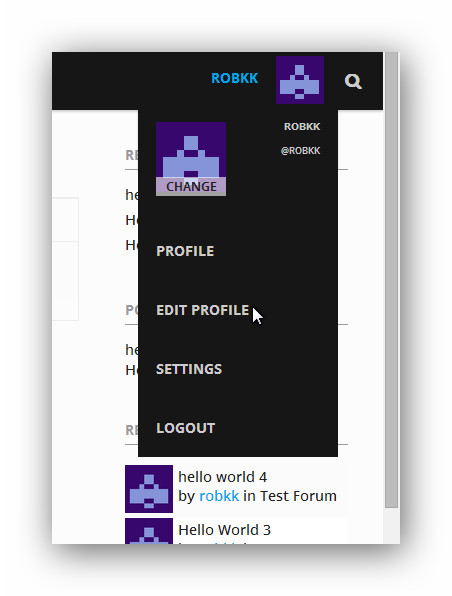
    So basically on the forum, when someone clicks edit my profile at the top of the page, it goes to the backend. Even though, it would be preferable to go to the front end.

    I would not let users see the toolbar, this is really just for admins.

    You need to disable the toolbar – add this to your functions file

    add_filter('show_admin_bar', '__return_false');
    

    then put the profile into your menu

    Layout and functionality – Examples you can use

    #151198
    cybarmitzvah
    Participant

    Thanks Stephen Edgar for the help, in request by him, I am posting this here and starting this new topic:

    disable front end editing

    So basically on the forum, when someone clicks edit my profile at the top of the page, it goes to the backend. Even though, it would be preferable to go to the front end. Currently, the only way a user can go to the front end is by clicking their name next to a post or in a topic/replies sequence.

    I am using the mesocolumn theme and am new to wordpress. site: http://www.astronomertalk.com

    I also moved template-full-width.php, to my child theme, and called it bbpress.php. After doing this, nothing has changed except now the forum specific sidebar, that came with the theme, does not show up.

    Source code from bbpress.php:

    <?php
    /*
    Template Name: Full Width
    */
    ?>
    
    <?php get_header(); ?>
    
    <?php do_action( 'bp_before_content' ); ?>
    <!-- CONTENT START -->
    <div class="content full-width">
    <div class="content-inner">
    
    <?php do_action( 'bp_before_blog_home' ); ?>
    
    <!-- POST ENTRY -->
    <div id="post-entry">
    <section class="post-entry-inner">
    
    <?php if (have_posts()) : ?><?php while (have_posts()) : the_post(); ?>
    
    <article <?php post_class('post-single page-single'); ?> id="post-<?php the_ID(); ?>">
    
    <h1 class="post-title entry-title"><?php the_title(); ?></h1>
    
    <div class="post-content">
    <div class="entry-content"><?php the_content( __('...Continue reading', TEMPLATE_DOMAIN) ); ?></div>
    <?php wp_link_pages('before=<div id="page-links">&after=</div>'); ?>
    
    </div><!-- POST CONTENT END -->
    
    </article>
    
    <?php endwhile; ?>
    <?php comments_template(); ?>
    <?php else : ?>
    <?php get_template_part( 'lib/templates/result' ); ?>
    <?php endif; ?>
    
    </section>
    </div>
    <!-- POST ENTRY END -->
    
    <?php do_action( 'bp_after_blog_home' ); ?>
    
    </div><!-- CONTENT INNER END -->
    </div><!-- CONTENT END -->
    
    <?php do_action( 'bp_after_content' ); ?>
    
    <?php get_footer(); ?>

    Thank You,
    JB

    #151195
    K-Path
    Participant

    This is the HiddenCity website that I want to rebuild completely in WordPress/bbPress.
    http://ecopsi.org/

    This is plain a vanilla copy of Twenty Ten theme modified with the bbPress forum plugin.
    http://ecopsi.org/journal/

    I started out with html/css/javascript to skin the domain it’s loaded on. With WordPress added on a few years later and the bbPress added last year. To say the least I am not happy with the result. My work is conceptually flawed and poorly executed. The only good thing is that I learned a lot about WordPress and bbPress.

    With the 2015 presentation of a rebuilt HiddenCity website I intend to adopt the style of Montezuma theme while keeping the data and livery (colors and logo). The following link is an example of how I want the prototype bbPress forums on my personal site to look except with the Montezuma theme. After I’ve got it worked out on my personal site I’ll use what I’ve learned to upgrade the HiddenCity site.
    http://cultivators-forum.com/forum/growers-forums/

    This is the only part that I’m not sure is possible. I want to make the following modifications.

    • forum topic to be the posts
    • categories to be forums
    • comments are replace by replies to the post

    In this case the the beginning of the last three or four replies showing with the topic again which appears as a post. The unregistered User can only see a static page and a forum for newcomers. I shouldn’t have to do anything to the Montezuma theme aside from the mods needed to make WordPress/bbPress execute the list above and tweak its colors to match the corporate livery of The HiddenCity Foundation.

    Thank you.

    PS — I don’t mind compensating someone for their time and attention in order to get this done.

    #151188
    Arjun S Kumar
    Participant

    Hi folks,
    As you all know, the plugin bbP Signature received it’s last update almost two years ago. I’m not actively updating the plugin, though I recently stumbled upon a WordPress mailing list thread regarding abandoned plugins, and I thought of writing this post.

    If any of you guys are looking forward to contribute to the plugin, I can provide you with commit access, so that the plugin is live.

    The source is also available on GitHub, so you can even make pull requests.
    https://github.com/arjunskumar47/bbp-signature

    #151177
    kvns09
    Participant

    Hi, How do I make my forum fill the entire page? Right now it only covers around 50%. I have used widget logic to hide all the widgets and I have also done some research on this and tried editing the bbpress.css file but nothing works. Any help is much appreciated.

    Heres a link to the page with the problem

    WordPress 3.9.2
    bbPress 2.5.4

    #151160
    Stephen Edgar
    Keymaster

    Don’t use bbPress login widgets or shortcodes then, use whatever is supplying that form instead, essentially we are all just piggy backing the standard WordPress login form.

    #151159
    Stephen Edgar
    Keymaster

    Download and install the bbPress Genesis plugin, that should fix things for you.

    https://wordpress.org/plugins/bbpress-genesis-extend/

    #151158
    Stephen Edgar
    Keymaster

    First up, a clarification on what you are calling posts; are you inferring users in the back end editing WordPress blog posts? That is sort of how your last reply reads to me. bbPress uses Forums, Topics and Replies and it can get confusing if these terms aren’t explicitly used at times 😉

    When in the back end and you try to restore a trashed topic by clicking restore indeed you will see that error, it’s a know issue and will be fixed in the next release. The workaround is to use the “bulk actions” and select the checkbox next to the topic or topics to restore, select “restore” from the bulk action drop down and click apply.

    If you are seeing that error in the font end it shouldn’t be doing that and should work as expected when restoring topics.

    Either/or try the same again with a new admin/key master user and see if you can still replicate the issue.

    #151152
    melanie bund
    Participant

    Hi
    I am using the latest wordpress and bbpress
    i have my own login form, (for people to upload images to their portfolios) how do i synchronise bbpress with that form rather than having to have 2 login forms which seems silly
    Thank you in advance
    Melanie

    LoraLu
    Participant

    I am attempting to use the shortcode [bbp-forum-form] to allow users (keymasters) to be able to add new forums as needed. I set up a new page and added this shortcode. The page looks great and the shortcode pulls up the form to add a new forum (as desired). However, when I test it by filling out this form and clicking submit, nothing seems to happen. The page does seem to refresh but a new forum is not added.

    Am I missing something? I am new to bbpress so perhaps I just missed a setting somewhere? I am running the latest version of WordPress (3.9.2) and bbPress 2.5.4. My site URL is http://wwcustomercare.azurewebsites.net.

    Thank you in advance for your help!
    Lora

Viewing 25 results - 8,951 through 8,975 (of 26,865 total)
Skip to toolbar