Skip to:
Content
Pages
Categories
Search
Top
Bottom

Search Results for '\"wordpress\"'

Viewing 25 results - 8,601 through 8,625 (of 26,865 total)
  • Author
    Search Results
  • #153787

    In reply to: Widgets

    Robin W
    Moderator

    bbPress is tested with wordpress default themes. It maybe a conflict – you need to check plugins and themes

    It could be a theme or plugin issue

    Plugins

    Deactivate all but bbpress and see if this fixes. if it does, re-enable one at a time to see which is causing the error.

    Themes

    If plugins don’t pinpoint the problem, as a test switch to a default theme such as twentytwelve, and see if this fixes.

    #153784
    Dromicus
    Participant

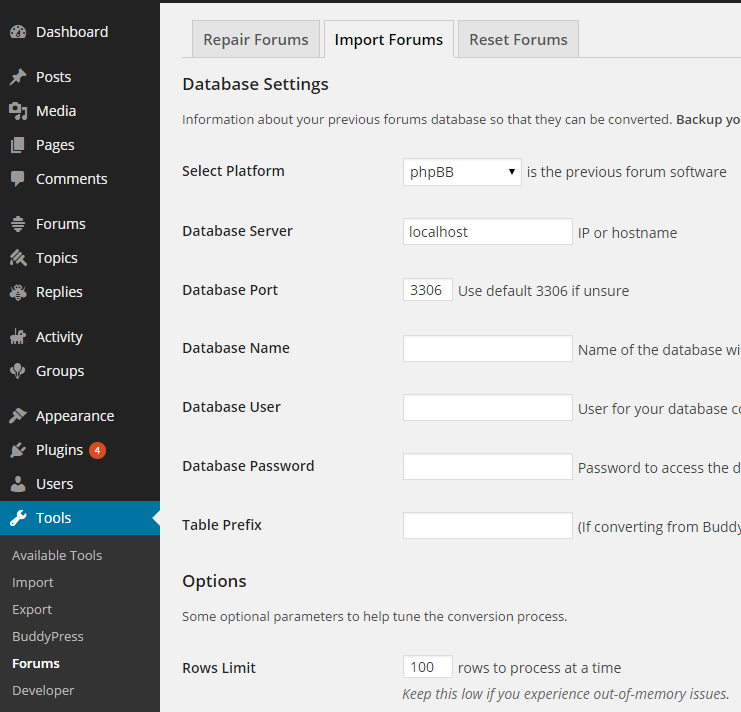
    Trying to follow these instructions and not seeing the steps.

    Getting There
    1.Log in to your WordPress Admin Dashboard
    2.Select the ‘Tools’ tab select ‘Forums’ from the navigation menu
    3.Select the ‘Import Forums’ tab at the top of the screen.

    I am using wordpress 4.0 and am not seeing tools tab….in the left hand colum I see forums but if I go their I can not see an import section.

    #153772
    ankytt
    Participant

    Hello bbPress team,

    Firstly i would like to thank you for making bbPress. Its a nice handy plugin for wordpress lovers. Right now, i am trying to create a Expert Question-Answer forum using wordpress. My site has 2 types of roles. 1st is normal and 2nd is expert. Now, i need to add a functionality so that Normal users can ask their doubts in forums. But, only Experts should be able to reply to his topic or the author of the topic itself. Is this possible with bbPress? Please let me know.

    I am using bbPress 2.5.4 on WordPress 4.0.

    Thanks,
    ankytt

    #153751
    Nicolas Korobochkin
    Participant

    Disable user registration in wordpress.

    #153738
    Robkk
    Moderator

    you can use this plugin

    https://wordpress.org/plugins/bbpress-bbcode/

    but this also needs to be used with

    https://wordpress.org/plugins/bbpress2-shortcode-whitelist/

    and you can also this plugin which has bbcode and alot of other functions added to it.

    https://wordpress.org/plugins/gd-bbpress-tools/

    #153722
    Andrew Leonard
    Participant

    WordPress 4.0 running Twenty Fourteen Child theme.
    bbPress Version 2.5.4

    The Forum

    Somebody posted in “Cultivars”.
    I created a new Forum called “Identification” and edited the Post so that it’s parent was in “Identification” rather then “Cultivars”
    The result is that if you look at the forum “front page”, the Post still seems to be in “Cultivars” but is really in “Identification”

    I disabled all the plugins and the child theme but that did not cure this problem

    Any ideas?

    #153706
    tharsheblows
    Participant

    Hi – the 1000 posts thing is a known issue which will be fixed in 2.6.

    In the meantime do these two steps in order (but test them first! always test first):
    1. change this code: https://bbpress.trac.wordpress.org/ticket/2615
    2. run the “Recalculate the position of each reply” tool in Tools -> Forums

    Again, test it all first before doing it to your live site.

    Are you using bbPress 2.5.4? Prior to that, sending subscriptions was slowing things down, too.

    #153705
    athenaweb
    Participant

    I had the same problem when updating WordPress all the topics etc disappeared. I changed the theme as suggested by Robin and they re-appeared. Then I switched back to the original theme again and strangely the topics etc were still there…

    #153687
    pcgs51
    Participant

    I am working with a site that has bbPress. Its an old site and I was only recently informed of issues. One I’m currently trying to fix is an issue where I’m seeing my Gravatar appear in Topics and Replies. But I have never participated in this forum.

    However, I see my Gravatar and username in Topics and Replies which makes no sense. My client said he was seeing similar issues with his Gravatar. But for now I can only address mine.

    • I tried updating all plugins
    • Used the Tools>Forums> Repair Forums I selected each relationship to repair one at a time but no luck.
    • Turned off all the plugins except for bbPress.
    • Deactivated the theme and activated Twenty Thirteen. No change.
    • Logged in as a different Admin and still see MY Gravatar and my username.

    WordPress: v. 4.0
    bbPress: v. 2.5.4
    URL: http://icmmaca2.wpengine.com/forums/forum/mmaca

    I’m stumped. Any ideas or similar experiences?
    Thanks

    #153681
    freshwater
    Participant

    making a post in my bbpress/wordpress forum site, i click the “link” in the wysiwig editor, add link and title then post, all the text, images put in with “img” button work except the front end post ignores the anchor tag. i can see the tag is there when i go back to edit the post.

    here is the copied tag which bbpress generated:
    ++<+a href=”http://earthjustice.org/blog/2014-october/turning-the-tide-of-history-for-maui-s-four-great-waters&#8221; title=”Turning the Tide of History: Maui Waters Flow Again After 150 Years” target=”_blank”></+a>++ (i had to put plus sign + in the code because this post/bbpress.org forum is ignoring the tag too)

    here is the post http://theboatpeople.org/forums/topic/maui-waters-flow-again-after-150-years/
    you can see the above anchor tag in the page source using a web browser.

    i can’t remember if i’ve ever used the button before in the last years. this id is the admin so it’s got to have authority to use this tag, it shows up in the wysiwig editor.

    thanks for any help!

    #153678
    Harry1951
    Participant

    Hi I’m new on bbPress.
    I have the following problem with the shortcode.
    When I use the shortcode [bbp-forum-index] the forum shows up like this:
    Forum
    La Vie En France (1, 0), Bouwen en verbouwen (1, 0), Het franse dossier (1, 0), Het kopen en verkopen van een huis in Frankrijk (1, 0), Alles over deze website (1, 0), Recepten (1, 0), Chez Jo-Jo (2, 0)

    When I use the shortlink it shows up as it should be.
    How can? and what to do, because I prefer to use the shortcode.

    Wordpress 4.0
    bbPress 2.5.4
    Theme Twentyeleven

    #153669
    Vadim
    Participant

    bbPress 2.5.4, WordPress 4.0, Theme: Accelerate.

    Font size does not depend on the theme.
    Extra small font is not convenient read.
    Please do, the size of 16px.

    I can do it myself, I know the file bbpress.css.
    But also for the new font size need to customize the size of all the blocks of the forum.
    The names of the words in different languages ​​have different widths blocks.

    #153649

    In reply to: bbpres admin

    filiip
    Participant

    Probably plugin is too old for the WordPress version I am using.

    https://wordpress.org/plugins/bbpress-admin/

    Now, I am trying to modify bbpress theme. I am using Arras theme for the page and I would like to make some changes with default bbpress theme. I am new in this waters. But I am learning now. 🙂

    #153642
    temi_t
    Participant

    I am trying to set up a discussion forum on a website I manage using the step by step guide provided by bbpress.

    I got through the steps of creating a forum and topic. However when I click on the forum a message displays that 1 topic is present in the forum. Then another message says “Oh bother! Nothing was found here!”

    I have uninstalled the bbpress and re-installed it but I’m still running into the same problem.

    Here’s a link to the forum page. It can also be accessed from the website’s main menu as follows: SURVEY >> PTRC Forums

    My WordPress version is: 4.0
    bbPress version: 2.54

    Thanks in advance

    #153632
    Robin W
    Moderator

    bbPress forums can be private, public or hidden.

    private are only viewable if logged in, hidden are only viewable by mods and above.

    However my private groups plugin will give you all the control you need

    https://wordpress.org/plugins/bbp-private-groups/

    re importing

    https://codex.bbpress.org/import-forums/mingle/

    #153619
    shelleyheath
    Participant

    Hi There,

    I have a website which restricts content via the Groups plugin (https://wordpress.org/plugins/groups/)

    On one of the restricted pages I am using the following code to insert a forum: [bbp-single-forum id=12492]

    However when working in the frontend and adding a topic, sometimes it renames the actual page… The forum ending to the url just tacks itself to the page on which [bbp-single-forum id=12492] is featured.

    Forum page:

    PCLC 1: A TIME FOR INTRODUCTIONS!

    Original url:

    http://lifepurposecoachingcenters.com/classrooms/pclc-1/

    Reset url after it goes wrong:

    http://lifepurposecoachingcenters.com/classrooms/pclc-1-a-time-for-introductions/

    Any ideas would be much appreciated!

    Thanks very much!

    #153603
    londonhutch
    Participant

    Hi,

    First time here so please be gentle.

    I run a moderately popular vBulletin 4.1 site with 11,000+ users, 13,900+ threads and 39,000 posts. The users very rarely use any of the “power” features of vBulletin and I want to fully integrate the board into WordPress.

    My preference would be to transfer using the script from vBulletin to bbPress, or alternatively to use a site like cms2cms. My main concern is what will happen to my Google search rankings. At the moment the site is very well spidered by Google and we are the no.1 search result for a number of very important key words, phrases.

    Is there any way I can redirect all the posts, threads etc to the new bbPress so that my ranking would not be seriously affected? I am not that technically minded when it comes to robot files etc, so any help would be gratefully appreciated.

    Thanks in advance.

    CodingMachine
    Participant

    In the background without editing bbpress at wordpress template function, there

    Can you help me to understand your problem more Clearly

    hanshilei
    Participant

    In the background without editing bbpress at wordpress template function, in the plug-in, bbpress at only. PHP and a few other files of the root directory, but there is no editable bbpress at template function at the bottom of the template?

    #153557
    jugoretz
    Participant

    Well, I think I’ve found a better workaround than the Network Activate Solution.

    Based on a lead from this topic from a year ago https://bbpress.org/forums/topic/missing-admin-menu-items/ , I tried activating Capability Manager Enhanced (https://wordpress.org/plugins/capability-manager-enhanced/) and surprise! There were the missing capabilities, not checked, not active, in the Capability Manager settings.

    So I just enabled all the forum-related capabilities for administrators (could do this for any role, I’m sure) in CME, and that made everything work again for the site administrators, even when bbPress is not activated network-wide.

    So that’s a much better solution (from my perspective, at least). If you want to use bbPress in multisite, just be sure to also use Capability Manager Enhanced on any site where you want the site admin to have the capability to add/edit/delete/manage forums.

    #153551
    jessy
    Participant

    You are using WordPress 4 and there is a bug for bbPress forum posts.

    Install plugins:
    http://www.rewweb.co.uk/bbpress-wp4-fix
    http://www.rewweb.co.uk/bbpress-wp4-fix2/

    #153533
    mannmithund
    Participant

    Hello there

    I fail in inserting / embedding an m4v video into a forum posts. Posts show text and images as intended, but for videos, just the smart tag is shown:

    [video width="640" height="640" m4v="video.m4v"][/video]
    

    What am I doing wrong?
    I run wordpress 4 and bbpress 2.5.4

    Help is much appreciated.

    – MannMitHund

    #153530
    bee7er
    Participant

    Hi All
    Is it possible to limit the WordPress plugin bbpress to a single forum? And by-pass the forums list and go straight into the topics for the forum.

    I have checked the settings and there does not appear to be any way of doing this.

    Thanks

    #153529
    yoshimitsu1234
    Participant

    Can anyone answer my question in detail?
    How do i add featured image to a bbpress forum post from wordpress post editor page?

    #153523
    Robin W
    Moderator

    you may need to rule out other factors, as far as I know bbpress works with woocommerce eg

    bbPress WooCommerce Integration: Tutorial on How to setup a Paid Forum on WordPress

    bbPress is tested with wordpress default themes. It maybe a conflict – you need to check plugins and themes

    It could be a theme or plugin issue

    Plugins

    Deactivate all but bbpress and woocommerce and see if this fixes. if it does, re-enable one at a time to see which is causing the error.

    Themes

    If plugins don’t pinpoint the problem, as a test switch to a default theme such as twentytwelve, and see if this fixes.

Viewing 25 results - 8,601 through 8,625 (of 26,865 total)
Skip to toolbar