Skip to:
Content
Pages
Categories
Search
Top
Bottom

Search Results for '\"wordpress\"'

Viewing 25 results - 7,676 through 7,700 (of 26,864 total)
  • Author
    Search Results
  • #160407
    tummybos
    Participant

    Thanks very much @robkk. The link on wp user query is a great tool to solve my problem.
    Concerning the use of BuddyPress, i think the link will be a problem in the sense that the links to the profiles that will be displayed will not link to the users forum profile. I want the links to go to user’s bbPress profile page, not the default wordpress user page nor the buddypress profile.
    So I have decided to go by the Wp user query way, but please how am I going to create the php code. Am i supposed to wrote it in a page? or where should I put the code and how will i create the page?
    Thanks.

    #160406
    Robkk
    Moderator

    @gptxffa

    Showing the comment your are replying to next to the reply to: text bbPress does not do that. That sounds like some custom development go to http://jobs.wordpress.net/ and post a job.

    as for reply threading , i guess not threading??

    see if its a theme or plugin issue

    Plugins

    Deactivate all but bbpress and see if this fixes. if it does, re-enable one at a time to see which is causing the error.

    Themes

    If plugins don’t pinpoint the problem, as a test switch to a default theme such as twentytwelve, and see if this fixes.

    Then come back

    #160403
    gptxffa
    Participant
    #160401
    gptxffa
    Participant

    Here is a screen shot which may help

    http://gptxffa.com/wordpress/wp-content/uploads/2015/03/reply-issue.jpg

    #160397
    Robkk
    Moderator

    what version of bbPress / BuddyPress / WordPress are you using?

    #160390
    Robkk
    Moderator

    This sounds like some custom development.

    I suggest you hire a developer , go post a job at http://jobs.wordpress.net/

    #160389
    Robkk
    Moderator

    There is a way using the wp user query

    https://codex.wordpress.org/Class_Reference/WP_User_Query

    plugins like BuddyPress have this type of feature too.

    bbPress does not have a feature/shortcode like this, but if you use BuddyPress , bbPress is compatible with it.

    #160362
    Stephen Edgar
    Keymaster

    You may need to extract the users out to a separate table, or you may be able to treat these users as “anonymous users”, I’d suggest first though I’d look at mapping some of the fields for the content only as that should not take much time to get up and running.

    First you want to do this with bbPress 2.6 ‘alpha’ rather than the current 2.5.6 release as there are significant improvements to the importers in the upcoming version.

    You can get your hands on 2.6 alpha via https://wordpress.org/plugins/bbpress/developers/ and it is listed under “Other Versions” as “Development Version”
    Or the direct download link https://downloads.wordpress.org/plugin/bbpress.zip

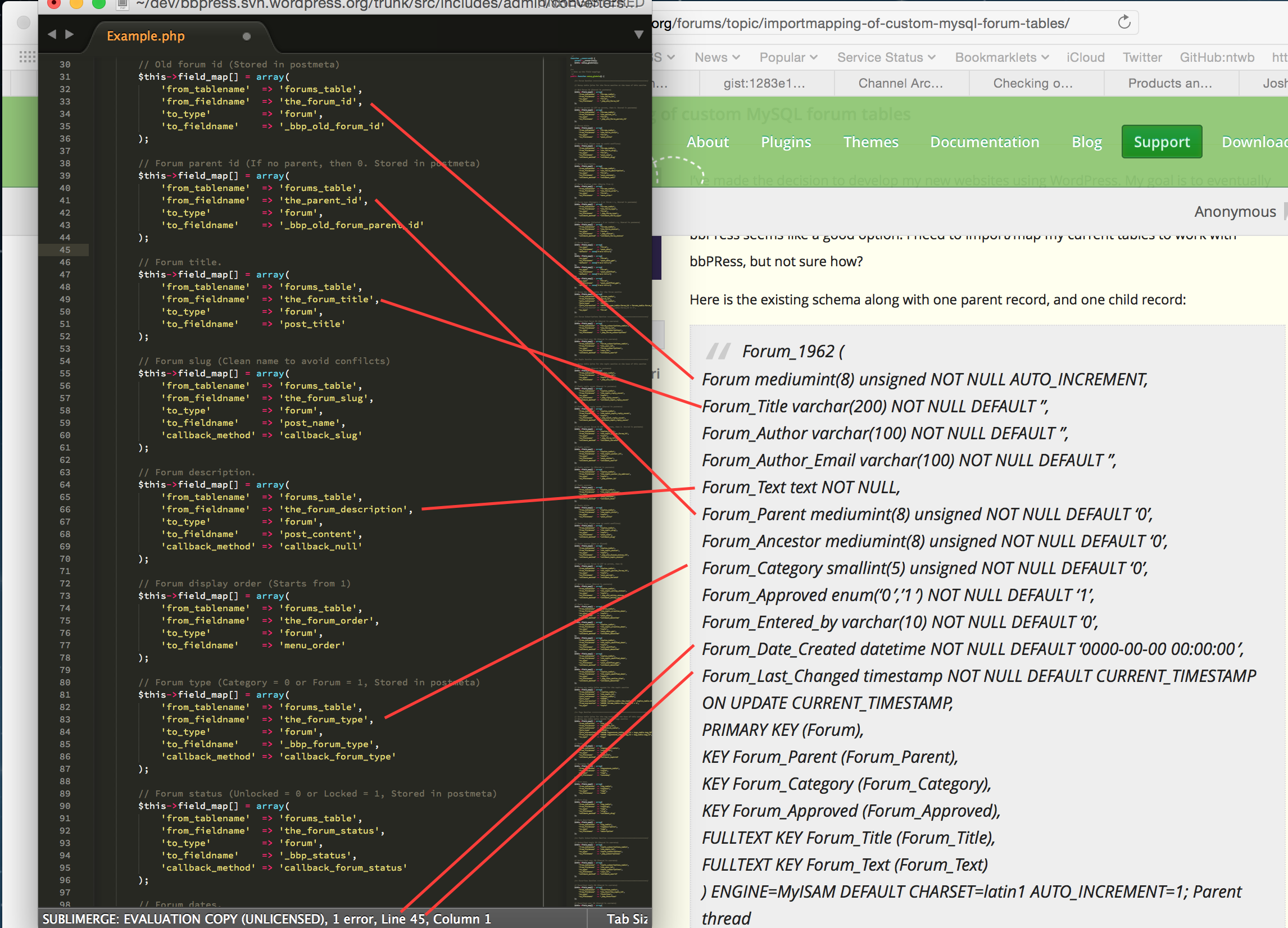
    Next you want to make a copy of Example.php from the includes/admin/converters folder of the plugin to MyConverter.php and in that file replace any instance of Example with MyConverter (this is case sensitive to be mindful of that)

    Next up start mapping the fields from your schema to the fields in MyConverter.php

    In the following screenshot I’ve mapped drawn lines to the easily concluded fields, any field mappings that you do not use you can simply delete, ideally using as many as you can will ensure the best bbPress experience for your data though.

    Take a stab at doing the above for the rest of your database, topics, replies etc and get back to us.

    If you need a place to host code snippets, use GitHub Gists: http://gist.github.com

    #160352
    impressor
    Participant

    Notice: bbp_setup_current_user was called incorrectly. The current user is being initialized without using $wp->init(). Please see Debugging in WordPress for more information. (This message was added in version 2.3.)

    #160348
    impressor
    Participant

    Notice: bp_setup_current_user was called incorrectly. The current user is being initialized without using $wp->init(). Please see Debugging in WordPress for more information. (This message was added in version 1.7.)

    Why? and How to fix?

    Buddypress also had this error, but they fixed it almost 2 years ago. Something to do with calling is_user_logged_in()

    See here: https://buddypress.org/support/topic/debug-error-bp_setup_current_user-was-called-incorrectly/

    #160347
    phil_b
    Participant

    Hi all,

    I hope you guys can offer some advice suggestions here.

    This is the situation:

    – I have a wordpress multi-site setup (4 blogs in total)
    – There are currently 4 xenforo forums I need to import. These need to be imported in to my 4 multi-site blogs. One xenforo forum to each of the 4 blogs.
    – all users from all xenforo forums, imported in to each of the 4 blogs should be able to visit each of those 4 blogs and post in any they choose

    The goal is to ultimately have a single user base within my wordpress multi-site, but with 4 different forums running (one under each blog), where users can access and post data in all of them (as well as submit regular post comments etc)

    The main issue I can see me having is that each xenforo forum will have users who’s IDs start at 1, and go up to about 15,000 (lots of users!!). If I import one forum in to the first multisite blog, then what happens when I import the next forum in the second multisite blog? Will users get overwritten? Will forum topics/replies get attributed to the wrong user?

    Note: I am also running buddypress.

    A solution I have considered is to import all users from xenforo forum 1. Then loop through all users in xenforo forum 2 to update their ID’s to +15,000 (i.e user with ID 1 becomes user with ID 15001 etc). Then import that forum in to bbpress. Then do the same with xenforo forums 3 and 4 (+30000, +45000).

    That is a hefty task though.

    Any advice/help would be really appreciated!

    #160344
    Robin W
    Moderator

    writing an entire forum code for wordpress as a solo project seems to be a significant challenge, so using bbpress and amending that would seem to be a good strategy.

    ok, since you seem to be very php savvy, suggest you go to

    https://codex.bbpress.org/import-forums/

    and simply amend one of the templates there for your forum.

    #160343
    Lisa
    Participant

    I’ve made the decision to develop my new websites using WordPress. My goal is to eventually re-write my PHP code as a WordPress plugin, but, until then I need to use what’s available, and bbPress seems like a good option. I need to import/map my current tables to work with bbPRess, but not sure how?

    Here is the existing schema along with one parent record, and one child record:

    Forum_1962 (
    Forum mediumint(8) unsigned NOT NULL AUTO_INCREMENT,
    Forum_Title varchar(200) NOT NULL DEFAULT ”,
    Forum_Author varchar(100) NOT NULL DEFAULT ”,
    Forum_Author_Email varchar(100) NOT NULL DEFAULT ”,
    Forum_Text text NOT NULL,
    Forum_Parent mediumint(8) unsigned NOT NULL DEFAULT ‘0’,
    Forum_Ancestor mediumint(8) unsigned NOT NULL DEFAULT ‘0’,
    Forum_Category smallint(5) unsigned NOT NULL DEFAULT ‘0’,
    Forum_Approved enum(‘0′,’1’) NOT NULL DEFAULT ‘1’,
    Forum_Entered_by varchar(10) NOT NULL DEFAULT ‘0’,
    Forum_Date_Created datetime NOT NULL DEFAULT ‘0000-00-00 00:00:00’,
    Forum_Last_Changed timestamp NOT NULL DEFAULT CURRENT_TIMESTAMP ON UPDATE CURRENT_TIMESTAMP,
    PRIMARY KEY (Forum),
    KEY Forum_Parent (Forum_Parent),
    KEY Forum_Category (Forum_Category),
    KEY Forum_Approved (Forum_Approved),
    FULLTEXT KEY Forum_Title (Forum_Title),
    FULLTEXT KEY Forum_Text (Forum_Text)
    ) ENGINE=MyISAM DEFAULT CHARSET=latin1 AUTO_INCREMENT=1;

    Parent thread
    =============
    (19261, ‘Can I rent an RV?’, ‘BillB’, ‘bill@web-crafter.net’, ‘I\’d like to give RVing a try, but there\’s no way I\’m going to plunk down thousands of $$ to buy an RV. Is it possible to rent an RV like you\’d a car?’, 0, 19261, 1962, ‘1’, ‘rvcn’, ‘2002-12-12 13:52:29’, ‘2002-12-12 13:53:25’);

    Ancestor thread
    ===============
    (19262, ‘Re: Can I rent an RV?’, ‘Mark’, ‘mark@ittelligent.com’, ‘No problem. Just check your yellow pages for a rental agency in your area. I know there are a few national outfits too. Cruise America and El Monte come to mind off the top of my head.’, 19261, 19261, 1962, ‘1’, ”, ‘2002-12-12 13:59:42’, ‘2002-12-12 13:59:42’);

    You’ll notice that there are fields for both parent and ancestor, which allows for infinite sub-topic threads (those replies to replies under one parent). Also, I the author name and email are also stored in this table, and not tied to a separate user table (so will need to address that). Each MySQL dump is between 1MB and 3MB.

    Need any more information? Please advise.

    My goal is one of two options:

    1. Import/Map existing table dumps in several websites to WordPress and bbPress using above forum schema as source, OR
    2. Convert my existing PHP forum code to be compatible with WordPress and forget about bbPress altogether if I can’t easily map the table (I don’t know WordPress enough to even think about doing this myself, even though the code is simple and fast, and will ne advice on someone who can)

    I am doing this so I can better control the mobile templates and have a more robust way of controlling my websites. I need to do this for about 6 websites, and would like the method to do this myself after the first time.

    Thanks in advance,

    Lisa

    #160336
    Robin W
    Moderator
    #160326
    Andrew Breksa
    Participant

    Check out bbp user online status (https://wordpress.org/plugins/bbp-user-online-status/) a plugin I recent wrote to add online/offline statues to bbpress topics/replies.

    #160320

    Check in bbpress/templates/default/bbpress/content-search.php

    bbPress employs some “theme compatibility” magic to insert itself into your existing WordPress theme, and that directory is where those template parts live to try and fill in the gaps

    Chad R. Schulz
    Participant

    I’m building what while be a discussion board style website. I will embed a single forum through a shortcode in each/every post.

    This will allow standard WordPress navigation and give each forum its own post/page.

    I will not allow users access to any part of the natural bbpress forum hierarchy (categories/forums/subforums/etc.) and will use redirects to ensure that all requests for specific forums end up on the appropriate post/page that uses the embedded shortcode.

    My question: Without the need to query numerous (potentially hundreds) of individual forums through traditional forum navigation, do I still need to spread the forums out among multiple categories/sub-categories when building the forums on the backend.

    Remember, no user will ever need, nor get, access to the forum hierarchy/structure. ALL forums links will redirect to the appropriate post.

    Having to create a needlessly complex hierarchy/structure is daunting and would make a mess for moderators to dig through.

    Just curious. Appreciate any guidance in this matter.

    Thanks,
    Chad Schulz

    #160314
    screenwavemedia
    Participant

    I’m extending an existing WordPress theme with bbpress functionality. I’ve gotten everything up and running except I can’t seem to find the base template for search results to customize everything AROUND the BBPress search results code. It looks like by default it’s pulling from page.php or single.php, but I would like to use a more specific template for it. I’m not seeing anything in Extras that fits the bill.

    #160307
    Stagger Lee
    Participant

    Take rest with CSS. Dont know how it looks.

    Small warning. If your forum is not visited well it could look amateurish. You will have post after post, after post, avatar of one and same User/Topic author.

    Same situation is if you use automatic bbPress topic from WordPress Posts.

    Making bigger avatars can make things worse if you dont have many Users. For instance another tweak “last commenter avatar”. I tried all this, and if you have just one User who like to comments more than other Users, it looks boring to see enlarged avatar of this User on whole screen everywhere.

    I mean easier to take it if avatar is few pixels big.

    #160297
    Robin W
    Moderator

    sorry for late reply, we don’t always catch all !

    This plugin should do it

    #https://wordpress.org/plugins/bbp-private-groups/

    #160289
    Stagger Lee
    Participant

    You can use same function for bbPress part, I believe. It is up to you where do you want to adapt it.

    Or maybe “is_user_logged_in()”:

    http://wordpress.stackexchange.com/questions/34429/how-to-check-if-a-user-not-current-user-is-logged-in

    #160254
    Stagger Lee
    Participant

    Just checked. Ignore User plugin works well even 3 years old:

    https://wordpress.org/plugins/bbpress-ignore-user/

    #160253
    Robkk
    Moderator

    @aleksderfar

    the plugin is still fresh it was uploaded to the WordPress repository 5 days ago.

    making the online status location configurable seems to be on the developers to-do list.

    i did see that the plugin author did reply back though.

    and you did figure how to show the green/red icon , so if you could tell him how you did it to help with future development of the plugin.

    #160247
    Robkk
    Moderator

    this should be a direct path to the activity.php file that you would need to edit

    /wp-content/plugins/bbpress/includes/extend/buddypress/activity.php

    follow all the comments in here https://bbpress.trac.wordpress.org/ticket/2690

    and you should see dans fix for the patch to make it work.

    #160237
    Stagger Lee
    Participant

    @Peter-Hamilton man, admin you are lying and trolling us ? 🙂
    How it is possible you made something like this without experience in PHP and WordPress.
    Mathematically impossible.

Viewing 25 results - 7,676 through 7,700 (of 26,864 total)
Skip to toolbar