Search Results for '"wordpress'
-
Search Results
-
Hello All.
I am trying to install bbPress to my WordPress MU installation for 4th time now.
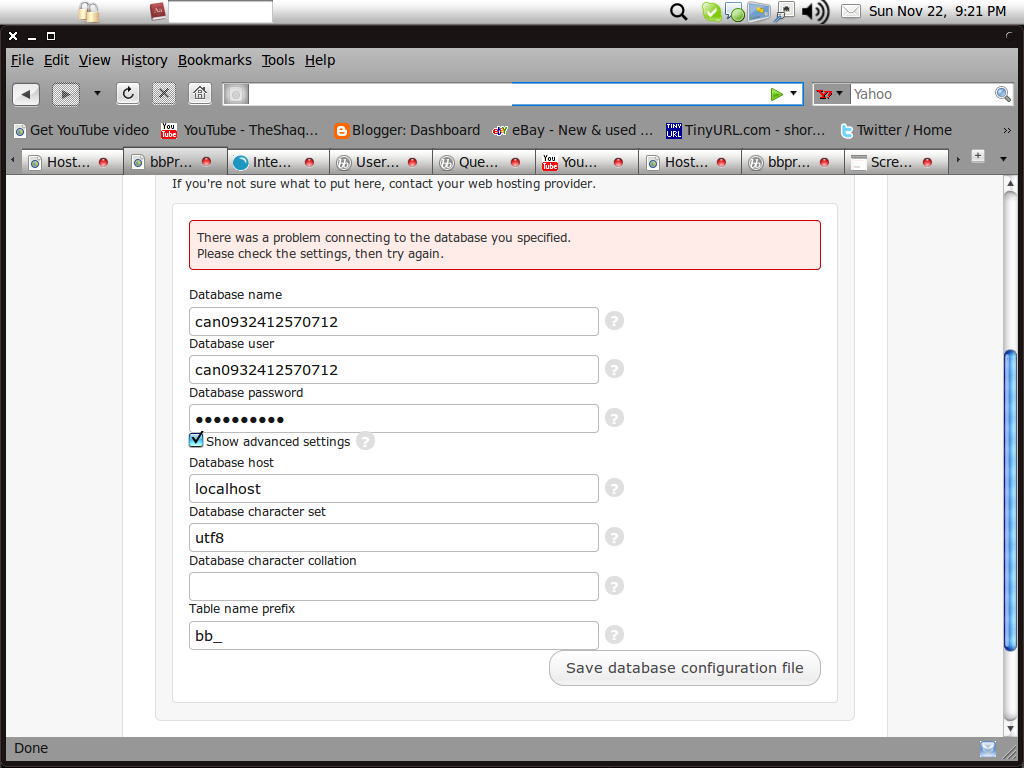
During the installation process, in the Step 2 where we have the option to integrate the Forums with WordPress, I type all the AUTH keys and all other keys and user database settings correctly, but it ends up showing the following error.
“There was a problem connecting to the WordPress user database you specified. Please check the settings, then try again.”
I’m 100% sure I’ve typed the correct data. Okay. So I skipped the User integration part and proceed to finish the installation. Then, I get my Forums set up. Nice and running. Good. But in the Admin page, if I try to integrate the users with WordPress, I am suddenly logged out of my account and my Admin account is vanished.
If I try to log-in, it says there’s no such account and I can’t access the Admin page any longer/
Why is this happening and what should I do?
I integrated wordpress with BBpress, using the bbPress-WordPress syncronization plugin, it works fine, but I want to link the comments button under the post to direct to the proper forum topic. Is there a way to do this? Or a plugin for this?
EDIT: Actually, nevermind. After making a few posts and reading the hundreds of comments, it’s clear that this plugin is still buggy and not complete, and every other sync plugin is out of date. Off to try something else, BBpress has nothing yet to offer that any other forum doesn’t already have if it can’t integrate completely with wordpress..
http://i714.photobucket.com/albums/ww145/GrrAnimalCrackers/Bleh/Screenshot-52.png
MySQL Database Information
Status: Setup
Host Name: can0932412570712.db.5237484.hostedresource.com
Database Name: can0932412570712
Database Version: 5.0
Description: WordPress
User Name: can0932412570712
What am I doing wrong, why can’t I get past this part? Do I have to edit a certain file? Just today I installed phpbb3 with these setting, why isn’t it working with bbpress?
Hi all,
I am Abhinav. I am facing a slight problem deep integrating the latest stable versions of WordPress ( 2.8.6 ) with bbPress ( 1.0.2 ) on a website – I have completed the user and cookie integration and it works perfectly. All the settings are configured and saved properly. However after I add the line :
require_once(/absolute/path/to/wp-load.php);to the top of bb-config.php .. Forums page goes blank! No errors, no warning messages.. Just a blank page with no code at all..
Before installing the bbPress live on the server, I developed the theme on my system locally and tested deep integration thoroughly a few times – everything works just fine locally but it’s creating trouble live on the server.
I have checked echoing values from the WordPress files that are loaded into bbPress.. that confirms that WordPress is being loaded properly.. But why isn’t bbPress loading after that !
I suspect that having WordPress installed and running since a long time already is causing the problem!
I have deep integrated various websites where WordPress was already installed and running for quite sometime without any issues..
Can it be a plugin conflict? The website is using 37 (
 ) plugins at the moment..
( Should I post a list of plugins being used? )
Can anyone help me out, please?
I’d be very grateful..
Regards..
Hi,
I have a wordpress site running now but need to know if I want to add the forum, do I need to create a new mysql database on my server or can I just use the existing database my current wordpress installation is using? I was not sure if I could fill out the same data in bb-config.php as I did in the wp-config.php file from wordpress.
I have a strange problem. When I’m on the forum front page or a forum page, the timezone is set to “America/Los_Angeles “, but when I go onto one of the topic pages, it is “Etc/GMT+7”.
I am checking by using the PHP function “date_default_timezone_get()” in the header right after the <body> tag.
These two are different by an hour because of daylight saving, which is causing an issue with the simple-onlinelist plugin.
Where in the initialization of bbPress is the timezone set? Any ideas why it would be set differently depending on the bbPress page that is loaded?
If it matters, I have deep integration with WordPress MU 2.8.4a, which also has the timezone at “America/Los_Angeles”.
Thanks.
I’m looking for a good forum plugin for WordPress, and bbPress seems like a good choice. The main thing I like about bbPress is its simplicity. Dead-simple to use, with no confusing toolbars to intimidate users. However, aside from installing numerous plugins, it lacks many of the basic features of a forum. In my view, if I’m spending more effort to get something to work as well as another solution, I’ll go with the alternative.
The forum will only be used for basic discussion, so advanced functionality is not needed, but its helpful and attractive to include a few anyway. Keeping it easy and intuitive yet functional for first-time forum users is key.
Right now I’m leaning towards bbPress, but do you have any additional suggestions?
We are creating a wordpress website which requires secure forums for schools.
How it needs to work is: school forums will be set up for individual schools.
If you are parent and want to see YOUR SCHOOL forum – you will need to
a) click on your school from a drop down list of available school forums
b) register for this school forum
c) An administrator will confirm your registration (depends if you answered security question correctly)
d) From there you can happily view information (which may be confidential) on the school forum page and post/view information as well
FEEDBACK FROM DEVELOPER:
Simplepressforum – doesn’t allow us to do the above
We then Installed the WordPress MU and had a look at buddypress.
The type of functionality that we are looking for is not available in WordPress MU. Buddy Press is entirely build on the facebook concept, and not geared towards groups as we are looking for.
A solution might be to create a custom forum with all the functionality that is needed and just include it in an iframe in wordpress. Downside to this will be that the there will be 2 back-ends for managing the website, Word Press and the Forums.
========
Really don’t want to go custom design … I really though something like this would be simple to set up … excuse the pun …
Can anybody help?
Ok, I just installed two wordpress blogs that share the same users using this method:
They seem to work as far as logging in and out but i don’t believe they share the same cookies (due to the fact that i can log in/out of one and still be logged in/out of the other).
I’d like to make one forum installation to serve BOTH of these sites (having seperate forum sections for each blog)…is it possible to do the cookie integration between all three?
Hopefully that made sense and thank you to anyone who can help.
Hi, I’m trying to figure out how to display bbPress’ tag cloud from the sidebar in WordPress. I’ve googled a lot, but can’t seem to find anyone who’s done this.
I’ve hacked a temporary solution that displays the topic tags from bbpress as a list in the wordpress sidebar, but I’d really love to have the size formatting as well.
<?php
global $wpdb;
$taglist = $wpdb->get_results(“select name from bb_terms”,”ARRAY_N”);
$number_of_tags_to_show = 10;
for ($count = 0; $count < $number_of_tags_to_show; $count++)
{
if($taglist[$count][0])
{
$tag = str_replace( ” “, ” “, $taglist[$count][0]);
echo ‘
- <a href=”http://www.mysite.org/forum/tags.php?tag=’;
echo $tag;
echo ‘”>’.$tag.’
‘;
}
}
?>
Any suggestions for how to access bb_tag_heat_map from inside WordPress?
- <a href=”http://www.mysite.org/forum/tags.php?tag=’;