Css or php changes by sftp not updated to my wordpress site. I figured out this is not parent/ child theme problem .. I am using godaddy wordpress managed hosting and this issue occurs because of their cache layer and i don’t know how to clear it. I try to contact them but unable to reach them beacuase of voice issue in international call.
Anyhow my tab/heading problem is solved because of loop code in this link https://raw.githubusercontent.com/robkk/better-bbpress-responsive-theme/master/bbpress/loop-forums.php
i want some modification in tabs/heading — like in the picture arrow appears which show or hide forums../// or modification like tabs act like toggles (function).

If the users were imported AND you can see them in the WordPress backend then you can assign the topics and replies manually be editing each topic and reply manually or doing this directly in the database.
This is extremely time consuming and I do not recommend it.
My only recommendation is to reset bbPress and import again.
I am having problems working thru this upgrade process. I just successfully upgraded all users, posts and forums from bbPress version 0.9.0.7 to version 1.2. Conversion worked great.
Now I am working on upgrading from bbPress version 1.2 to the latest. I installed WordPress version 2.5.4-5380. Then installed the bbPress plugin version 2.54.
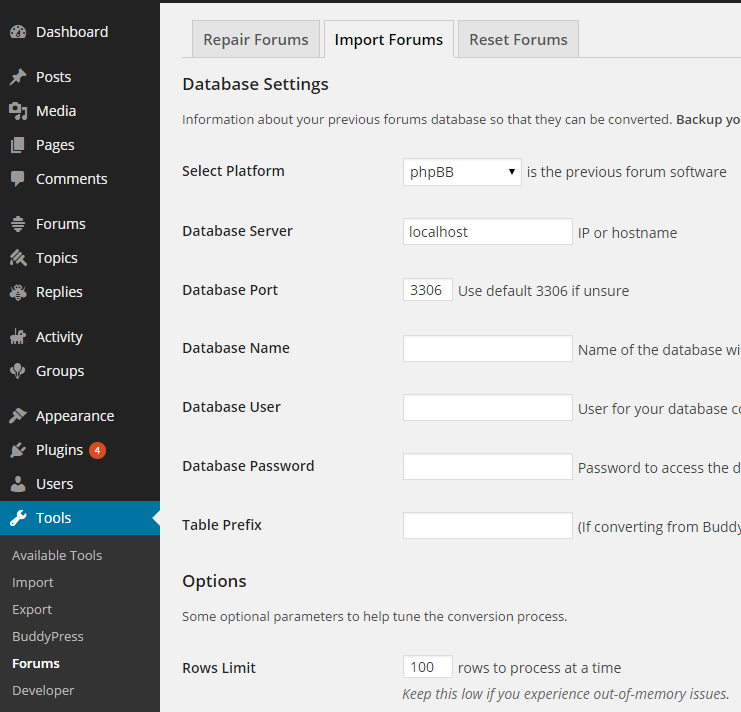
In Tools, Forums, Import forums, the correct information is entered. I also put a check mark in the box “Convert users (Attempt to import user accounts from previous forums)”. However, after clicking “Start” it trundles along and says “no users to convert”, “no passwords to clear”, “no forums to convert”, etc . . .
Checking in Forums and Users, I do not see any of the previous users and forums added. I wonder if we need to add table prefix info (i.e. “bb_”) into the importer settings?
hello, good day!…I want to put a button "thanks" for each post in the user profile and the Times Appears "Thanked"
but I find this plugin or shortcode, or a way to do
example:

I found this plugin: https://wordpress.org/plugins/bbpress-like-button/
but does not show the data in the public profile …
although the plugin either to pay, no matter
It is now important for a forum
help!
kind regards
Wordpress and phpBB (> v3.0) are separated, no bridge, nothing: two differents things. The only account imported was my phpbb account and now are working with the wordpress one.
In wordpress are not exist any phpBB account.
Anonymous users, in real, are not accounts.. anyway there is a way to assign them manually to new accounts? I prefer to don’t import forum again
Same thing, that was what I meant 😉
Also after resetting the forums check that any previous or duplicated users do not exist, this is an issue that sometimes results in having to manually delete previously imported users, it is fixed in the next release of bbPress.
Extra Notes: Make sure you are importing from phpBB v3, if you have been previously using a bridge plugin between phpBB and WordPress you will also have issues.
If you didn’t check the box “import users” then there will be no users to associate with the imported topics and replies and they will be assigned to anonymous.
Go to your WordPress Dashboard -> Tools -> Forums – Reset Forums
Reset your forums and import again.
bbpress 1.0.2 is obsolete for a few years now and is no longer supported, current bbpress is version 2.5.4
https://wordpress.org/plugins/bbpress/
using wordpress and bbpress 2.x, you could set up wp at domain.tld/blog and put bbpress (2.x) on a wp page like domain.tld/blog/forum
see the bbpress codex for more info on setting up bbpress 2
Step by step guide to setting up a bbPress forum – Part 1
see here for info on importing other forums
https://codex.bbpress.org/import-forums/
sam
I’ve only just noticed the same issue as everyone else, I DO have S2member installed, but that wasn’t the issue.
Turns out it was down to the Custom Search plugin by “bestwebsoft” https://wordpress.org/plugins/custom-search-plugin/
I’ve raised the issue on the WP support forum https://wordpress.org/support/topic/wp-40-breaking-bbpress-not-showing-1st-forum-post?replies=1#post-6172365
Thanks, Robin! Now I feel much more confident and I will start my first WordPress project. Since I am a starter, but still I want to insert nice pictures in my site, could you please suggest some decent freeware alternative of Adobe PhotoShop?
I have been using this piece of code to call the default bbPress breadcrumbs.
/**
 * Filter to call default bbPress breadcrumbs
 */
add_filter( 'bbp_get_breadcrumb', 'myfix_bbp_get_breadcrumb', 1, 3 );
function myfix_bbp_get_breadcrumb($trail, $crumbs, $r){
        // This will remove wordpress-seo filter to disable bbPress breadcrums by default
        remove_all_filters("bbp_get_breadcrumb",10);
        return $trail;
}
I want to put a button "thanks" for each post in the user profile and the Times Appears "Thanked"
but I find this plugin or shortcode, or a way to do
example:
I found this plugin: https://wordpress.org/plugins/bbpress-like-button/
but does not show the data in the public profile …
although the plugin either to pay, no matter
It is now important for a forum
help!
kind regards
Can I build a website with WordPress without coding?
I ran my first website for two years without needing coding. SO yes is the answer
All membership plugins are individual, so cannot dierctly say what your does.
Cancelling a membership plugin does not usually delete the user in the wordpress database, so their posts should remain with their name against them.
If it does, then I’m not sure what will be displayed.
Manually deleting a user you get asked whether you wish to delete the posts or assign then to another user
no problem
set up your ‘cars’ as categories
Dashboard>forums>new forum. Call it say GM then on the right hand side you’ll see ‘Type’ change this to category
Save this and exit.
The in
Dashboard>forums>all forums you have your forum list. For the GM forum, hover over the ‘edit’ option, and at the bottom of the screen you’ll see something like
http://www.mysite.com/wp-admin/post.php/post=123&action= edit
Make a note that 123 equals the GM forum category – you’ll need this later.
The create your sub forums as forums eg Buick, Cadillac, and on the right and side make these have a parent of GM
Then create a wordpress page called say GM, and put the shortcode
[bbp-single-forum id=123]
where 123 was the post number of the category forum you noted above
Then just add this page to your menu
Hi, ive had problems from my users that avatars are not showing in the forums. I checked it out & it seems theres a backslash being removed from the URL to the image. I had to remove:
add_filter( ‘bbp_get_topic_author_link’, ‘stripslashes’ ); from the filters.php and it now all works fine. Problem is my theme is in source control and surely editing core files cannot be correct, right?
This is in my loop-single-topic.php file and this is what displays the name and avatar:
<span class=”bbp-topic-started-by”><?php printf( __( ‘Started by: %1$s’), “”.bbp_get_topic_author_link( array( ‘size’ => ’90’))); ?></span>
Is this a known bug and is there a better way to fix this? I am using the latest BBpress and WordPress 4.0. Avatar plugin is WP User Avatar
Thanks
Cheers
Here is the resultant SQL query for your code above:
SELECT SQL_CALC_FOUND_ROWS wp_posts.ID
FROM wp_posts
INNER JOIN wp_postmeta ON wp_posts.ID = wp_postmeta.post_id
INNER JOIN wp_postmeta AS mt1 ON (wp_posts.ID = mt1.post_id)
INNER JOIN wp_postmeta AS mt2 ON (wp_posts.ID = mt2.post_id)
WHERE 1=1

AND ( ( YEAR( post_date ) = 2014 ) )

AND wp_posts.post_type = 'topic'

AND (wp_posts.post_status = 'publish'
	OR wp_posts.post_status = 'closed'
	OR wp_posts.post_status = 'private'
	OR wp_posts.post_status = 'hidden')

AND (wp_postmeta.meta_key = '_bbp_last_active_time'
	OR (mt1.meta_key = '_bbps_topic_status'
		AND CAST(mt1.meta_value AS CHAR) LIKE '%1%')
	OR (mt2.meta_key = '_bbps_topic_status'
		AND CAST(mt2.meta_value AS CHAR) LIKE '%2%')
	)

GROUP BY wp_posts.ID
ORDER BY wp_posts.post_date DESC
LIMIT 0, 15
I think you are hitting a known limitation of WordPress at the moment nesting queries, take a look at Boone’s posts on the improvements coming to WordPress 4.1:
Meta, Date, and Tax Query improvements in WP 4.1
…classes currently accept a ‘relation’ parameter, which allows multiple query clauses to be joined with AND or OR. So, for instance, you can query for: posts that are in the ‘Boone’ category AND have the tag ‘Awesome’ AND do not have the term ‘Raphael’ in the favorite_turtle taxonomy. But this syntax only allows for so much expressiveness: you can’t mix AND and OR, and you can’t group clauses. These limitations make it difficult to use these queries in support of complex content filtering…
Then take a read of the follow up post explaining what has happened since that first post, I haven’t had the time to look at how this changes affect bbPress, they should not break bbPress, but these will be something we will take a look at to a) Ensure bbPress is not affected by these WordPress 4.1 updates and b) How we can leverage these improvements in future versions of bbPress.
Update on Query improvements in 4.1
I really need some help, i am using a plugin that allows me to make custom wordpress roles and give them permissions to make topics and stuff in the forums… I want to make it so the text that is displayed on the forums like “Participant” or “Keymaster” are changed to the text of the users wordpress role ie. “Participant” becomes “New Member” so that i can make a rank identification system.
I could have;
New Member {Same as Participant permisstions}
Full Member {Same as Participant permisstions}
Senor Member {Same as Participant permisstions}
Moderator {Same as moderators permisstions}
Administrator {Same as keymasters permisstions}
Ect…
The plugin i am using is Capability Manager Enhanced
hi, sorry,i am new to bbpress, we just set up a wordpress for our support center with bbpress installed for Q&A purpose(not as a forum). that’s why we wondering how to show topics in bbpress home page instead of forums(to make it more like a Q&A and save the hassle) or even create topics without forums.
your help is really appreciated!thx
Hi, there!
I am new to WordPress and I’m wondering if i need any text editor like Notepad++ in order to create a website. This might be a dummy question, but I really need to know. Can I build a website with WordPress without coding? Thanks in advance!
unfortunately bbshowcase was for the standalone version 1 of bbpress and doesn’t work with the wordpress plugin version.
As suggested, I copied all the template files inside bbPress plugin directory to my active theme
Not sure where you got that from. Only if you want to alter templates do you need to copy templates to a bbpress directory, and then only those you wish to change.
Also, how do I remove Topic: and Forum: slug at the title of the page?
Can you specify exactly what you want to remove – a screenshot would be good
sorry wp4.0 changed the way default permalinks worked, and this has broken bbpress child forums, which is I suspect your problem.
There is a trac ticket for this with WordPress.
The interim fix is to go to pretty permalinks (which you say you don’t want to) or only have forums at the top level. In theory this will be fixed in 4.0.1 whenever that comes out.
@mnhfile
also try to test out on a local development area like WAMP or MAMP
install divi , bbpress, and then add the file to your bbpress folder in your divi child theme.
MAC
http://www.wpbeginner.com/wp-tutorials/how-to-install-wordpress-locally-on-mac-using-mamp/
PC
http://www.wpbeginner.com/wp-tutorials/how-to-install-wordpress-on-your-windows-computer-using-wamp/
if you cant even get it on localhost , contact elegant themes support they also run bbpress on there support forums maybe they can help too.
@atfpodcast maybe there is some setting that you accidently checked that might have caused the issue.
i just tested off of localhost and just using default settings in everything.
try testing on a local development area and see if it works
PC
http://www.wpbeginner.com/wp-tutorials/how-to-install-wordpress-on-your-windows-computer-using-wamp/
MAC
http://www.wpbeginner.com/wp-tutorials/how-to-install-wordpress-locally-on-mac-using-mamp/
Does this help? You should be seeing the “Tools” section in WordPress 4.0 most definately.