Search Results for '"wordpress"'
-
AuthorSearch Results
-
July 19, 2015 at 3:07 pm #164223
Topic: Dashboard doesn’t open when bbPress activated
in forum Troubleshootingwcreimer
ParticipantWhen I activate the latest bbPress (2.5.8) or SimpleRestrict (1.0.2) plugin then try to login to my site, the WordPress dashboard does not open. Instead, I simply get the home page of the site.
To deactivate these plugins, I have to go to my site files, rename the “plugins” folder, sign in to the site (the Dashboard appears) then reactivate my plugins other than bbPress and SimpleRestrict. Signing out, then signing in shows me the Dashboard. I have repeated this procedure about 3 times with the same result. The site is http://ruralpolicy.ca.
If I activate bbPress (in order to use the Forums option), the site seems to work okay, but I can’t log in to the Dashboard.
I recently redefined the site address URL and it seemed to make the necessary changes to the shortlinks okay. I can’t be sure, but this bbPress-Dashboard problem appeared around the time I made this change.
I’m using the Twenty-ten theme with a child.
Any suggestions what the problem might be?
July 19, 2015 at 2:06 pm #164222In reply to: Help Wanted: Adding WebWiz Content to BBPress
Robin W
ModeratorJuly 19, 2015 at 10:20 am #164217In reply to: spam users are registering in my website
seo india
ParticipantMost of the Marketing Bots are advance enough to break through any type of Captcha Code. The real issue is not pondering over your captcha code, but you need to make your login/registration process secure with additional questions such as
What is the 3rd character in my Domain after www. ?
As far as math captcha is concerned, it can be easily cracked by Marketing Bots. You need to create your own custom question and this will surely help to get rid of automated registrations.
I was handling wordpress blog for 1 client and every day I used to get around 10-50 comments. Ultimately I had to block the commenting feature. Spamming is really bad form of marketing.
July 19, 2015 at 9:13 am #164216In reply to: Help Wanted: Adding WebWiz Content to BBPress
bananadan
ParticipantRobin:
I am striking out on http://jobs.wordpress.net/. The majority of the people who have responded to my post send me massively long resumes and covers letters explaining how they are the “greatest developers” and can do anything and then some. Very few have addressed my needs which is in fact that I want to hire someone with lots of BBPress experience to install BBPress and then import the data from our Web Wiz forum and then configure BBPress to look and act as we want.
Would you allow me to post something in your site to try and find someone who is actually a BBPress guru?
DanJuly 18, 2015 at 8:21 pm #164210Sam Rohn
Participantthe bbpress search code posted above by robkk works fine for me with wordpress 4.2.2 + bbpress 2.5.8, shows expected bbpress topics and replies in wp search results for admins, non admin members, and non logged in users
also respects posts hidden by s2member bbpress level restrictions
sam
July 17, 2015 at 10:11 pm #164195In reply to: Edit allowed only for 1st post
Robkk
Moderatorthis site uses gravatar, so go to gravatar.com and use the same email you used for this site/wordpress.org, and change it there.
For anybody that wants to view their profile and have been redirected to this topic. There is a bug right now that is being looked over. To edit your profile go to this exact url, with username being your exact username.
https://bbpress.org/forums/profile/username/
To go to certain profile links add these additional slugs for each. So for example go to https://bbpress.org/forums/profile/username/subscriptions to view your subscriptions.
Topics Started > topics/
Replies Created > replies/
Favorites > favorites/
Subscriptions > subscriptions/
Edit Profile > edit/ (You can look at any information but not save)July 17, 2015 at 8:17 pm #164194ModeratorThis feature is not yet implemented into bbPress yet. WHen it is, in the next big release or so, I should have a guide explaining how to do it.
July 17, 2015 at 10:35 am #164190In reply to: spam users are registering in my website
folgerj
ParticipantThanks Sam, I’ll use Keith’s stop spammers as I’ve used that before. I know he had cancer so I sent some money his way and I’m glad he’s still around.
I know that spam is a wordpress thing more than a BBpress thing but when we show up maybe these tips could be put in a general forum that is closed and it can help folks.
It would be nice since I had four people or one person with four emails login in this morning and they created groups with no links about delayed ticket arrival garbage (10 – 15 paragraphs) so I went in and marked their accounts as spam and blocked them and then deleted the groups they created.
Things like this could be added as a lessons learned.
Thanks all…
July 17, 2015 at 8:30 am #164188In reply to: bbPress.org profile edit redirect error
susf.se
ParticipantI do not know if it is a css problems, or what happens when I activate bbPress this is comming up I’m grateful for help in this problem, here is what happening.
user was called incorrectly. The current user is being initialized without using $wp->init(). Please see Debugging in WordPress for more information. (This message was added in version 1.7.) in /customers/3/d/7/susf.se/httpd.www/wp-includes/functions.php on line 3560 Warning: Cannot modify header information – headers already sent by (output started at /customers/3/d/7/susf.se/httpd.www/wp-includes/functions.php:3560) in /customers/3/d/7/susf.se/httpd.www/wp-includes/pluggable.php on line 1196
Thank yoy in advance
Marianne / susf.seJuly 17, 2015 at 3:19 am #164177Topic: dots bbpres theme
in forum Themesdutchnerd
ParticipantJuly 16, 2015 at 11:12 pm #164165In reply to: How to showcase select topics on homepage
ModeratorThis would require some custom development for the layout. So you may need to hire a developer/designer to do that type of layout.
But I think how slickdeals has it, is basically creating blog posts and also a topic for each blog post for users to discuss.
This plugin may help with creating a topic for every blog post you create.
July 16, 2015 at 10:56 pm #164162In reply to: 500 Internal Server Error after update
ModeratorFollow anything that is listed on this WordPress Codex guide
https://codex.wordpress.org/Common_WordPress_Errors#Internal_Server_Error
July 16, 2015 at 10:08 pm #164155In reply to: Not getting forum notifications
ModeratorTry this plugin and see if it fixes your issue
https://wordpress.org/plugins/asyncronous-bbpress-subscriptions/
July 16, 2015 at 10:18 am #164127Stephen Edgar
KeymasterStagger Lee,
The plugins you mention, Jetpack, that’s maintained by Automattic, Advanced TinyMCE is just a standard WordPress plugin that happens to be maintained by a core developer as his own project aside from core, Pods is a 3rd party plugin also not associated with WordPress, your last example, Shortcake is a featured plugin that is being proposed to be merged into core, this plugin has been bought to the core team to be considered for merging into core, the WordPress core team has not gone out and found plugins to maintain or merged.
There’s details of WordPress’ featured plugins available:
We are happy to do the same with bbPress, if a plugin developer comes to us with a plugin that they would like to see merged in bbPress we are more than happy to look into doing just that, the same way WordPress does. 🙂
Here is a list in my opinion should have under Author names at least one nam of bbPress core developers. Not of things on list has anything to do with me personally, just using other popular forum scripts as reference.
Sorry, I disagree with this, if a plugin author or the community has a problem with a plugin we’ll happily help out where we can when asked. As to maintaining that list of plugins, speaking for myself, I have other projects that I am interested in and being asked to maintain a bunch of other plugins is not something I am interested in doing. 🙂
As the bbPress slogan goes “Forums made the WordPress way”, we try and do everything the same way WordPress does, we maintain the core software and make it as open as possible for developers to extend with plugins and themes, but because we are not as big as WordPress, we don’t have the same amount of developers developing for bbPress.
July 16, 2015 at 7:19 am #164120KeymasterAlso to note, until bbPress 2.5 pt_BR is 100% translated the only translations delivered via WordPress Update will be bbPress 2.4, language packs are only built once they are complete at 100%
This link shows the bbPress language packs available:
https://api.wordpress.org/translations/plugins/1.0/?slug=bbpress&version=2.5These need to be translated to 100% to get these via WordPress Update
https://translate.wordpress.org/projects/bbpress/2.5.x/pt-br/defaultIf you can help translate those strings then you’ll get bbPress 2.5 translations, you can also get in contact with your locale team via https://br.wordpress.org/
July 16, 2015 at 7:10 am #164118KeymasterA year or two ago we had lots of translation issues with bbPress, to fix this I got en_AU (English Australian) of the ground and translated all the things, WordPress, BuddyPress and bbPress and help out on the #polyglots team https://make.wordpress.org/polyglots/
The string I translated to test was the
Pendingstring replaced withstickfingerforen_AU:I then downloaded the .po and .mo files (at the bottom of that screen you can export these) and replaced my en_AU
bbpress-en_AU.mo/bbpress-en_AU.pofiles in/wp-content/languages/pluginsWhat happens if you export the .po/.mo files from /bbpress/2.5.x/pt-br/default?
Also make sure your files are named
bbpress-pt_BR.moandbbpress-pt_BR.poJuly 16, 2015 at 6:11 am #164112Stagger Lee
ParticipantThanks Rob.
I have seen this list but it is not the same as Feature plugins are for WordPress core. Those plugins in WP are maintained and developed by same WP core guys. (Jetpack, Advanced TinyMce, Pods, Shortcake, etc….etc…)
In an way you behind bbPress are one of them. But I im asking to twist a logic a bit. Be a “WordPress”, not “feature plugin”.
Take some of those plugis from your list and give them to bbPress core developers. Or ask original developers to sign some of you on list of plugin Authors. For those developers who dont have much free time you have some plugins literally made from one-two PHP files.
People should never be afraid to update bbPress because of few files in one plugin.
I am never afraid Pods, Jetpack will stop working with new WordPress version. Never.My point is, for everything in WordPress self there is a replacement. Something doesnt work, go ahead and install another similar plugin and style it. If it doesnt work for bbPress, well, cannot explain what it means.
July 16, 2015 at 6:09 am #164111stickFinger
ParticipantHi Stephen
Thanks for your input here.:-)
I guess i did not understand you very well 🙁
You telling that in the en_US.po file it works, am i correct?I´ve just download a fresh copy of the po file at: https://translate.wordpress.org/projects/bbpress/dev/pt-br/default
and that is the header:
 Translation of Development in Portuguese (Brazil)
# This file is distributed under the same license as the Development package.
msgid ""
msgstr ""
"PO-Revision-Date: 2015-07-15 17:00:03+0000\n"
"MIME-Version: 1.0\n"
"Content-Type: text/plain; charset=UTF-8\n"
"Content-Transfer-Encoding: 8bit\n"
"Plural-Forms: nplurals=2; plural=(n > 1);\n"
"X-Generator: GlotPress/1.0-alpha-1000\n"
"Project-Id-Version: Development\n"
there is no Kewyword list
I´ve read something regarding this issue also on buddypress foruns. It seems that the strings after the “_x(….” caracter is the problem on some languages.July 16, 2015 at 4:29 am #164105In reply to: Checkbox for "Keep a log of this edit"
David13_13
ParticipantHello again.
I just installed a new website and the latest version of WordPress and BBpress and the last code that worked well in that website is no working here. The email notification works well, but still is checked the log field…
Any suggestion please?
I guess that the code of BBpress has changed in recent versions…
Thanks in advance
July 16, 2015 at 3:16 am #164104ModeratorThanks for debugging and creating this ticket, sorry for not responding earlier though.
https://bbpress.trac.wordpress.org/ticket/2829
I will contact the devs about this to see what they think.
July 16, 2015 at 1:15 am #164097In reply to: Hacking the conversion script
SethTurin
ParticipantThese are very helpful! One thing I’m unclear on – and forgive my wordpress newness here – how are these scripts being run? Are they just uploaded to the server and navigated to in the browser? Or is it getting run through the wordpress architecture somehow?
July 15, 2015 at 10:56 pm #164093ModeratorMaybe the URL of the registration page can be used as the URI.
Yes use that page you created with the bbPress registration form shortcode. You can also use the default WordPress registration page which would be.
http://yoursite.com/open/wp-login.php?action=register
Same for the Lost Password page, you can use the page you placed the bbPress lost password shortcode or the default lost password form by WordPress.
July 15, 2015 at 10:46 pm #164092Moderator9 years. Man. Can you stop rely on third party developers and plugins. They are simply said a mess.
This one from this trac is not the only one lacking in forum core.First 5 years is an entirely different bbPress from what it is now, but the last 4 it picked up more and more and now it seems to be finished from what I can tell.
Make a list of “must” things in the core. Otherways you lose time coding, relatively nobody use bbPress.
There is this, that lists possible considerable plugin functionality that might be in the core. I need to clean it up later though and move some information I placed their earlier to some other guide I created. There are also probably more functionality I recommended to be adopted that I haven’t yet listed in the page yet.
Share tasks between bbPress core developers and give each of them, or few of them, adopt a fetured plugin. it doesnt have to be in the core. Just some security it will follow all changes in the bbPress core and adapt fast to changes, continue to work with all new bbPress version.
Plugin functionality adoption happens for some plugins like bbPress threaded replies which made its way to core, and also topic/forum subscriptions. Other plugins need to rely on the plugin author to keep up, if there is an issue or no updates the community will usually fork/adopt the plugin. I might help though, I thought about it.
I repeat, third party (plugins) community for bbPress is a complete mess and cannot be trusted. How do you expect people can sleep well with 5-15 thousands of registered Users on forum and one important third party plugin has a developer writing one comment per year on support forum. Or per 3 months, one per month. All the same.
Hopefully when I get around to writing the Plugin developer section in the codex, that it will help most of the code quality/security side of things. But right now most devs will have to use the WordPress codex to gain their knowledge of this (I am mostly gonna base the information I learn from this).
Support Forum activity has many factors to it. The dev could be busy or just stopped supporting the plugin.
Also would you mind sending me list of plugins that you may not trust through my email, not to call anyone out in the forum. And see if I can take a look at why you may be thinking that.
July 15, 2015 at 9:47 pm #164090KeymasterI just changed the https://translate.wordpress.org/projects/bbpress/dev
pendingstring tostickfingerand it works as expected 😉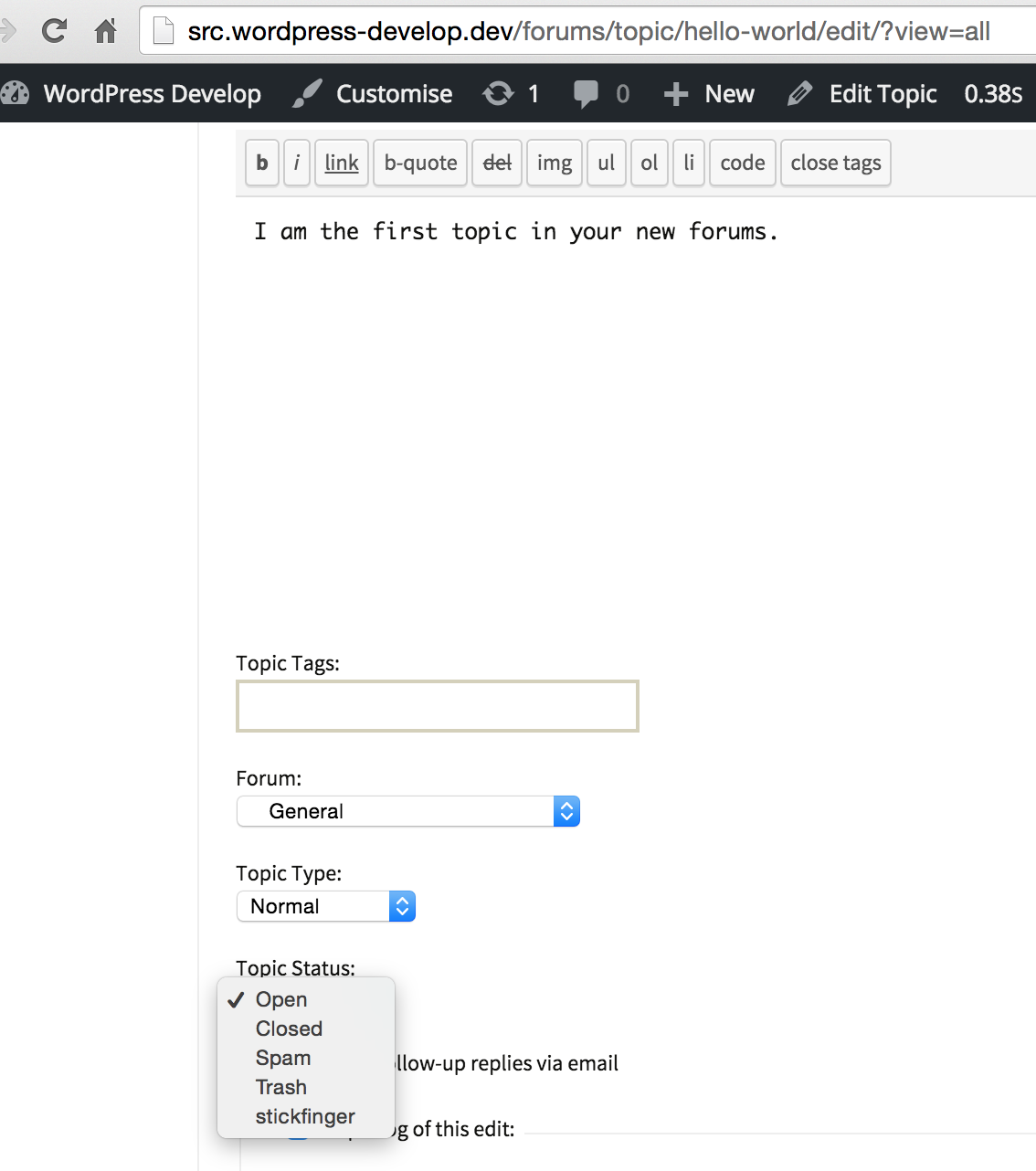 July 15, 2015 at 8:23 pm #164086
In reply to: Blank pages after 2.5.8 upgrade
KeymasterWhat happens if you resave your permalinks? Go to Settings > Permalinks
A more common and now default of WordPress is to use the
Post nameformat, also known as pretty permalinks, as such the following would be what you’d see for the “maine” forumhttp://www.plowandanchorconnect.com/forums/forum/plow-and-anchor-forums/maine
-
AuthorSearch Results

