@robkk, That would be to allow additional tags, right?
In this case it looks like tags are getting into the content that already are not allowed by default. The screen shot shows a span tag, which is not included in the bbPress allowed list in bbpress/includes/common/formatting.php.
I have also seen this happen with TinyMCE activated. It seems to be iOS users and they claim that they haven’t pasted anything, but I have not observed this for myself yet.
It does give stats as it imports, you should be something similar to:
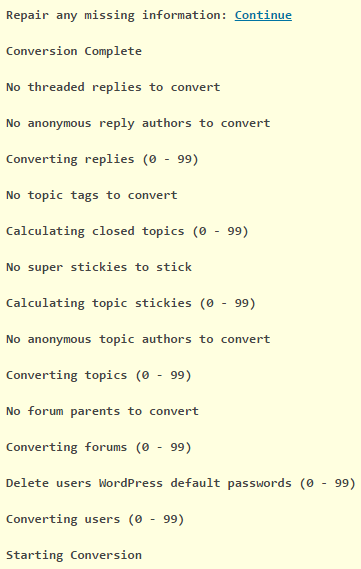
If you also view the source of the page, right click and “inspect” will also bring this up, you should see some debug code showing the SQL queries being performed during the import:
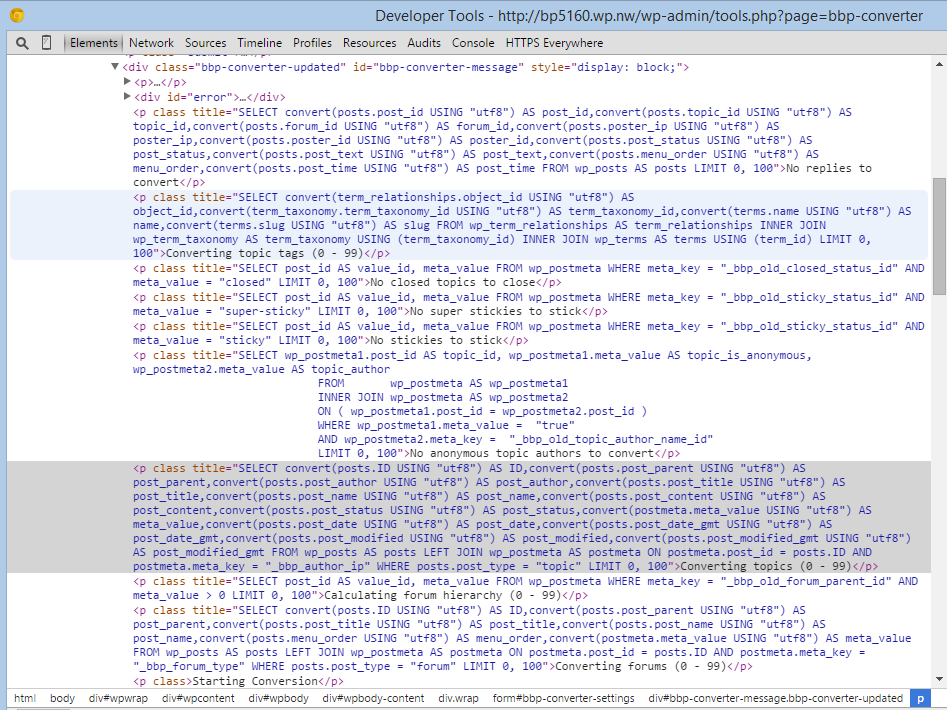
The forums, if imported will be in the wp_posts table of your WordPress database, if you filter the posts and search the post_type column for forum, topic, or reply you should see any imported posts.
i understand what you say and do that exactly
removed al mods and use a basic pbpbb 3.1.9 database
I use for all the latest verions
-bbpress 2.6 alpha
-phpBB 3.1.9
-phpBB Converter file 5795
As i said earlier in this topic, there is a problem with the latest version of the phpbb converter https://bbpress.trac.wordpress.org/browser/trunk/src/includes/admin/converters/phpBB.php?rev=5795
After converting all the passwords, at the beginning converting posts or topics i there is an error.

Cool, hopefully that will fix any issues, and we switched wordpress.org/support to bbPress 2.6-alpha a couple of weeks ago 🙂
I am running phpBB 3.1.9 and bbPress 2.5.10
As I am still a relatively new WordPress user, and have never used bbPress, I installed the latest version, but I normally avoid alpha and beta software.
As this is an offline installation for learning/experimentation I guess there is no risk so will try 2.6
I imported a sql backup of my database to my local system and phpMyAdmin shows this with 6 forums with prefix “phpbb_”
Database Server localhost
Database Name iabi1038_phpb1
Database User <myuser>
Table Prefix phpbb_
This chugs along, with no obvious errors, (but no real report of what it did) – although the “No forums to convert” error no longer appears.
Unfortunately I cannot seem to find the Forum in my WordPress installation.
I really dig the look and execution on the face of the Support area of the wordpress.org sites, with forums delineated on one side and support threads from all the different forums displayed on the other. It is in fitting with the design I am trying to achieve for my current project and I haven’t seen it elsewhere.
Anyone have a direction to look in for a setup similar?
I’m new to this wordpress website building stuff, so please excuse all current and hopefully not much future ignorance.
Cheers,
Andrew
It looks like you have not imported the phpBB database into the same MySQL instance WordPress is using.
You cannot use a “remote” database to import from.
Robin made the plugin awhile ago. bbPress devs made a fix awhile ago, but slated it into 2.6 instead of a 2.5 point release.
https://bbpress.trac.wordpress.org/ticket/2607
Install the other wpfix 2 plugin. It should have the same code snippet you are trying to use, without having to place any code anywhere.
I recommend users who are beginners to not edit bbPress core files. Or any other plugin/theme/wordpress core files unless you know exactly what you are doing code wise.
Okay, yeah this site does have an interesting layout.
http://eat.at/swap/forum1/251729_Help_Need_recipe_for_fig_jam_ASAP
From what I can see real quick.
Your not going to edit the loop-single-reply.php file like @netweb suggested, because after clicking the reply title link you are redirected to a normal layout single reply. So to get this layout you are going to edit content-single-topic.php, remove the pagination, and place a custom template instead of loop-replies..php so that you won’t mess with replies in a forum profile.
<?php if ( bbp_has_replies() ) : ?>

	<?php bbp_get_template_part( 'pagination', 'replies' ); ?>

	<?php bbp_get_template_part( 'loop',       'replies' ); ?>

	<?php bbp_get_template_part( 'pagination', 'replies' ); ?>

<?php endif; ?>
Replace the above code with this for example.
<?php if ( bbp_has_replies() ) : ?>

	<?php bbp_get_template_part( 'loop',       'classic-threads' ); ?>

<?php endif; ?>
The code that will be in loop-classic-threads.phpwill be a copy of loop-replies.php and a very minimal loop-single-reply.php. Wherever say <?php bbp_get_template_part( 'loop', 'single-reply' ); ?> is called in the new loop-classic-threads.php file, I would just copy the whole loop-single-reply.php template where that get template function was and keep only the code you need.
The code that is going to be in the area you put the loop-single-reply.php code is only going to have the username, date, maybe the reply positions, and reply title. The reply title is going to mostly come from a customized version of the bbPress reply title plugin. But you are going to output the reply title in the template as a link. A link (I think bbp_reply_url() is the right function ) to the single reply template, which is only 1 reply isolated, which bbPress can do.
Does this help enough??
I’m gonna see if I can recreate most of this layout later
@johnnya23
On a separate issue, I do notice the the topic counts don’t reset when topics are deleted.
Try recounting the topics by running the nessessary repair jobs in Tools > Forums.
@pauldamas
If you want contact me personally and I will check on this and see if I can come up with anything.
https://robkkdev.wordpress.com/contact/
Good afternoon,
This is more WordPress related I think, because bbPress is using the WordPress environment for authentication. Just check that on your /wp-admin page, under ‘Settings -> General -> Membership’ you have the ‘Anyone can register’ correctly checked.
Pascal.
Hello,
i just instal bbpress but people can not registrer to the forum. when they do that, they see
a wordpress page with: registrer is not allowed.
you can see what i mean on: http://thelittleone.nl/forum/registreren-forum/
can someone help me?
I have setup WordPress on a computer (Raspberry Pi3 running Ubuntu MATE 16.04) and it is working.
I installed bbPress and am trying to import my phpBB Forum http://binnie.id.au/BulletinBoard/index.php
It is unclear exactly what I need to enter in the “Import Forums” dialog.
I have tried many different options. I am assuming that this is asking for MySQL details.
My CPanel reports
Server: Localhost via UNIX socket
Server type: MySQL
Server version: 5.5.48-cll – MySQL Community Server (GPL)
Protocol version: 10
User: iabi1038@localhost
Server charset: UTF-8 Unicode (utf8)
MySQL® Databases shows
Database Size Privileged Users
iabi1038_phpb1 2.32 MB iabi1038_phpb1
I have tried
Database Server binnie.id.au
Database Name iabi1038_phpb1
Database User iabi1038_phpb1
Table Prefix phpbb_
This chugs along, with no obvious errors, except it seems to find nothing.
No reply_to parents to convert
No replies to convert
No tags to convert
No super stickies to stick
No stickies to stick
No topics to convert
No forum parents to convert
No forums to convert
No passwords to clear
No users to convert
Starting Conversion
See the menus used here on both bbPress.org/forums and BuddyPress.org/support:
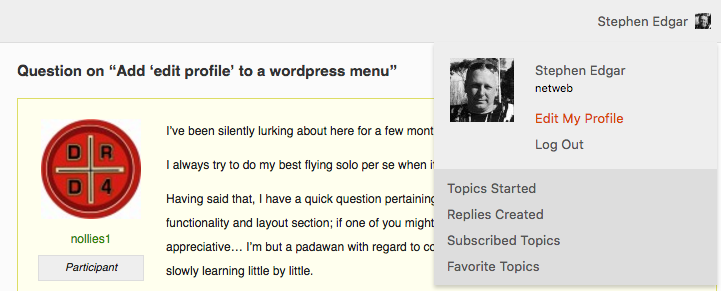
These are both menus, both use said “parent” menu items to arrange the items, both these menus are open source and pretty good examples and slightly different of how you can add bbPress and BuddyPress functionality to menus
https://meta.trac.wordpress.org/browser/sites/trunk/buddypress.org/public_html/wp-content/plugins/bbpress-org/toolbar.php
https://meta.trac.wordpress.org/browser/sites/trunk/buddypress.org/public_html/wp-content/plugins/buddypress-org/toolbar.php
Take a look around and look out for “parent” and see what you find…
i have the same problem as you
i have 1 forum and 1 topic associated to it but i can’t see the topic using WordPress 4.6.1
I’ve been silently lurking about here for a few months, this is my first official post.
I always try to do my best flying solo per se when it comes to troubleshooting.
Having said that, I have a quick question pertaining to the Codex ‘examples you can use’ in the functionality and layout section; if one of you might nudge me a bit then I would be most appreciative… I’m but a padawan with regard to coding/ comprehending the language, but I’m slowly learning little by little.
For ease of reference, the example I am referring to is for the following (direct copy/paste of statement): “This solution lets you add an “edit profile” to your wordpress menu – this only appears as a menu item if the user is logged in.”
To take this a step further, is it possible to get this working but not yielding it as being a main parent menu item?, perhaps it is achievable by changing some of the code in the example published in the codex?… or adding additional code?
That is, if at present there is an existing menu of Home, About, Accounts, Contact us, etc. etc…. who might be able to provide me with clues on how one could read/interpret/tweak the code provided on that codex page such that the ‘edit profile’ looks and performs exactly as intended, but rather than showing up on the main nav menu to instead have it be revealed, let’s say, under the ‘Accounts’ item, i.e., as a child to Accounts…
Yes this reveals what little I know in terms of understanding how to read code, and/but/so I’d appreciate any helpful suggestions on whether the above scenario is possible.
Thanks for reading 🙂
Cheers,
Bbpress uses the wordpress login, so they will have single signon.
I want to create a member section in wordpress. Only the members will have access to a directory & a forum. Now I can give these 2 links visible when someone registers creates a account .. thats ok
But what my question is can the same username/password used to login to the forum, as if the user needs to again register for the forum it would be 2 times he needs to register. In short using a single login for forum and member area
Its a common issue related to WordPress comments theme styling having issues with bbPress replies since they have a common class attribute .reply.
Since your theme is a free WP theme, I was able to test it out real quick to see the issues.
Use all this custom CSS, add it into a child themes style.css file or in a custom css plugin.
Know that if it does not work, try adding !important at the end, for example like this.
Also know that some of the CSS is for your replies links color, so change that if you end up changing your links color so that it would match.
.example {
  position: relative !important;
  right: auto !important;
}
Here is all the custom CSS you would need to use to fix your theme related issue.
#bbpress-forums .reply a {
  position: relative;
  right: auto;
  bottom: auto;
  display: initial;
  padding: 0;
  border: none;
  font-size: inherit;
  text-transform: none;
  -webkit-transition: none;
  transition: none;
}

#bbpress-forums .reply a {
  border-color: inherit;
  color: #BF4D28;
}

#bbpress-forums .reply a:hover {
  color: #E6AC27;
  background-color: inherit;
}
Hi All – I maintain a very simple site for an astronomy group (sdbhas.org) on a volunteer basis, and we recently migrated to wordpress so I’m still a newbie. I recently installed bbpress and everything seemed to be working very well. However, while testing I noticed that replies to a topic are rendering the area where the username and avatar would go on the extreme right edge of the screen. The forum’s not publicly visible as of yet, but a screenshot of what’s happening is below:
Reply render failure
bbpress version: 2.5.10-6063
wordpress: 4.6.1
theme: parabola
This does appear to be theme-related since when I tested with 2016 it rendered properly. Searching the forum I couldn’t find anything similar, so would anyone have an idea as to what’s happening or a suggestion for a fix? Although I’m a software engineer, java and c++ are my areas, not php/css – so go easy 😉
Thanks in advance for the help!
–Thanks,
Chris
I’ve installed BBpress and it didn’t show in the WP menu.
After some searching I found the topic on User roles and gave myself admin and keymaster role.
Now I can see the BB press options in the WP menu, but when I try to acces them I get an error: ‘ You are not allowed to edit posts in this post type. ‘
My version of WordPress is outdated. Can this be the problem here?
Specs:
BB press 2.5.10
Wordpress: 4.4.5
Kind regards, Simon
If you aren’t using any plugins that modify the registration process or custom frontend registration forms and instead are using the default WordPress registration forms, right after you get an activation link in your email, you should be redirected to a strong autogenerated password that you can edit if you want, just make sure to edit it before you hit reset password. If a user wants to change their password later they can also do that in their bbPress edit profile section.
As for the emails going to spam, a way that can help this is by sending email through an SMTP server for your site. There are a bunch of plugins on WordPress that can help configure this.


