Hey, that’s pretty cool. I hadn’t been using the plugin, but I’ve added it and it works. Trouble is, that word “[sticky]” is still there, and so is everything else. Where would I look to get rid of [sticky] and the other stuff you can see here?
http://www.triplepundit.com/forum/
I realize the test.png icon is CSS, but some of the rest isn’t….
Hi John:
I downloaded from this website, the following page:
https://bbpress.org/download/
I downloaded the “Latest 1.0 zip” version….
Please advise,
A.
Here’s a list of bbPress professionals, although I don’t know how many of them have done development:
http://bbshowcase.org/forums/topic/bbpress-professionals-advertise-in-this-topic
The most prolific developers are _ck_ and Nightgunner5.
Nightgunner5 has written 9 plugins that I’m aware of (I use two of them, and they are excellent):
https://bbpress.org/plugins/profile/nightgunner5
_ck_ is by far the most prolific developer, with 60 plugins:
https://bbpress.org/plugins/profile/_ck_
But according to that link above on bbshowcase (her site), she’s not available right now. If you have a larger budget though, it might be worth dropping her a line and seeing if she’s open to it.
You might also try Ivan here:
https://bbpress.org/plugins/topic/wordpress-bbpress-syncronization/
If there are active plugin developers that I’ve missed, please let cupra know in the comments!
Good luck! And if you’re open to contributing any custom plugins to the plugin section when you’re done, that’d be great! I’d be glad to help test the plugin… 
This might be a cleaner solution
<?php

switch ( $topic->forum_id ) { // Ignore these forums

case 29:

case 30:

case 18:

case 15:

case 4:

continue 2;

}

?>
or for including only certain forums
switch ( $topic->forum_id ) { // Include only these forums

case 29:

case 30:

case 18:

case 15:

case 4:

break;

default:

continue 2;

}

?>
but using that if statement, you need to change the line
<?php if( $topic->forum_id != 29 && $topic->forum_id != 30 && $topic->forum_id != 18 && $topic->forum_id != 15 && $topic->forum_id != 4 )
and you can find the forum ID from looking at its Edit URL in the admin panel (under Forums)
Hi Chandersbs,
i am sorry i didnt get what i should do: should i edit only this part
{ //exclude forums here ?>
and fill it with the id of the forum i want to exclude?
Or should i change the ids in the following line? I only have 1 forum to exclude, and its “position” is 4, does that mean that its id is 4 as well?
<?php if( $topic->forum_id != 29 && $topic->forum_id != 30 && $topic->forum_id != 18 && $topic->forum_id != 15 && $topic->forum_id != 4 )
Thanks!
The Process
johnhiler, you’re right!
Sorry, but I have not read.
I have commented this line too, after add the <div>:
<?php bb_latest_topics_pages( array( ‘before’ => ‘<div class=”nav”>’, ‘after’ => ‘</div>’ ) ); ?>
Thank you, again.
A last question, (I’m sorry if I should open a new thread for this): Do you know why in Tools options the checkboxes appear without check after save :S
I don’t know, maybe is just for me, but, in local I have the same problem too. Or maybe is in all instalations.
Are you using the frontpage topics plugin?
https://bbpress.org/plugins/topic/front-page-topics/
The plugin used to have the exact problem you mentioned, but the latest version of the plugin fixed it right up!
I’m using this code:
<?php if ( $topics ) : foreach ( $topics as $topic ) : ?>

<?php if( $topic->forum_id != 29 && $topic->forum_id != 30 && $topic->forum_id != 18 && $topic->forum_id != 15 && $topic->forum_id != 4 ) { //exclude forums here ?>

<tr<?php topic_class(); ?>>
If you’re using the Kakumei theme, replace this with that:
<?php if ( $topics ) : foreach ( $topics as $topic ) : ?>

<tr<?php topic_class(); ?>>
Just change the id’s
Does anybody have an idea how to implement a plugin, which reacts upon a click on a ‘+’ or ‘-‘ sign within (at the end of) a category header within a forum list (say on frontpage) to display or hide the respective forums listed below the category header?
Eventually extending _ck_’s solution(s):
http://bbpress.org/forums/topic/hiding-subforms-on-your-home-page
http://bbpress.org/forums/topic/plugin-request-exclude-specific-forum-topics-from-front-page-latest#post-9018
with a JavaScript?
Hello,
how would it be possible to exclude posts from a certain forum in the “latest discussions” section?
Like in this forum in your “latest discussions” you get posts from every forum except for “pimp your press”.
I did use the search, but i only found how to hide the category, and not how to prevent “lates discussions” from collecting posts from a certain category. Probably my English isnt good anough and miss the right search keyword.
Thanks for your advices… and patience.
the Process
Solution found – bb_user_nicename_sanitize()– needs peer review because of possible side-effects (UTF8 etc.)
<span><?php if ( 1 < get_topic_posts() ) : ?>

<?php printf(__('- <a href="%1$s">Latest reply</a> from '),attribute_escape( get_topic_last_post_link()) ) ?>

<a href="<?php bb_option('uri'); ?>profile.php?id=<?php echo (bb_user_nicename_sanitize(get_topic_last_poster(),50)); ?>"><?php echo get_topic_last_poster(); ?></a>


<?php endif; ?>

</span>
PS: A look into one’s database via phpadmin produces the right insights …
get_user_profile_link( $topic->topic_poster ), rather than all that sanitize/echo stuff. Can’t check it 100% since my test server is dead, but that should be right I think.
The code developed so far (resembling the buddyPress Forum experience):
...

<span id="topic_posts"><?php topic_posts_link(); ?>, </span>

<span id="topic_voices"><?php printf( '%s voices', bb_get_topic_voices() ); ?></span>

<span><?php if ( 1 < get_topic_posts() ) : ?>

<?php printf(__('- <a href="%1$s">Latest reply</a> from '),attribute_escape( get_topic_last_post_link()) ) ?>

<a href="<?php bb_option('uri'); ?>profile.php?id=<?php echo (sanitize_user(get_topic_last_poster(),true)); ?>"><?php echo get_topic_last_poster(); ?></a>


<?php endif; ?>

</span>
does only generate an “User not found.” error with:
..../profile.php?id=Test%20User
How can I complete the from part with a clickable link to the profile of the latest poster?
34 posts, 2 voices - Latest reply from ...
The user name ist Test User – it does contain a space.
Oh no… please don’t test it unless you are on 0.8.x!!
It’s definitely not recommended for 0.9 or 1.0… I just linked to it so you could check out the code, in the event that you were interested in adapting it to support more recent bbPress versions!
Thank you John, I’ll test it 
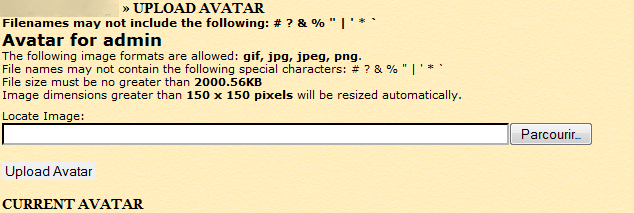
Hi all,
I installed Uplad Avatar, but when i clik on “Avatar”, add “Locate Image” and click on “Upload Avatar” the addition does not work.
view image attest :
http://yazhouzhijia.free.fr/images/images_bug/bubbpress.png
My config :
BBpress 1.0 (use table user form wordpress)
Wordpress : 2.8.4
Thank you
@ chrishajer: Here are my active plugins:
Akismet
bb-NoSpamUser
BBcode Buttons Toolbar
BBcode Lite
bbPress signatures
bbPress Smilies
bb Topic Views
Best Answer
Bozo Users
Check For Updates
Enhanced Registration
Human Test for bbPress
Ignore Member
Mass Delete Users
Members Online
Mini Stats
My Views
My Views module – Most/Least Posts
My Views module – Most/Least Views
My Views module – Started/Participated Topics
New User Notification Email
Post Count Plus – Dynamic.Titles & More!
Post Count Plus for WordPress
Related Topics
Reputation (Karma) for bbPress
Skip Akismet
Subscribe to Topic
Topic Icons
Unread Posts
The really strange thing is, the Dashboard shows 18 forums (which is the correct number), but bb-admin/forums.php just won’t display them.
I suppose I can try disabling all plugins, and see if forums.php then displays the forums properly?
I did not even see the code in my front-page.php file of the theme. Below is the code. Can I try to add it to it to play around with the heat map?
Thanks.
?php bb_get_header(); ?>


<?php if($forums) : ?>


<?php if($topics || $super_stickies) : ?>


<div class="breadcrumb section">

<h2 class="section-header"><?php _e('Latest Discussions','rag'); ?></h2>

</div>


<table id="latest">

<tr>

<th class="topic"><?php _e('Topic','rag'); ?> — <?php new_topic(); ?></th>

<th class="posts"><?php _e('Posts','rag'); ?></th>

<th class="last-poster"><?php _e('Last Poster','rag'); ?></th>

<th class="freshness"><?php _e('Freshness','rag'); ?></th>

</tr>


<?php if($super_stickies) : foreach ($super_stickies as $topic) : ?>


<tr<?php topic_class(); ?>>

<td><?php bb_topic_labels(); ?> <big><a href="<?php topic_link(); ?>"><?php topic_title(); ?></a></big></td>

<td><?php topic_posts(); ?></td>

<td><?php topic_last_poster(); ?></td>

<td><a href="<?php echo str_replace("&", '&', get_topic_last_post_link()); ?>"><?php topic_time(); ?></a></td>

</tr>


<?php endforeach; endif;?>


<?php if($topics) : foreach($topics as $topic) : ?>


<tr<?php topic_class(); ?>>

<td><?php bb_topic_labels(); ?> <a href="<?php topic_link(); ?>"><?php topic_title(); ?></a></td>

<td><?php topic_posts(); ?></td>

<td><?php topic_last_poster(); ?></td>

<td><a href="<?php echo str_replace("&", '&', get_topic_last_post_link()); ?>"><?php topic_time(); ?></a></td>

</tr>


<?php endforeach; endif; ?>


</table>


<?php endif; ?>


<?php if(bb_forums()) : ?>


<div class="breadcrumb section">

<h2 class="section-header"><?php _e('Forums','rag'); ?></h2>

</div>


<table id="forumlist">


<tr>

<th><?php _e('Forum','rag'); ?></th>

<th><?php _e('Topics','rag'); ?></th>

<th><?php _e('Posts','rag'); ?></th>

</tr>


<?php while(bb_forum()) : ?>


<tr<?php bb_forum_class(); ?>>

<td><?php bb_forum_pad('<div class="nest">'); ?><a href="<?php forum_link(); ?>"><?php forum_name(); ?></a><?php forum_description(); ?><?php bb_forum_pad('</div>'); ?></td>

<td><?php forum_topics(); ?></td>

<td><?php forum_posts(); ?></td>

</tr>


<?php endwhile; ?>


</table>


<?php endif; ?>


<?php else : ?>


<?php post_form(); ?>


<?php endif; ?>


<?php bb_get_footer(); ?>
That is it. In this link http://invictatrader.com/bbpress/tags/ you see there a total of 54 tags so far on the big test box on the left. On the right only a maximum of 40 are displayed. How do I change the number of tags to be shown in the box on the right? Like say just 20 or 30 or even 50 if need arises.
Thank you.
Right, I can turn them back on if you would like; and it would help.
I was doing a little compatibility testing last night, and to get it working in IE I had to remove the permalinks…
Yes, I meant the default theme, kakumei.
So, it’s a problem with your theme.
I created an account and posted a test topic. I don’t even see the little X next to the tag to delete it. So, how are you going about deleting tags? Normally, you get a little X next to any tag you use so you can delete your own tags.
Try the other way round, skinning bbPress with your WordPress widgets. Under deep integration, the sidebar functions might work fine. Maybe. bbPress isn’t light enough to just be invoked by a small piece of code in a widget though. That said, there is a WordPress plugin for displaying the latest posts and such from bbPress.
Argh, ASP.NET is an evil possessed devil of a language… anyone got a database dump I can test with?