1. Its the WordPress Toolbar, used on all WordPress sites by default.
2. This plugin adds avatar suggestions, it might not be presented easily for users, but he expains it in this video.
3. bbPress by default doesn’t have the ability to upload files, for avatars that plugin I mentioned allows avatar upload.
4. You can filter the default wordPress smilies and use custom ones, their is emoji to use because of WordPress, also there a good plugin that has a feature to import phpBB smilies call WP-Monalisa.
Ok, I had to create manually all these columns.
Here what I did (I use ‘forum_’ as table prefix):
ALTER TABLE forum_profile_fields_data
ADD pf_phpbb_facebook varchar(255);
ALTER TABLE forum_profile_fields_data
ADD pf_phpbb_twitter varchar(255);
ALTER TABLE forum_profile_fields_data
ADD pf_phpbb_occupation varchar(255);
ALTER TABLE forum_profile_fields_data
ADD pf_phpbb_interests varchar(255);
ALTER TABLE forum_profile_fields_data
ADD pf_phpbb_location varchar(255);
ALTER TABLE forum_profile_fields_data
ADD pf_phpbb_youtube varchar(255);
ALTER TABLE forum_profile_fields_data
ADD pf_phpbb_skype varchar(255);
ALTER TABLE forum_profile_fields_data
ADD pf_phpbb_googleplus varchar(255);
ALTER TABLE forum_profile_fields_data
ADD pf_phpbb_website varchar(255);
ALTER TABLE forum_profile_fields_data
ADD pf_phpbb_aol varchar(255);
ALTER TABLE forum_profile_fields_data
ADD pf_phpbb_yahoo varchar(255);
ALTER TABLE forum_profile_fields_data
ADD pf_phpbb_icq varchar(255);
ALTER TABLE forum_profile_fields_data
ADD pf_phpbb_wlm varchar(255);
Just realised I didn’t post the right error.
Here it is…
Error Code: 1054. Unknown column ‘profile_fields_data.pf_phpbb_website’ in ‘field list’.
That column doesn’t exist in my profile_fields_data table.
Also, I was not getting that error with the previous version of the converter so i am wondering if the converter expects a specific/recent phpBB version to convert from
Hi everybody,
I’ve been trying as suggested bbpress 2.6 alpha but the PhpBB import fails right at the beginning.
I’ve been already importing successfully by using the latest 2 versions and I’ve never faced this error before.
Also take into account I am running the import in the same environment and against the same data set.
Here the error:
SELECT convert(users.user_id USING “utf8mb4”) AS user_id,convert(users.user_password USING “utf8mb4”) AS user_password,convert(users.user_form_salt USING “utf8mb4”) AS user_form_salt,convert(users.username USING “utf8mb4”) AS username,convert(users.user_email USING “utf8mb4”) AS user_email,convert(profile_fields_data.pf_phpbb_website USING “utf8mb4”) AS pf_phpbb_website,convert(users.user_regdate USING “utf8mb4”) AS user_regdate,convert(profile_fields_data.pf_phpbb_aol USING “utf8mb4”) AS pf_phpbb_aol,convert(profile_fields_data.pf_phpbb_yahoo USING “utf8mb4”) AS pf_phpbb_yahoo,convert(profile_fields_data.pf_phpbb_icq USING “utf8mb4”) AS pf_phpbb_icq,convert(profile_fields_data.pf_phpbb_wlm USING “utf8mb4”) AS pf_phpbb_wlm,convert(profile_fields_data.pf_phpbb_facebook USING “utf8mb4”) AS pf_phpbb_facebook,convert(profile_fields_data.pf_phpbb_googleplus USING “utf8mb4”) AS pf_phpbb_googleplus,convert(profile_fields_data.pf_phpbb_skype USING “utf8mb4”) AS pf_phpbb_skype,convert(profile_fields_data.pf_phpbb_twitter USING “utf8mb4”) AS pf_phpbb_twitter,convert(profile_fields_data.pf_phpbb_youtube USING “utf8mb4”) AS pf_phpbb_youtube,convert(users.user_jabber USING “utf8mb4”) AS user_jabber,convert(profile_fields_data.pf_phpbb_occupation USING “utf8mb4”) AS pf_phpbb_occupation,convert(profile_fields_data.pf_phpbb_interests USING “utf8mb4”) AS pf_phpbb_interests,convert(users.user_sig USING “utf8mb4”) AS user_sig,convert(profile_fields_data.pf_phpbb_location USING “utf8mb4”) AS pf_phpbb_location,convert(users.user_avatar USING “utf8mb4”) AS user_avatar FROM forum_users AS users LEFT JOIN forum_profile_fields_data AS profile_fields_data USING (user_id) WHERE users.user_type !=2 LIMIT 0, 100
Not sure yet what the problem is.
I’ll do my little investigation and I’ll let you know.
Gio
Hello,
I want to migrate phpBB forum to bbPress. I use the default import tool of bbPress, I was able to migrate it successfully but the only problem is the author name shown as Anonymous in almost all topics. When I chose to import the users, the topics shown with the correct users besides the users in Hebrew that converted automatically to numbers and shown as Anonymous and that’s because WordPress doesn’t support Hebrew characters in the username.
I would like to convert it without the users but still keep the author name, as in archive forum. It’s also make sense to keep the original name of user who post even the user doesn’t exist in system. Any suggestions? Thanks.
I just realized this problem has to do with an old installation of phpbb. My bad!
Thanks
It took some time to make this topic visible on the forum. So, I’ve solved my own problem.
Instead of writing an htacces file I chose to write an alternative viewtopic.php script that collects the appropriate new bbPress URL from the database.
If your new bbPress forum is online, you place the following script in your old phpBB domain and save it as viewtopic.php (exactly where the old viewtopic.php used to be located) and don’t forget to replace the “my_xxxx” values with your information:
<?php
  // If all else fails, use this url.
  $defaulturl = "http://my_domain/forums/";

  // Your new bbPress database credentials.
  $host = "my_host";
  $db = "my_database";
  $dbuser ="my_database_user";
  $userpwd = "my_database_user_password";

  // Build the query according to url parameters p or t.
  $query = '';
  if (!empty($_GET['p'])) {
      $query = "SELECT xkcom_posts.guid FROM xkcom_postmeta
                INNER JOIN xkcom_posts ON xkcom_posts.ID = xkcom_postmeta.post_id
                WHERE xkcom_postmeta.meta_key = '_bbp_old_reply_id'
                AND xkcom_postmeta.meta_value = '" . $_GET['p'] . "';";
  }else if (!empty($_GET['t'])) {
      $query = "SELECT xkcom_posts.guid FROM xkcom_postmeta
                INNER JOIN xkcom_posts ON xkcom_posts.ID = xkcom_postmeta.post_id
                WHERE xkcom_postmeta.meta_key = '_bbp_old_topic_id'
                AND xkcom_postmeta.meta_value = '" . $_GET['t'] . "';";
  }

  // Set the new url to the default url
  $url = $defaulturl;

  // Check if we need to make a database connection.
  if (!empty($query)) {
    // Make a connection
    $mysqli = new mysqli($host, $dbuser, $userpwd, $db);

    // Check the connection.
    if (!$mysqli->connect_errno) {
      // Run the query.
      $result = $mysqli->query($query);

      // Get the new URL.
      if ($result) {
	$row = $result->fetch_array(MYSQLI_ASSOC);
	$guid = trim($row["guid"]);
	if (!empty($guid)) {
	  $url = $guid;
	}
      }

      // Free the result set.
      $result->free();

      // Close the connection.
      $mysqli->close();
    }
  }

  //var_dump($url);

  // Write the header.
  header("Location: " . $url, true, 301);
?>
I’ve successfully imported phpBB data into bbPress. Now, I’d like to redirect URLs like
http://my_phpbb_domain.com/viewtopic.php?f=1&t=2
to:
http://my_wordpress_domain.com/forums/topic/corresponding_topic/
I’ve search the web and have been experimenting with several solutions but without any luck. Anything I do throws a 404.
These are some of the links I tried out:
Rewriting URLs
Redirection to new bbPress board?
As you can see, these topics are at least 7 years old. On the other hand, I don’t expect that something has changed on how to write redirects in an htaccess file.
Does somebody here has some experience with this?
I’ve imported phpBB 3.1.9 into bbPress 2.6 alpha without problems.
I suggest you to create a development machine if you haven’t done so already and give it a try.
Hi All,
After configuring the importing form and clicking the start button, a failure message appears after amount of time;
Unknown column 'forums.forum_topics' in 'field list'
After clicking again on the start button only the reactions will be converted from phpBB to bbpress.
How can I import the topics and users properly, without encounter these failures?
Grtz.
Willem
Hi everyone, loving bbpress but running into a roadblock. A client has chosen a theme that fits their site really well, and comes with a phpbb skin, but no bbpress theme. Is there a way to either
A: Easily implement the phpbb theme
OR
B: Through some plugin, allow bbpress to use a theme different from the main WP install
Thanks
Rodolfo
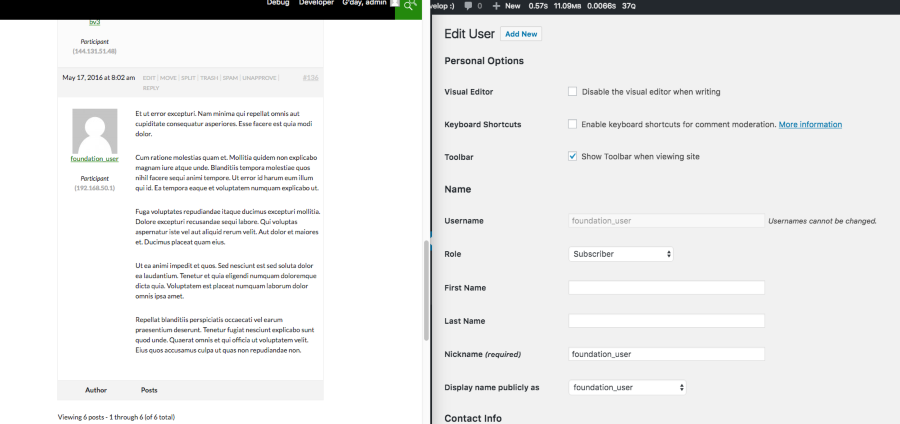
I also just created a new user on the phpBB board: foundation_user, activated the user and then made the user a founder, posted a reply to a topic and ran the importer and all worked as expected:
I’ve just tested my phpBB 3.1.19 phpBB test install and everything worked perfectly without changing the founder state of an admin account:
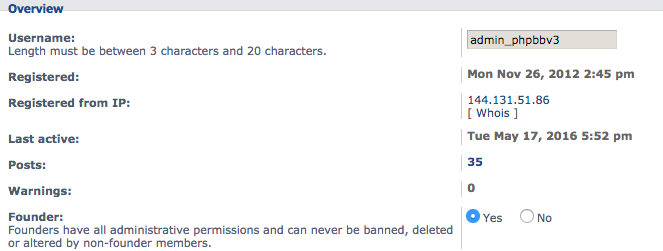
I am using 2.6, but i fixed the issue by removing the “founder” setting in phpbb.
I found out the problem lies within the “founder” option in phpbb which you can set for specific users, after setting this to “No” the importer seems to be doing it’s thing.
Addition:
I have now tried backing up the phpbb database, and then delete the users converting to “imported_username” and “username” but it just finds another user and converts them redundant.
This might indicate the problem could lie within the first 4 user profiles, is there anything that could mess up the importer like that?
Hi, i am trying to import a 3.1.7 phpbb DB to bbpress, but some of my “core” users won’t convert.
I don’t get an error, but they just don’t seem to be retrieved, allthrough their posts and topics are showing fine.
I get the right amount of users imported, “142” but some of the users are being imported as “imported_username” could it be that the importer checks for 142 users and skips the rest?
I should say, that i have no users on the forum and i am doing a clean install without any prior imports.
hi all,
I just wanted to share an update on my mission to migrate from PHPBB to BBPress.
In version 2.5.8 I had the problem with the wrong authors (fixed with some additional db query).
Now in 2.5.9 I cannot even complete the migration.
I know that when I get the dashes (“——“) it means I lost the connection and I have to start the conversion again that would resume supposedly from where it stopped.
That was true for 2.5.8 but in 2.5.9 I’ve tried 5 times already and when I get the dashes and try to resume, I get a message that says that there are no more replies to convert (which is not true).
Any idea on how I can correctly resume the process?
Just FYI, it takes 2 full days of processing to convert about 370K replies.
I would appreciate If anybody can tell me how can I improve this performance (I’ve full control on the machine).
Thanks,
Gio
Regarding option 1, is it even possible and does such a script exist?
Yes, there one, maybe two scripts, but they are quite out of date.
Regarding option 2, what are the required wp_postmeta keys I would need to generate?
Have you looked at the internals of any of the ~25 importers included with bbPress?
phpBB and SMF are the two most “feature complete” in that they import nearly 100% of the required wp_postmeta fields.
A basic example version of an importer is included, Example.php in the `/includes/admin/converters/ folder, its fairly basic, when comparing it with either the phpBB or SMF importers it might make more sense. There is also some initial documentation on modifying this yourself https://codex.bbpress.org/getting-started/importing-data/import-forums/custom-import/
If you upload to https://gist.github.com/ or somewhere, take a screenshot of it from phpMyAdmin I’ll happily help you get it up and running.
Also, I suggest using bbPress 2.6-alpha, loads of importer improvements over bbPress 2.5.9, you can grab it from here https://bbpress.org/download/
@siparker, as I just replied to @giobby’s phpBB post you should try the import with bbPress 2.6-alpha (hoping to release in the next couple of weeks).
It contains pretty big improvements around the importing and matching of users and their data. It should now correctly map any Anonymous users to bbPress’ Anonymous user though now it will include their vBulletin Anonymous user name. It also works in a similar fashion for deleted users, if the user was deleted and their posts kept, bbPress now maps these posts and usernames to its own internal Anonymous user.
Also make sure to run the repair tools after importing, it fixes up any freshness, last poster type issues if we couldn’t import that data it recalculates it for you.
Grab 2.6-alpha from https://bbpress.org/download
You should try bbPress 2.6-alpha, there are heaps of phpBB improvements in bbPress 2.6 🙂
That should fix your author mapping, it also adds support for mapping anonymous/deleted users to their topics which is pretty cool.
The mapping of the users old phpBB user ID is also updated to work quite differently to how it did in the 2.5.x release so again this should fix that for you also.
p.s. bbPress.org here runs 2.6-alpha, and we’re hoping to ship 2.6 in the next couple of weeks.
Edit: Get 2.6-alpha via our downloads page https://bbpress.org/download
I’ve run in the same issue by importing into PHPBB.
You can read through my post: https://bbpress.org/forums/topic/import-phpbb-wrong-authors/
If you check, you may find that some authors are displayed as anonymous because the corresponding attribute in wp_posts.post_author has no match with your wp_users.id
I’ve found out that these authors have still the old user id of the forum you are importing from (VBulletin).
I can’t guarantee the following solution will work for you, but I recommend you to create a temporary table to map your old user ids to the new wordpress ones by joinin them on the user_email attribute.
Then just update all the orphan wp_posts.post_author with the right wordpress id.
I can’t guarantee this will fix all your dirty posts.
I leave this reply for those who faced the same issue and also for the developers who may find where the problem is.
From one side we have a wrong author getting associated to the wordpress posts (forum, topic and replies).
One thing that can be done to fix this after having run the import is to match the date and time of the post, the ip address of the author and potentially the last 8 characters of the content (will not work if it’s a smiley or bb code).
This would fix the issue even if I can’t guarantee it will work for all the dirty posts.
The second thing, even more worrying, is the fact that certain authors are associated to the topics/replies with their old PHPBB user_id.
It’s easy to spot them because those dirty posts won’t join with the wp_user table and therefore they are reported as anonymous users in the website.
One way to fix that after the import is to update all those old PHPBB ids by replacing them with the corresponding wordpress users ids (just join on email address).
Hi everybody,
that’s my first post so I take the opportunity to thank the community for its amazing job.
I am in the process of migrating an existing community (PHPBB based) to BBPress on a dedicated server.
In terms of volumes, we are talking about 6K users, 350K replies and 15K topics.
The import seems to run quite well but I’ve notice that the author of certain posts is wrong.
I’ve found in the forum someone with the same problem but he was running a specific plugin to sync his existing PHPBB installation whilst in my case I have a pure PHPBB installation running on version 3.0.12
Do you guys no some magic options to remap the posts to the right authors?
Thank you in advance,
Gio
Hello,
I want to know what is the best practice for the database settings for import forums?
I have a big phpbb db with 100,000 topics and mabout 8000 users.
Especially
Rows Limit
100 rows to process at a time
Keep this low if you experience out-of-memory issues.
Delay Time
1 second(s) delay between each group of rows
Keep this high to prevent too-many-connection issues.
And what does Convert users mean?
Attempt to import user accounts from previous forums. Non-bbPress passwords cannot be automatically converted. They will be converted as each user logs in.


