Search Results for 'code'
-
AuthorSearch Results
-
March 1, 2014 at 1:31 pm #143100
Topic: Change color
in forum Showcasedriftffkf
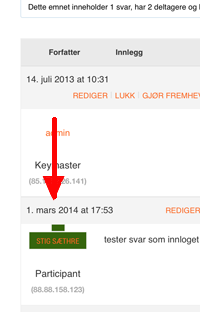
ParticipantI have modified font-sizes and colors of my bbpress-installation, but I’m stuck with an ugly green “blob” in the answers linking to my profile. Where do I find the code to modify this? Looks like this:
 March 1, 2014 at 7:06 am #143095
In reply to: No “New Topic Button” URGENT problem
Lynqoid
ParticipantHere is the shortcode for the new topic form.
[bbp-topic-form]Or you can pass it the forum id using this
[bbp-topic-form forum_id=$forum_id]March 1, 2014 at 3:32 am #143092Topic: Max image width/height posted on forum
in forum Requests & Feedbackjslom
ParticipantFor some reason this code was not implemented into my bbpress defauly bbpress.css file.
I am posting it so you guys can update it for future releases..When posting an image to the forum your current css makes the image 100% width, so it does not break the forum layout. Unfortunately this does not keep the image proportional so the height stays the same. All you have to do is this.
Change
#bbpress-forums div.bbp-topic-content img,
#bbpress-forums div.bbp-reply-content img {
	max-width: 100%;
To
#bbpress-forums div.bbp-topic-content img,
#bbpress-forums div.bbp-reply-content img {
	max-width: 100%;
        height: auto;
February 28, 2014 at 6:32 pm #143083In reply to: Freshness Date Format
ZachMatthews
ParticipantThat code is also pulling only the date/time when the topic was STARTED, not the most recent reply. Any help?
February 28, 2014 at 6:26 pm #143082In reply to: Freshness Date Format
ParticipantThat code kinda works. It looks like some of the timestamps are off, and the timestamps on the Forums page (as opposed to Topics) aren’t correct and aren’t updating. Anyone know how to fix that?
looks like this line isn’t working:
add_filter( 'bbp_get_forum_freshness_link', 'wpse_77441_change_time_format', 10, 2 );Zach
February 28, 2014 at 2:37 pm #143077In reply to: Pagination issue when threaded replies are enabled
Doremdou
ParticipantI have never seen any response from the devs/leaders of the bbpress team themselves, seems only volunteers (and thank you very much to them) are answering this forum. I can understand that, because they already created this plugin in their spare time, are not paid or anything, so if they had to answer here it would be a lot of more work… that is what I think.
I think the threaded/nested replies included in bbpress are working the way it should, it is not a bug, it is just the way they wanted it to be it seems.
The only way to fix this problem is to find someone skilled enough to code /and/or hack the current code to change the way nested replies are working and add pagination to it.
I am trying to do it, but can’t figured it out yet… I am not a developper at all, so there is a lot of things I don’t understand… :/Another solution would be to update the bbPress Threaded Replies plugin https://wordpress.org/support/plugin/bbpress-threaded-replies to make it work with the new bbpress version (and disable the integrated system in bbpress…) but I don’t know how to do that either…
Hope we’ll find a fix soon, if someone has an idea we’ll be really grateful 🙂
Thank you,
DoremFebruary 28, 2014 at 4:16 am #143062In reply to: [Theme: TwentyEleven] BBpress forum overlaps Sidebar
Robin W
Moderator‘The box fields are overlapping one of the widgets on my side menu’
Can you give us a url so that we can see the problem?‘The other thing I need to change the color of the box fields.’
This would be a css change – see https://codex.bbpress.org/bbpress-styling-crib/ and If what you want to do is not thee, come back and tell us which bit needs chnagingFebruary 27, 2014 at 3:31 pm #143048robahas
ParticipantHi – I figured this out. Everything under a forum category is a descendant. So based on that you can select an entire “section” of the forum. Here is the code (this is in the genesis framework, so adjustments would be needed for applying to the body class in non-genesis installations). The key is to get the ancestors of the current post, and if your top level forum is included, then apply the css.
add_filter( 'body_class', 'sp_body_class' );
function sp_body_class( $classes ) {
    global $post;
    $anc = get_ancestors($post->ID, 'post');
     if ( is_single( '1530' ) || in_array('1530', $anc) )
          $classes[] = 'custom-class';
          return $classes;
}
February 27, 2014 at 1:56 pm #143040In reply to: Shopp and bbPress Conflict
ModeratorWhilst much of this link is blanked out, it does seem to indicate a problem with conflicting page templates.
What I’d suggest you do is create a page template for your bbpress so that it only uses that one, leaving shop to use whatever template it is using.
https://codex.bbpress.org/step-by-step-guide-to-setting-up-a-bbpress-forum/ part 8
You don’t say what theme you are using – and in fact it could be the theme’s page template that is causing the issue.
But let’s suggest for a starter that you look in your theme, and copy then rename it’s default page template as per part 8 above.
If you need further help doing that, or it doesn’t work, come back
February 27, 2014 at 11:02 am #143030In reply to: No toolbar available
Moderatornot quite sure what you mean, but have a look at
and if you still have a problem, come back
February 27, 2014 at 7:09 am #143021In reply to: no text editor, just a blank box.
ModeratorYou would paste that code into your theme’s function file.
If you do not have a child theme you should consider creating one, just google “wordpress child theme video” and you’ll find lots of help. You’d then put this code into that theme’s function file.
If you put it in the main theme (or indeed bbpress) it will be overwriten by any upgrades to those.
February 27, 2014 at 5:31 am #143017In reply to: A Guide to bbPress
ModeratorI have been adding to the documentation with a much longer step-by-step guide, much more still to add !
February 27, 2014 at 4:45 am #143011In reply to: bbPress features?
Moderator1. Can admin set forums as private – by invitation only?
2. A search function to search for topic and keyword?
it’s there
3. A notification can be set to follow certain topics e.g. network or mobile, therefore any of these topics posted, an email notification will be sent to me?
plugin bbp notify
4. Member can upload and download files?
gd-bbpress-attachments plugin
5. Is it mobile responsive?
yes
6. Member can create new topic
yes
7. Admin or assign moderator can accept or reject new users?
and
plugin bbpressmoderation
8. Can admin block certainly users? on users’ email or ip?
plugin wp-ban9. hosted on any share hosting provider? e.g. godaddy?
yes with any wordpress setupFebruary 27, 2014 at 4:36 am #143009In reply to: Forum Index expanding into sidebar.
Moderatorsection 8
If you find the page template from the theme that has a sidebar, just follow then instructions above to rename it to bbpress.php and put it in the right directory
February 26, 2014 at 9:14 pm #143004In reply to: no text editor, just a blank box.
kokocipher
ParticipantI know there is a solution to add a code snippet to turn visual text editor on from https://codex.bbpress.org/enable-visual-editor/
But do I paste that in the bbpress function.php file?
February 26, 2014 at 2:13 pm #142985In reply to: no title in content-single-reply.php
Nic
Participantmhh. as i already said i still talking about <title>! the one in the browser bar 😀
current sourcecode is:<title>| dashcamtest.de</title>
as you can see the topic title is missing!February 26, 2014 at 12:19 pm #142982In reply to: move Username and IP to the right of the avatar
ParticipantHi again,
I just played with https://codex.bbpress.org/bbp_author_link/ and adapted it to my theme.February 26, 2014 at 10:24 am #142978In reply to: Add a Class to my Body Tag using the Forum Title
Rackmire
ParticipantHi Thanks for your support and fast reply. Much appreciated,
Do I just paste this code in my header.php file?
Thanks,
February 26, 2014 at 10:23 am #142977In reply to: font size and color plugin
ParticipantHi,
how does this work? how to implement this?
I’ve tried creating a plugin folder and putting it within a new file, it appears in the plugins area and i click activate but nothing happens. Do I need any extra code to insert in my theme files for it to relate to?
Thanks
February 26, 2014 at 9:42 am #142970In reply to: Login screen in forum is gone
backpackersontrack
Participanthttp://backpackersontrack.com/forums/forum/africa/ –> this one does contain a login screen. This one shows up when clicking on forum: Africa
http://backpackersontrack.com/forum-2/ –> this one doesn’t. This one shows up when clicking on forum via our homepage.
On the forum page on my dashboard, I inserted this code: [bbp-forum-index], referring to our BBpress forum.
February 26, 2014 at 8:12 am #142966In reply to: How can we ‘hide’ subforum (categories) in forums?
ParticipantIf you want to achieve a hierarchy like this:
- Continent
 - Country one
 - Country two
-Continent two
 - Country one
Then I would suggest setting up the continents as categories and the countries as forums. If you hide the countries how does the user get to the country forum to post a topic? Or do you give them a direct link or something?
February 26, 2014 at 5:55 am #142959In reply to: Edit topic reply, changes post order
dzpoa
Participant@netweb No, i’m not using threaded replies. and “Forum root should show” is set to “Topics by Freshness”. It looks to me now that those settings fixed the issue, not the code 🙁
February 26, 2014 at 4:32 am #142956In reply to: How many topics and replies to show per page
ParticipantHello, thank you for your code @marky_uk 🙂
Unfortunately it does not seem to work right.
In fact, there is a pagination with threaded replies with your code, but same replies are replicated on each page (so it is always the whole bunch of replies on each page) it does not separate them.Would be greatly appreciated if someone has another idea 🙂
thank you 🙂February 26, 2014 at 4:15 am #142951In reply to: Settings not saving in admin for new fields added
ModeratorI’m a bit of a newbie to this area, having just created my first settings page, so of this is irrelevant, please ignore !
The following talks about needing to register
https://codex.wordpress.org/Settings_API
eg “NOTE: You MUST register any options you use with add_settings_field() or they won’t be saved and updated automatically. ” – which seems to describe your problem
and
https://codex.wordpress.org/Function_Reference/register_setting
That may not be necessary as you’re adding it as a filter??
anyway my code cribbed from elsewhere looked like
// register the plugin settings
function ui_register_settings() {

	// create whitelist of options
	register_setting( 'ui_settings_group', 'ui_settings' );
	}
//call register settings function
add_action( 'admin_init', 'ui_register_settings' );
where ui_settings was my array.
February 26, 2014 at 12:14 am #142947In reply to: Each Forum to Have its Own Admin Email
shawlw
ParticipantThanks Robin. I’m very interested in going through the code, so I’ll follow up on that. Cheers.
-
AuthorSearch Results

