Skip to:
Content
Pages
Categories
Search
Top
Bottom

Search Results for 'code'

Viewing 25 results - 12,401 through 12,425 (of 32,521 total)
  • Author
    Search Results
  • #143902

    In reply to: SimplePress Import

    Stephen Edgar
    Keymaster

    There we go, that indeed will be the issue.

    Essentially after the forum hierarchy is calculated it starts importing the topics (though that’s the last message you see)

    We use a custom ‘bbcode’ parser to convert the imported forums BBCodes eg. [url], [b], [img] etc.

    So if you are using a plugin that is doing something with BBCodes it’s a high probability that that is the conflict.

    Disable said plugin and you should be good to go and/or if you don’t know which plugin it is disable them all, do your import, then enable your plugins again.

    #143901

    In reply to: SimplePress Import

    matrixino
    Participant

    Ok found the problem. The WP plugin Boingball BBcode was using the same class name.
    I’m importing now and went to the next step. Finger crossed 🙂 Thanks for your time

    #143900

    In reply to: SimplePress Import

    matrixino
    Participant

    WP 3.8.1 – SP 5.4.1 (but also isn’t working with 5.4, i just upgraded when trying to fix this) – BBP 2.5.3
    I’m working on a duplicate copy of my wp db (I always do a test run before working on live site).

    However I just noticed this error in my php logs:
    “PHP message: PHP Fatal error: Cannot redeclare class bbcode in /wp-content/plugins/bbpress/includes/admin/parser.php on line 979” while reading response header from upstream

    So I think some other plugin (or maybe wp itself?) is declaring that class already. I’m going to debug this now.

    #143887

    In reply to: Delete Topic Function

    Robin W
    Moderator

    there are two capabilities within bbpress roles

    ‘delete_topics’
    ‘delete_others_topics’

    Looks like the plugin is changing the wrong one.

    I presume it is the participant role that you like delete topic on ?

    If so, please come back and confirm, and I’ll cut a quick filter for you after the weekend if you know how to add some code to your functions file.

    #143884
    Robin W
    Moderator

    if it worked before, then something has changed.

    If you want to stop it using the template then create a ‘bbpress’ folder in the root of your theme, and copy

    wp-content/pluigins/bbpress/templates/default/bbpress/loop-single-reply.php across to this new folder.

    The edit to remove the code that displays this – lines 47 to 55 have an if(keymaster) statement that display this info

    #143883
    Robin W
    Moderator

    Ok, so if I understand you problem correctly, what you’d like is the main forum page to show is

    1.
    Category
    Forum
    Subforum
    forum
    subforum

    The subforums are not currently showing?

    and

    2. for each to have a description?

    you are trying to achieve this by using a wordpress page and shortcodes.

    What confuses me is that you give a link to the page you want to use – if this is a real page, then what is preventing you form using it?

    Sorry if I’m not understanding you correctly

    #143874
    Robmcclel
    Participant

    My objective is to not use the standard forum root index page that is auto-created and instead use a WordPress page with forum shortcodes.

    The auto-generated forum root page is here: http://thirdscribe.com/cafe

    and I would much rather use this page here: http://thirdscribe.com/cafe-forums

    I have not had any success in customizing my root from the settings panel where it says: “Customize your Forums root. Partner with a WordPress Page and use Shortcodes for more flexibility.”

    Failing the ability to use the WP page with shortcodes, I would like for the sub-sub forums to be shown, as well as the text descriptions for everything, in the root index. This forum supports a book network, and to have the subgenres showing under the genres is pretty important. Again, I would prefer to just use the page generated using the shortcodes, but I’ll accept just getting the subgenres and descriptions to show.

    This is my first time using bbPress — I like it and like the back end administration, but I REALLY need to be able to show more information on this forum page.

    I am running WP 3.8.1, Buddypress 1.9.2, and bbPress 2.5.3

    Any help or suggestions appreciated.

    #143870

    In reply to: SimplePress Import

    Stephen Edgar
    Keymaster

    I was on Simple:Press v5.3.4 and have just now upgraded to v5.4.1

    Tested the current bbPress v2.5.3 import using the SimplePress5 importer and everything worked fine.

    Repair any missing information: Continue
    Conversion Complete
    No reply_to parents to convert
    Converting replies (0 - 99)
    No tags to convert
    No super stickies to stick
    Calculating topic stickies (0 - 99)
    Converting topics (0 - 99)
    Calculating forum hierarchy (0 - 99)
    Converting forums (0 - 99)
    Delete users WordPress default passwords (0 - 99)
    Converting users (0 - 99)
    Starting Conversion

    This is the SQL query that runs the step you are stuck on:
    SELECT post_id AS value_id, meta_value FROM sp_postmeta WHERE meta_key = '_bbp_forum_parent_id' AND meta_value > 0 LIMIT 0, 100

    This shouldn’t really cause any issues, worst case scenario you no longer have your forums grouped in their previous hierarchal structure.

    The only other thing I can think of is maybe a SimplePress plugin/extension may have modified the database setup beyond the basic ‘out of the box’ setup I use.

    You could also try reordering your SimplePress forums to force an update of their values in the database. Also try removing the forums from the groups and delete the groups. You can easily add the groups/categories again on the bbPress side once the import is completed successfully.

    #143851
    aidibiomed
    Participant

    Hello: I’m running into the same issue. I’ve created a Page and used the Index Short Code, Created a Forum, and a Topic. I can see the forum, just not the topic. And when I try to access the link it sends me to a 404 error.

    #143840
    jyd44
    Participant

    Hi,
    your initial question was about replies. In fact, you have exactly the same issues for posting, reading, and so on. You have to use the same kind of trick for every action you want to block.
    The best way to find which filter is key to control an action, is to start from the template files, to see which bb_call is made, read the source code of this function and discover which filter is applied. It’s the same also for the buddypress menus (either in the admin bar, either in the body of the page), depending on your requirements (eg. Do you allow a non member to discover the list of member in a group, and so on.)
    Yes it’s a huge job. When you complain about the way the access control in bbpress is handled, remember that I told you before that blocking the access to replies will not be the only one issue you will have to face. With roughly the same requirements, I have written more than 1800 lines of code (including comments !) to tune the menus and to refine the access control rules. Fortunately, thanks to the filter and action mechanism of WP and the goodwill of their developpers, bbPress and BuddyPress offer many possibilities for this tuning.

    #143834
    still
    Participant

    Using shortcode [bbp-single-topi id=xx].
    Page looks like this: http://screencast.com/t/eo3RUhcczzyW .
    How to fix the layout?

    Thank you.

    #143826
    Perry Vermeulen
    Participant

    Thanks Lynq – in what php code and where exactly can I add that code? In bbpress/bbpress.php? and where exactly?

    Perry

    #143820
    Stephen Edgar
    Keymaster

    I’d suggest you start with the docs in the codex.

    It looks like you don’t need to know any PHP just yet 😉

    Codex

    #143798
    Stephen Edgar
    Keymaster

    Make a copy of your page.php (or page-no-sidebar.php depending on your preference) of your StudioPress theme template file and name it bbpress.php

    This should also remove ‘door’ from your page.

    #143788

    I’ve created a series of Forums on this site:
    http://xxxxxxxx.ca

    They are located here at http://xxxxxx.ca

    I used a series of shortcodes so I could customize the pages…

    I seem to be running into a problem of “now you see them now you dont” when topics or replies are posted.. almost as if the short codes cant hold the link to the topics and replies.. yet the one main topic I “stuck” to the top and closed as an admin always remains.

    If you register for the forums, everythings fine… if you post, it seems to be fine.. but go back later.. and its gone. I cant make any sense out of this. It all seems very buggy… I’m suspicious of a conflict in there somewhere, sometimes the wp menu bar shows.. and I can see the posts.. sometimes.. even though Im logged in it disappears.. but is there to touch.. and I can still see the posts.. sometimes its gone completetly and bbpress thinks I logged out completely, then I can see nothing.. grrrrrrr

    The short of it.. these forums arent working right… very frustrating and somehow I need to fix it. I cant just start disabling things without affecting the whole site.

    Any sugestions?

    With the disappearing toolbar over top.. I suspect a conflict.

    I currently run WP 3.8.1
    I also use BBPress 2.5.3, BBPress reCapctha 1.1, mailchimp for wordpress lite 1.5.7, W3 Total Cache 0.9.3, WP SEO 1.5.2.2

    Im lost.. about to go into the long haul of troubleshooting but any suggestions would be helpful.. I am by no means an expert in these forums, these are the first I have ever built.

    #143784
    Apokh
    Participant

    Okay I declared the 2 Functions

    function my_bbp_current_user_can_publish_replies($input)
    {
    $topic_id = bbp_topic_id();
    $root_forum = alsb_get_post_root_forum($topic_id);
    $groups_id = bbp_get_forum_group_ids($root_forum);
    $user_id = get_current_user_id();
    if (groups_is_user_admin( $user_id, $groups_id[0])
    || groups_is_user_mod ($user_id, $groups_id[0])
    || groups_is_user_member ($user_id, $groups_id[0]) )
    return true;
    else return false;
    }
    
    function alsb_get_post_root_forum($post_id)
    {
    $post = get_post($post_id);
    do
    {
    $post = get_post($post->post_parent);
    }while ($post->post_parent != 0);
    return $post->ID;
    }
    
    add_filter (‘bbp_current_user_can_publish_replies’, my_bbp_current_user_can_publish_replies, 10);

    within my themes function.php. It seems to work, but only for the Parent Forum, not for their child forums.

    So when i have

    Parent (Private buddypress rootforum for Goup)
    — Child 1
    — Child 2

    Only the Parent is “safe”, when I click as non-member of the group in the forum index on one of the Children, I have access, can read and post. Seems the Access Control of bbpress cannot compete in direct comparism to the forumintegrations of other CMS´. I´m asking how other users do realize their communities with buddypress (which is based on a really good idea) in comnbination with bbpress as forum.

    #143775
    dtbaker
    Participant

    I added this new Voting feature as part of the old GetShopped Support Forum plugin.

    It was the quickest way I could get a support forum (resolved/unresolved) plus topic voting working together.

    Here is the comment I made on the WordPress plugin repo site:
    https://wordpress.org/support/topic/i-added-bbpress-voting-and-fixed-some-bugs-version-303?replies=1

    Code is available on github. It’s not polished enough to be a standalone plugin just yet.

    I have added a few new things:
    1) topic voting
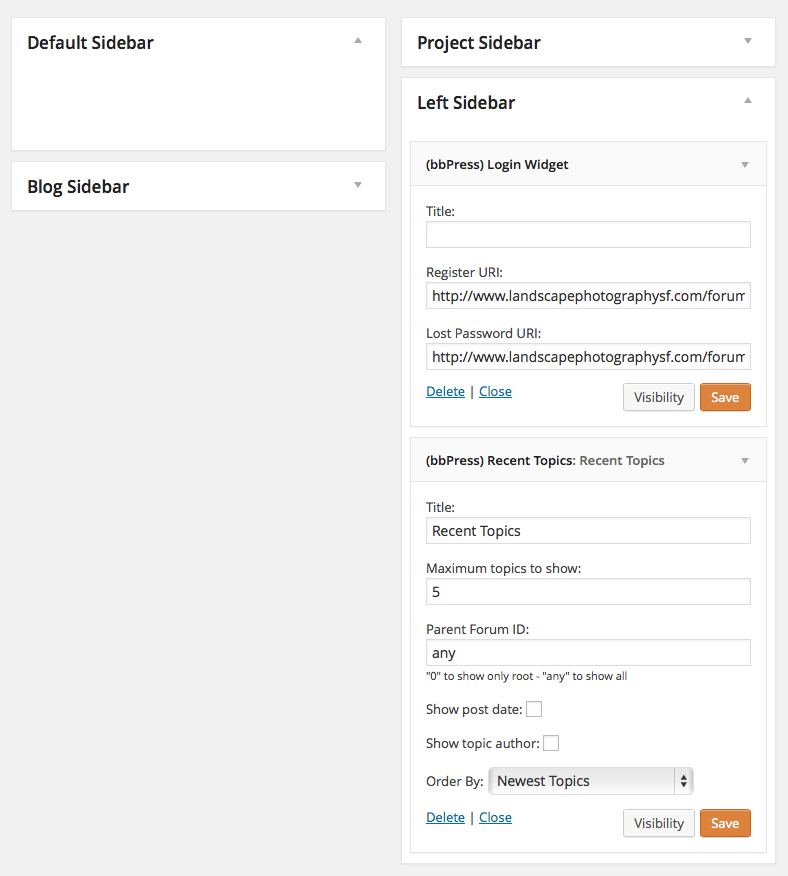
    2) sidebar registration widget
    3) copied the ‘resolved’ dropdown to near the submit button, so you can easily mark a topic as resolved while you are replying to it (much quicker!)
    4) fixed a couple of potential bugs around permissions (ie: anyone could mark a thread resolved or assign a thread to someone etc..)

    You can grab the code (and see the changes) from here: https://github.com/dtbaker/bbPress-Support-Forums

    The voting and sidebar registration features can be seen in the demo here: http://ultimateclientmanager.com/forums/forum/feature-requests/

    (I have modified some of the div tags/classes in this plugin to better support bootstrap, so it might look a bit funky on the standard bbPress install)

    Cheers,
    Dave

    https://wordpress.org/plugins/bbpress-vip-support-plugin/

    #143736
    Robin W
    Moderator

    elegant – depends !

    If you simply alter this file then on any bbpress version update you’ll lose the changes, so make a note of them.

    There are alternatives

    1. Add the css styling change to the style.css file within your child theme.

    If you have a child theme, then this is ideal, as neither plugin nor theme update will affect your change. Simply add the code below to your style.css

    /*Styling for forum description */
    #bbpress-forums div.bbp-forum-content {
    clear:both !important;
    margin-left: 0px !important;
    padding: 0 0 0 0 !important;
    	}
    

    2. If you only have a main theme, then consider using a child theme – it’s quick and easy to create one, basically it’s just a theme that you create that says “use this main theme, but then add these bits”. Google child theme video and you’ll get loads of help.

    3. Add this to the style.css in your main theme
    But you’ll need to keep a note of it for theme upgrades, so this is really no better than changing in the bbPress template, and neater to do it in bbPress than your theme

    4. Make a directory called css in your theme (either child or main) and copy the bbpress.css file into it. Then make changes there. this then won’t be overwritten on upgrades, but you will not get the benefit of changes to the default bbpress.css that may be in upgrades.

    Overall 1. is by far the best choice, as you keep the code no matter what happens. Otherwise keep a note of your changes (which are fine, and are what I did to test prior to putting the end result in my style.css), so that you can replicate them on upgrades.

    #143735
    oweniverson
    Participant

    i’m not a developer by any means, but this seems to work (there’s probably a better way 🙂
    in my bbpress.css file here “wp-content\plugins\bbpress\templates\default\css”
    i just broke out “div.bbp-forum-content” from this:

    #bbpress-forums div.bbp-forum-content,
    #bbpress-forums div.bbp-topic-content,
    #bbpress-forums div.bbp-reply-content {
    	margin-left: 130px;
    	padding: 12px 12px 12px 0;
    	text-align: left;
    }
    

    to this:

    #bbpress-forums div.bbp-forum-content {
    	margin-left: 0px;
    	padding: 12px 12px 12px 0;
    	text-align: left;
    }
    
    #bbpress-forums div.bbp-topic-content,
    #bbpress-forums div.bbp-reply-content {
    	margin-left: 130px;
    	padding: 12px 12px 12px 0;
    	text-align: left;
    }
    

    and set that left margin to 0 px rather than 130.
    let me know if there’s a better or more elegant way!

    sarau
    Participant

    Hi Robin,
    Sorry for the long delay. I got sided-tracked. I followed your advice and I found something like a 404.php. The page is called no-results.php I found the text that I need to edit on the page and made changes to it however, because the text is displayed with the use of php, I’m not sure how to make it recognize the html hypertext link I added. Is it possible to make a link active within this code? It would be convenient to just click on the text and get where you need to go, if that’s possible. Here’s the code that I’m referring to:

    <p><?php esc_html_e('The page you requested could not be found or could not be displayed. If you are a parishioner and you are trying to access a forum page, it may be that you <a href="http://www.url-here/">need to log in</a>. You can do so on the forum page in the right sidebar. Otherwise, try refining your search, or use the navigation above to locate the post.','Chameleon'); ?></p>

    I can remove the anchor tag if I need to but it would be nice to have the link.

    On another, related note, when you go to the top level forum page, if you aren’t logged in it displays text that says “Oh bother! No forums were found here!” I’m pretty sure this text is coming from the bbPress plug-in. Do you know if there is a way to customize what it says here as well?

    Thanks again for all your help!

    #143724
    Robin W
    Moderator

    Thanks, I’ve slightly amended it to get it to display on all pages and added it to the documentation

    Layout and functionality – Examples you can use

    Thanks again for posting your solution !

    #143723
    Robin W
    Moderator

    I’ve just added the code I think you’re after to the documentation viz

    Layout and functionality – Examples you can use

    Come back if that’s not what either of you were after !

    #143719

    In reply to: Photo in profile

    Robin W
    Moderator

    bbpres uses gravatar as it’s photo system.

    load you photo to gravatar and it will appear

    I have a page on my site that explains this to users viz :

    This site uses Gravatar to display avatars. if you already have a Gravatar account with your email for this site, then it will display on your forum posts; it can take a few hours before the link is established the first time.
    
    What is an Avatar?
     When you post, you'll see the default avatar beside your name. You can change this to any image you wish (providing it's decent!).  Many people have a picture of themselves, or anything that represents your ego or character.
    
    Changing from the default avatar.
    The site uses Gravatar.  The Gravatar site stores you avatar against your email address.
    
    This allows you to have a single image that many websites can use without you needing to add it or change it on each site.
    
    Since this site knows your email address (through your profile), this site can pick up the avatar stored with Gravatar.
    
    If you're not already signed up with Gravatar, then follow this link [https://en.gravatar.com/site/signup] to register your email address and avatar with them.  This site will then pick up that avatar and display it against your post. It can take a few hours before the link is established the first time.
    
    Confused?
     Don't worry - if you're happy with the default avatar against your name, you need to do nothing further !


    #143692
    George Stephanis
    Participant

    Just confirmed that deactivating threaded replies via Settings → Forums fixes the issue.

    #143691
    BackpackersUnion
    Participant

    Bump – because this is the first Google Search result on bbPress slowing down sites.

    Everything I read about bbPress said it’s light weight and integrates well into WordPress. Integration was excellent, but the website speed suffered significantly. I finally had to uninstall it and will need to look for a lighter weight forum plugin.

    Click here to see a screen shot of the P3 Plug-in profiler results.

    bbPress was responsible for half the load time of all active plugins (bbPress was a fresh install – with no forum activity). I had 24 plugins running total which means bbPress was taking longer to load than 23 other plugins combined. With results like that, there has to be a way to make bbPress more efficient either through caching or making bbPress more efficient when it searches for its short codes (which I believe is why bbPress loads on every page).

    I’ve seen this concern on a few forums and really want to see bbPress be successful. If anyone has had success speeding up bbPress or believes my experience was an anomaly, please let us know. Thank you.

    Website – WordPress 3.8.1 Multisite, BuddyPress 1.9.2., bbPress 2.5.3

Viewing 25 results - 12,401 through 12,425 (of 32,521 total)
Skip to toolbar