Search Results for 'code'
-
AuthorSearch Results
-
August 5, 2014 at 6:39 am #150279
In reply to: Finding .css style file
tonydes
ParticipantIt does show 14. I replaced it, but it didn’t change. Do I need to add any code to the CSS editor?
August 5, 2014 at 6:35 am #150278In reply to: Finding .css style file
Robkk
Moderatorokay on loop-single-topic.php in your child theme
look for
<span class="bbp-topic-freshness-author"><?php bbp_author_link( array( 'post_id' => bbp_get_topic_last_active_id(), 'size' => 14 ) ); ?></span>does it show 14 on your theme??, to remove it replace with this
<span class="bbp-topic-freshness-author"><?php bbp_author_link( array( 'post_id' => bbp_get_topic_last_active_id()) ); ?></span>did it work??
August 5, 2014 at 6:16 am #150276In reply to: Finding .css style file
Moderatorwhen you edited the template , did you just remove the
array( 'size' => '14' )because when i look at http://revlanka.com/forums/forum/automotive-news/local-news/
it doesnt even show
started by: Adminanymore, just remove the array code and that should remove the avatar and thats it.August 5, 2014 at 6:09 am #150274In reply to: Finding .css style file
ParticipantI just tried out the code as well and it didn’t work.
August 5, 2014 at 6:02 am #150273In reply to: Finding .css style file
ParticipantSo I did what you said and added the loop-single-topic.php to a folder in my child theme labelled bbpress. I edited out that code, but unfortunately nothing changed!
August 5, 2014 at 5:49 am #150269In reply to: Menu link to Profile
Stephen Edgar
KeymasterRobin, WordPress includes functions for this:
e.g.
sanitize_file_name($current_user->user_login);https://codex.wordpress.org/Function_Reference/sanitize_file_name
https://codex.wordpress.org/Function_Reference/sanitize_title
https://codex.wordpress.org/Function_Reference/sanitize_title_with_dashes
(There are quite a few of them, they are linked in the ‘related’ sections of the above articles)August 5, 2014 at 5:46 am #150267In reply to: Finding .css style file
Moderator@tonydes i just forgot about this, do this first
pay attention to the started by image on the link to your forums in the above post.
add this for custom css ,
span.bbp-topic-started-by img {
width:20px;
height:20px;
}
does that change the size??
August 5, 2014 at 5:37 am #150265In reply to: Finding .css style file
Moderatorfirst one more question , do you have custom css rules that you added already that include modifying images?
I don’t have a bbpress custom theme
okay create a bbpress custom theme now, add all the templates into your child theme.
more info here https://codex.bbpress.org/step-by-step-guide-to-setting-up-a-bbpress-forum-part-3/
lets work on this first http://revlanka.com/forums/forum/automotive-news/local-news/
since it has the issue on the notice , started by and freshness authors
now go to loop-single-topic.php and find
<span class="bbp-topic-started-by"><?php printf( __( 'Started by: %1$s', 'bbpress' ), bbp_get_topic_author_link( array( 'size' => '14' ) ) ); ?></span>does it say 14 ?
if you dont want the started by author image remove make it where its like this
<span class="bbp-topic-started-by"><?php printf( __( 'Started by: %1$s', 'bbpress' ), bbp_get_topic_author_link() ); ?></span>tell me if that works
I’m pretty novice at this, but does this mean that I have to edit from the style sheet?
all of the images that have issues (started by, notice, freshness), are sized in the templates in php rather than css .
August 5, 2014 at 5:08 am #150259In reply to: Finding .css style file
Participant@robkk, I’m using a premiumpress theme. I tried again after disabling all my plugins, but the code still didn’t work.
I don’t have a bbpress custom theme either. I’m pretty novice at this, but does this mean that I have to edit from the style sheet?August 5, 2014 at 4:40 am #150256In reply to: Finding .css style file
Participant@robkk haha I know, the images are absurdly huge! I tried the code but unfortunately it didn’t work 🙁 Honestly I ‘d prefer if none of those avatars were there except for the one in the post. However, I’ll take smaller avatars any day rather than those big pictures!
August 5, 2014 at 4:40 am #150255In reply to: Finding .css style file
Participant@robkk haha I know, the images are absurdly huge! I tried the code but unfortunately it didn’t work 🙁 Honestly I ‘d prefer if none of those avatars were there except for the one in the post. However, I’ll take smaller avatars any day rather than those big pictures!
August 5, 2014 at 4:24 am #150253In reply to: Finding .css style file
Moderator@tonydes you dont know how much im laughing, its like your forum is bombarded with a gallery of your self portrait. xD
do you want the started by and freshness authors still if they were just a smaller size??
and also the notice author image if it was a smaller size??
but first try this if you dont want any of those avatars, see if this code works.
.avatar-14 { display: none !important; }August 5, 2014 at 4:15 am #150251In reply to: Text Color and Font
ModeratorIs there some code generator and if not the plugin, I guess I can add it in “Style.css”
I just need when people posting in forums they have options to change color and size of font. I am unable to find something
you want a code generator , so that users have an option to change font color and font size, I do not know how to do this, so i cant help much here.
as for CSS I am not very familiar with that.
everything in the documentation says all about using css ,and how to, using firebug.
give me something specific to change the font size and color ,and ILL help you there.
August 5, 2014 at 3:59 am #150250In reply to: Finding .css style file
ParticipantSo the css editor works, and this code got rid of all my avatars, but I’d like to keep the one in the post itself;
.bbp-author-avatar {
display: none;
}Here’s a link to the over sized pictures: http://goo.gl/wmTgBo
Thanks for taking a look at it! Much appreciated!
August 5, 2014 at 3:59 am #150249In reply to: Deleting all avatars except one in post
Moderatordont reply on the other topic you made
pretty much just copying the same thing from this
give me a link to your site
so i can see if its a special code in your template making the avatars huge
if its a .avatar css rule making all the avatars on your site big
or if i could find something else.I’m pretty sure my theme does not use a conventional style sheet so I may have to edit this in the root folder?
thats not a good idea , it will be lost next upgrade.
August 5, 2014 at 3:52 am #150247In reply to: Finding .css style file
Moderatorgive me a link to your site
so i can see if its a special code in your template making the avatars huge
if its a .avatar css rule making all the avatars on your site big
or if i could find something else.I’m pretty sure my theme does not use a conventional style sheet so I may have to edit this in the root folder?
thats not a good idea , it will be lost next upgrade.
August 5, 2014 at 3:49 am #150245In reply to: Menu link to Profile
Robin W
Moderatorok try this, which should tidy most usernames
<meta http-equiv="refresh" content="0;URL=http://mysite.com/forums/users/
<?php global $current_user;
      get_currentuserinfo();
$string = $current_user->user_login ;
     //Lower case everything
    $string = strtolower($string);
    //Make alphanumeric (removes all other characters)
    $string = preg_replace("/[^a-z0-9_\s-]/", "", $string);
    //Clean up multiple dashes or whitespaces
    $string = preg_replace("/[\s-]+/", " ", $string);
    //Convert whitespaces and underscore to dash
    $string = preg_replace("/[\s_]/", "-", $string);
    return $string;
echo $string . "";
?>/edit/">
August 5, 2014 at 12:31 am #150231In reply to: Finding .css style file
Participant@Robkk Thanks for the response, but I moved the file to both locations, and edited the css but nothing worked. I used this code to resize the images:
#bbpress-forums div.bbp-template-notice img.avatar, #bbpress-forums p.bbp-topic-meta img.avatar {
width: 20px !important;
height: 20px !important;
}I’m pretty sure my theme does not use a conventional style sheet so I may have to edit this in the root folder?
August 4, 2014 at 11:24 pm #150214In reply to: Uninstalling BBPress
KeymasterNone of those plugins standout as something that would cause the issue, though I expect most likely it is one of them…
You state:
When the bbPress plugin is deactivated, I can not. Instead what I see is a page that displays:
And then:
I disabled then deleted bbPress and still saw the error reported above. I then re-installed and re-enabled bbPress and the error went away.
If you can’t access
/wp-adminwith bbPress disabled, how exactly are you re-activating bbPress?August 4, 2014 at 10:33 pm #150213In reply to: Uninstalling BBPress
KevinBCarney
ParticipantSorry. I forgot to include that.
Quite a few.
Active:
Akismet
AtContent
Captcha
CommentLuv Premium
Contact Form 7
Duplicate Post
Flamingo
Google Plus Authorship
Google XML Sitemaps v3 for qTranslate
Greg’s High Performance SEO
MaxButtons
Mingle Forum
nrelate Related Content
Open external links in a new window
OptimizeMember
Smart Google Analytics Code
Wordfence Security
WordPress HTTPS
WP-OptimizeInactive:
404 Redirected: Conflicts with MingleForum, not yet deleted
bbPress
Debug Bar: Installed by my hosting provider
Developer: Installed by my hosting provider
Hello Dolly
Long Depreciated Notices: Installed by my hosting provider
P3 (Plugin Performance Profiler)
Post Duplicator
Social Sharing Toolkit
Use Google Libraries: Installed by my hosting provider
WordPress SEOAugust 4, 2014 at 10:23 pm #150212In reply to: Text Color and Font
desiamerican26
ParticipantHi robkk,
Thanks for your fast reply. I am not too good with CSS format.
I just added “Adding CSS” plugin and was trying to see some code to work with it, but unable to do it.
Is there some code generator and if not the plugin, I guess I can add it in “Style.css”
I just need when people posting in forums they have options to change color and size of font. I am unable to find something like and as for CSS I am not very familiar with that.
Thanks
NikAugust 4, 2014 at 9:50 pm #150210In reply to: Uninstalling BBPress
ParticipantStephen… Thank you for your reply.
Here is my current issue.
When the bbPress plugin is activated, I can access my website via zippe.biz/wp-admin.
When the bbPress plugin is deactivated, I can not. Instead what I see is a page that displays:
Error 500
The server encountered a syntax error, and could not complete your request.
Website owner? check your code, and your debug log, you may find a ‘parse’ error in there.
Visitor? Try and reload it in a few minutes.I disabled then deleted bbPress and still saw the error reported above. I then re-installed and re-enabled bbPress and the error went away. I then disabled bbPress and the error returned.
I have no idea what to do next. My hosting provider is working on this as well as we’re not sure where to focus our attention.
Any help you can provide will be greatly appreciated.
August 4, 2014 at 9:33 pm #150209In reply to: Uninstalling BBPress
Keymaster@kevinbcarney The
Deleting Conversion Table… Failedis nothing to worry about, this is just cleaning up and removing the extra database table if you had previously imported forums.
@jordanpinski wrote“My issue with the plugin is the ‘edit’ feature on posts doesn’t work”
Could you clarify what you mean by this, editing WordPress Posts or bbPress topics/replies?
Rob is also correct above (presuming you do want to delete all bbPress data)
- Run “Reset Forums”
- Deactivate bbPress
- Uninstall bbPress plugin
I’ve just tested this and I have no issues accessing the dashboard after performing the above steps.
Caveat: You are correct that the
bbp_keymasterrole is still assigned to the user inwp_usermeta, though this should not block access for you to WordPress’ dashboard, there is a tweak to the uninstall/deactivation for bbPress 2.6 listed here in #2580. I also came upon another issue that I’m updating a patch for now, but again, none of this should be stopping yopu from accessing the dashboard after deactivation and/or uninstall.As Rob wrote, what other plugins are you using that may conflict with this? It could be any plugin role or capability related and/or other plugins that extend bbPress functionality.
August 4, 2014 at 8:01 pm #150205In reply to: Text Color and Font
ModeratorAugust 4, 2014 at 5:48 pm #150197Topic: bbPress lists not displaying correctly?
in forum Troubleshootinglizbeck
ParticipantHi all,
I just installed bbpress using the shortcode to display the forums on my frontpage, but I don’t think the lists are displaying as intended. In the part2 instructions it says the default look is:
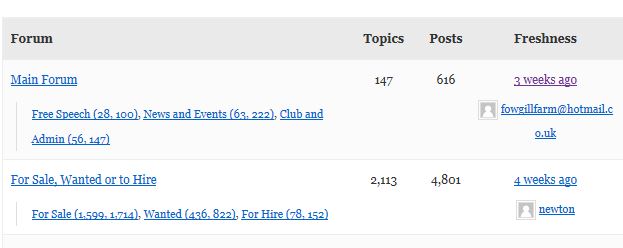
But, by default my forum is displaying as a list: http://pubs.hamlin.org/tech/
I’d be happy to use the default view if I could make it work. Does anyone have an idea of what’s going on here? I’m using the twentyeleven theme.
Thank you in advance for your help!
– Liz -
AuthorSearch Results

