Skip to:
Content
Pages
Categories
Search
Top
Bottom

Search Results for 'code'

Viewing 25 results - 10,776 through 10,800 (of 32,504 total)
  • Author
    Search Results
  • #151249
    Stephen Edgar
    Keymaster

    A massive copy and paste of your code is not helpful, no one wants to read a wall of code with no formatting, next time use the “code” button in the toolbar to wrap your code so it’s a little easier to read, also only post the specific parts of the code that is relevant.

    Either way, I’m closing this as a duplicate of your other post as that was readable and I’ve answered it. https://bbpress.org/forums/topic/pagination-on-forum-listing-page/

    #151246

    In reply to: Mass spam attack

    Stephen Edgar
    Keymaster

    This really isn’t a bbPress issue, it is more of a WordPress issue.

    Your web host should be able to do some things via firewall rules.

    A good starter doc is https://codex.wordpress.org/Combating_Comment_Spam , conceptually it is the same thing, you have some ‘content’ that spammers want to get in on, in this case rather than comments it’s your bbPress forums and/or topics.

    bbPress uses WordPress user system for user authentication (login registration etc)

    I know it’s probably ideally not what you were looking for but is the state of things.

    A couple more thoughts would be to verify your Akismet API key is valid and Akismet is actually catching what spam it can. I’d also look to adding “capcha” plugin that supports the bbPress, there’s a few of these in WordPress plugin directory.

    #151242
    Stephen Edgar
    Keymaster

    Check out some of our docs, scroll down past the main headers on the following link and you’ll see some tutorials: https://codex.bbpress.org/

    If you want a capcha for your site search the WordPress plugins for “bbPress Capcha”, there are a couple of these I think from memory.

    #151239

    In reply to: Topic page width

    Stephen Edgar
    Keymaster

    Check out some of the docs, there’s a link at the top of this page.

    If you don’t want particular widgets in a sidebar remove those widgets, this is not a bbPress issue so we have nothing to fix here.

    If you don’t want a sidebar, use a template from your theme that doesn’t include a sidebar.

    Step by step guide to setting up a bbPress forum – Part 1

    #151233
    Robin W
    Moderator

    suspect you have a whitespace in your functions file

    Whitespace before <?php when “functions.php line 1” mentioned

    If the message says the error is in line 1, then it is typically leading whitespace, text or HTML before the opening <?php marker.

    eg

     <?php
    

    not

    <?php

    #151221
    cybarmitzvah
    Participant

    Hi I just tried to add your code to the site.

    add_filter('show_admin_bar', '__return_false');
    Warning: Cannot modify header information - headers already sent by (output started at /home/vaghar123/public_html/wp-content/themes/awesome/functions.php:1) in /home/vaghar123/public_html/wp-includes/pluggable.php on line 1121

    and tat was the error I got from a non admin account.

    #151214
    Robin W
    Moderator
    #151208
    jilleryfregan
    Participant

    I have a weird bug going on with my Static Homepage.

    We are using the plugin called Store Locator (http://wordpress.org/plugins/store-locator-le/) to show office locations. It’s a fairly simple plugin called by a shortcode in a page to display a map and list of offices.

    When I installed bbPress in addition to this Store Locator plugin, my static homepage was no longer working and my homepage reverted to a generic list of recent posts. (The static page was set in all settings correctly).

    This happens on every theme, including twentyfourteen, only when both plugins are activated at the same time.

    Is there any hook or reason that these two plugins would affect the static homepage?

    Thank you!
    Wordpress Version: 3.9.2
    bbPress Version: 2.5.4
    Website: http://209.240.4.6/

    #151204
    Robin W
    Moderator

    it is in

    \bbpress\templates\default\bbpress\form-reply.php

    However it would be easiest to change the text using a function which you put in your functions file

    //This function changes the text wherever it is quoted
    function change_translate_text( $translated_text ) {
    	if ( $translated_text == 'old text' ) {
    	$translated_text = 'new text';
    	}
    	return $translated_text;
    }
    add_filter( 'gettext', 'change_translate_text', 20 );

    Functions files and child themes – explained !

    #151202
    Robin W
    Moderator

    So basically on the forum, when someone clicks edit my profile at the top of the page, it goes to the backend. Even though, it would be preferable to go to the front end.

    I would not let users see the toolbar, this is really just for admins.

    You need to disable the toolbar – add this to your functions file

    add_filter('show_admin_bar', '__return_false');
    

    then put the profile into your menu

    Layout and functionality – Examples you can use

    #151198
    cybarmitzvah
    Participant

    Thanks Stephen Edgar for the help, in request by him, I am posting this here and starting this new topic:

    disable front end editing

    So basically on the forum, when someone clicks edit my profile at the top of the page, it goes to the backend. Even though, it would be preferable to go to the front end. Currently, the only way a user can go to the front end is by clicking their name next to a post or in a topic/replies sequence.

    I am using the mesocolumn theme and am new to wordpress. site: http://www.astronomertalk.com

    I also moved template-full-width.php, to my child theme, and called it bbpress.php. After doing this, nothing has changed except now the forum specific sidebar, that came with the theme, does not show up.

    Source code from bbpress.php:

    <?php
    /*
    Template Name: Full Width
    */
    ?>
    
    <?php get_header(); ?>
    
    <?php do_action( 'bp_before_content' ); ?>
    <!-- CONTENT START -->
    <div class="content full-width">
    <div class="content-inner">
    
    <?php do_action( 'bp_before_blog_home' ); ?>
    
    <!-- POST ENTRY -->
    <div id="post-entry">
    <section class="post-entry-inner">
    
    <?php if (have_posts()) : ?><?php while (have_posts()) : the_post(); ?>
    
    <article <?php post_class('post-single page-single'); ?> id="post-<?php the_ID(); ?>">
    
    <h1 class="post-title entry-title"><?php the_title(); ?></h1>
    
    <div class="post-content">
    <div class="entry-content"><?php the_content( __('...Continue reading', TEMPLATE_DOMAIN) ); ?></div>
    <?php wp_link_pages('before=<div id="page-links">&after=</div>'); ?>
    
    </div><!-- POST CONTENT END -->
    
    </article>
    
    <?php endwhile; ?>
    <?php comments_template(); ?>
    <?php else : ?>
    <?php get_template_part( 'lib/templates/result' ); ?>
    <?php endif; ?>
    
    </section>
    </div>
    <!-- POST ENTRY END -->
    
    <?php do_action( 'bp_after_blog_home' ); ?>
    
    </div><!-- CONTENT INNER END -->
    </div><!-- CONTENT END -->
    
    <?php do_action( 'bp_after_content' ); ?>
    
    <?php get_footer(); ?>

    Thank You,
    JB

    Robkk
    Moderator

    no i dont want to do that , its harder for me to design the look of the widget.

    here let me explain a little bit more on why i want to hack your shortcodes plugin to show recent replies.

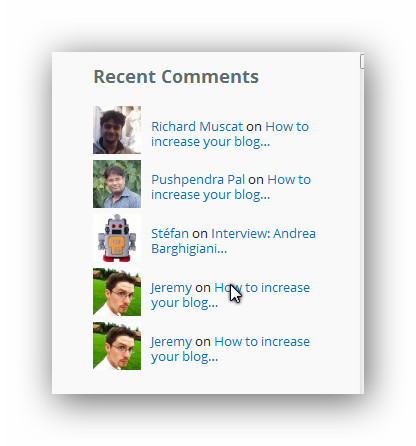
    well first i want my recent replies (and also recent topics) to look sort of like any recent comments widget. im going to use jetpacks recent comments on their website as an example.

    jetpack website example

    I have already pretty much made a copy of your shortcode plugin , edited it and threw it in my functions.php and put the shortcode in the visual editor widget by blackstudio

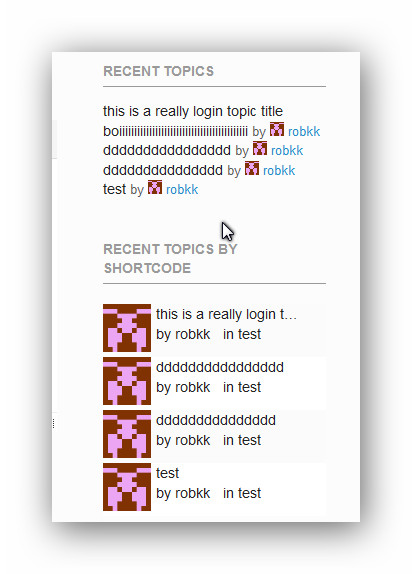
    heres what it looks like vs the default recent topics widget.

    my recent topics vs default

    now to make a replies widget with your shortcode all i have to do is rearrange code and use css to style everything together.

    to make it look like its showing recent replies, i just show the latest reply authors avatar , their name and what topic they replied on and im done.

    The only problem when doing this is if there is no replies on a topic , it would just show the topic author instead.

    Plus if you can figure this out i can also make a hack to make a replies archive. Which would be cool for something else i might do and ILL share it all when im done.

    i just need help on only showing topics with replies instead of all topics. if that is possible.

    #151190
    divyesh25
    Participant

    hi everyone,

    i have one page in which i am listing “no-replies” topics. for that i am using shortcode this [bbp-single-view id="no-replies"]. currently i have total 11 topics and i am listing 5 topics per page, among them 10 topics have “no replies”. paging 1 and paging 2 list 5 topics properly but there is paging 3 is also show and on that i got message like this “Oh bother! No topics were found here!”.

    please help me how i can remove paging 3.

    thanks

    #151182
    tiredofit
    Participant

    I’ve dusted off an old site of mine – using buddypress.

    I have the Forums component setup as a seperate site in Multisite, and just went to go through to make sure all the features worked on this site.

    When I went to the forums site, I was presented with the Forum list as usual (I have created a Static page and use the shortcode to load the forums list). The forums themselves have topics inside of them, and I can view them seperately by visiting the backend and viewing the topic. When I click the seperate board links, it instead takes me to the Create New Topic section.

    What could be going wrong?

    #151181
    Robkk
    Moderator

    the css or content-statistics.php

    if its the css ,

    test to see if you need to add more classes to the code so it could with the tab widget,

    test it by seeing if another stats widget has the css if you place it alone in the sidebar by itself in the tab widget

    Komal23
    Participant

    Hi

    I have used registration widget and logged in shortcode in a widget. But I wanted to show registration widget only when user is not logged in.
    But it shows both. What should i do for that?
    Here is the link of forum of my site.

    R-CE Forum

    Please help me in this ASAP.

    Thanks in advance.

    #151160
    Stephen Edgar
    Keymaster

    Don’t use bbPress login widgets or shortcodes then, use whatever is supplying that form instead, essentially we are all just piggy backing the standard WordPress login form.

    #151156
    Stephen Edgar
    Keymaster

    Create new topic and per my previous replies, and include the name of the theme. You are using and include the source code of the contents of the bbpress.php file you created.

    disable front end editing

    disable front end editing

    #151147
    Robkk
    Moderator

    ok heres the code

    .widget_display_stats  dt, .widget_display_stats  dd {
    	text-align: center;
    }
    
    .widget_display_stats dd {
    	background:#CCC;
    	padding: 5px;
    	margin-top: 5px;
    	color: #222;
    }

    category tags and forums number

    if your talking about whats in the stats widget

    just copy content-statistics.php into your child theme if you havent already.

    and edit the file and remove what you want.

    #151146
    divyesh25
    Participant

    Hi robin,

    i want list that all topics since user last visit to site, so for that some how i am update user last activity date and time and when user logged in next time i am get that date and time. so using this date & time i want to list topics since last visit of user.

    i hope u got it what i want to say. the code is below. if i do any mistake please suggest me.

    if u have better solution then please suggest me.

    thanks

    <?php$week = date( ‘W’ );
    $year = date( ‘Y’ );?>
    <?php if ( bbp_has_topics(‘author’ => 0, ‘order’ => ‘DESC’, ‘post_parent’ => ‘any’,’year’ => $year, ‘&w’ => $week) ) : ?>
    <?php while ( bbp_topics() ) : bbp_the_topic(); ?>
    <?php bbp_get_template_part( ‘loop’, ‘single-topic’ ); ?>
    <?php endwhile; ?>
    <?php else : ?>
    <?php bbp_get_template_part( ‘feedback’, ‘no-topics’ ); ?>
    <?php endif; ?>

    #151143
    Robin W
    Moderator

    You explain me in detail with code?

    Can you explain what you are trying to do and where on your site eg put a shortcode on the front page, add a widget that does this etc.

    #151142
    divyesh25
    Participant

    hi Robin,

    thanks for reply.. i am implemented your suggestion, but not getting result. can You explain me in detail with code?

    thanks

    LoraLu
    Participant

    I am attempting to use the shortcode [bbp-forum-form] to allow users (keymasters) to be able to add new forums as needed. I set up a new page and added this shortcode. The page looks great and the shortcode pulls up the form to add a new forum (as desired). However, when I test it by filling out this form and clicking submit, nothing seems to happen. The page does seem to refresh but a new forum is not added.

    Am I missing something? I am new to bbpress so perhaps I just missed a setting somewhere? I am running the latest version of WordPress (3.9.2) and bbPress 2.5.4. My site URL is http://wwcustomercare.azurewebsites.net.

    Thank you in advance for your help!
    Lora

    Robin W
    Moderator

    you’d do better to just steal the replies widget I wrote for private groups

    download

    https://wordpress.org/plugins/bbp-private-groups/

    and then open up and edit

    includes/pg_forum_widgets.php

    line 464 onwards has the replies widget, I’m pretty sure that lines 539 to 542

    //PRIVATE GROUPS Get an array of IDs which the current user has permissions to view
            $allowed_posts = private_groups_get_permitted_post_ids(new WP_Query($query_data));
            // The default forum query with allowed forum ids array added
            $query_data['post__in'] = $allowed_posts;
    

    is all that’s added to the orginal code, so remove those lines.

    and line 574 contains the size

    you can just fork all that to the end of the file into your functions file

    Robkk
    Moderator

    ok i think i have found an alternative to styling the recent replies widget better.

    your topic archive shortcode plugin, i bet i can edit that to create a new recent replies widget

    but the only thing i need help on is how to not show topics that have no replies at all.

    what would i need to add to your plugin to do that?

Viewing 25 results - 10,776 through 10,800 (of 32,504 total)
Skip to toolbar