ok, I just discovered the solution on another forum. In your WordPress Appearance menu, go to Editor and find meta-single-topic.php and locate the following code:
<a href="<?php echo home_url() ?>">← Back to discussions</a>
Change it to:
<a href="<?php echo home_url() ?>/forums">← Back to discussions</a>
Or enter the forum URL manually.
@cocolabombe0 I see you already have a ticket here 🙂
Did the link to the code I sent you help?
If you open up phpMyAdmin which I presume you’ve most likely got installed on your webhost and then open the SMF database and then open the smf_messages table then click ‘sql’, copy and paste this into the query box and click “Go” (The Go button is at the bottom right)
show variables like 'character_set_database';
show variables like 'collation_database';
You should see something like this https://cloudup.com/cluBnqdtz4x
In my case the character set is utf8 and collation is utf8_general_ci
@donchulio Adding a topic titled Ankündigungen with the topic content Ankündigungen and a reply with content Ankündigungen works as expected for me with bbPress 2.5.8
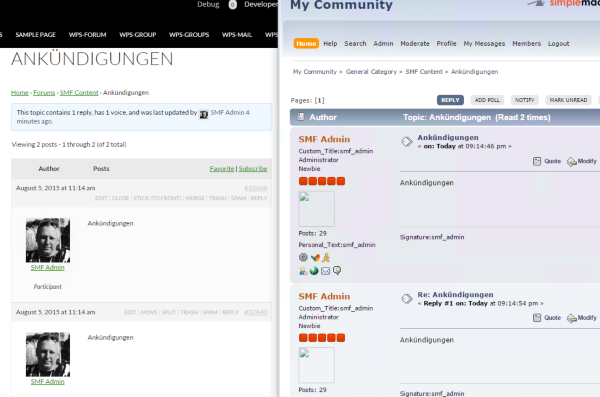
Can you check what character set and collation both your source SMF database is and also the same for your WordPress database?
Yes that is an other problem, every languageID field is empty.
how can i solve that?
You shouldn’t need to do anything, if there is no value it will default to English
In the wbb1_1_board from wbb3 is the parentID “0”
but in wbb1_board from wbb4 is the parentID “NULL” (german for zero).
There are a lot of these fields….
Indeed Null is German for zero, also NULL is a special value in SQL databases.
Typically I’d expect a reply to always have a parentID, that ID should be the topic ID.
A topics parent ID will typically be the forum ID the topic belongs to.
bbPress will treat replies without a parentID as an “orphaned” reply because there is no association between the topic and reply id’s.
bbPress will treat topics without a parentID as a topic not associated with a specific forum, so unlike replies, bbPress does not require topics to have to have a forum id.
Forums without a parentID are treated as “top level” forums, forums with a parentID of another forum are treated as “child” or “sub” forums of the parent forum.
So some parentID values may be an integer 1, 13, 653 etc, sometimes it will be 0 meaning there is no parentID and other times it will be NULL, it is all dependant upon that forum softwares configuration and the context it’s being used in.
OK. I have to because it is the wordpress code that displays the name of the pseudo code and modify the profile.
Oh yes, this is what plugin that added this option.
But I think I have to change the file after a shot on the admin bar file to separate the two codes.
But I do not know too so it’ll be tough.
Hi everybody! I need to change some “titles” and “invalid” some actions of BBPress so I can use it for my blog. Anybody who could help me with some codes, please?
Than you! 😀
Cheers!
no, I have not used the codex.
I checked the box of bbpress option.
And the links are replaced.
http://www.hostingpics.net/viewer.php?id=857251bbpress.jpg
If you used code from the codex for an profile link in your menu, if you want it to lead to the edit section of your profile just add /edit to the url in the code.
All of what is listed is here, only the German language you are using is the 100% finished translation.
https://translate.wordpress.org/projects/wp-plugins/bbpress/stable
Shouldn’t it be Dein Profil for a straight translation of Your Profile which is what bbPress has for profiles??
For custom plugin translations I have to look into it, there use to be a way to have custom plugin translations.
This old code is what I think you could use and test. Edit the existing German language files with something like Poedit. Save them. And Place them in a child theme for example, and put the url in the code below.
function load_bbpress_tr_mofile( $mofile, $domain )
{
    if ( 'bbpress' == $domain )
    {
        // replace this. :)
        return 'FULL_PATH_TO_YOUR_FILE';
    }
    return $mofile;
}
add_filter( 'load_textdomain_mofile', 'load_bbpress_tr_mofile', 10, 2 );
Good evening, I added a field on the WP profile and wanted to bbpress posted on the profile.
How do we do?
I tried your plugin bbp profile information so I have almost everything I want but not totally.
What added to the Profile page of WP fields (Role on the site, website, additional fields (with add function), etc.).
For the formatting, changing the file should be simple but I do not know what code used to do.
Same, how added some fields in the WP topics (subject / response).
What bothers me in the plugin’s name display / First name / email automatically. Why not have checkboxes on what the user wants to view. But before the administrator can block fields.
Given that I want to add a facebook fields and if it is not empty and the link, I want to display on the profile and the topic / response mode with an image.
For additional fields, four are enough for me, but how to add it to the wp-admin?
On my site, wp-admin is accessible for admins and the member / user by everyone.
If you do not understand me, I will try to make screenshots to make it more understandable.
Sincerely Nicolas.
Okay well there might be a way to bulk create bbPress posts, there are already a bunch of WordPress plugins that do this for blog posts. I will test to see if I can find one that works with custom taxonomies and custom post types.
I don’t think you have to go through that trouble, it would be way easier if bbPress has its own tables but it doesn’t, the posts are in wp_posts and post meta in wp_postmeta.
Stored Database Data
This is what I used before.
li.bbp-topic-voice-count {
    display: none;
}

li.bbp-topic-title {
    width: 65%;
}
Ok, I found on this forum that I have to add this code to the css editor:
.bbp-topic-voice-count {
visibility: hidden;
width: 20%;
}
I have done it, it works but how I can extend the topic title and freshness widths to make it look better?
http://bit.ly/1NQj9fO NSFW
I need to add a button to bbPress instance of the teeny MCE.
I’ve used the following code to test how my mce plugin work:
// add new buttons
add_filter('mce_buttons', 'myplugin_register_buttons');

function myplugin_register_buttons($buttons) {
   array_push($buttons, 'separator', 'myplugin');
   return $buttons;
}

// Load the TinyMCE plugin : editor_plugin.js (wp2.5)
add_filter('mce_external_plugins', 'myplugin_register_tinymce_javascript');

function myplugin_register_tinymce_javascript($plugin_array) {
   $plugin_array['myplugin'] = plugins_url('/js/tinymce-plugin.js',__FILE__);
   return $plugin_array;
}
This works like it should on the admin side.
I can’t wrap my head around how to get the same principle to work for bbPress instance of teeny mce. Which filter/action do I need to use and where? I’ve tried using the teeny_mce_buttons filter without any luck.
WP 4.2.4, bbPress 2.5.8
I think using something like this would work for what you want.
function custom_bbp_has_replies() {
    $args['orderby'] = 'post_modified';
    $args['order'] = 'DESC';
    return $args;
}
add_filter('bbp_before_has_replies_parse_args', 'custom_bbp_has_replies' );
Shouldn’t it be there automatically?? just add /feed after the url of any forum, topic, and forum and topic archive.
Yeah that makes sense since the original file was for a user with a german/english forum I think.
You may not need this either since the original user had a german forum.
/**
	 * Set languages, add more languages if needed
	 *
	 * @param int $language WBB v4.x numeric forum status
	 * @return string WordPress safe
	 */
	public function callback_topic_language( $language = 4 ) {
		switch ( $language ) {
			case 4 :
				$language = 'German';
				break;

			case 5  :
			default :
				$language = 'English';
				break;
		}
		return $language;
	}
Step by step might be this
You copy the loop-single-reply.php file in your child theme in a folder called bbpress.
when you look at the code of theme template in your code editor, you will see an tag called
<?php bbp_reply_author_link( array( 'sep' => '<br />', 'show_role' => true ) ); ?>
This peice of code has attributes to display your avatar and user role. You can place similar code around each other to reorder it to the layout you want.
For more information about cusotmizing the reply author link see here.
bbp_reply_author_link
Also I think you can reorder the reply content to show up first with CSS and just switch it around in the template file.
Since you found out it is your theme, you may need to contact your theme author especially if you are using a paid theme. There might be conflicting code in the theme.
If bbPress worked out of the box before, but doesn’t anymore.
Did you add custom bbPress templates??
Did you add any code to your functions.php file in a child theme??
I have added that code to css editor.
It would be perfect if you could instruct how to remove sidebar step by step.
try some Plugin/Theme troubleshooting
Troubleshooting
You can try increasing memory and see if that works, but only try it after you seen it is not another plugin or your current theme causing the issue and you have also tried some of the additional solutions listed.
Blank Pages
Funny thing is that bbPress has listed at least 6 German languages, maybe the one you would want needs to be the German → German (Formal)??
German
Swiss German
German (Switzerland)
German → German (Formal)
Swiss German → Swiss German (Formal)
German (Switzerland) → German (Switzerland) Informal


