Search Results for 'code'
-
AuthorSearch Results
-
August 6, 2015 at 2:21 pm #165105
In reply to: how to disable Author information for users
Robkk
ModeratorIF you are talking about this kind of profile information.
Forum Role: Participant
Topics Started: 4
Replies Created: 11
you can edit/remove it by copying the template
user-profile.phpAugust 6, 2015 at 2:09 pm #165101In reply to: Change role title
ModeratorIt is listed how to do it here.
August 6, 2015 at 1:56 pm #165100In reply to: Replies not displayed
ModeratorTry some troubleshooting, see if this only happens in a certain theme that you may have placed code snippets, cache needs to be cleared, or that a plugin is causing an issue.
August 6, 2015 at 10:21 am #165096Topic: Change role title
in forum TroubleshootingRinuko
ParticipantHello
I’m using latest version of WP and BBPress.
I’m looking for a away to change my role titles in BBPress but can’t find anything.
I’ve looked here and google’d but all end to plugins thats not available anymore or edit code but those lines don’t seem to exsist in present version (unless i missed something).August 6, 2015 at 8:30 am #165094In reply to: link admin bar change
cocolabombe0
ParticipantIt is these values but I tried to create a function to replace values but I do not know it at all.
I try to put code in my function.php not affect my wordpress (update)August 6, 2015 at 4:29 am #165093In reply to: SMF Import to bbPress
Stephen Edgar
Keymaster@donchulio Thanks, strange the collation isn’t there, but anyway, I’ll create an SMF test site using
latin1and see what results I get 🙂August 6, 2015 at 3:53 am #165088In reply to: bbp-header background doesn’t change
ModeratorSorry for the super duper late reply, your post was marked as spam and had to be approved by a moderator.
You can run PHP in CSS unless you put your styles in a PHP function and added the code to the header using the wp_head hook.
https://codex.wordpress.org/Plugin_API/Action_Reference/wp_head
August 6, 2015 at 3:48 am #165084ModeratorSorry for the super duper extremely late reply to your post, it was marked as spam and had to be approved by a moderator.
Thanks for contributing some code to help other users, I will add this to that codex article later today.
August 6, 2015 at 3:34 am #165077In reply to: I need to make a forum for my site
ModeratorSorry for the late reply to your post, it was marked as spam and had to be approved by a moderator.
I do not have a list of great themes to choose from but bbPress can work with any WordPress theme you install.
I explain it better here.
August 6, 2015 at 3:31 am #165076In reply to: Create a theme
ModeratorYou create any old regular WordPress theme.
This WordPress codex guide will get you started into theme development.
August 6, 2015 at 3:25 am #165074In reply to: guidance to change the theme of our company forum
ModeratorSorry for the late reply your post was marked as spam and was awaiting approval.
bbPress themes are basically just WordPress themes, you can use any WordPress theme and theme compatibility in the bbPress plugin will do the rest. You may need to edit some files though, because some themes may be tricky to work with.
I explain it better here.
August 6, 2015 at 3:22 am #165072In reply to: want to help others
ModeratorSorry your reply was marked as spam and was awaiting review.
If you still are interested in contributing you can easily help out other users in the forums.
If you are a skilled PHP developer, you can start getting your feet wet in the bbPress trac if you want and help out the core developers and core plugin development.
If you are a skilled writer, I can grant you permission of an editor, but I have to see at least 1 or 2 guides written in Google Docs before granting you that role for security reasons. I can give you suggestions on guides to write if you want, or you can just email me some ideas for me to write to.
August 6, 2015 at 3:14 am #165070In reply to: add template_part seven
ModeratorSorry for the late reply, just noticed your reply was marked as spam and was pending review for some reason.
The file you need to edit is
content-single-topic.phpThe code is
<?php bbp_single_topic_description(); ?>Without any template edits, you can also place this in your child theme or in a functionality plugin.
add_filter( 'bbp_get_single_forum_description', 'ja_return_blank' );
add_filter( 'bbp_get_single_topic_description', 'ja_return_blank' );

function ja_return_blank() {
    return '';
}
There is a plan to create a guide to show the template hierarchy in better detail.
August 6, 2015 at 2:33 am #165064In reply to: Import from SMF and strange tags in text.
KeymasterA quick look at the
<tt>issue:We’re doing this:
// Replace '[tt]' with '<tt>'
$SMF_markup = preg_replace( '/\[tt\]/',   '<tt>',  $SMF_markup );
// Replace '[/tt]' with '</tt>'
$SMF_markup = preg_replace( '/\[\/tt\]/', '</tt>', $SMF_markup );
I’m wondering if your SMF forums used custom BBCode’s here? It looks like it was for URL’s where
class="bbcode_url"was being added to links, maybe also a custom BBCode for[tt]was being used where no closing[/tt]BBCode was required?August 6, 2015 at 2:28 am #165062In reply to: Import from SMF and strange tags in text.
Keymaster@abcdiamond A good DB search and replace plugin is https://wordpress.org/plugins/better-search-replace/
The
class="bbcode_url"could most likely be ignored as it’s only a CSS styleStrange that you have
<tt>and not</tt>, I’ll take a another look at these.August 5, 2015 at 8:55 pm #165058In reply to: Change meta/page title for user pages
ModeratorI think this will do it. Edit any words in English to German.
function my_german_titles( $new_title ){
// Profile page
	if ( bbp_is_single_user() ) {

		// User is viewing their own profile
		if ( bbp_is_user_home() ) {
			$new_title['text'] = esc_attr_x( 'Mien', 'User viewing his/her own profile', 'bbpress' );


		// User is viewing someone else's profile (so use their display name)
		} else {
			$new_title['text'] = sprintf( esc_attr_x( "%s's", 'User viewing another users profile', 'bbpress' ), get_userdata( bbp_get_user_id() )->display_name );
		}

		// User topics created
		if ( bbp_is_user_home() && bbp_is_single_user_topics() ) {
			$new_title['format'] = esc_attr__( "Miene Topics",        'bbpress' );

		// User rueplies created
		} elseif ( bbp_is_user_home() && bbp_is_single_user_replies() ) {
			$new_title['format'] = esc_attr__( "Miene Replies",       'bbpress' );

		// User favorites
		} elseif ( bbp_is_user_home() && bbp_is_favorites() ) {
			$new_title['format'] = esc_attr__( "Miene Favorites",     'bbpress' );

		// User subscriptions
		} elseif ( bbp_is_user_home() && bbp_is_subscriptions() ) {
			$new_title['format'] = esc_attr__( "Miene Subscriptions", 'bbpress' );
		}

	// Profile edit page
	} elseif ( bbp_is_single_user_edit() ) {

		// Current user
		if ( bbp_is_user_home_edit() ) {
			$new_title['text']   = esc_attr__( 'Edit Your Profile', 'bbpress' );

		// Other user
		} else {
			$new_title['text']   = get_userdata( bbp_get_user_id() )->display_name;
			$new_title['format'] = esc_attr__( "Edit %s's Profile", 'bbpress' );
		}

}

    return $new_title;
}

add_filter( 'bbp_before_title_parse_args', 'my_german_titles' );
August 5, 2015 at 8:32 pm #165056In reply to: SMF Import to bbPress
KeymasterWhich one is
latin1? Having both these values would be helpful so I can test it please 🙂August 5, 2015 at 8:31 pm #165055In reply to: link admin bar change
KeymasterbbPress has quite a few functions that will help you here:
bbp_get_user_profile_url()would get you/forums/membre/user
bbp_get_user_profile_edit_url()would get you/forums/membre/user/editYou can also use
bbp_get_current_user_id()if you need the current user IDAugust 5, 2015 at 8:20 pm #165054In reply to: Importing from WBB4
Keymaster@sammmmy Fixed, the posts were caught by Akismet for having more than 2 links, I’ve fixed one and removed the other duplicates.
This is excellent, I’ll take a look later, a couple of things if you could clarify please:
In the posts table,
subjectis the topic title?
In the posts table,messageis either the topic or the reply content?
In the threads table,topic, what is this? Is this also the topic title? And if it is also the topic title does this match thesubjectfield from the posts table exactly?August 5, 2015 at 6:09 pm #165051In reply to: add profile fields profile, topic
ParticipantI try to edit the user-profile.php file.
I’ve just figured out how to retrieve information.Profile Overview:
http://www.hostingpics.net/viewer.php?id=211738profile.jpgMember List
http://www.hostingpics.net/viewer.php?id=989016member.jpg<?php $user_info = get_userdata(bbp_get_displayed_user_id()); ?> <p class="bbp-user-forum-role"><?php echo 'Roles sur le site: ' . implode(', ', $user_info->roles) . "\n";?></p> <p class="bbp-user-forum-role"><?php printf( __( 'Forum Role: %s', 'bbpress' ), bbp_get_user_display_role() ); ?></p> <p class="bbp-user-topic-count"><?php printf( __( 'Topics Started: %s', 'bbpress' ), bbp_get_user_topic_count_raw() ); ?></p> <p class="bbp-user-reply-count"><?php printf( __( 'Replies Created: %s', 'bbpress' ), bbp_get_user_reply_count_raw() ); ?></p> <p><?php printf ( __( 'First name: %s', 'bbpress' ), bbp_get_displayed_user_field( 'first_name'));?></p> <p><?php printf ( __( 'Licence: %s', 'bbpress' ), bbp_get_displayed_user_field( 'licence'));?></p> <p><?php printf( __( 'Role sur le site: %s', 'bbpress' ), bbp_get_user_blog_role() ); ?></p> <p><?php printf( __( 'Role sur le site: %s', 'bbpress' ), bbp_get_user_role() ); ?></p> <h2 class="entry-title">Réseaux sociaux</h2> <p><?php printf( __( 'Facebook: %s', 'bbpress' ), bbp_get_displayed_user_field( 'facebook') ); ?></p> <p><?php printf( __( 'Twitter: %s', 'bbpress' ), bbp_get_displayed_user_field( 'twitter') ); ?></p> <p><?php printf( __( 'Google+: %s', 'bbpress' ), bbp_get_displayed_user_field( 'google_plus') ); ?></p>How to display the roles with the text displayed on the image of the members?
Basically, I want the user michael Menil, we see:
Roles sur le site: administrateur, keymaster, admin bureauThese terms mean:
Administrator (the website)
KeyMaster (the Forum)
admin office (lower than the administrator)The first two roles are given by WP FRONT ROLE USER EDITOR PERSONAL PRO. The third, I created from scratch by the same plugin.
August 5, 2015 at 1:31 pm #165044In reply to: “Back to Discussions” link goes to Homepage
jules.maas
Participantok, I just discovered the solution on another forum. In your WordPress Appearance menu, go to Editor and find meta-single-topic.php and locate the following code:
<a href="<?php echo home_url() ?>">← Back to discussions</a>Change it to:
<a href="<?php echo home_url() ?>/forums">← Back to discussions</a>Or enter the forum URL manually.
August 5, 2015 at 1:27 pm #165043In reply to: ← Back to discussions link goes to home page
Participantok, I just discovered the solution on another forum. In your WordPress Appearance menu, go to Editor and find meta-single-topic.php and locate the following code:
<a href="<?php echo home_url() ?>">← Back to discussions</a>Change it to:
<a href="<?php echo home_url() ?>/forums">← Back to discussions</a>Or enter the forum URL manually.
August 5, 2015 at 9:53 am #165037In reply to: link admin bar change
Keymaster@cocolabombe0 I see you already have a ticket here 🙂
Did the link to the code I sent you help?
August 5, 2015 at 8:06 am #165032In reply to: SMF Import to bbPress
KeymasterIf you open up phpMyAdmin which I presume you’ve most likely got installed on your webhost and then open the SMF database and then open the
smf_messagestable then click ‘sql’, copy and paste this into the query box and click “Go” (The Go button is at the bottom right)show variables like 'character_set_database'; show variables like 'collation_database';You should see something like this https://cloudup.com/cluBnqdtz4x
In my case the character set is
utf8and collation isutf8_general_ciAugust 5, 2015 at 7:30 am #165030In reply to: SMF Import to bbPress
Keymaster@donchulio Adding a topic titled
Ankündigungenwith the topic contentAnkündigungenand a reply with contentAnkündigungenworks as expected for me with bbPress 2.5.8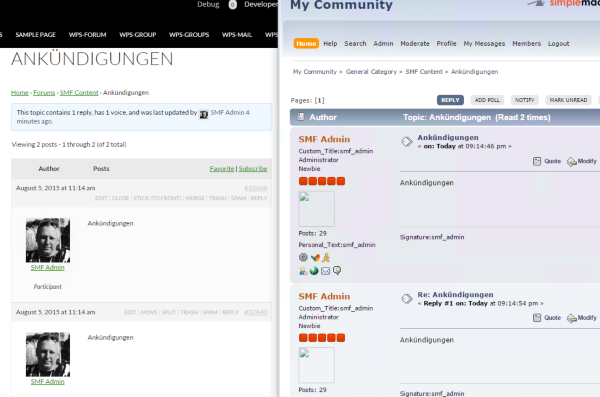
Can you check what character set and collation both your source SMF database is and also the same for your WordPress database?
-
AuthorSearch Results


